Note
Access to this page requires authorization. You can try signing in or changing directories.
Access to this page requires authorization. You can try changing directories.
The Data-tier Application experience provides an easy-to-use experience to deploy and extract .dacpac files and import and export .bacpac files.
This experience makes it easier to manage .dacpac and .bacpac files. It simplifies the development and deployment of data-tier elements that support your application. For more information, see Data-tier applications (DAC) overview.
Features
- Deploy a
.dacpacfile to a new or existing SQL database (Publish DACPAC) - Extract the schema from a SQL database to a
.dacpacfile (Extract DACPAC) - Import a
.bacpacfile to a new or empty database (Import BACPAC) - Export the schema and data from a SQL database to a
.bacpacfile (Export BACPAC)
Install the MSSQL extension
To use the Data-tier Application features, install the MSSQL extension for Visual Studio Code.
In Visual Studio Code, select the Extensions icon to view available extensions.
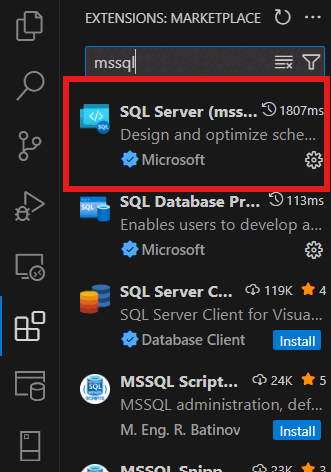
Search for the SQL Server (mssql) extension and select it to view its details. Select Install to add the extension.
Once installed, Reload to enable the extension in Visual Studio Code (only required when installing an extension for the first time).
Tip
For a comprehensive overview of the MSSQL extension's features and capabilities, see the MSSQL extension for Visual Studio Code.
Launch the Data-tier Application experience
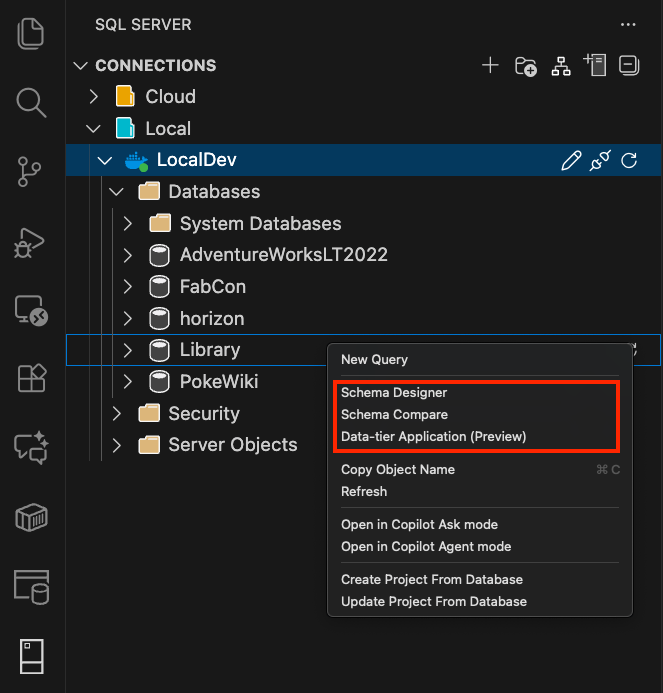
To launch the experience in the MSSQL extension for Visual Studio Code, right-click the Databases node, or right-click a specific database in the Object Explorer. Then, select Data-tier Application.
Feedback and support
If you have ideas, feedback, or want to engage with the community, join the discussion at https://aka.ms/vscode-mssql-discussions. To report a bug, visit https://aka.ms/vscode-mssql-bug. To request a new feature, go to https://aka.ms/vscode-mssql-feature-request.
Related content
- Data-tier applications (DAC) overview
- Connect to a database with the MSSQL extension for Visual Studio Code
- Quickstart: Run your first query with the MSSQL extension for Visual Studio Code
- GitHub Copilot for MSSQL extension for Visual Studio Code
- Database operations
- Schema Compare
- Schema Designer
- Visual Studio Code documentation
- MSSQL extension for Visual Studio Code repository on GitHub