Note
Access to this page requires authorization. You can try signing in or changing directories.
Access to this page requires authorization. You can try changing directories.
When an Azure AI application feels slow, it's tempting to assume the issue is model selection. Should you switch to a smaller model, fine-tune an existing one, or try a faster alternative? In production environments, end-to-end latency typically depends more on the request pipeline than on raw model inference speed. The largest contributors are often outside the model itself: how much context you send, how many network round trips you introduce, whether tools run sequentially, and whether you have enough capacity under load. This is an important distinction. While models are often outside your control, the surrounding architecture in your AI solutions is something you can improve. This article explains where latency originates in Azure AI applications and presents an architecture-first checklist for improving responsiveness, scalability, and cost efficiency. The checklist is organized into phases, so you can focus first on the highest-impact optimizations before moving to later-stage considerations such as capacity planning and fine-tuning.
Architectural decisions, not defaults
Provisioned throughput (PTU), Hosted Agents, and AI Gateways are powerful architectural options, but they aren't baseline requirements for production Azure AI applications. Each addresses specific constraints, such as sustained load, shared governance, or complex stateful coordination, and introduces additional control at the cost of added complexity. They deliver the most value after you've removed waste, when prompts, retrieval, routing, and orchestration are disciplined and real traffic patterns are understood. Treat these components as deliberate optimizations for predictability and scale, not as shortcuts for unresolved architectural inefficiencies.
What you’ll learn
By the end of this article, you’ll be able to:
- Break down end-to-end latency into measurable stages, including networking, queueing, retrieval and tools, model execution, safety checks, and orchestration.
- Identify and measure the performance signals that matter, such as Time to First Token (TTFT), total latency, p95/p99, token usage, tool latency, and queueing delay.
- Reduce unnecessary work by controlling prompt size, retrieval scope, and context growth.
- Route requests and right-size models so most traffic follows the fastest and most cost-efficient path.
- Improve perceived performance using streaming and interaction-aware design.
- Design orchestration flows that minimize round trips and avoid sequential bottlenecks.
- Apply caching and memory to avoid re-computation and control context over time.
- Make failures predictable using bounded retries and explicit fallback strategies.
- Plan capacity and separate workloads to maintain stable performance under load.
- Decide when fine-tuning actually helps and when it doesn’t.
- Understand when to use Foundry Agent Service vs Hosted Agents, and how orchestration runtime and gateway placement affect state management, coordination overhead, and latency.
How this article is organized
The checklist is structured into phases. Each phase targets a specific class of architectural decisions, starting with observability and waste reduction, then moving through routing, orchestration, responsiveness, reliability, and scale. Start with Phase 1 and work downward. Earlier phases typically deliver the largest performance gains with the least risk. Later phases, such as capacity planning and fine-tuning, are most effective once the surrounding architecture is already efficient.
Phase 1: Observe first (don’t guess)

Measure performance across the entire AI request pipeline
Effective optimization begins with measurement. Without clear visibility into where time is spent, it’s difficult to identify the true source of latency. In Azure AI applications, perceived slowness rarely comes from a single component. Instead, it emerges from how networking, queueing, retrieval, orchestration, model execution, and safety checks interact across the request lifecycle. Azure provides several built-in tools to observe these layers:
- Azure Monitor and Application Insights provide end-to-end visibility into request timing, dependency latency, failure rates, and tail latency across distributed services.
- Azure OpenAI and Azure AI Foundry monitoring expose model-specific metrics such as prompt token usage, completion tokens, throughput, and latency characteristics.
- Distributed tracing with Application Insights and OpenTelemetry enables attribution of latency to specific stages such as retrieval, tool calls, or orchestration logic.
- Azure AI Foundry tracing provides detailed telemetry for prompts, tools, retrieval steps, and model calls, which is especially useful for debugging and optimizing agent-based workflows. In Azure AI Foundry, agent tracing can be connected to Azure Monitor Application Insights to capture telemetry such as latency, exceptions, and retrieval/tool operations. Together, these tools help answer a fundamental question early in the optimization process: Is latency introduced by the model, or by the system surrounding it?
Tracking metrics
Focus on metrics that explain both perceived responsiveness and behavior under load.
- Time to First Token (TTFT): Measures how quickly output begins in streaming scenarios. High TTFT often points to upstream delays such as queueing, retrieval, orchestration, or content filtering.
- Total latency: Measures time from request start to completion. It reflects the full user experience and is influenced by prompt size, output length, tools, retries, and downstream dependencies.
- Queueing delay: Captures time spent waiting before processing begins. Sustained increases usually indicate capacity constraints, quota pressure, or uneven workload distribution.
- Tool and retrieval latency: Measures time spent outside the model. Slow retrieval, external APIs, or sequential tool chains are common sources of hidden latency.
- Tool call count and sequencing: Tracks how many tools are invoked per request and whether they run sequentially or in parallel. This is especially important for agent-based workflows and p95/p99 spikes.
- Input and output token counts: Provide visibility into prompt size and response length. Growth in these metrics often signals prompt inefficiency, over-retrieval, uncontrolled context growth, or overly verbose responses.
- Tokens per second: Measures generation speed once output starts. Drops may indicate model/deployment pressure or capacity constraints.
- Tail latency, especially p95 and p99: Shows the behavior of the slowest requests, which are often dominated by queueing, large prompts, slow dependencies, retries, or fallback paths.
- Cost per request: Track end-to-end cost, including tokens, tool calls, and external services. Cost spikes often correlate directly with latency and inefficiencies.
- Retries and fallback rates: Measure how often requests are repeated or escalated. Increasing rates often indicate instability in prompting, retrieval, validation, or downstream services. Key takeaway: If you can’t explain p95 or p99 latency using these metrics, you don’t yet have sufficient visibility.
Phase 2: Reduce unnecessary work in prompts and retrieval
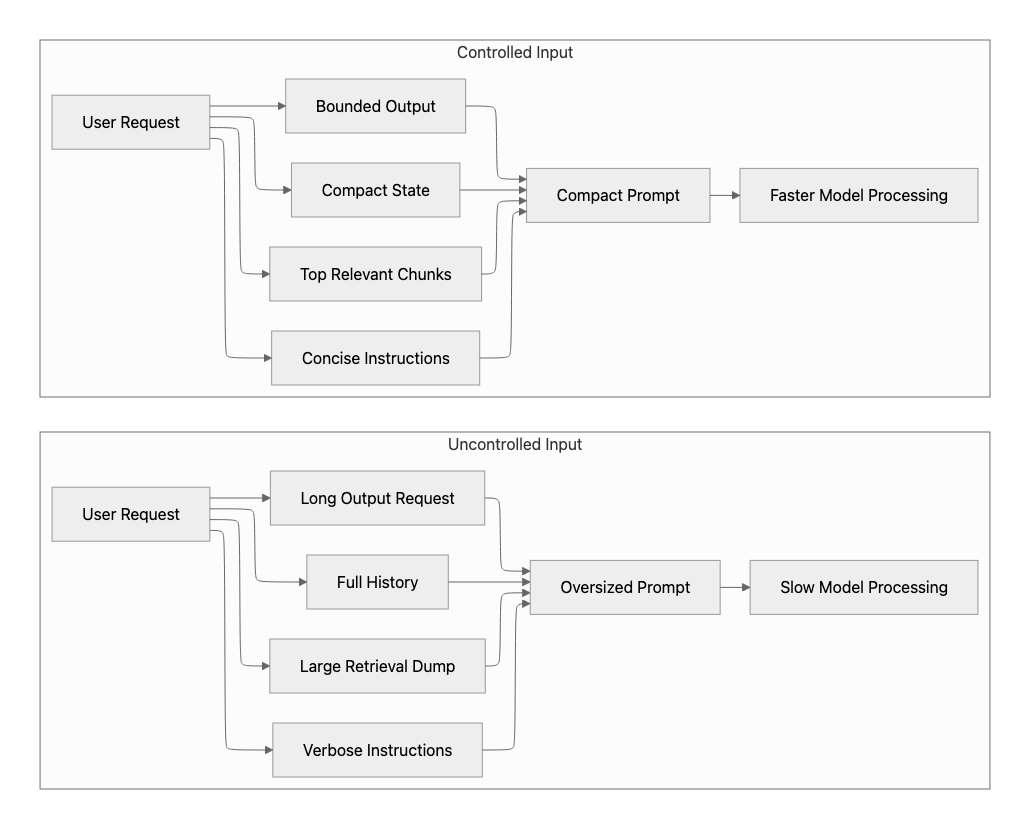
Control prompt size, retrieval scope, and response length
After establishing observability, the most immediate performance improvements usually come from reducing the amount of work performed per request. Prompt size, retrieval payloads, and generated output length are among the most predictable drivers of both latency and cost. The model must process input tokens before generating a response, and then generate output tokens sequentially. Consider the Azure OpenAI Responses API. Oversized prompts and unnecessarily long responses therefore increase latency, reduce throughput, and often dominate p95 and p99 behavior. For this reason, this phase focuses on input discipline: send only the most relevant information to the model, and ask it to generate only the output the user experience requires.
Best practices
- Enforce a strict context budget: Treat prompt size as a first-class architectural constraint. Keep instructions concise and stable, and avoid sending information that is not required for the current task.
- Retrieve less, but better: Prefer a small number of high-quality, well-ranked chunks instead of large, unfiltered context windows. Apply reranking and stop retrieval once sufficient signal is obtained.
- Summarize conversation history into compact state: Replace long transcripts with structured summaries in multi-turn flows to prevent prompt growth.
- Apply token-aware chunking: For large documents, process only high-value sections first. Retrieve additional content incrementally when required, rather than sending the full document upfront.
- Control output length: Set explicit response-length expectations and use output limits such as max_completion_tokens where appropriate. See structured outputs with Azure OpenAI.
- Avoid unnecessary explanation: Don't ask the model to produce reasoning, long justifications, citations, or detailed summaries unless the user experience requires them.
Why this matters
Smaller prompts lower TTFT, reduce tail latency, improve throughput, reduce cost, and make later phases more effective.
Phase 3: Shape traffic intelligently
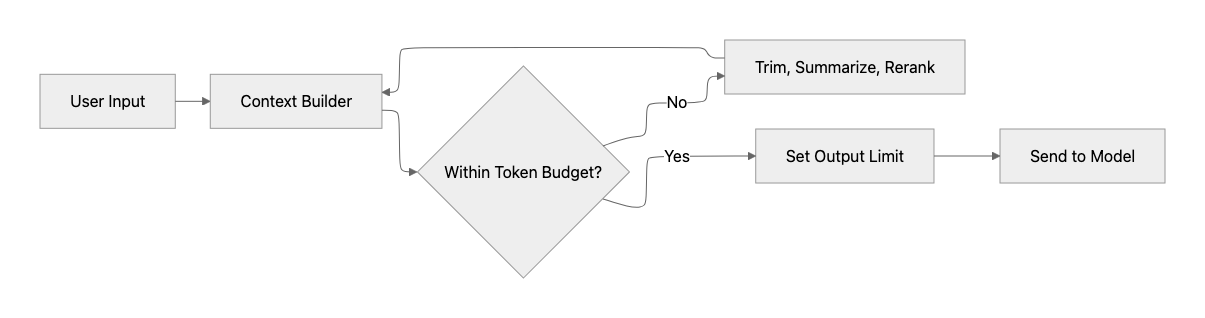
After reducing unnecessary work, the next major optimization is how requests are distributed across models and infrastructure. In many applications, all requests are sent to a single model deployment. This approach is simple, but inefficient. It forces low-complexity tasks to use the same resources as high-complexity tasks, increasing both latency and cost while reducing predictability under load. A more effective approach is to shape traffic based on request characteristics.
Route requests and choose the smallest effective model
Different requests require various levels of capability. By aligning each request with the smallest model that satisfies quality requirements, applications can significantly improve performance and cost efficiency.
Best practices
- Route by task complexity: Simple tasks such as classification, extraction, rewriting, or short Q&A often do not require large models. Route them to smaller, faster models to reduce latency, improve throughput, and lower cost.
- Adopt “start small, then escalate” patterns: Begin with a lightweight model and escalate only when needed, such as when validation fails, confidence is low, or deeper reasoning is required. This keeps most traffic on the fast path.
- Separate workloads by latency profile: User-facing chat and copilot experiences need low TTFT, while batch enrichment, offline document processing, and background jobs can prioritize throughput and cost. These workloads should not compete on the same deployment.
- Use Foundry-native routing options where appropriate: In Microsoft Foundry, a deployable Model Router can select an appropriate model based on routing mode, such as cost, quality, or balanced, instead of hard-coding a single model deployment for all traffic.
- Design for regional resilience and quota pressure: In multi-region deployments, routing should consider regional availability, capacity, quota limits, throttling, and queueing. Redirecting traffic across regions can help avoid localized degradation and make better use of available quota pools.
Why this matters
Effective traffic routing ensures that:
- Most requests follow a low-latency execution path
- High-capability models are used only when needed
- Capacity is utilized more efficiently
- Performance remains predictable under load
Phase 4: Improve perceived performance with streaming

Stream responses and design for interaction
After reducing unnecessary work and routing requests efficiently, the next optimization is perceived performance. In user-facing AI applications, responsiveness is determined not only by total completion time, but also by how quickly the application appears to react. Streaming is one of the most effective ways to improve that experience.
Best practices
- Optimize for Time to First Token (TTFT): Stream responses so users begin seeing output as soon as generation starts. In conversational and interactive agent experiences, TTFT is often the most important signal of responsiveness.
- Design the UI for progressive interaction: Render output incrementally, show progress states during retrieval or tool execution, and allow users to cancel long-running requests. For example, use messages such as “Searching…,” “Fetching data…,” or “Calling tool…” so users understand where time is being spent.
- Don’t stream by default: Streaming improves perceived performance, but for short responses or structured outputs, it can add complexity without user benefit.
- Separate human vs machine responses: Stream human-readable responses, but return structured outputs (JSON/tool calls) in a single payload to avoid partial or invalid states.
- Validate before you stream, not during: Perform any critical checks that must block output, such as schema or safety validation, before streaming starts. This helps avoid costly restarts or partial responses that must be withdrawn.
Why this matters
Streaming improves perceived speed, increases user trust, and makes users more tolerant of complex or long-running tasks, even when total latency does not change. Explore more related to performance efficiency for startup applications on Azure.
Phase 5: Remove orchestration overhead
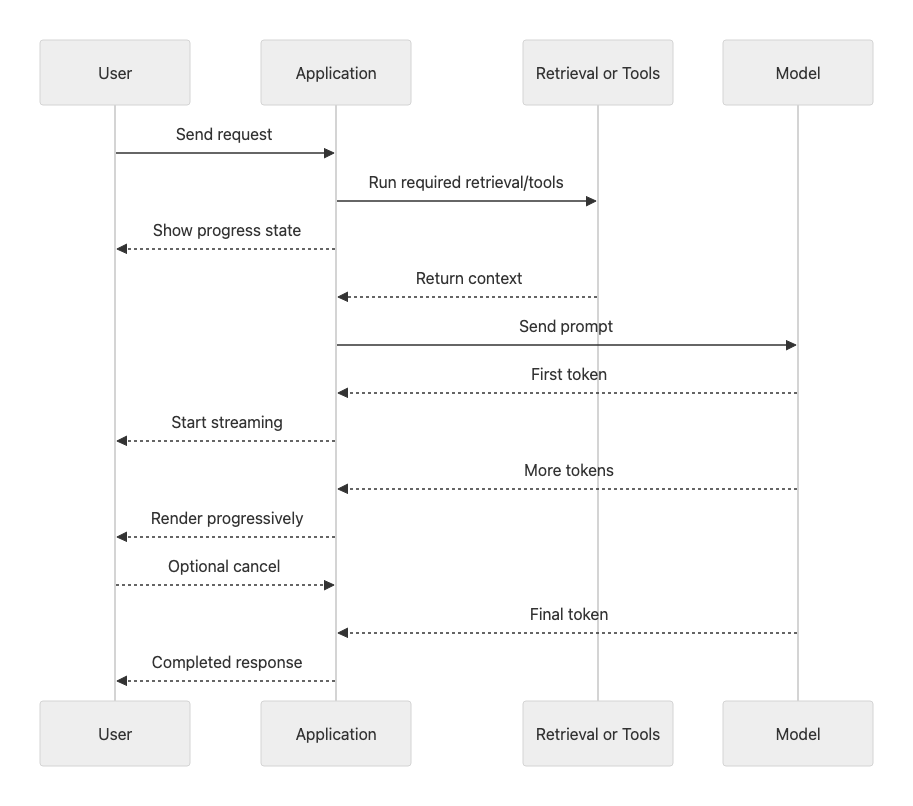
Simplify request flows and reduce coordination cost
At this stage, most obvious waste has already been removed:
- prompts are smaller
- retrieval is tighter
- models are routed intelligently
- streaming improves perceived speed
Yet many systems still feel slow. When this happens, the primary cause is often orchestration, not model inference. In modern AI applications, a single user request frequently triggers:
- retrieval from one or more indexes
- multiple tool or API calls
- formatting and validation
- safety checks
- one or more model invocations
- fallback or retry logic
Individually, each step may be fast. Executed sequentially, they compound into large end-to-end latency and unstable p95/p99 behavior. This phase focuses on reducing coordination cost: the time and variability introduced by how work is stitched together.
Be explicit about state management (stateless vs stateful flows)
A common source of hidden latency and cost is unclear state management. Unbounded or implicit state increases prompt size, coordination overhead, and variability across requests. State can live in different places:
- the client (stateless requests with explicit context)
- the application or orchestrator (code-managed state)
- the platform (for example, Hosted Agents or Foundry Agent Service)
Each option has tradeoffs.
Stateless designs:
- are easier to scale and reason about
- make latency and cost more predictable
- simplify debugging and replay
- avoid uncontrolled context growth
Stateful designs:
- improve conversational continuity
- reduce client-side complexity
- introduce risk if state grows without bounds or is replayed blindly
Key guidance
Keep the critical execution path as stateless as possible. Introduce state deliberately, and only when it improves the user experience. When using Hosted Agents or Foundry Agent Service, be explicit about:
- what state is persisted automatically
- how conversation history is summarized or compacted
- which requests truly require full session context
State management is an architectural decision, not an implementation detail. Handled casually, it quietly becomes a primary driver of latency, token usage, and tail behavior.
Reduce coordination overhead with an AI Gateway
As systems grow beyond a single app or agent, orchestration overhead frequently comes from duplicated cross-cutting logic: authentication, throttling, quota enforcement, retries, backend selection, logging, and failover handling. An AI Gateway, such as Azure API Management integrated with Microsoft Foundry, introduces a shared control plane between applications and model deployments. Instead of embedding this logic in every orchestrator, the gateway applies it once, consistently, across all traffic. At the gateway layer, you can centralize authentication, enforce token budgets, and rate limits, apply routing and failover policies, and capture uniform telemetry across agents and applications. This shortens request paths, reduces duplicated orchestration glue, and makes latency more predictable under load.
Important
An AI Gateway is a control plane, not an agent or reasoning layer. Its goal is to simplify orchestration, not to add another decision loop.
Best practices
- Parallelize independent steps: If retrieval, API calls, or data lookups are independent, execute them concurrently. Sequential execution increases both total latency and tail latency.
- Control concurrency, not just parallelism: Parallel execution improves latency, but unbounded concurrency can overload downstream systems, cause throttling, and increase tail latency.
- Bound fan-out: Parallelism helps only when it is controlled. Limit the number of tools, API calls, retrieval queries, or documents processed per request to avoid overloading downstream systems.
- Keep optional work off the critical path: Don't block user responses on nice-to-have tools, enrichment, analytics, or logging. Trigger them only when the request truly requires them, or defer them to follow-up/background steps.
- Be intentional about tool usage: Not every request requires every tool. Unnecessary tool calls introduce latency, increase failure points, and amplify variability in response times.
- Set latency budgets per step: Define timeouts or budgets for retrieval, tool calls, validation, model calls, and fallback paths. This prevents one slow dependency from dominating the whole request.
- Pass compact intermediate state: Avoid passing full transcripts, raw retrieval dumps, or verbose tool outputs between orchestration steps. Use structured summaries or compact state instead.
- Offload cross-cutting concerns to a gateway: Use an AI gateway, like AI gateway in Azure API Management to handle retries, throttling, quota enforcement, backend selection, and logging consistently across applications. This reduces duplicated orchestration logic and shortens request flows.
- Choose APIs that reduce orchestration glue: Use platform APIs and SDKs that simplify state management, tool invocation, structured outputs, tracing, and streaming when they reduce custom coordination logic.
- Introduce concurrency limits and backpressure: Use queues, semaphores, or rate limits to keep parallel work within safe system capacity.
- Account for cold starts and connection setup: Cold starts in serverless or containerized components, as well as repeated TLS and connection setup, can significantly impact TTFT. Reuse connections and keep warm paths for latency-sensitive workloads.
- Use agent frameworks to simplify, not to add layers: Microsoft Agent Framework and Foundry Agent Service can help structure tools, workflows, telemetry, and multi-agent patterns, but additional orchestrators also add coordination loops. Prefer one orchestrator with well-scoped tools unless the use case truly requires multi-agent coordination. Microsoft’s Azure Architecture Center explicitly frames multi-agent orchestration as a pattern choice that should fit the specific requirement, not a default architecture.
Why this matters
Reducing orchestration layers and consolidating coordination logic at the gateway lowers end-to-end latency, reduces failure points, improves p95/p99 predictability, and makes systems easier to reason about and debug.
Phase 6: Enforce correctness without loops
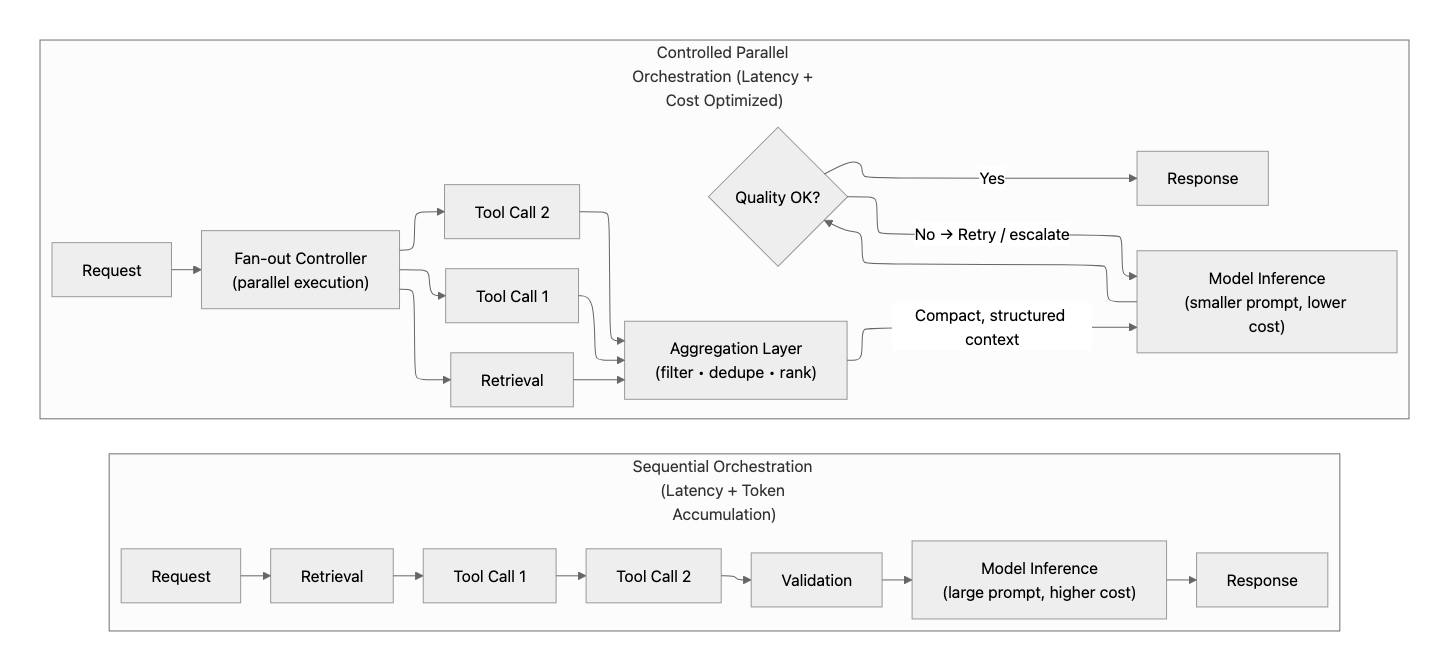
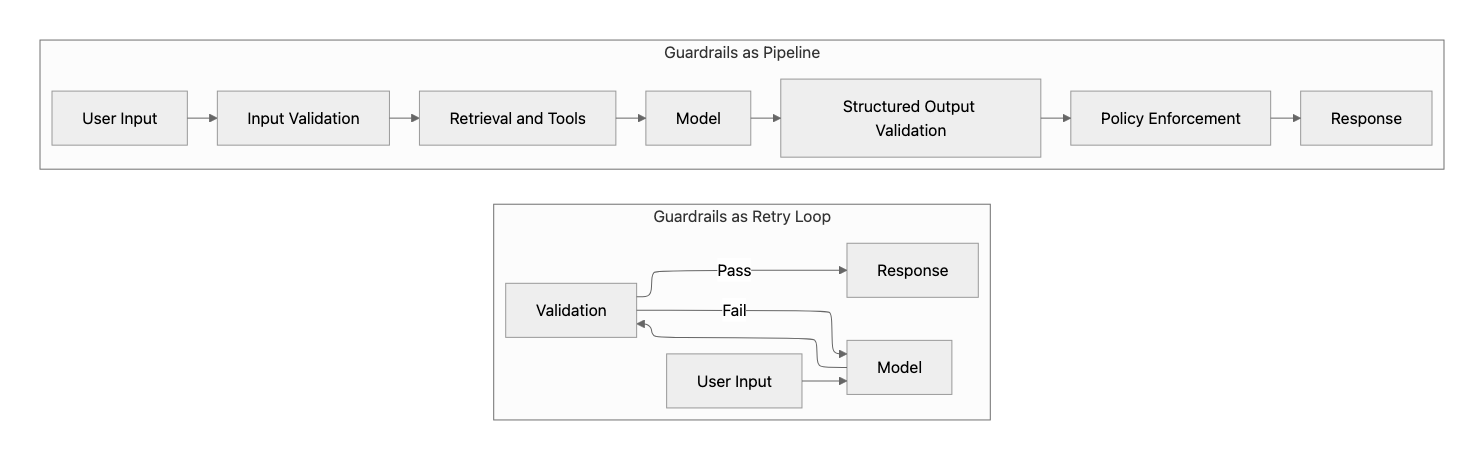
Design guardrails as a pipeline, not a retry cycle
Guardrails are essential for user-facing AI applications, but when implemented as iterative retry loops, they can become a significant source of latency and cost. Each additional validation pass or re-generation increases response time and token usage. In practice, repeated validation loops are a common cause of tail latency (p95/p99) spikes and unpredictable performance. A more effective approach is to implement guardrails as a structured pipeline with clearly defined checkpoints.
Best practices
- Validate early, before expensive work: Apply lightweight checks such as input validation, schema validation, and basic policy screening before invoking retrieval, tools, or the model. Safety checks, using Azure AI Content Safety (responsible AI guardrails) should be added early on as well.
- Constrain outputs with structured schemas and strict validation: Use structured outputs (for example, schemas or JSON formats) to reduce ambiguity and minimize the need for post-processing or re-validation. You can also enforce output validation. For example, set
strict: trueon function tool calls using these steps: how to use function calling with Azure OpenAI. - Verify once, not repeatedly: Avoid designs where outputs are regenerated and rechecked multiple times. Repeated moderation or validation loops significantly increase latency and reduce predictability.
- Expect non-deterministic outputs: Model responses can vary even with identical inputs. Design validation, evaluation, and fallback strategies that tolerate variability instead of assuming stable outputs.
- Align guardrails with intervention points: Apply validation at defined stages such as user input, tool inputs, tool outputs, and final response.
Why this matters
Predictable guardrails and controls prevent runaway retries and preserve performance.
Phase 7: Skip work when possible
Use caching and memory intentionally
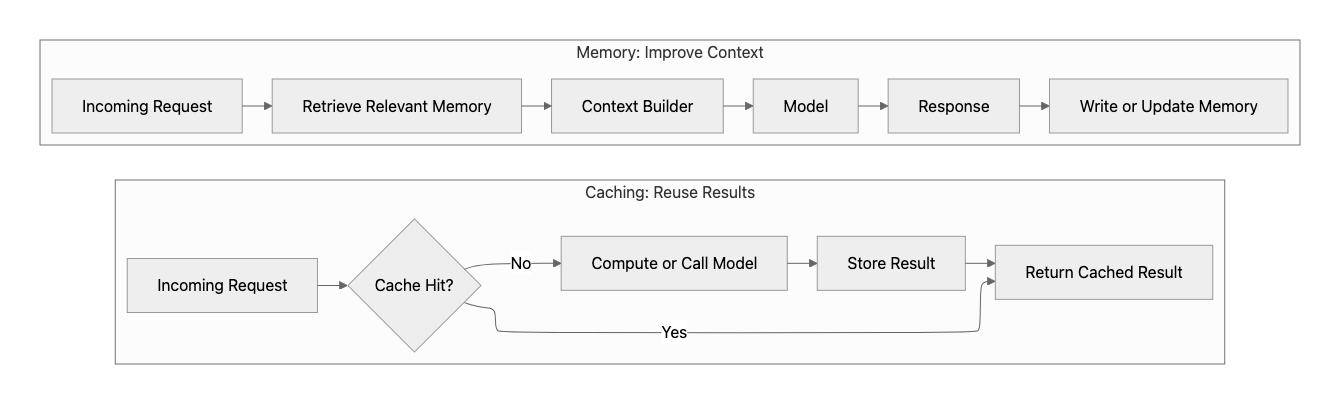
After correctness and orchestration are optimized, the next efficiency gain comes from eliminating repeated work. This is why state discipline matters: without explicit control over what state is persisted and replayed, memory and caching can quietly reintroduce prompt growth, repeated work, and latency you’ve already paid to remove earlier in the architecture. In production AI applications, many requests are identical or similar. Without optimization, the application repeatedly performs the same retrieval, orchestration, and model inference, increasing both latency and cost. Two architectural patterns address this problem: caching and memory. Although they are often confused, they solve fundamentally different problems.
- Caching avoids re-computation by reusing previous results
- Memory improves context quality by storing and retrieving relevant information
How this maps to Hosted Agents
In Foundry Agent Service and Hosted Agents, the platform can manage session state, files, and conversation history across turns. This improves continuity, but it does not remove the need for context discipline. Durable conversation history should not be treated as “send everything forever.” Keep memory selective, summarize or compact prior state when needed, and cache repeatable work such as retrieval results, tool responses, and stable intermediate outputs.
Best practices
- Use caching to skip re-computation: Cache stable outputs such as identical prompts, semantically similar queries, retrieval results, embeddings, summaries, or tool responses. This reduces latency and backend load immediately.
- Apply standard caching patterns: Use patterns such as cache-aside to maintain consistency between cached data and source systems while improving response time.
- Define cache freshness rules: Use TTLs, versioned cache keys, invalidation rules, or source-data timestamps so cached results do not become stale.
- Respect user and tenant boundaries: Don't reuse cached responses, retrieval results, or memory across users, tenants, or permission scopes unless the data is explicitly safe to share.
- Measure cache effectiveness: Track cache hit rate, latency saved, token savings, stale-cache rate, and cache bypass reasons.
- Use memory to improve context, not speed alone: Store structured information such as summaries, extracted facts, or user preferences. This avoids replaying long histories and improves response relevance. AI agent and orchestration design patterns are available with context and memory considerations.
- Keep memory structured and selective: Retrieve only the information required for the current request. Uncontrolled memory retrieval can increase prompt size and negate performance gains.
- Define a memory write policy: Decide what should be stored, when it should expire, how it can be updated or deleted, and what should never be stored.
- Use model-side caching when available: Keep reusable prompt prefixes stable so prompt caching can reduce repeated processing.
Why this matters
Used together, caching and memory provide complementary benefits:
- Caching reduces repeated computation and improves response time immediately
- Memory reduces prompt size and improves response quality over time
- Selective memory can reduce prompt size when it replaces long histories with compact, relevant state.
This leads to lower latency, reduced cost, better context control, and more stable performance as the system scales.
Phase 8: Use advanced retrieval only when necessary
Prefer targeted, iterative retrieval over dumping context
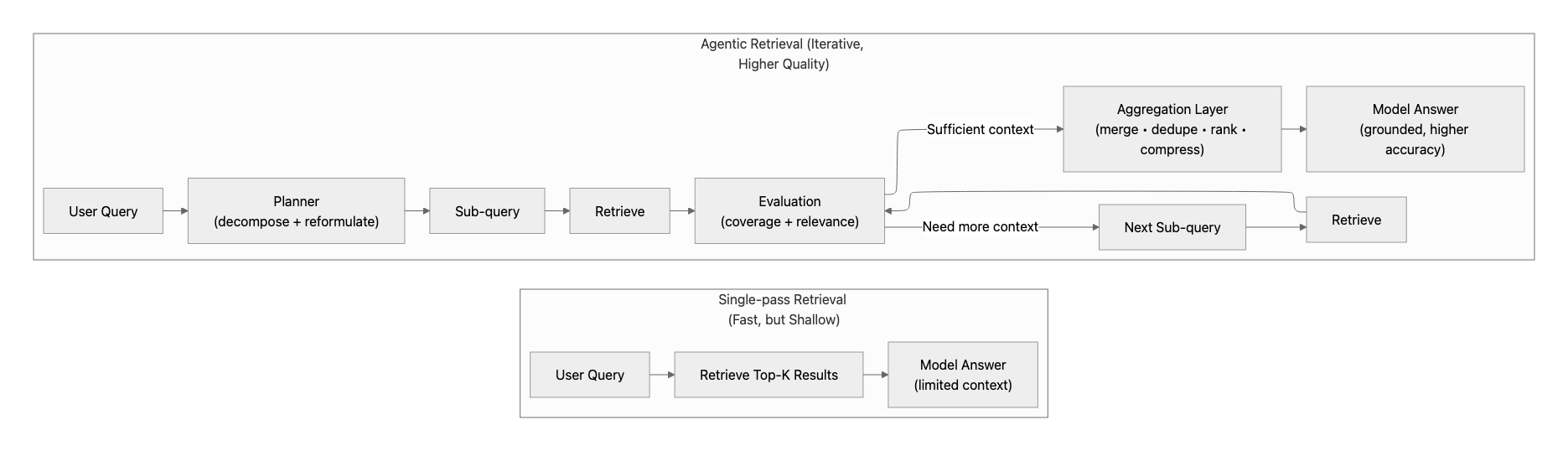
After optimizing prompts, routing, orchestration, caching, and memory, some requests will still require more advanced retrieval strategies. This is where agentic retrieval (often referred to as Agentic RAG) becomes useful. However, it should be applied selectively, not as a default approach. Unlike single-pass retrieval, agentic retrieval introduces additional model calls, decision steps, and coordination overhead. Without proper controls, it can increase latency, cost, and variability.
Best practices
- Start with the simplest retrieval that works: Use single-pass retrieval as the default. Escalate to iterative or agent-driven retrieval only when required for accuracy.
- Decompose questions incrementally: Break complex questions into smaller sub-queries and retrieve context in stages instead of retrieving everything upfront.
- Evaluate and stop early: After each retrieval step, determine whether sufficient information has been gathered. Avoid continuing retrieval unnecessarily.
- Limit agent reasoning loops: Set limits on iteration count, tool usage, and confidence thresholds to prevent excessive retrieval cycles and unpredictable latency.
Why this matters
Selective agentic retrieval improves accuracy while keeping cost and latency bounded.
Tip
Be intentional in how you apply advanced retrieval. Indiscriminate use can have the opposite effect.
Phase 9: Make failures predictable
Use bounded retries and explicit fallback paths
No AI system produces correct results in every case. Responses may fail validation, lack confidence, time out, trigger rate limits, or depend on unavailable tools. In agent-based systems, many failures come from downstream dependencies introduced by retrieval, tools, and orchestration steps. These failures should be handled intentionally with tool-level timeouts, bounded retries, and graceful degradation when a dependency is unavailable. Without a defined fallback strategy, applications typically exhibit one of two failure modes:
- Returning low-quality or incorrect results silently
- Retrying excessively, increasing latency and cost As described in Phase 5, orchestration paths that include multiple tools, retries, validations, or downstream calls amplify latency and tail behavior when failures occur. Fallback logic should therefore be designed as part of the orchestration flow itself, not bolted on through unbounded retry loops.
Best practices
- Define a clear primary path: Start with the fastest and lowest-cost approach that handles most requests.
- Set timeouts for each dependency: Define timeouts for model calls, retrieval, tools, APIs, and databases so one slow component does not block the entire request.
- Bound retries explicitly: Limit the number of retries or alternative attempts (for example, one or two additional steps). Unbounded retries quickly turn quality issues into latency and cost problems.
- Use backoff for transient failures: When failures are caused by throttling, temporary service issues, or rate limits, retry with exponential backoff rather than immediately repeating the same request.
- Escalate intentionally: When the primary attempt fails, escalate in a controlled way. For example, by tightening the prompt, applying stricter validation, or using a higher-capability model.
- Fail visibly when needed: If automated strategies cannot produce a reliable result, return a clear error or route the request to human review. Avoid silent failures or indefinite retry loops.
- Track fallback behavior: Measure timeout rates, retry counts, fallback rates, validation failures, tool failures, and human-review escalations so reliability problems become visible.
Why this matters
Explicit fallback strategies keep p95/p99 latency predictable, prevent silent cost and token amplification, improve debuggability and system trust, and align quality goals with performance constraints. See reliability patterns in the Azure Architecture Center.
Phase 10: Close the loop with real signals
Use feedback loops
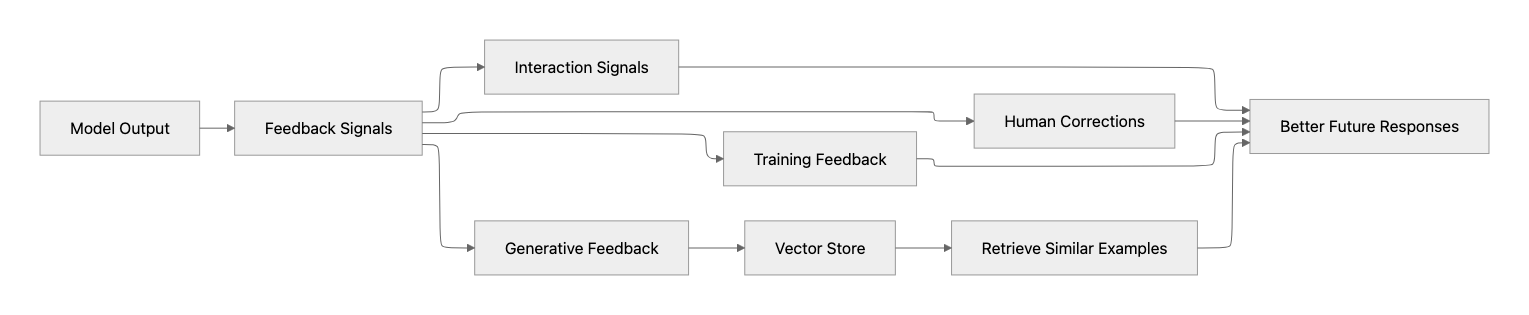
By this stage, your system is fast, predictable, and reliable. The remaining gains come from learning what actually happens in production and feeding that insight back into prompts, routing, retrieval, and defaults.
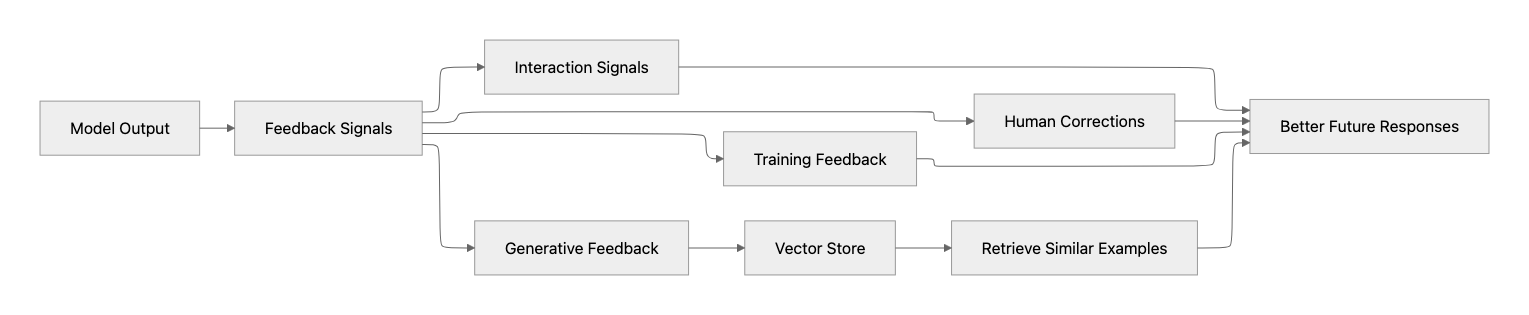
Types of feedback loops
In practice, feedback loops come in a few simple forms:
- Training feedback: Use collected outputs and corrections to improve models later (fine-tuning or distillation).
- Human feedback: Let users or experts correct results to improve reliability.
- Interaction signals: Use retries, edits, or fallbacks to detect where the system fails.
- Generative feedback: Store high-quality responses and reuse them as context for similar requests. Together, these help improve accuracy in production without increasing latency or cost.
Best practices
- Capture production signals continuously: Track latency, token usage, success rates, evaluation scores, and failure modes from real traffic.
- Evaluate outputs: Monitor quality metrics such as relevance, groundedness, and coherence, especially for retrieval and agent-based workflows.
- Correlate quality with cost and latency: Poor quality often appears indirectly as retries, fallbacks, or longer conversations.
- Run offline and continuous evaluations: Use test datasets, synthetic evaluations, and regression testing to detect quality or latency regressions before they reach production.
- Use feedback to tune earlier phases: Most improvements should go into prompt design, routing logic, retrieval strategy, or orchestration.
Why this matters
Tight feedback loops prevent silent quality regressions, reveal high-impact optimization targets, improve accuracy without increasing model size or cost, and turn production traffic into a learning asset, while keeping growth from breaking the user experience. Monitoring and evaluation metrics for generative AI are critical, which can be done with the Agent Monitoring Dashboard.
Phase 11: Plan for predictable scale
Size capacity based on real workload patterns
As traffic grows, performance issues are often caused by how work arrives, not just how much work you have. Bursty traffic, mixed workloads, long-running requests, large prompts, and retry spikes can quickly overwhelm available capacity. At scale, throughput, concurrency, quota, and workload isolation matter as much as model choice. This phase is about making latency predictable under load, not just fast in ideal conditions.
Best practices
- Separate workloads by latency sensitivity: User-facing interactions (chat, copilots) require low latency, while batch or background jobs prioritize throughput. Mixing them on the same deployment often causes queueing and latency spikes.
- Choose the right deployment type: Match the workload to the deployment model. Use Standard or Global Standard for flexible pay-per-token workloads, Data Zone deployments when data processing boundaries matter, Provisioned Throughput for predictable latency at a steady scale, and Batch for large asynchronous workloads. Microsoft Foundry deployment types include Global Standard, Global Provisioned, Global Batch, Data Zone Standard, Data Zone Provisioned, Data Zone Batch, Standard, and Regional Provisioned.
- Plan capacity using real traffic patterns: Use actual prompt sizes, response lengths, and concurrency to size deployments. Capacity planning based only on request count can be misleading because token volume often determines throughput pressure.
- Use provisioned throughput when latency matters: For steady or latency-sensitive workloads, reserved throughput reduces variability and queueing.
- Use Batch for large asynchronous workloads: Offline enrichment, bulk document processing, evaluations, and other non-interactive jobs should use batch-style processing where appropriate. Azure OpenAI Batch is designed for asynchronous high-volume processing and uses separate quota, helping avoid disruption to online workloads.
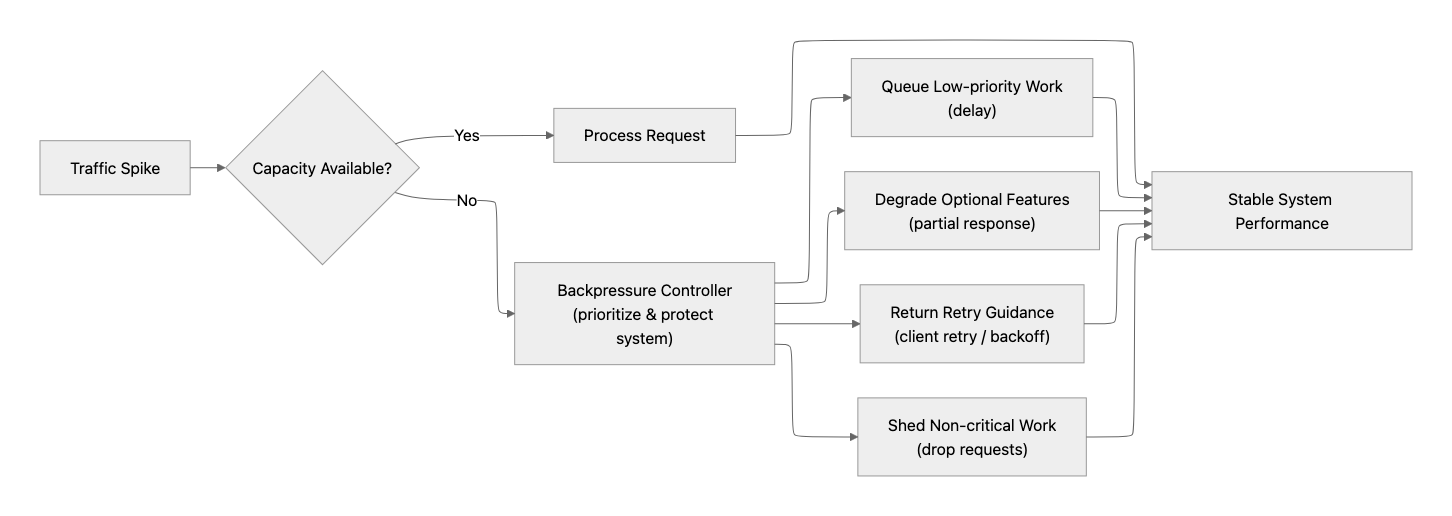
- Use backpressure when demand exceeds capacity: Queue, degrade, shed low-priority work, or return a clear retry response instead of letting latency grow without bound.
- Account for quota tiers, regional quota pools, and deployment type: Quota behavior differs across Standard, Data Zone, Global Standard, Provisioned Throughput, and Batch deployments. Track TPM/RPM utilization, 429s, Retry-After duration, and usage-tier effects, so traffic spikes do not collapse into throttling and queueing.
- Separate evaluation and batch traffic from production: Evals, load tests, experiments, and offline processing can create noisy traffic patterns. Keep them isolated from user-facing deployments.
- Revisit routing as you scale: As traffic grows, ensure most requests still follow the fastest and most cost-efficient path.
Why this matters
Capacity planning is what turns a fast system into a reliable one. It keeps latency stable under load, prevents quality from degrading during spikes, and makes cost and performance predictable, so growth doesn’t break the user experience.
Phase 12: Fine-tune as a final lever
Fine-tune after the architecture is efficient
Fine-tuning is powerful, but it is rarely the first or best response to latency or cost problems. Its real value emerges after prompts, routing, retrieval, orchestration, guardrails, caching, and capacity are already disciplined. Use fine-tuning when you need to reduce repeated prompt instructions, improve consistency, adapt to stable domain-specific patterns, or stabilize structured outputs. For agent systems that must stay current, retrieval and tools remain the right approach for fresh or frequently changing knowledge. Fine-tuning is better suited for stable behavior: formats, terminology, tone, task patterns, and repeated instructions. Treat fine-tuning as an optimization, not a shortcut.
Best practices
- Fine-tune to reduce prompt size and complexity: Move repeated examples, instructions, and formatting rules into the model, so you don’t send them on every request. This lowers token usage and improves latency.
- Prefer smaller fine-tuned models: Fine-tuning smaller models can often achieve the required quality with lower latency and cost than using a larger base model.
- Use fine-tuning for domain adaptation: Fine-tuning helps the model understand specialized terminology or workflows, but it should not be used for frequently changing knowledge. Use retrieval for that.
- Measure the full tradeoff: Evaluate token savings, latency impact, training cost, and operational complexity before committing.
- Try structured outputs before fine-tuning for format problems: If the main issue is JSON shape or schema compliance, first try structured outputs, strict validation, or clearer instructions. Fine-tuning is more useful when those approaches are insufficient or create too much prompt overhead.
Why this matters
Used at the right time, fine-tuning lowers latency by shrinking prompts, reduces per-request cost, improves output consistency, and complements routing and caching strategies.
Tip
Introduce fine-tuning at the right stage. Too early and it may obscure underlying architectural issues.
Final takeaways

Model choice matters, but in production AI systems, it is rarely the dominant factor when an application feels slow. Latency is usually driven by the layers around the model: prompt size, retrieval and tool calls, orchestration patterns, and capacity under load. An architecture-first approach helps you fix the right problems in the right order:
- Measure the full request path, including queueing, tool latency, and token usage.
- Reduce unnecessary work by enforcing a context budget and keeping retrieval tight.
- Route and right-size so routine traffic stays on a fast path.
- Stream for responsiveness and design the UI for progressive output and cancellation.
- Optimize orchestration to minimize round trips and sequential bottlenecks.
- Scale predictably only after you’ve removed waste.
- Fine-tune last when it helps reduce prompt length or stabilize structured outputs. When efficiency is applied across the entire request pipeline, you get faster responses, more predictable performance, and better cost control without having to rely on a new model release. If you’re building agents, treat tool choice, state management, and orchestration runtime (including Hosted Agents vs code-managed orchestration) as performance decisions, not implementation details.
Contributors
Principal authors:
- Sherry List | Microsoft for Startups Architect-in-Residence
- Bobur Umurzokov | CTO & Founder Datox
Note
The author created this article with assistance from AI. Learn more.