Note
Access to this page requires authorization. You can try signing in or changing directories.
Access to this page requires authorization. You can try changing directories.
After redeeming startup credits and completing tenant setup, many startup teams will not begin by learning the Azure portal in depth. A more common starting point is to configure an AI-assisted development workflow that lets developers stay in the terminal or editor they already prefer, while securely connecting that workflow to Azure. This article helps startups move from account setup to agent-driven development on Azure using GitHub Copilot CLI or Claude Code. We will also discuss the relevant MCP Servers and tools to support developers using CLI based developer workflows.
Prerequisites
Before you start, make sure that you:
- Redeemed your Microsoft for Startups Azure credits.
- Activated your Azure Sponsorship subscription.
- Completed the post-redemption Azure account setup.
- Configured a company-backed Microsoft Entra tenant, custom domain, and admin permissions so the environment isn't tied to a single person.
- Redeemed your GitHub benefits. For more information, see How to use Azure credits for GitHub, AKS, and AI Models.
Tip
Configure your Azure tenant as soon as you redeem your credits. Add additional users and admins, configure your corporate domain, and confirm that your Microsoft for Startups credits are active. For more information, see Set up your Azure account.
Set up your development environment
Before configuring agents, MCP servers, or Azure access, set up a baseline developer environment that gives your team a consistent way to work locally. The goal is not to force every startup into one exact toolchain, but to make sure developers can authenticate, install the required CLI tools, and choose the right working mode for the task at hand.
Choose the right interaction mode: CLI vs Agent mode in VS Code
AI-assisted development can happen in your terminal, your editor, or a GitHub-hosted environment. The best choice depends on the task.
| Interaction mode | Use it when | What to expect |
|---|---|---|
| GitHub Copilot CLI | You want direct control in the terminal. | The assistant helps you explore a repo, run setup tasks, answer code questions, and use MCP-powered tools with visible approval steps. |
| GitHub Copilot Chat in agent mode | You're actively changing code in your editor. | The assistant helps you plan, review, edit, and refine code while staying in the project context. |
| GitHub-hosted coding agents | The task is larger, can run independently, and should come back as a pull request. | The agent researches the repository, creates a plan, makes changes on a branch, and opens a pull request for review. |
Example prompts
Use these examples as starting points and adapt them to your repository and approval model.
GitHub Copilot CLI: validate Azure setup
Review this repository and explain how to run it locally.
Do not edit any files yet.

Then, using azure-mcp tools, verify that:
- Resource groups and deployed resources match the expected naming convention.
- RBAC is scoped correctly, with no broad Owner assignments.
- Diagnostics and monitoring are enabled for key resources.

Summarize findings and gaps as pull request comments.
GitHub Copilot Chat in agent mode: implement infrastructure and CI/CD
Create an initial IaC and CI workflow.

Add:
- An infra folder with a Bicep or Terraform structure.
- A GitHub Actions workflow that validates infrastructure and runs tests.
- A rollback note in the pull request template.

Use minimal viable defaults and keep the structure modular for later expansion.
GitHub-hosted coding agent: plan and open a pull request
Create an implementation plan for the feature described in docs/feature-spec.md.

If the plan looks safe:
- Make the changes on a new branch.
- Add or update tests.
- Update documentation.
- Open a pull request with a summary and testing steps.
Recommended starting point
For most startup teams, start with the simplest safe workflow:
- Use Copilot CLI to verify your Azure and GitHub setup.
- Use Copilot Chat in agent mode for interactive changes in VS Code.
- Use GitHub-hosted coding agents for larger pull-request-oriented work.
- Add MCP servers only after you define the permissions, approval model, and logging that each tool needs.
Set up tools for agents and IDEs
Onboarding tools is about connecting your coding agent and IDE to the right context and capabilities. MCP (Model Context Protocol) servers give agent tools a structured way to access approved capabilities, such as Microsoft documentation, repo helpers, or Azure resource operations. Treat onboarding like any other developer dependency: automate configuration, validate connectivity, and ensure access boundaries are clear.
Connect your IDE and developer tools to the coding agent
- Choose the primary client experience, such as VS Code with an agent-enabled workflow or a terminal-first workflow.
- Install and sign in to your agent tool, such as Copilot Chat, Copilot CLI, or Claude Code, by using your organization's approved identity.
- Decide what belongs in user settings and what belongs in workspace settings. Use workspace settings for repo-specific MCP servers, prompts, and guardrails so they travel with the code.
- Check in repository instructions, such as coding conventions, build and test commands, and rules for actions the agent shouldn't take. For Claude Code, this guidance is commonly stored in
CLAUDE.md. - Define safe defaults for tools. Require explicit approval for file writes and shell commands, and allowlist any commands the agent can run unattended.
- Verify the setup by asking the agent to run a small orientation task, such as mapping the repo, running tests, or proposing a small refactor. Confirm the result with diffs and CI.
Recommended MCP servers
- Microsoft Learn MCP Server: Use this server when your agent needs trusted, current Microsoft documentation and code samples. The public remote endpoint is
/api/mcp. For more information, see Get started with the Microsoft Learn MCP Server. - Azure MCP Server: Use this server when your agent needs to inspect, query, and manage Azure resources from your development environment. For more information, see Get started with the Azure MCP Server.
Important
Only connect agents to approved MCP servers. Prefer allowlisted endpoints, least-privilege tool scopes, and auditable logs. If a tool can write to repositories or deploy resources, treat it like production access and gate it appropriately.
Build an Azure-optimized agent team
For enterprise-grade B2B solutions on Azure, start with a simple agent model and extend it only where Azure-specific responsibilities are clear. Azure guidance treats the landing zone as the recommended starting point for a scalable, secure, and governed environment. It also distinguishes between the platform landing zone, which provides shared services such as identity, connectivity, and management, and application landing zones, which hold workload resources for applications and environments. Across both, enable core controls such as Azure RBAC, Cost Management, and Microsoft Defender for Cloud.
This distinction matters for B2B products because the goal isn't only to ship features quickly. The goal is to build a product that enterprise customers can trust. Microsoft startup guidance for production-grade agents on Azure calls out design areas that become critical as teams move beyond prototypes: multitenancy, the application layer, the orchestration layer, and the context layer. Enterprise scenarios also require attention to security, reliability, and adaptability across multiple customers.
Recommended Azure agent roles
Microsoft provides Azure Skills that you can adapt for agent workflows. Startups can also use the gstack pattern as a model for a multi-agent engineering team. The following roles are recommended Azure-optimized extensions for startups building enterprise-grade B2B products on Azure.
Product and requirements planner agent
Use this agent as the front door for new work. It turns product asks into a short implementation plan that includes feature scope and nonfunctional requirements, such as tenant isolation, governance needs, deployment constraints, and operational expectations.
Azure platform architect agent
Use this agent to shape the platform landing zone and environment foundation: tenant setup, management groups, subscription strategy, connectivity, identity, governance baselines, and shared platform services. Azure landing zone guidance positions these decisions as foundational and recommends using the landing zone model as the standardized starting point for Azure environments at scale. Use the azure-enterprise-infra-planner skill as a starting point.
Enterprise application architect agent
Use this agent to focus on the application landing zone and the business workload itself. For B2B solutions, this role owns workload boundaries, environment separation, application-layer design, and how tenant-specific logic maps to the broader platform foundation.
Identity and security agent
Use this agent to review enterprise access control and workload protection. Azure Well-Architected guidance identifies identity as the primary perimeter and recommends strict, conditional, and auditable identity and access management. This role reviews authentication patterns, workload identities, RBAC boundaries, network segmentation, and secure defaults.
Azure DevOps and IaC agent
Use this agent to own the "everything through code" layer: deployment templates, platform automation, and repeatable provisioning. Azure operational excellence guidance connects the foundation to platform automation and DevOps, and Azure governance guidance recommends Bicep or Terraform-based deployment flows for new environments. Use the azure-prepare skill as a starting point.
Reliability and observability agent
Use this agent to review health, alerts, and production behavior. Azure Well-Architected reliability guidance recommends modeling health states, designing monitoring and alerting strategies, and using metrics, logs, and traces to track critical flows and workload components.
Azure integration agent
Use this agent to keep the developer experience grounded in the real Azure environment. Azure MCP Server lets AI agents interact with Azure resources through natural language and can be used from GitHub Copilot CLI, GitHub Copilot coding agent, SDK-based apps, and other MCP-compatible clients. Start with the azure-deploy skill and modify it for your environment.
Governance and cost agent
Use this agent to enforce budgets, tagging, policy assignments, and compliance guardrails as the startup moves from credit-funded experimentation toward enterprise operation. Azure governance guidance recommends automated guardrails, Azure Policy enforcement, and cost controls such as budgets and alerts. The azure-compliance and azure-cost skills are useful starting points.
Reviewer and QA agents
Use these agents to review correctness, security, edge cases, landing zone alignment, access boundaries, monitoring coverage, and infrastructure change safety before merge. Start with the azure-validate skill and modify it for your customer and environment needs.
How this differs from a generic gstack setup
The gstack-style pattern (Think → Plan → Build → Review → Test → Ship → Reflect) is still a useful starting point because it provides role separation, review loops, and a simple operating model. The recommended change is to turn the generic engineering swarm into a team that mirrors Azure architectural boundaries: platform foundation, workload design, security, automation, observability, and governance. That structure keeps Azure-specific concerns from becoming an afterthought.
Build with spec-driven development, Infrastructure as Code, and CI/CD from day one
As you begin building on Azure, treat application code, infrastructure, and deployment as one engineering system. Instead of designing the product in one place, provisioning infrastructure in another, and automating deployments later, use a workflow where:
- The specification defines the intended outcome.
- Infrastructure as Code (IaC) defines the desired Azure environment.
- CI/CD validates and deploys changes through a repeatable pipeline.
This approach reduces drift between intent and implementation, gives your team a shared source of truth, and helps you scale from prototype to production.
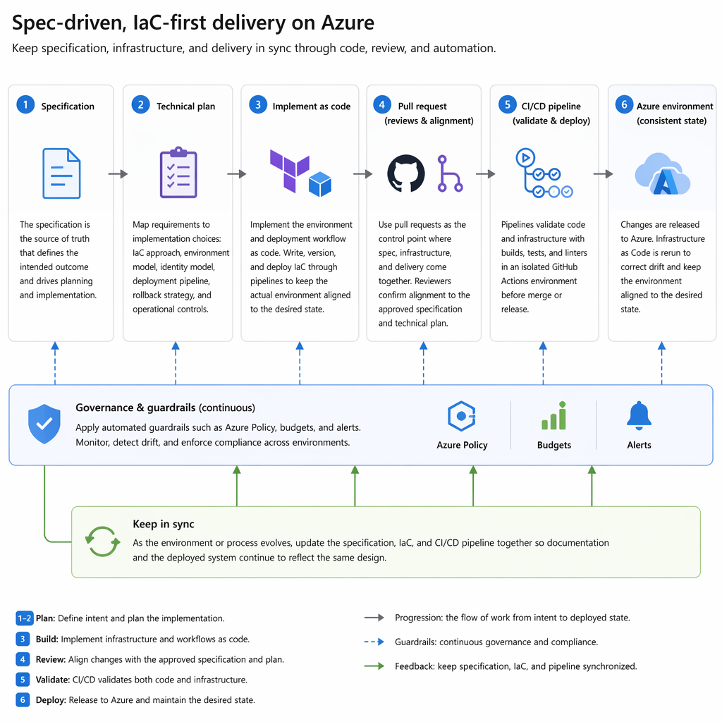
Example workflow
Define the feature in a specification.
Use a spec-first approach to capture the problem, users, requirements, constraints, and success criteria before writing code.
Have the planner agent create an implementation-ready feature brief.
The planner clarifies scope and requirements so the workflow starts from an explicit plan instead of ad hoc prompting.
Have the Azure platform architect agent design the Azure foundation for the feature.
This agent decides how the feature fits into the Azure environment, including identity, governance, networking, management, and landing zone placement.
Have the Azure DevOps and IaC agent define the infrastructure as code.
Implement the required Azure resources, environment structure, and deployment configuration in Bicep or Terraform, stored in version control.
Have the Azure integration agent verify the real Azure environment.
Connect the workflow to Azure-aware tools such as Azure MCP Server so the agent can inspect resources, validate assumptions, and work against the actual Azure environment instead of guessing.
Have reviewer and QA agents audit the change.
Review correctness, security, edge cases, monitoring, logging, and health checks before merge.
Use pull requests and CI/CD to validate and deploy the feature.
Put application code, IaC, and deployment workflow changes behind a pull request so builds, tests, and validation run before merge.
Keep the spec, infrastructure, and deployment workflow in sync.
Treat the specification, IaC, and pipeline as living artifacts so the deployed system stays aligned with the intended design over time.
This model gives startups a more reliable way to move from first build to production-ready delivery on Azure. Instead of relying on manual portal setup, disconnected scripts, or undocumented decisions, your team gets a workflow where the specification captures intent, IaC captures the Azure environment, and CI/CD enforces consistency every time you ship.
Summary
Agent-based development helps startups move from idea to implementation by combining clear specifications, specialized agent roles, Azure-aware tooling, and repeatable delivery workflows. The team starts with a specification that defines what should be built, uses planning to turn that intent into technical decisions and tasks, and implements application code and infrastructure through version-controlled workflows instead of ad hoc changes.
A strong workflow also benefits from specialized roles instead of one generic coding assistant. For Azure projects, agent-based development becomes more useful when agents can work with Azure-aware tools, such as Azure MCP Server, and when changes are reviewable through pull requests, diffs, tests, and CI/CD.
This approach helps startups build quickly without creating future rework. For founders, that means faster first deployments, fewer manual configuration mistakes, clearer reviews, and a smoother path from prototype to production-grade software.
Additional Resources
Properly Setting Up Your Azure Account | Microsoft Learn
Architecture for startups on Azure