Note
Access to this page requires authorization. You can try signing in or changing directories.
Access to this page requires authorization. You can try changing directories.
Enterprise customers expect startups to protect customer data, control production access, manage security risks, and investigate incidents. Establishing these practices early reduces friction during security reviews and gives your team a repeatable foundation as the business scales.
This guide shows how to establish a practical cloud security baseline on Azure by using cloud security posture management, minimum viable Zero Trust controls, risk remediation, monitoring, and clear response ownership.
Prerequisites
- An Azure subscription and a nonproduction environment where you can test configuration changes.
- Access to Microsoft Defender for Cloud, which assesses resource configurations and provides security recommendations. Security Reader provides read-only access to its security views. You also need resource read permissions for inventory. Remediation requires the specific write permissions for each change.
- An understanding of which services store customer data and who owns their operation. You don't need a dedicated security team, but you do need a primary response owner and a backup.
- For command examples, Bash in Azure Cloud Shell or an authenticated Azure CLI session. Replace placeholders with your own subscription and resource values.
- For the monitoring exercise, access to Azure Monitor, Azure's service for collecting and analyzing telemetry, and a Log Analytics workspace, the destination used for log queries. An authorized engineer must configure subscription activity-log export and grant workspace query access. No prior Azure Monitor experience is assumed.
Why this matters for startups and enterprise growth
Enterprise customers increasingly expect startups to explain how they protect data, control privileged access, separate production environments, respond to security events, and produce evidence for security reviews. Waiting until a major customer asks can create last-minute remediation work and delay adoption.
An exposed database or stolen deployment credential can interrupt delivery, force emergency recovery, and delay customer security reviews. Match controls to the customer data and production services you operate. Assigning ownership and preventing recurring configuration errors reduces investigation work and protects runway. Start with one production service and one corresponding test environment: inventory the assets, address the highest-impact risks, assign response ownership, and retain evidence that the controls work. This approach creates a practical baseline that can mature with your product and customer requirements.
Identify your assets and prioritize risk
Begin with production identities, customer data, source code, continuous integration and continuous delivery (CI/CD) credentials, public application programming interfaces (APIs), and the Azure control plane. Record each resource's owner, environment, data sensitivity, and expected access path. Don't assume that a resource group alone isolates environments. Permissions and network boundaries must enforce that separation.
Create a resource inventory
Run the following read-only commands in Bash. They select your working subscription and list resources without changing cloud resource configuration. Sign in first if you use a local CLI session.
SUBSCRIPTION_ID="<subscription-id>"

az account set --subscription "$SUBSCRIPTION_ID"

az resource list --subscription "$SUBSCRIPTION_ID" \
	--query "[].{Name:name,Type:type,Group:resourceGroup}" \
	--output table
Expected result: A table of resource names, types, and resource groups visible to your identity. Compare it with your deployment definitions. An empty result can mean the subscription is empty or your read scope is incomplete. It doesn't prove that there are no assets.
| Priority | Question | First action |
|---|---|---|
| 1 | Could a stolen identity gain administrative control? | Review broad role assignments and administrator authentication. |
| 2 | Can an untrusted client reach sensitive data or management endpoints? | Review ingress, data-service networking, and public management access. |
| 3 | Can credentials be retrieved from code or automation? | Review secret scanning findings and rotate exposed credentials. |
| 4 | Could compromise spread between environments? | Check scoped workload identities and enforced production separation. |
| 5 | Would an alert reach someone who can act? | Test notification delivery and log access. |
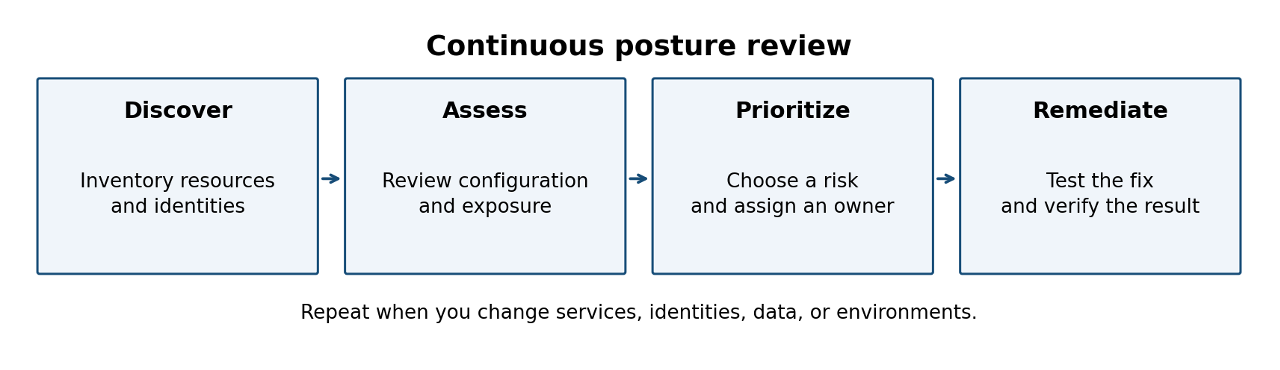
Verify: Select up to five production risks, using fewer if that number reflects the size of your environment. Assign each finding an owner and due date, and define a test that demonstrates the intended control. Revisit the inventory whenever a deployment introduces a new service or identity.
Separate posture management from threat detection
Posture management identifies weaknesses before exploitation. Threat detection identifies suspicious or malicious activity that needs investigation. You need both because correct configuration doesn't rule out stolen credentials or application compromise.
| Dimension | Posture management | Threat detection |
|---|---|---|
| Signal | Misconfiguration, vulnerability, or risky access path | Suspicious activity, credential misuse, or workload alert |
| Example | Customer-data storage permits anonymous reads | Unexpected access or suspicious behavior on a protected workload |
| Action | Validate exposure and remediate the configuration | Investigate evidence, contain the threat, and recover |
| Owner | Resource owner with a tracked due date | On-call responder with a defined escalation path |
Cloud security posture management (CSPM) is a core feature of Microsoft Defender for Cloud. Foundational CSPM provides posture-management capabilities at no cost. The paid Defender CSPM plan adds advanced capabilities, including risk prioritization and attack-path analysis. Workload threat protection depends on the applicable Defender plans and supported resources. Enabling posture assessment doesn't enable every runtime detection capability.
Caution
Enabling paid Defender plans, additional logging, or private connectivity can increase costs. Review the selected resource scope, plan requirements, and expected usage before you enable them.
Verify: Create a coverage record for each production workload. Record the available posture assessment, selected threat protection, logging destination, and response owner. Investigate uncovered resources instead of interpreting the absence of alerts as protection.
Tip
Use secure score as a posture trend. Prioritize exposed production assets and sensitive data by using context instead of treating a score target as proof that you're secure.
Implement minimum viable Zero Trust
Zero Trust uses three principles: verify explicitly, use least privilege access, and assume breach. Apply these principles to human identities, workload access, network reachability, and recovery. Your initial controls should be enforceable engineering defaults.
Verify identities and narrow privileges
- Require multifactor authentication (MFA) for human access, especially administrators. Test your emergency-access procedure before you tighten the authentication policy.
- Use Azure role-based access control (RBAC) at the narrowest practical scope. Avoid routine use of Owner. Separate production administration from ordinary development.
- Prefer managed identities for supported Azure-hosted workloads so that applications authenticate without embedded credentials. Use Azure Key Vault for secrets that you still need to store.
- If you adopt time-bound privileged access or Conditional Access, confirm Microsoft Entra licensing, policy scope, and emergency-access exclusions before rollout.
Inspect role assignments with the following read-only command. This command includes assignments inherited from parent scopes. Directory lookup might require additional access.
az role assignment list \
	--scope "/subscriptions/$SUBSCRIPTION_ID" \
	--include-inherited --all \
	--query "[].{Principal:principalId,Role:roleDefinitionName,Scope:scope}" \
	--output table
Expected result: Assignments visible at the selected subscription scope. Review child resource-group and resource scopes separately. This output isn't a complete review of group membership, eligible assignments, or tenant permissions.
Reduce reachability and protect data
- Remove unrestricted Secure Shell (SSH) and Remote Desktop Protocol (RDP) access. Establish a controlled administrator access path before you remove the current path.
- Choose private endpoints or restricted networks for sensitive services where appropriate. Test Domain Name System (DNS) resolution, application connectivity, deployment access, and failover before you change public access.
- Separate production and development identities and data. Validate that development credentials can't read production customer data.
- Encrypt data in transit and at rest, rotate exposed credentials, and rehearse restoration from trusted backups.
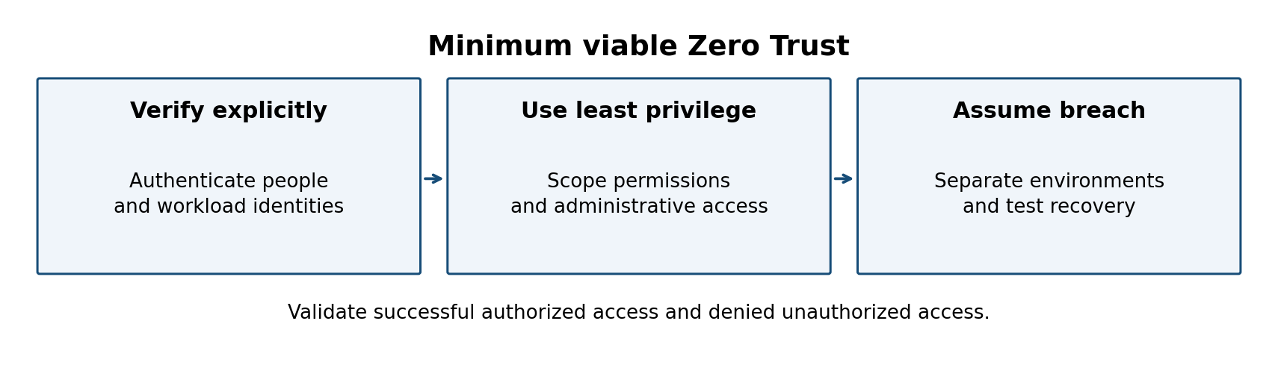
Verify: Run one authorized application request and one denied request from an unauthorized test identity. Test deployment and recovery workflows with the reduced permissions. Record the result before you close the change.
Review, remediate, and verify recommendations
Use Microsoft Defender for Cloud to identify affected resources, review recommended actions, and track configuration improvement. The following workflow uses the Azure portal.
- Open Microsoft Defender for Cloud in the Azure portal and select Recommendations. Scope the view to your subscription and production workloads.
- Review configuration, vulnerability, and exposed-secret findings. When advanced risk prioritization is enabled, use its risk context. Otherwise, assess exposure and sensitivity manually.
- Select one recommendation and inspect the resource, remediation guidance, required permissions, and effect on application behavior.
- Record the initial resource setting and rollback method. Apply the fix in nonproduction, and then test application, deployment, and administrator access.
- Use your change process to apply the validated fix to production. Assign owners and due dates to deferred findings. Document exceptions with an expiration date and review owner.
- Check resource settings immediately and return to the recommendation after its assessment refreshes. Record the status and validation evidence.
Important
Remediation requires permissions for the affected resource and operation. Security Reader doesn't grant those permissions. A recommendation can remain visible until reassessment. Don't repeat a disruptive change solely because its status hasn't refreshed.
Fix recurring configuration risks
| Finding | Safer pattern | Verification |
|---|---|---|
| Excessive role permissions | Scope roles to required operations. Use distinct workload identities. | Deployment and runtime succeed with reduced access. |
| Publicly reachable data service | Restrict network access or adopt a tested private access path. | Approved clients connect. Unauthorized paths fail. |
| Secret in a repository or pipeline | Revoke or rotate it. Use managed identity or a protected secret store. | Old credentials fail and dependent workloads use the replacement. |
| Open management ports | Use controlled administrative access and narrow ingress. | Administrator recovery works without broad internet access. |
| Shared production and development access | Enforce identity and resource boundaries. | Development identities can't access production data. |
| Missing investigation logs | Enable relevant telemetry with an owner and retention decision. | A test action appears in the expected log destination. |
| Unsafe infrastructure defaults | Use reviewed modules and policy checks. | A test deployment uses the approved settings. |
| Stale resources or credentials | Confirm ownership and dependencies before cleanup. | No active dependency requires the item selected for removal. |
Tip
Test anonymous-access changes in a nonproduction storage account before you apply them to production. Confirm that authenticated requests still succeed and anonymous requests fail, and then allow Defender for Cloud to reassess the resource.
Apply the baseline to your startup architecture
Artificial intelligence applications with public APIs
If your artificial intelligence (AI) application stores customer prompts or documents and calls a model service, prioritize workload credentials, public API ingress, and data-store access. Give every new production service an owner, data classification, authentication model, and logging decision. Cloud posture controls don't replace application authorization or evaluation of model behavior.
Verify: Use test data to confirm that one tenant can't retrieve another tenant's documents. Confirm that the model-calling identity has only its required permissions and that logged events don't expose sensitive prompts or secrets.
Business-to-business products preparing for enterprise customers
If your business-to-business (B2B) product receives security questionnaires, map each requested control to a configuration, evidence source, and owner. Use compliance assessment features when your selected plan supports them, but distinguish automated assessment results from independent certification or a complete determination of compliance.
Verify: Select one customer requirement and reproduce its evidence from current settings and logs. Record what is automatically assessed and what needs manual review.
Small teams without a security operations center
If you don't operate a security operations center (SOC), assign a primary responder and backup. Separate suspected active compromise from scheduled posture remediation. Route urgent alerts to your response channel and configuration findings to an owned engineering queue. A product severity label alone shouldn't decide the route.
Verify: Send a safe notification test through the intended route. Confirm that the responder receives it, can open the evidence, and knows how to escalate when unavailable.
Multicloud growth
If you add Amazon Web Services (AWS), Google Cloud Platform (GCP), or an acquired environment, confirm connector permissions and supported coverage before you centralize posture review. Apply the same ownership and prioritization model across environments without assuming identical feature availability.
Verify: Compare a known test asset in each cloud with the connector inventory and assessment view. Track missing coverage and resolve the access or support gap.
Monitor and respond to security signals
Define what you collect, who receives each signal, and what action that person can take. The Azure Monitor activity log records control-plane events. It doesn't capture every application, database, storage-access, or sign-in event, so configure service-specific and identity telemetry separately.
| Signal | Initial investigation | Response owner |
|---|---|---|
| Identity and privilege changes | Validate actor, assignment scope, sign-in context, and authorization. | Identity or platform owner |
| Unexpected control-plane changes | Compare with deployment history and approved changes. | Platform responder |
| Defender workload alerts | Review evidence, affected resource, identity, and customer impact. | On-call incident owner |
| Secret exposure or misuse | Identify affected credentials and dependent workloads. | Service owner |
| Unusual data access | Compare with expected client behavior and application access rules. | Application or data owner |
| Availability or integrity changes | Check deployment source, recovery assets, and configuration drift. | Service responder |
Collect and query control-plane events
- Open the activity log for your subscription, and then select Export Activity Logs to create a diagnostic setting that sends the relevant event categories to a Log Analytics workspace. An authorized engineer must create the diagnostic setting.
- Open the workspace Logs view. Run the following Kusto Query Language (KQL) example after Administrative events arrive.
- Compare each returned event with your approved change history. Record the actor, target, timestamp, and result for any unexplained change.
AzureActivity
| where TimeGenerated > ago(24h)
| where CategoryValue == "Administrative"
| project TimeGenerated, Caller, OperationNameValue,
		ActivityStatusValue, ResourceId
| order by TimeGenerated desc
Expected result: Administrative control-plane events from the preceding 24 hours, newest first. This query is an investigation view, not a threat detector. If it returns no rows, check the export scope, permissions, collection delay, and whether a known action occurred during that interval.
Note
Azure retains subscription activity-log events for 90 days by default. Choose exported log retention according to your investigation and customer obligations. Data-plane and identity logs have separate collection and retention requirements.
Verify: Perform an approved, benign test change in nonproduction and locate its event after ingestion. Confirm that your backup responder can access the same evidence. Review collection gaps after each new service deployment.
Respond to a suspected compromise
- Triage the alert. Confirm severity, affected resource, timeline, identity, and whether production or customer data is involved.
- Contain the attack path by using your runbook. Restrict the compromised identity or workload while you preserve a trusted administrative path. Capture evidence in parallel. Don't delay urgent containment to complete an export.
- Preserve alert details, relevant logs, deployment history, and resource state before you rebuild.
- Remove the cause and persistence. Patch the weakness, rotate exposed credentials, and check dependent workloads.
- Recover from trusted artifacts or backups, verify normal service behavior, and monitor for recurrence.
- Record the root cause and add a preventive control, test, or response improvement.
Warning
Deleting the only copy of investigation logs or an affected resource before you preserve required evidence can permanently destroy that evidence. Before you take destructive recovery actions, preserve the alert details, relevant logs, deployment history, and resource state identified in the preceding response steps.
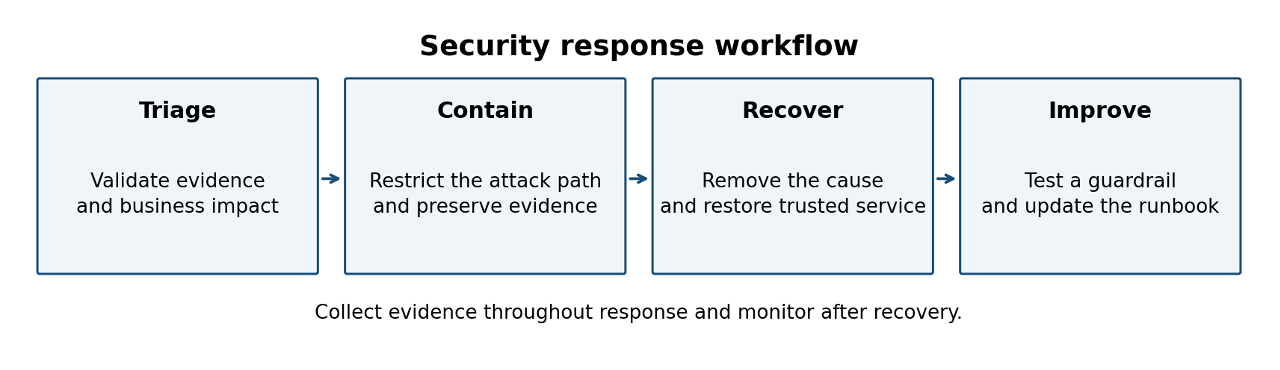
Measure: Record detection, acknowledgment, containment, and recovery timestamps for exercises and incidents. Use the results to improve routing and runbooks. Choose response targets based on your risk and coverage instead of an invented universal threshold.
Automate routing and prevent recurrence
Defender for Cloud workflow automation can invoke Azure Logic Apps in response to alerts, recommendations, and compliance assessment changes. Start with notifications or evidence enrichment. Confirm trigger support and permissions for your selected environment before you deploy the workflow.
- Create one workflow that routes a relevant production finding to an engineering ticket or response channel. Include the resource, owner, environment, and investigation link.
- Use a narrowly scoped automation identity. Log actions, define retry behavior, and prevent duplicate notifications from producing duplicate work.
- Test the trigger and destination by using a documented safe test method. Confirm that the owner can access the linked evidence.
- Add recurring remediation to your infrastructure as code (IaC) module or deployment check. Validate the template in nonproduction.
- Roll out Azure Policy in audit mode first where supported. Review compliance and deployment impact before you choose a blocking or modifying effect.
- Give exceptions an owner, expiration date, and compensating control. Recheck them when you change services or permissions.
Caution
Automated containment can interrupt production or remove your recovery path. Require a trusted trigger, explicit scope, tested recovery, and a named owner before you allow a workflow to change access or isolate resources.
Verify: Test one approved configuration and one intentionally noncompliant test configuration. Confirm that the guardrail detects or blocks the latter as designed, and then remove the test resource. Track repeated findings and notification failures so that you can refine the control.
Build a 30-day implementation plan
Use this sequence to expand the initial baseline. Adjust the pace to your estate and risk. The plan is a working schedule, not a compliance commitment.
| Period | Outcome | Enterprise-readiness evidence |
|---|---|---|
| Week 1 | Inventory production assets. Review identities and initial findings. | Owned resource inventory and prioritized findings. |
| Week 2 | Validate fixes for exposure, credentials, and environment boundaries. | Access tests, remediation records, and documented exceptions. |
| Week 3 | Establish log collection, response ownership, and alert routing. | Accessible logs, tested alert routing, and named primary and backup responders. |
| Week 4 | Add one recurring guardrail and run a response exercise. | Guardrail test, exercise notes, and reviewed exceptions. |
Measure: Review overdue high-impact findings, time to remediate them, recurrence of the same cause, and the fraction of critical services with a tested response owner. Record the denominator for coverage measurements. Investigate changes in secure score alongside changes in assessed resources and recommendations.
When this baseline is no longer enough
Increase rigor when you handle more sensitive data, add production environments, take on enterprise assurance obligations, or need wider incident coverage. A larger estate can justify advanced posture prioritization, more formal evidence retention, and scheduled recovery exercises. These growth signals change your requirements, not evidence that your initial baseline failed.
- Add architecture review when changes introduce new identities, sensitive data paths, or trust boundaries.
- Formalize incident roles and escalation when an engineer can no longer provide reliable coverage.
- Map controls to customer or regulatory obligations when you need reproducible assurance evidence.
- Adopt specialized tooling when you can name the coverage or response gap that it addresses.
- Resist the temptation to adopt enterprise security tooling before your exposure, coverage, and response needs justify it.
Reference checklist
Review these items monthly and after significant architecture or identity changes. Continue urgent alert response and regular posture triage between reviews.
- Confirm critical resource ownership and the inventory of production services.
- Review privileged roles, workload credentials, and emergency-access tests.
- Check internet exposure and verify production and development boundaries.
- Review overdue findings and exceptions, including expiration dates and compensating controls.
- Confirm selected Defender coverage and resolve assessment or connector gaps.
- Verify that identity, control-plane, and relevant data-plane logs arrive and remain accessible for the required retention period.
- Test response routing, backup ownership, and access to investigation evidence.
- Review repeated causes and test one delivery guardrail or recovery procedure.