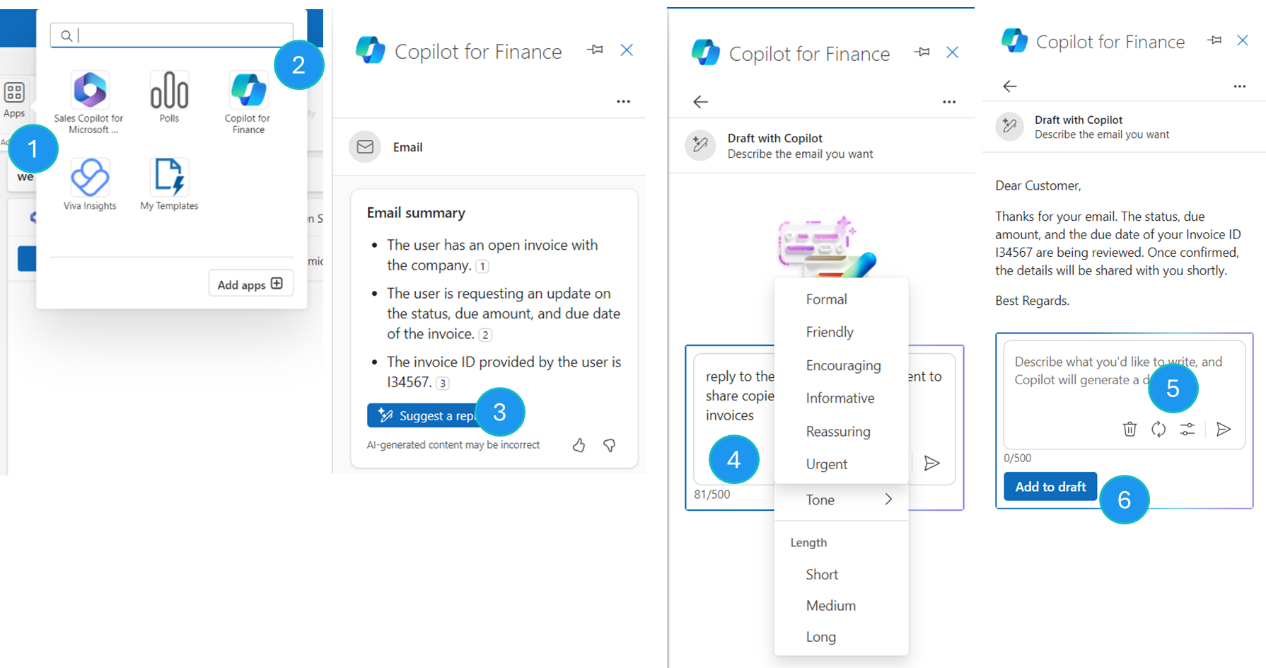
Reply to emails with finance agents
Finance agents use generative AI to let you quickly compose emails that are relevant to the context. When you provide a prompt in the Copilot composer, finance agents use the body of the source email to generate a draft. You can then review that draft, append the content to the email, and send the email to recipients.
To compose a reply to an existing email, follow these steps.
Open an existing email, select Reply, and then select All Apps on the top menu. Alternatively, from an existing email, select Suggest a reply below the email summary.
Select the finance agents app.
In the Copilot pane, in the Email summary section, select Suggest a reply.
Enter a prompt to guide finance agents about the email reply that you want to compose. You can optionally specify the following information:
Tone
Length
If you're dissatisfied with the draft that's generated, select Regenerate.
When you're satisfied with the draft that's generated, select Add to draft. The draft is inserted into the body of the email.