Microsoft Security Copilot overview
Microsoft Security Copilot represents a fundamental shift in how security operations are performed—moving from manual investigation and analysis to AI-assisted workflows that scale at machine speed. In this unit, you explore what Security Copilot is, how it works, its capabilities for security and IT operations, licensing options, and deep integration with Microsoft Intune and Defender for Endpoint.
What is Microsoft Security Copilot?
Microsoft Security Copilot is a generative AI-powered security solution that uses large language models (LLMs) and your organization's security data to help you:
- Investigate faster: Ask questions in natural language and get instant insights from across your security tools
- Understand threats: Receive plain-English explanations of complex attacks, techniques, and indicators
- Take action: Get step-by-step remediation guidance tailored to your environment
- Share knowledge: Generate reports and summaries for technical and non-technical audiences
Security Copilot integrates with Microsoft Intune, Microsoft Defender for Endpoint, Microsoft Sentinel, Microsoft Entra ID, and third-party security tools through plugins.
Note
If you're new to Security Copilot, we recommend first completing the Describe Microsoft Security Copilot module to learn terminology, how Copilot processes prompts, and elements of effective prompts.
Security Copilot experiences
There are two primary ways to use Security Copilot:
| Experience Type | Where You Access It | Key Capabilities | Best For |
|---|---|---|---|
| Embedded in Microsoft Defender | Microsoft Defender portal (security.microsoft.com) | Summarize incidents, analyze scripts, generate guided responses | Investigating security alerts and threats without context switching |
| Embedded in Microsoft Intune | Intune admin center (intune.microsoft.com) | Troubleshoot devices, compare configurations, analyze compliance issues | Device management and helpdesk troubleshooting |
| Embedded in Microsoft Entra ID | Entra admin center (entra.microsoft.com) | Investigate identity threats, analyze sign-in logs, review role assignments | Identity and access management investigations |
| Standalone Portal | Security Copilot portal (securitycopilot.microsoft.com) | Cross-product insights, custom investigations, promptbooks, collaboration | Complex multi-source investigations and team collaboration |
In this module, you use both embedded experiences (primarily Copilot in Intune and Defender) and the standalone portal for comprehensive investigations.
How Security Copilot works
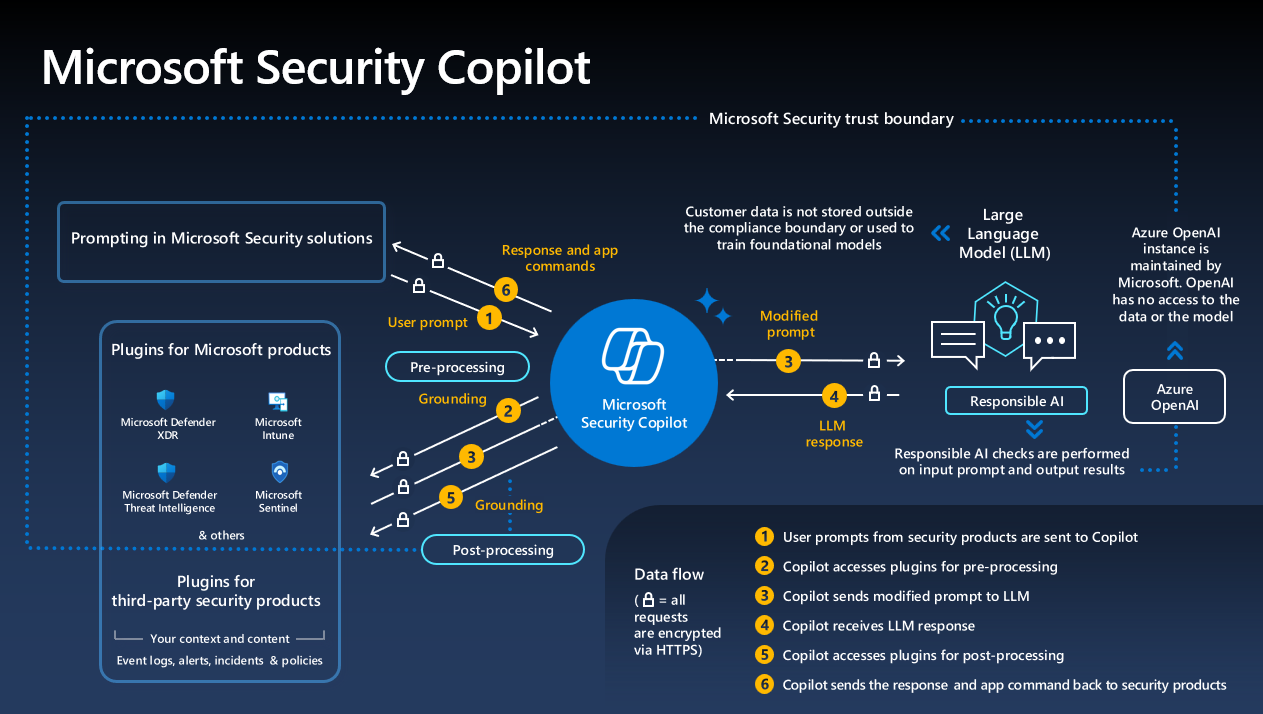
Security Copilot combines three key components to deliver AI-powered security operations:
Security Copilot combines three key components:
| Component | Description | Key Capabilities |
|---|---|---|
| Large Language Models (LLMs) | OpenAI GPT-4 architecture customized for security operations | Natural language understanding in multiple languages, security terminology and attack technique context awareness, complex scenario analysis and correlation, human-readable explanations for any audience |
| Security-Specific Plugins | Connectors to security data sources | Microsoft plugins: Defender XDR (incidents, alerts, threat intelligence), Intune (devices, apps, policies, compliance), Defender for Endpoint (inventory, vulnerabilities, timelines), Microsoft Entra ID (users, groups, sign-in logs), Microsoft Sentinel (security events, SIEM data), Defender Threat Intelligence (IOCs, threat actors). Third-party: ServiceNow, Splunk, CrowdStrike, and others |
| Skills and Capabilities | Specific AI-powered actions Copilot performs | Summarization (incidents, devices, users), Analysis (decode scripts, assess risk, explain techniques), Investigation (correlate data, timeline analysis, root cause), Guidance (remediation steps, policy recommendations), Query generation (natural language to KQL/KeyQL), Report creation (technical and executive documentation) |
Security Copilot capabilities for IT and security teams
| Role | Key Capabilities | Example Prompts |
|---|---|---|
| SOC Analysts | Incident investigation: Instant summaries with timeline, affected assets, and actions. Threat hunting: Convert natural language to KQL queries, search for IOCs. Threat intelligence: Look up threat actors, TTPs, correlate public IOCs with internal events. | "Summarize incident 12345 and tell me if it's a real threat"; "Show me all devices that communicated with IP 192.0.2.100 in the last 7 days"; "What TTPs does the Volt Typhoon threat actor use?"; "Generate a KQL query to find devices with suspicious PowerShell execution" |
| IT Administrators | Device troubleshooting: Diagnose noncompliance, compare devices, root cause analysis. Policy analysis: Understand policy impact, find assignments, and identify conflicts. Compliance remediation: Step-by-step fixes, generate scripts, and explain application failures. | "Why is device WIN11-LAB01 noncompliant?"; "Compare device DESKTOP-ABC to DESKTOP-XYZ and show me the differences"; "What does the Windows 11 security baseline policy do?"; "Show me devices that haven't checked in to Intune in the last 30 days" |
| Security Architects/Managers | Security posture: Review overall posture, identify gaps, and analyze vulnerability trends. Risk prioritization: Business impact assessment, compare risk levels, track improvements. Executive reporting: Nontechnical summaries, status reports, compliance documentation. | "Summarize our top 5 security risks across all endpoints"; "Show me device compliance trends for the last 30 days"; "Create an executive summary of incident 12345 for the CISO"; "What percentage of our devices are protected by attack surface reduction rules?" |
License and provision
Before deploying Security Copilot, understanding licensing is critical because it determines your compute capacity and billing model. Organizations need to plan SCU allocation carefully to balance AI-powered capabilities with budget constraints—underprovisioning leads to throttled responses during critical incidents, while overprovisioning wastes resources.
License options
| License Option | SCU Inclusion | Billing | Best For | Data Privacy & Security |
|---|---|---|---|---|
| Microsoft 365 E5 or E7 | Auto-provisioned: 400 SCUs/month per 1,000 paid user licenses (up to 10,000 SCUs/month) | Integrated with Microsoft 365 billing; overage available for usage spikes | Organizations already on Microsoft 365 E5 or E7 | Data stays in tenant (not used for AI training), RBAC respected, SOC 2 Type 2 compliant, audit logs available |
| Standalone Security Copilot | Purchase SCUs separately (minimum 1 SCU) | Separate consumption-based billing with optional overage | Organizations on Microsoft 365 E3 or other license plans | Same compliance and security guarantees as E5/E7 |
Security Compute Units (SCUs)
The consumption-based model exists because AI operations vary drastically in complexity—summarizing a simple device status requires minimal compute, while correlating a multi-stage attack across thousands of devices and generating remediation plans demands significant processing power. This pay-for-what-you-use approach ensures organizations only pay for the AI assistance they actually need.
Security Copilot operates on a consumption-based model where each prompt, query, or analysis consumes SCUs based on complexity. For Microsoft 365 E5/E7 customers, capacity is auto-provisioned; non-E5/E7 customers provision SCUs (minimum: 1 SCU) and can configure overage capacity for usage spikes.
Typical SCU consumption:
| Operation Type | Example | SCU Cost |
|---|---|---|
| Simple prompt | "What is device ABC's compliance status?" | 0.1-0.3 SCUs |
| Incident summary | Automatic incident analysis | 0.5-1 SCU |
| Complex investigation | Multi-source data correlation | 1-3 SCUs |
| Promptbook | Multi-step automated workflow | 3-10 SCUs |
Provision Security Copilot
Proper provisioning is essential because misconfigured access or insufficient capacity can block analysts from using Copilot during active incidents—exactly when they need it most.
To enable Security Copilot in your tenant:
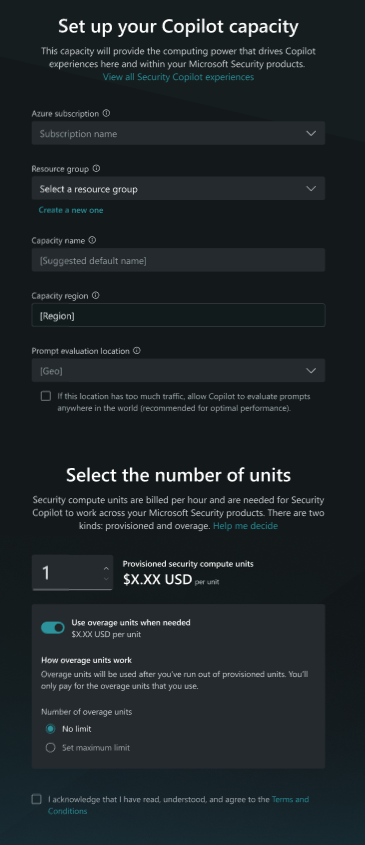
For Microsoft 365 E5/E7 customers, Security Copilot is auto-provisioned with a default capacity. You can start using it immediately after:
- Verify auto-provisioned capacity: Check that Default Security Copilot Capacity is active in your tenant
- Assign roles: Grant users Security Copilot owner or contributor roles
- Enable plugins: Turn on Microsoft Intune, Defender XDR, and other plugins
For non-E5/E7 customers, provision capacity manually:
- Provision SCUs: Create capacity in the Security Copilot portal or Azure portal (minimum 1 SCU)
- Assign roles: Grant users Security Copilot owner or contributor roles
- Enable plugins: Turn on Microsoft Intune, Defender XDR, and other plugins
Users must also have appropriate permissions in source systems (Intune Administrator for Intune data, Security Reader for Defender data, etc.).
Integration with Microsoft Intune

| Experience | Location | Key Capabilities | Best For |
|---|---|---|---|
| Embedded | Intune admin center (intune.microsoft.com) | Device troubleshooting (instant device summary, compliance status, compare configurations), Policy analysis (plain-English explanations, security impact, assignments), Data exploration (natural language queries), Device query assistance (generate KQL queries) | Contextual help while managing devices and policies |
| Standalone plugin | Security Copilot portal (securitycopilot.microsoft.com) | Cross-product correlation (combine Intune + Defender + Entra data), Detailed device investigation with compliance history, Policy/app analysis across environment | Complex multi-source investigations connecting device management with security threats |
Integration with Microsoft Defender for Endpoint
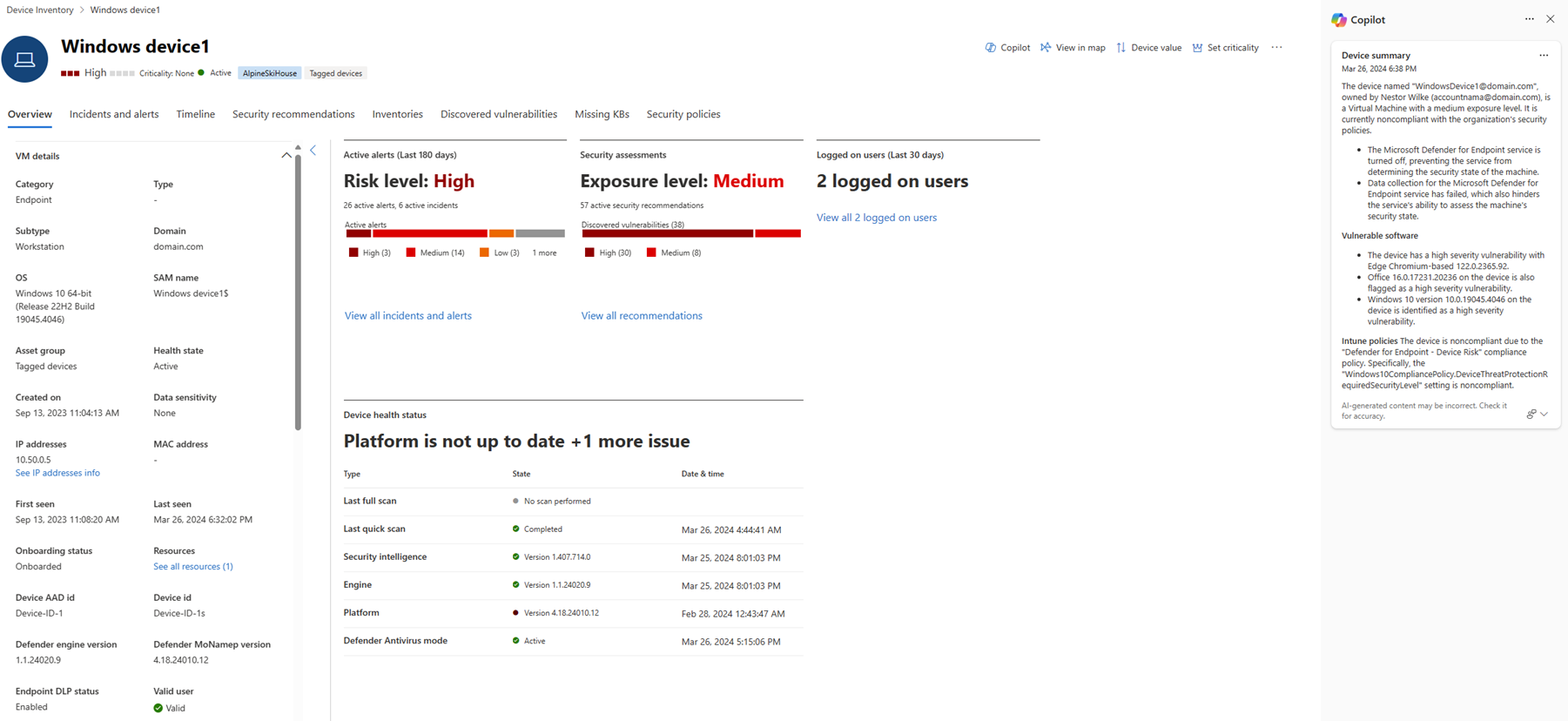
Defender integration is where Security Copilot delivers its highest value—reducing incident investigation from 2-3 hours to minutes by automatically correlating alerts, explaining attack patterns, and recommending proven remediation strategies.
| Experience | Location | Key Capabilities | Best For |
|---|---|---|---|
| Embedded | Defender portal (security.microsoft.com) | Incident summarization (automatic summaries with timeline, affected devices, recommendations), Guided response (AI-generated remediation steps with one-click execution), Script analysis (decode PowerShell/batch/bash scripts, identify IOCs), Device summary (vulnerabilities, threats, Intune compliance), Natural language to KQL (convert questions to advanced hunting queries) | Security alert investigation without context switching |
| Standalone plugin | Security Copilot portal (securitycopilot.microsoft.com) | Incident investigation across environment, Threat hunting with cross-product correlation, Vulnerability analysis with exposure scoring, Remediation guidance (scripts and policy recommendations) | Complex threat investigations requiring multiple data sources |
Promptbooks: Pre-built investigation workflows
Promptbooks automate repetitive multi-step investigations, ensuring consistent analysis while freeing analysts to focus on decision-making.
| Promptbook | Purpose | Key Outputs |
|---|---|---|
| Incident investigation | Comprehensive incident analysis | Executive summary, technical details, remediation recommendations |
| Suspicious script analysis | Decode and analyze scripts | Deobfuscated code, IOCs, malicious/benign verdict |
| Vulnerability impact assessment | Assess CVE exposure | Affected devices, exposure risk, remediation priority |
| Microsoft user analysis | Investigate user accounts | Sign-in patterns, risky behaviors, security recommendations |
| Threat actor profile | Research threat actors | TTPs, targets, campaigns, related IOCs in your environment |
Custom promptbooks: Build organization-specific workflows by defining investigation steps, configuring inputs (incident ID, device name, date range), and setting output actions (generate report, create ticket).
Best practices for using Security Copilot
- Start with built-in prompts: Use the prompt library and promptbooks to learn effective phrasing
- Be specific: Include device names, IDs, date ranges, and criteria ("Show me Windows 11 devices in Sales that are noncompliant" vs. "Show me bad devices")
- Combine data sources: Ask questions spanning Intune, Defender, and Entra for complete context
- Verify critical actions: Review citations and validate AI recommendations before executing high-impact actions
What's next?
Now that you understand Security Copilot's capabilities and integration with Intune and Defender, you're ready to learn investigation techniques. Next, you explore how to use natural language prompts, analyze incidents, and generate remediation recommendations—turning complex security operations into simple conversations.