Get data from and send data to an external REST service
The following example combines all the different HTTP classes and functions to retrieve data from an external service. The external service returns a JSON document with user information. You can use the jsonplaceholder.typicode.com website to test REST services. Additionally, you can request, add, and edit data from that website because it's a free space for you to practice.
procedure GetUserInformation(UserNumber: Integer)
var
    Client: HttpClient;
    ResponseMessage: HttpResponseMessage;
    ResponseString: Text;
begin
    if not Client.Get(StrSubstNo('https://jsonplaceholder.typicode.com/users/%1',
                      UserNumber), ResponseMessage) then
        Error(ErrorInfo.Create('The call to the web service failed.'));

    if not ResponseMessage.IsSuccessStatusCode() then
        Error(ErrorInfo.Create('The web service returned an error message:\\' +
                'Status code: ' + Format(ResponseMessage.HttpStatusCode()) +
                'Description: ' + ResponseMessage.ReasonPhrase()));

    ResponseMessage.Content().ReadAs(ResponseString);
end;
The ResponseString variable will contain the JSON document as a string. You can use the built-in JSON classes to parse the string and work with the content. You can also use the HttpClient class to upload data to a REST service. The subsequent code example sends data and an image to an external service. This service can, for example, perform image processing. In this example, the first picture from a certain item is retrieved. The Picture field in Items is a MediaSet field; therefore, it can contain multiple images. Those images are stored in the Tenant Media table.
procedure ChangeToBlackAndWhitePicture(Item: Record Item)
var
    TenantMedia: Record "Tenant Media";
    Client: HttpClient;
    Content: HttpContent;
    ResponseMessage: HttpResponseMessage;
    Stream: InStream;
    Url: Text;
begin
    if not (Item.Picture.Count() > 0) then
        exit;

    if not TenantMedia.Get(Item.Picture.Item(1)) then
        exit;

    TenantMedia.CalcFields(Content);

    if not TenantMedia.Content.HasValue() then
        exit;

    TenantMedia.Content.CreateInStream(Stream);

    Content.WriteFrom(Stream);
    Url := 'https://mywebsite.com/ImageConverter';
    if not client.Post(Url, Content, ResponseMessage) then
        exit;

    if not ResponseMessage.IsSuccessStatusCode() then
        exit;

    ResponseMessage.Content().ReadAs(Stream);
    Clear(Item.Picture);
    Item.Picture.ImportStream(Stream, 'New Image');
    Item.Modify(true);
end;
It's important to always put your Client.Get, Client.Post, Client.Put, and other calls within an if-statement. Each of these procedures returns a Boolean value to indicate if a connection to the server could be successfully set-up. Before an HttpRequestMessage can be sent, the Business Central server and the endpoint’s server need to create a connection.
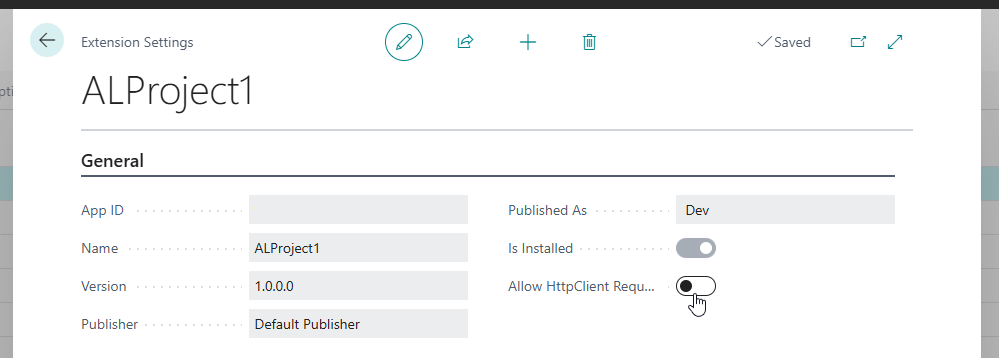
Sometimes connections to external services can be blocked, either by Business Central itself, or by a firewall. If the call is blocked by Business Central, then you need to open the Extension Management page and select your extension to open the Extension Settings page. Make sure the Allow HttpClient Requests is turned on.
This doesn't guarantee that the call itself was a success and resulted in a successful response. Therefore, you need to test the IsSuccessStatusCode procedure on the HttpResponseMessage variable. But it guarantees that a connection can be made and an HttpRequestMessage can be send to the endpoint.