Understand Active Directory backup
A usable AD DS backup is more than a copy of NTDS.dit. It must preserve the operating system state and application-consistent relationships required to restore a domain controller safely.
The following actions don't constitute an AD DS backup strategy:
- Copying
NTDS.ditto a network share or removable storage. - Exporting user objects.
- Saving only Group Policy files.
- Relying only on a hypervisor snapshot.
- Copying a virtual disk while the server runs.
- Swapping database files between controllers.
- Applying system state to an unsupported fresh installation or unrelated server.
You should use an AD-aware, application-consistent backup, and a supported restore procedure.
Note
Windows Server Backup or wbadmin.exe is able to perform application consistent Volume Shadow Copy Service (VSS) based system state backups, including that of AD DS and SYSVOL.
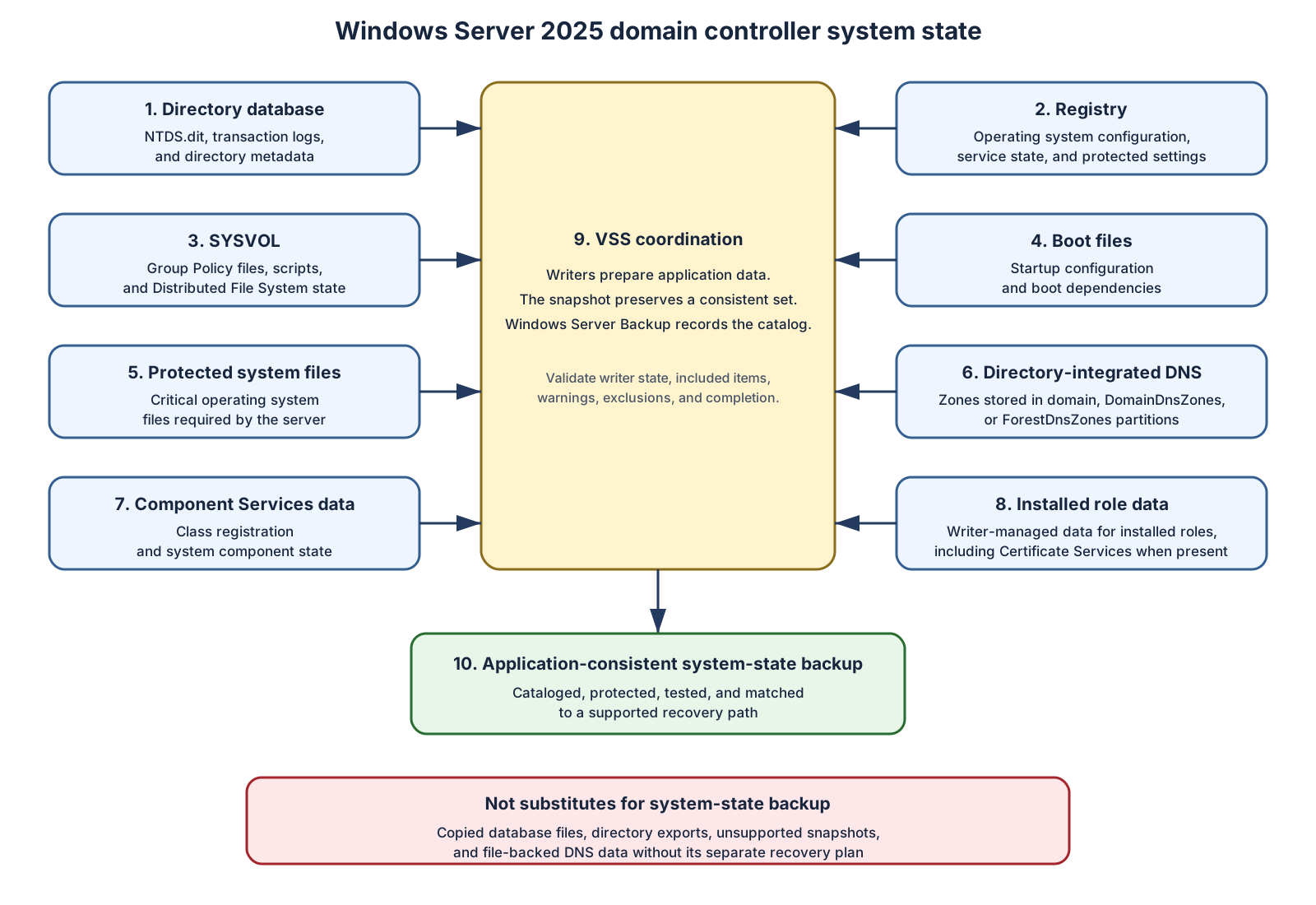
System state contents
System state on a domain controller includes components required by the installed roles and operating system. Relevant AD DS components include:
- Active Directory database.
- Registry.
- SYSVOL.
- Boot files.
- Protected system files.
- Component Services class registration database.
- AD-integrated DNS data in directory partitions.
- Certificate Services data if the domain controller also hosts that role.
Understand backup types
| Backup type | Primary use | Important constraint |
|---|---|---|
| System state | Restore AD DS and operating system state on a supported source installation | Not a general replacement-hardware image |
| Critical-volume | Protect volumes required to start Windows | Scope depends on system layout |
| Bare-metal | Reconstruct required operating system volumes | Requires a compatible recovery path |
| Full-server | Protect all selected server volumes | Larger storage and restore footprint |
Plan the backup type from the intended restore method. Don't discover during an outage that the selected backup can't restore the operating system, storage layout, or target hardware.
Volume Shadow Copy Services (VSS) consistency
Windows Server Backup coordinates with Volume Shadow Copy Service (VSS) writers. An application-consistent backup requires successful writer preparation, snapshot creation, and completion.
Validate:
- Backup result.
- VSS writer state.
- Included volumes and components.
- Warnings and exclusions.
- Catalog state.
- Media readability.
Running a successful backup job doesn't prove that:
- The required system-state component was included.
- Encryption keys remain available.
- The catalog can be read.
- The source server identity matches the recovery design.
- The backup predates corruption.
- A full restore can complete within the RTO.
Note
You should validate that your backup implementation functions as intended by performing regular test restores in isolated recovery environments.
Backup lifetime
The supported lifetime of an AD DS backup is determined by the directory’s effective deletion lifetimes. When Active Directory Recycle Bin is disabled, the backup lifetime is the effective tombstoneLifetime. When Recycle Bin is enabled, it's the shorter of the effective tombstoneLifetime and msDS-DeletedObjectLifetime values.
For forests created using Windows Server 2003 SP1 or later, tombstoneLifetime is normally set explicitly to 180 days during forest creation. Forests originally created using Windows 2000 Server or Windows Server 2003 without SP1 may still have no stored value if the attribute has never subsequently been configured. However, an absent value doesn't itself identify the forest’s age, functional level, or currently supported Windows Server versions.
An absent tombstoneLifetime value is valid and has a protocol-defined effective value of 60 days. If msDS-DeletedObjectLifetime is absent, it inherits the effective tombstone lifetime.
Use the following commands to inspect the stored values:
Import-Module ActiveDirectory

$configNC = (Get-ADRootDSE).configurationNamingContext
$dsObject = "CN=Directory Service,CN=Windows NT,CN=Services,$configNC"

Get-ADObject -Identity $dsObject -Partition $configNC `
    -Properties tombstoneLifetime, msDS-DeletedObjectLifetime |
    Select-Object tombstoneLifetime, msDS-DeletedObjectLifetime
A blank tombstoneLifetime result means the attribute is absent and its effective value is 60 days. To set tombstoneLifetime explicitly to 180 days:
Set-ADObject -Identity $dsObject -Partition $configNC `
    -Replace @{ tombstoneLifetime = 180 }
The setting is stored in the forest-wide Configuration partition and replicates to all domain controllers. Increasing it doesn't restore deletion records that have already been garbage-collected or automatically make backups that exceeded the previous effective lifetime supported.
When Active Directory Recycle Bin isn't enabled, the limit is the effective tombstone lifetime. When Recycle Bin is enabled, the limit is the lesser of the effective tombstone and deleted-object lifetimes. You can determine the deleted-object lifetime using the following PowerShell commands:
Import-Module ActiveDirectory

$configNC = (Get-ADRootDSE).configurationNamingContext
$dsObject = "CN=Directory Service,CN=Windows NT,CN=Services,$configNC"

Get-ADObject -Identity $dsObject -Partition $configNC `
    -Properties msDS-DeletedObjectLifetime |
    Select-Object msDS-DeletedObjectLifetime
A blank value means that Recycle Bin inherits the effective tombstoneLifetime. To explicitly set the deleted-object value to 180 days run the command:
Set-ADObject -Identity $dsObject -Partition $configNC `
    -Replace @{ 'msDS-DeletedObjectLifetime' = 180 }
To remove the explicit value and restore inheritance:
Set-ADObject -Identity $dsObject -Partition $configNC `
    -Clear 'msDS-DeletedObjectLifetime'
Explicit values below two days have an effective value of two days. This setting is principally relevant when Active Directory Recycle Bin is enabled.
Don't restore a domain controller from a backup older than that effective limit.
Restoring a backup taken beyond these limits can create these risks:
- Objects deleted long ago can return as lingering objects.
- Passwords and group memberships can be obsolete.
- Secure-channel state can be stale.
- The backup can predate schema or application requirements.
- The restored server can lack supported updates or drivers.
- Recovery can exceed the accepted data-loss window.
Being within the applicable effective lifetime is necessary, but it isn't sufficient. Select a backup that predates the corruption or compromise, is compatible with the approved recovery path, has been tested, and satisfies the accepted data-loss decision.
Replication identity
Each writable domain controller originates changes under a replication invocation ID. Update sequence numbers are meaningful only with that invocation ID.
When AD DS detects a supported virtualized rollback through VM-Generation ID:
- It changes the invocation ID.
- It discards the local RID pool.
- It accepts newer replicated changes from partners.
Without a supported safeguard, rollback can cause update sequence number reuse. Replication partners can incorrectly assume they already received changes. AD DS can quarantine replication after detecting rollback.
DNS data storage
Active Directory is heavily reliant on DNS data. AD-integrated DNS zones can be stored in:
- A domain naming context.
DomainDnsZones.ForestDnsZones.
These zones recover with their directory partitions. Other DNS data can require separate protection:
- File-backed primary zones.
- Local secondary-zone configuration.
- Delegations outside recovered zones.
- Conditional forwarders.
- Forwarder settings.
- DNS policies.
- Customized root hints.
Record storage type and replication scope for every zone.
Set coverage per domain
Design backup coverage from business requirements, directory topology, failure boundaries, and the recovery method you'll actually use. Back up at least two writable domain controllers in each domain where feasible. Multiple sources protect against:
- Media failure.
- A backup taken after corruption.
- Loss of one site.
- Hardware incompatibility.
- Missing keys or catalogs.
- Failure of the preferred recovery controller.
A read-only domain controller backup can't restore a writable domain controller.
For each domain, designate:
- Preferred recovery controller.
- Alternate recovery controller.
- Backup method.
- Backup location.
- Recovery hardware or virtual platform.
- DNS capability.
- Global catalog status.
- Restore test schedule.
Don't choose a recovery controller merely because it holds operations master roles. During forest recovery, you can seize and allocate roles to the selected recovered controller.
Map business requirements to backup policy
When determining your backup policy, define:
- Backup frequency from RPO.
- Copy completion time.
- Replication health required before backup.
- Retention within supported directory lifetime.
- Local copy for recovery speed.
- Offline or immutable copy for compromise resistance.
- Full-server or bare-metal coverage for operating system loss.
- Recovery test frequency.
Note
Address geographically isolated sites when WAN restoration time can violate the RTO.
Protect the trust boundary
Take care to secure your backup data. A domain controller backup can expose:
- Password hashes.
- Kerberos keys.
- Directory secrets.
- Group membership.
- Access control.
- LSA secrets.
- SYSTEM material used to decrypt protected directory data.
Treat the backup, catalog, mounted copy, exported data, and encryption key as Tier 0 material.
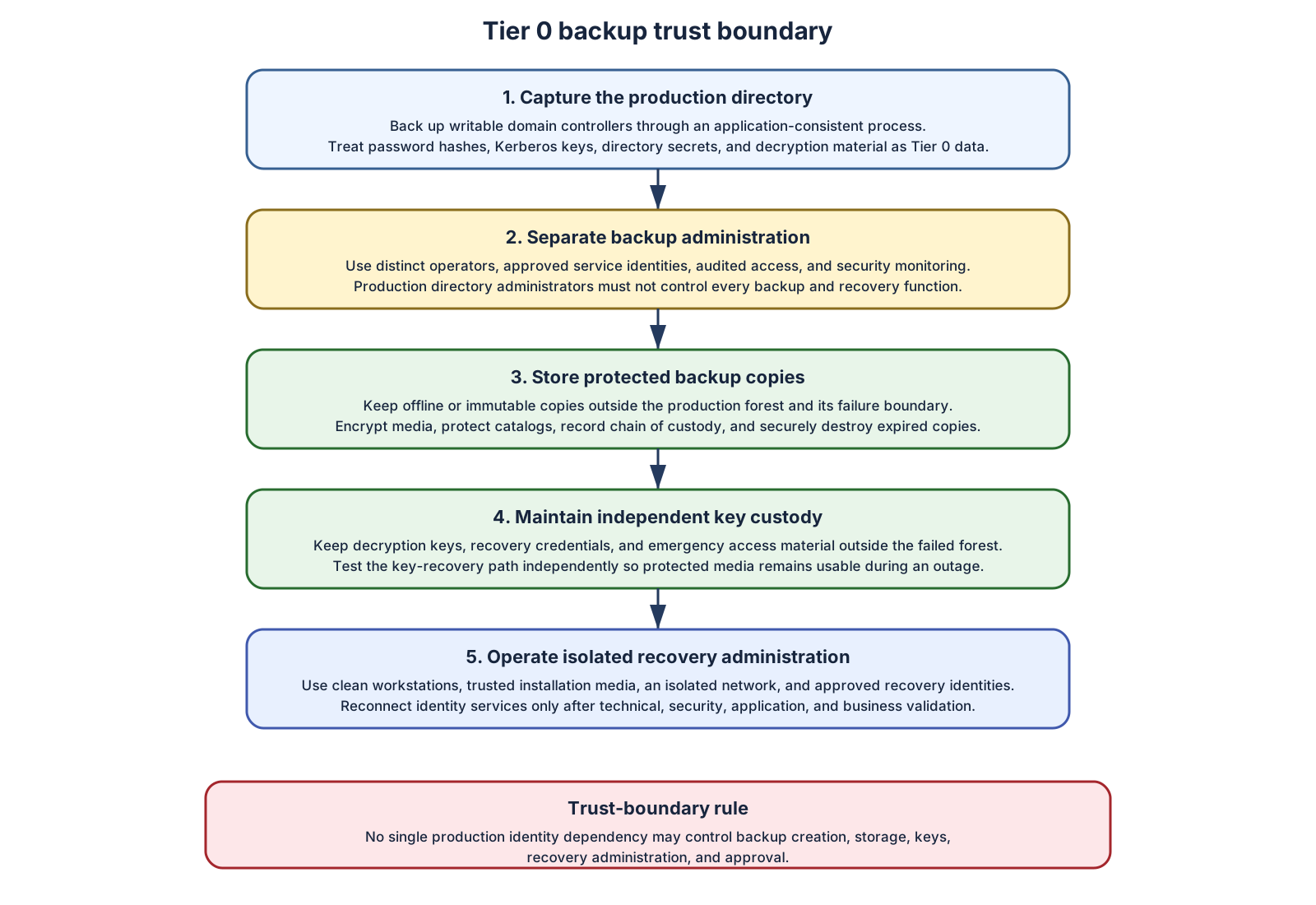
Apply these controls:
- Encrypt data in transit and at rest.
- Audit access to media, catalogs, consoles, credentials, and keys.
- Alert on unexpected access or copy operations.
- Separate AD DS administration, backup administration, monitoring, and key custody.
- Keep recovery credentials outside the production forest.
- Keep recovery documentation available during forest loss.
- Record chain of custody.
- Securely destroy expired media, temporary restores, mounted databases, exports, and obsolete keys.
Test key recovery independently. Encryption that can't be unlocked during forest loss converts a valid backup into unusable data.
Avoid shared failure boundaries
Backup infrastructure mustn't rely exclusively on:
- Production domain authentication.
- Production DNS.
- Production certificate enrollment.
- Production federation.
- A single hypervisor cluster.
- A single storage system.
- Credentials stored in the protected forest.
Use a recovery access design that still functions when the forest is unavailable or untrusted.
Design to recover from security incidents
Your backups should be designed to address security issues, not just equipment failure. When performing recovery from a security incident, assume an attacker can target:
- Backup administrators.
- Backup servers.
- Catalogs.
- Encryption keys.
- Hypervisor administrators.
- Privileged access workstations.
- Recovery runbooks.
Define controls that let responders answer:
- Which backup predates the earliest plausible compromise?
- Who accessed that backup?
- Can the media be mounted without production identity?
- Is the recovery workstation trusted?
- Are the installation source and drivers trusted?
- Can recovered systems remain isolated?
Regularly test backups
Use three distinct measures:
- Backup success. The job completed and expected components were recorded.
- Restore success. The backup can be decrypted, cataloged, mounted, and restored to a supported isolated target.
- Recovery exercise success. You can restore required identity capabilities within RTO and RPO, validate security, and control reconnection.
Your recovery test exercises should track:
- Backup completion rate.
- Restore-test completion rate.
- Time to retrieve media.
- Time to recover the first forest-root controller.
- Time to recover one writable controller per domain.
- Time to validate DNS, SYSVOL, replication, and authentication.
- Variance from the runbook.
- Data loss.
- Unresolved security gates.
Validation answers two questions:
- Can the backup be restored through a supported path?
- Does the backup represent a trustworthy recovery point?
Don't accept a backup solely because a scheduled job reports success.
Install Windows Server Backup
Windows Server Backup is an optional feature.
You can install it on the Windows Server 2025 domain controller that will create the backup by running the following command.
Install-WindowsFeature -Name Windows-Server-Backup
Minimum privilege depends on the operation. wbadmin backup tasks generally require Backup Operators, Administrators, or delegated permissions and an elevated process. Restoration of AD DS requires additional directory recovery authority and DSRM access.
Create a system-state backup
You can create a system-state backup on the source Windows Server 2025 domain controller by running the following command in an elevated console.
wbadmin start systemstatebackup -backuptarget:E: -quiet
Before running the command:
- Confirm
E:is an approved target. - Confirm the target isn't a protected source volume.
- Confirm available capacity.
- Confirm backup encryption and custody controls.
- Confirm the source domain controller is healthy.
- Record replication state.
You can validate that a backup that explicitly includes system state has been created by running the command.
wbadmin get versions -backuptarget:E:
Discover backup events
You can view backup events stored in the local event log by running the commands:
Get-WinEvent -ListProvider 'Microsoft-Windows-Backup' |
    Select-Object Name, @{
        Name       = 'LogLinks'
        Expression = { $_.LogLinks.LogName -join ', ' }
    }

Get-WinEvent -ListLog '*Backup*' |
    Select-Object LogName, IsEnabled, RecordCount
Note
Regularly inspect relevant Application and System events for VSS, storage, file system, and service failures.
Capture recovery dependencies
Maintain an inventory outside the forest of the following important information:
- Forest and domain names.
- Forest and domain functional levels.
- Domain controllers, sites, operating systems, IP addresses, and roles.
- Operations master holders.
- Global catalog placement.
- DNS zones, storage types, replication scopes, delegations, and forwarders.
- Trusts.
- Time hierarchy.
- Network routes and firewalls.
- BitLocker keys.
- Virtual TPM dependencies.
- Backup keys and catalogs.
- DSRM credentials.
- Built-in RID-500 Administrator identity, enabled state, and protected password history for every domain in the forest, retained for at least as long as usable backups.
- Critical applications and identity dependencies.
Protect the inventory as sensitive operational data.
You can capture current topology before an incident by running the following script:
$forestSeed = 'DC01.contoso.com'
$forest = Get-ADForest -Server $forestSeed -ErrorAction Stop

$forest | Select-Object RootDomain, SchemaMaster, DomainNamingMaster, GlobalCatalogs

$forest.Domains | ForEach-Object {
    $domainName = $_
    $domainSeed = Get-ADDomainController `
        -Discover `
        -DomainName $domainName `
        -Writable `
        -Service ADWS `
        -ErrorAction Stop

    $seedHost = [string]($domainSeed.HostName | Select-Object -First 1)
    if ([string]::IsNullOrWhiteSpace($seedHost)) {
        throw "No writable ADWS seed was returned for $domainName."
    }

    Get-ADDomain -Identity $domainName -Server $seedHost -ErrorAction Stop |
        Select-Object DNSRoot, PDCEmulator, RIDMaster, InfrastructureMaster

    Get-ADDomainController -Filter * -Server $seedHost -ErrorAction Stop |
        Select-Object HostName, Domain, Site, IsGlobalCatalog, OperationMasterRoles
}
Replace the example forest seed with an approved writable domain controller that runs Active Directory Web Services. Stop if any domain can't be discovered or enumerated. Partial output isn't a forest inventory.
Add:
- Domain controller IP configuration.
- Sites and subnets.
- Trusts.
- Time sources.
- DNS zone storage type and replication scope.
- Delegations and conditional forwarders.
- File-backed zones.
- BitLocker and virtual TPM recovery material.
- Hypervisor placement.
- Backup identifiers.
Store the inventory outside the forest.
For every file-backed primary zone, protect the actual zone file plus the DNS Server configuration needed to recreate the zone. Don't substitute Export-DnsServerZone output for a tested file-backed recovery artifact; Microsoft documents that export format for troubleshooting and it isn't the same as a standard zone file.
Build a last-known-safe evidence record
For every candidate backup, record:
| Evidence | Required decision |
|---|---|
| Timestamp, time zone, identifier, source controller | Identify the exact recovery point |
| AD DS health and replication state | Reject unhealthy source state |
| Incident timeline | Place the backup before the earliest plausible unsafe change |
| Schema, configuration, DNS, Group Policy, privileged change history | Detect embedded logical damage |
| Backup result, VSS state, warnings, exclusions, catalog | Confirm application-consistent capture |
| Restore-test history | Confirm the claimed recovery path |
| Operating system, hardware, storage, driver, machine identity compatibility | Confirm supported target |
| Keys, credentials, media, tools | Confirm recoverability outside production |
| Expected data loss | Obtain technical and business acceptance |
Reject the backup if material evidence is missing or contradictory.
Inspect offline directory data
Dsamain.exe can expose an offline AD DS database through LDAP after the backup or snapshot is made available through a supported process. Use an LDAP tool to compare candidate recovery points without booting a domain controller into DSRM.
Use this capability to answer:
- Did the problematic object or attribute change already exist?
- Which backup contains the required object hierarchy?
- What group membership existed?
- Which schema or configuration version is present?
ntdsutil snapshot and database mounting support investigation. They don't replace system-state or full-server backup.
Test restoration
An isolated restore test requires:
- Network that can't reach production domain controllers.
- No production DNS registration.
- Controlled time source.
- Trusted recovery workstation.
- Tested media and keys.
- Defined acceptance criteria.
Acceptance criteria should include:
- Server startup.
- AD DS service startup.
- SYSVOL readiness appropriate to the test.
- DNS data availability.
- Directory query.
- Event review.
- Backup source identity confirmation.
- Recovery time measurement.
Don't connect a test-restored domain controller to production.
Select the recovery point
Score candidates on:
- Safety.
- Recoverability.
- Compatibility.
- Data loss.
- Restore time.
- Evidence quality.
The selected backup needs:
- Technical approval.
- Security approval.
- Business acceptance of data loss.
The newest backup is preferred only after it passes those gates.