Understand the Fabric admin model
Before Alex can configure anything at Contoso, she needs to understand who's responsible for what in Microsoft Fabric. The platform has a five-level hierarchy and a four-tier admin delegation model. Knowing how they work together determines what she controls, what she delegates, and where she focuses her 30-day deployment effort. In this unit, you explore the Fabric architecture, identify the right admin roles for different responsibilities, and learn the tools Alex uses to manage the environment.
Understand the Fabric hierarchy
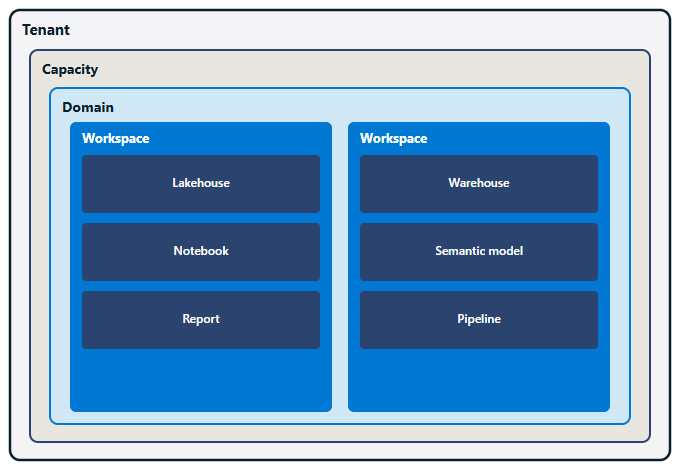
Microsoft Fabric operates on a five-level architecture, and each level defines a different scope of control. At the top is the tenant, which represents Contoso's entire Fabric environment. The tenant aligns with Contoso's Microsoft Entra ID directory, so every user who signs in with a Contoso account is part of the same tenant. Alex administers the tenant, which means she controls platform-wide settings that affect everyone, from security policies to feature availability.
Within the tenant, Alex provisions one or more capacities. A capacity is a dedicated compute and storage resource that powers Fabric workloads. At Contoso, Alex purchased an F64 capacity to support the five departments going live. When users run queries, train models, or refresh reports, they consume capacity resources. If the F64 runs out of capacity, work stops, so Alex monitors usage closely.
Inside a capacity, Alex organizes workspaces into domains. A domain is a logical grouping that reflects how Contoso structures its business, such as a Finance domain and a Risk domain. Domains help Alex enforce governance boundaries, because she can apply different policies and delegate administrative rights at the domain level. The Finance team's workspaces live in the Finance domain, and the Risk team's workspaces live in the Risk domain.
Each domain contains multiple workspaces, and a workspace is where teams store and share Fabric items. A workspace acts as a collaboration container. Team members with the right permissions can create lakehouses, build notebooks, and publish reports. Workspace admins control who has access and what they can do.
At the bottom of the hierarchy are items, which are the data assets users create: lakehouses, warehouses, notebooks, semantic models, and reports. Alex doesn't manage items directly; workspace admins do. Her job is to set up the environment so workspace admins can focus on managing access and content within their own workspaces.
Identify the right admin role
Microsoft Fabric uses a four-tier admin delegation model, and understanding it is critical because Alex can't manage everything herself. By assigning the right people to the right roles, she distributes responsibility and stays out of day-to-day decisions.
| Role | Scope | Responsibility |
|---|---|---|
| Fabric admin | Entire tenant | Controls tenant settings, manages all capacities and domains, assigns other admins |
| Capacity admin | A specific capacity | Manages workspaces assigned to that capacity, monitors capacity performance |
| Domain admin | A specific domain | Manages workspaces within the domain, enforces domain-specific policies |
| Workspace admin | A specific workspace | Controls access, manages items, assigns permissions to workspace members |
At Contoso, Alex is the Fabric admin, which means she has full control over the tenant. She can configure tenant settings, create capacities, define domains, and assign other admins. But she doesn't need to manage every workspace or troubleshoot every permission issue. That's where delegation comes in.
Alex assigns the IT lead as a capacity admin for the F64 capacity. The capacity admin monitors resource consumption, reassigns workspaces when needed, and alerts Alex if the capacity approaches its limits. The Finance lead becomes a domain admin for the Finance domain, and the Risk lead becomes a domain admin for the Risk domain. Domain admins manage workspaces within their domains and can enforce policies that reflect their department's governance requirements.
At the workspace level, each team's data lead is a workspace admin. Workspace admins control who can view, edit, or share items, and they handle day-to-day access requests. This delegation model keeps Alex focused on platform-level decisions instead of individual workspace issues.
Note
Microsoft Entra ID lists the Fabric admin role as Power BI Administrator. When you assign this role, look for that name.
Use the admin portal and supporting tools
Alex's primary tool is the Fabric admin portal, a web-based interface where she configures tenant settings, manages capacities, creates domains, and monitors platform activity. The admin portal organizes its capabilities into several sections:
- Tenant settings: Platform-wide feature controls that determine what users can and can't do across Contoso's Fabric environment
- Capacity settings: Tools to view, create, and manage capacities, and to assign workspaces to them
- Domains: Tools to create domains, assign domain admins, and organize workspaces by business function
- Users: Tools to assign Fabric admin, capacity admin, and domain admin roles
- Audit logs: Records of user activity across the tenant, used for compliance and security investigations
- Monitoring: Usage and performance data that helps Alex track capacity consumption and identify trends
The admin portal is Alex's daily workspace, but it's not the only tool she uses. She also relies on the Microsoft 365 admin center to manage Fabric licenses and Microsoft Entra ID to control user identity and access. For automation and scripting, she uses PowerShell cmdlets or REST APIs.
With a clear picture of the admin hierarchy, the delegation model, and the tools at her disposal, Alex is ready to start configuring the platform.