Exercise – Set up permissions using access packages
Access packages in Microsoft Entra are used to govern which resources an agent identity can access and manage by using approval workflows and least-privilege permissions. Agent 365 templates apply security, governance, and compliance policies to the agent. Access packages manage the agent’s access to business resources such as SharePoint sites, Teams, applications, and APIs.
Access packages also support time-bound access, approvals, and periodic access reviews to help ensure that permissions remain appropriately scoped over time. For more information, see Protect agent identities with Microsoft Entra.
In this exercise, you as Reed set up permissions by using access packages to ensure that the agent can perform its tasks while complying with security policies. You review and configure the access packages assigned to the agent's identity in Microsoft Entra.
Prerequisites
Create access packages in Microsoft Entra. For more information, see Access packages for Agent identities
To set up permissions for the agent, follow these steps:
Open the Microsoft Entra admin center in your browser.
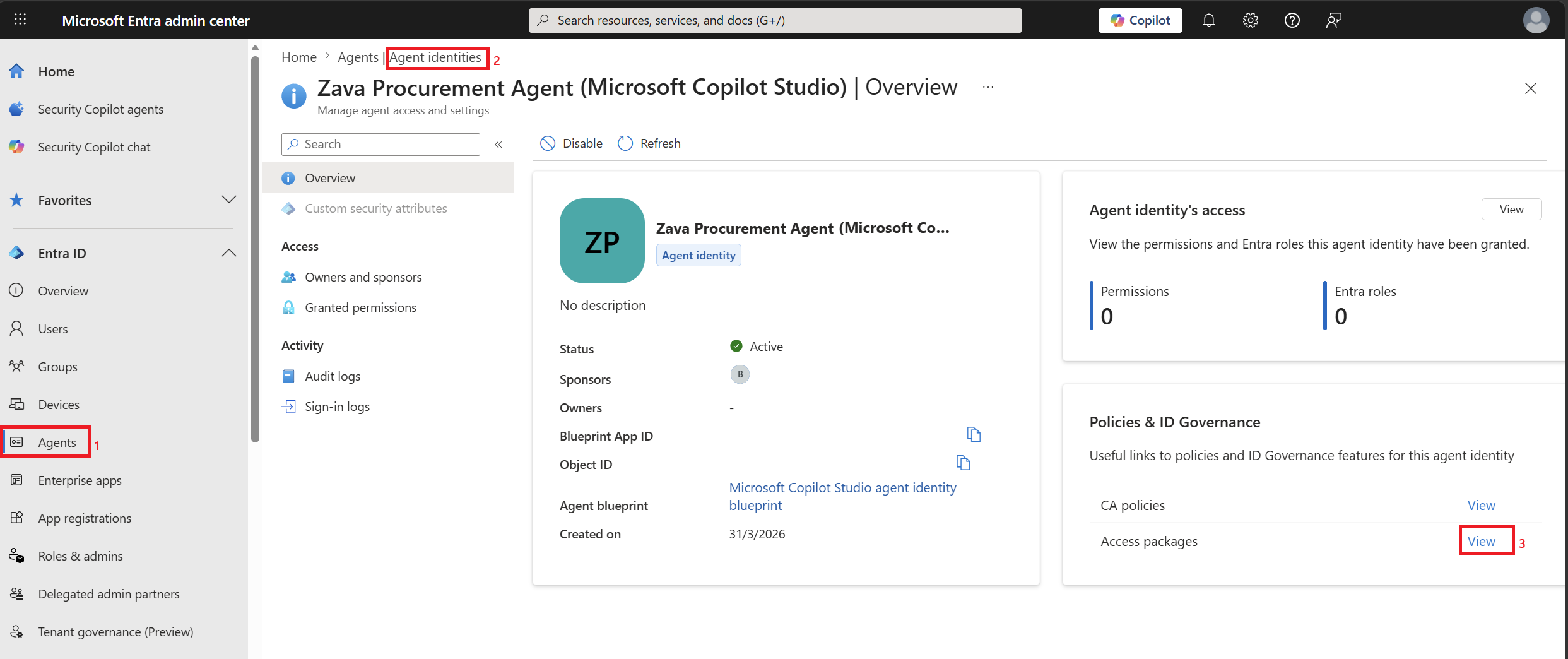
In the left navigation pane, select Entra ID, and then select Agents.
In the left navigation pane, select Agent identities and then search for the agent, for example Zava Procurement.
Select the Zava Procurement agent. The agent's identity overview page appears where you can manage its permissions and access.
In the Policies & ID Governance section, select View next to Access packages.
In the Identity Governance | Access packages page, select Agent permissions for DevOps team.
Select the Initial policy that is enabled.
Review the permissions assigned to the agent and then select Edit. For more information, see Access packages for Agent identities.
Review the permissions across the tabs, make any necessary changes, and ensure that the agent has the appropriate access for its operations.
Select Update to save your changes.
By following these steps, you successfully created a custom policy template to restrict external content sharing for agents and set up the necessary permissions for the Zava Procurement agent. The agent operates within the defined security parameters while performing its tasks.