Understand the AI landscape in Dynamics 365 Contact Center
Dynamics 365 Contact Center includes two complementary layers of AI: Copilot and autonomous AI agents. Each layer serves a distinct purpose, and understanding how they relate to each other helps you make better decisions about which capabilities to prioritize and in what order.
Copilot: real-time assistance during conversations
Copilot features are designed to help customer service representatives (CSRs) while they're actively handling a conversation. When a customer chats or calls, Copilot works alongside the representative, suggesting responses, summarizing the conversation, answering questions from the knowledge base, and helping draft communications.
The key Copilot capabilities in Dynamics 365 Contact Center include:
| Feature | What it does |
|---|---|
| Ask a question | Representatives ask Copilot questions in natural language. Copilot answers using the configured knowledge sources. |
| Conversation summary | Generates a concise summary of the live conversation at key moments—when a representative joins, when a transfer happens, or on demand. |
| Draft a chat response | Suggests a reply based on the conversation context and knowledge articles. |
| Write an email | Generates a draft email response using conversation context and knowledge sources. |
| Knowledge search | Surface relevant knowledge articles in the Copilot help pane as the conversation unfolds. |
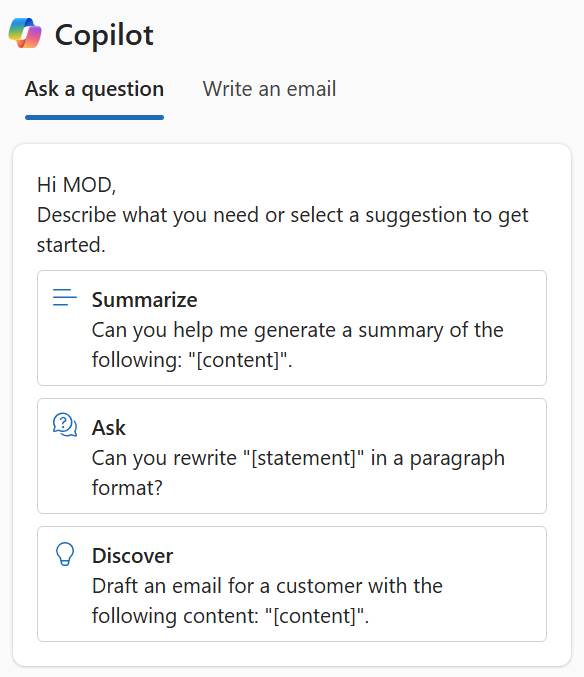
These features are configured in the Copilot Service admin center and enabled per experience profile, so you control which representatives see which capabilities.
Autonomous AI agents: background intelligence
Autonomous AI agents operate independently of active conversations. They analyze conversation history, evaluate quality, and capture knowledge, without requiring service representatives or supervisors to manually trigger each action.
The agents available in Dynamics 365 Contact Center are:
| Agent | What it does |
|---|---|
| Customer Assist Agent | Combines autonomous self-service with real-time representative assistance, and initiates proactive outbound engagement. |
| Quality Assurance Agent | Evaluates conversations in real time and after completion, scores quality, and enables supervisor monitoring and intervention. |
| Service Operations Agent (preview) | Supports conversational setup through natural language, conversation orchestration with playbooks, and built-in configuration validation. |
Autonomous agents are configured separately from Copilot and have their own prerequisites, including Copilot Credits and specific security roles.
How they work together
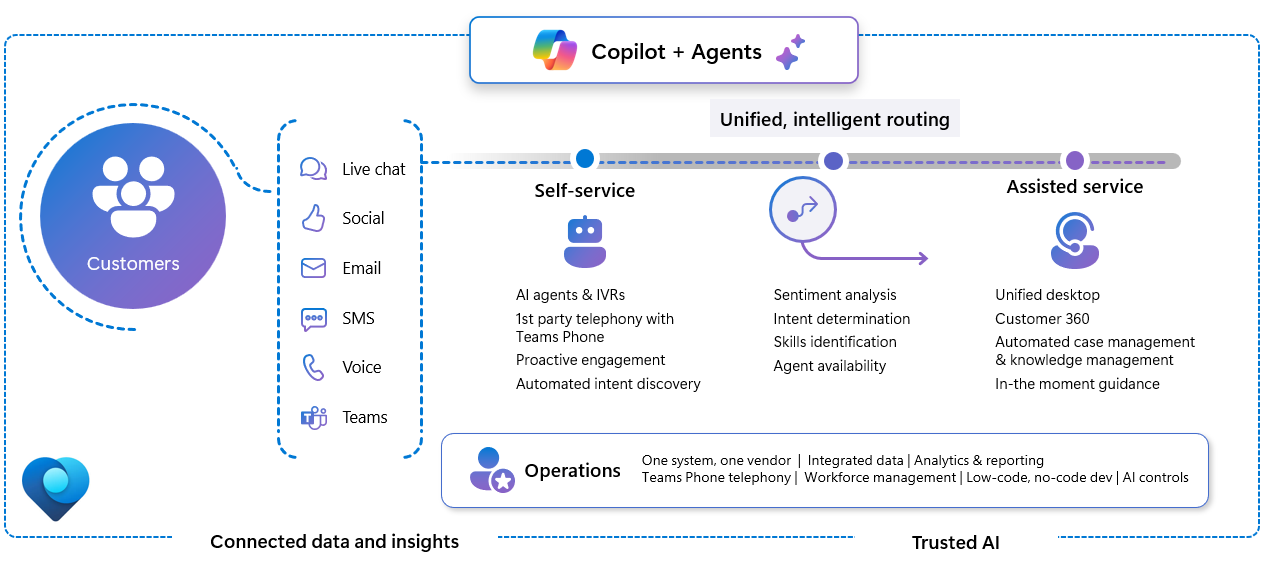
Copilot and autonomous agents are complementary, not competing. Consider the lifecycle of a single customer conversation:
- When a new conversation starts, the Customer Assist Agent understands what the customer needs in real time. It conducts a dynamic interview (if needed) and resolves the issue autonomously using your knowledge base and configured tools. If escalation is required, it hands off with full context.
- During the conversation, Copilot assists the representative by answering questions, suggesting responses, and providing a real-time summary if a transfer is needed.
- While the conversation is active and after it closes, the Quality Assurance Agent scores the interaction automatically and alerts supervisors to quality issues.
- The Service Operations Agent helps administrators optimize routing and orchestration based on the patterns these interactions reveal.
Each layer reinforces the other. The autonomous agents improve the data and content that Copilot draws from. Copilot helps representatives deliver better interactions that generate higher-quality data for the agents to analyze.
Shared prerequisites for AI agents
Before you enable any contact center agent, confirm that the following prerequisites are in place:
- Pay-as-you-go plan: AI agents consume Copilot credits for each operation. Configure a Power Platform pay-as-you-go plan or purchase a Copilot Studio Subscription Pack for prepaid capacity.
- Consent for cross-region data movement: For optimal performance, AI service calls might route to capacity outside your region. Provide consent before you enable any agent.
- Role assignments: Each agent requires specific security roles for administrators, supervisors, and users. These roles are separate from the general Dynamics 365 security roles.
Important
Skipping prerequisite steps results in setup errors that require manual resolution in Power Automate flows and Dataverse connection references. Complete all shared prerequisites before you configure individual agents.
Best practices for AI adoption
Deploying AI capabilities without a clear adoption plan can lead to confusion, underuse, and missed value. Before enabling features, consider these principles:
Start with a clear problem statement. AI adoption is most successful when it addresses a specific, measurable pain point—such as high average handling time, low first-contact resolution rates, or inconsistent quality scores. Identify your target areas before selecting capabilities.
Enable incrementally. Don't enable all AI features at once. Start with the capabilities that offer the most immediate value with the least disruption—typically Copilot conversation summaries and Ask a question. Validate impact before expanding.
Train representatives before you go live. Copilot features change how representatives work. Provide training on what the features do, how to interpret AI suggestions critically, and when to override or disregard a suggestion. Representatives who understand AI assistance use it more effectively.
Monitor and adjust. Copilot analytics and autonomous agent performance dashboards provide data on adoption and impact. Review this data regularly and use it to refine knowledge sources, adjust instructions, and identify where AI suggestions aren't landing.
Treat AI as a system, not a setting. The quality of Copilot responses depends on the quality of your knowledge base. The value of the intent agent depends on the quality of your conversation transcripts. AI capabilities compound over time when you maintain the underlying data they depend on.
With this strategic picture in mind, you're ready to configure each contact center agent, starting with the Customer Assist Agent.