Build code that targets the Client API object model
The introduction lays out two halves of client-side logic for the Request form: the code you write, and the moment that code runs. This unit covers both halves: the objects your code targets, and the event handler approach that gets your function running at the right time.
Reach form data through the right context object
Every Client API function you write starts from one of a small set of root objects. The execution context represents the context for an event on a form or grid. The platform passes it automatically to your handler whenever you configure the handler to receive it.
From that execution context, you retrieve the form context (formContext) by calling the execution context's getFormContext() method. It's a reference to the form, or to an item on the form such as a row in an editable grid.
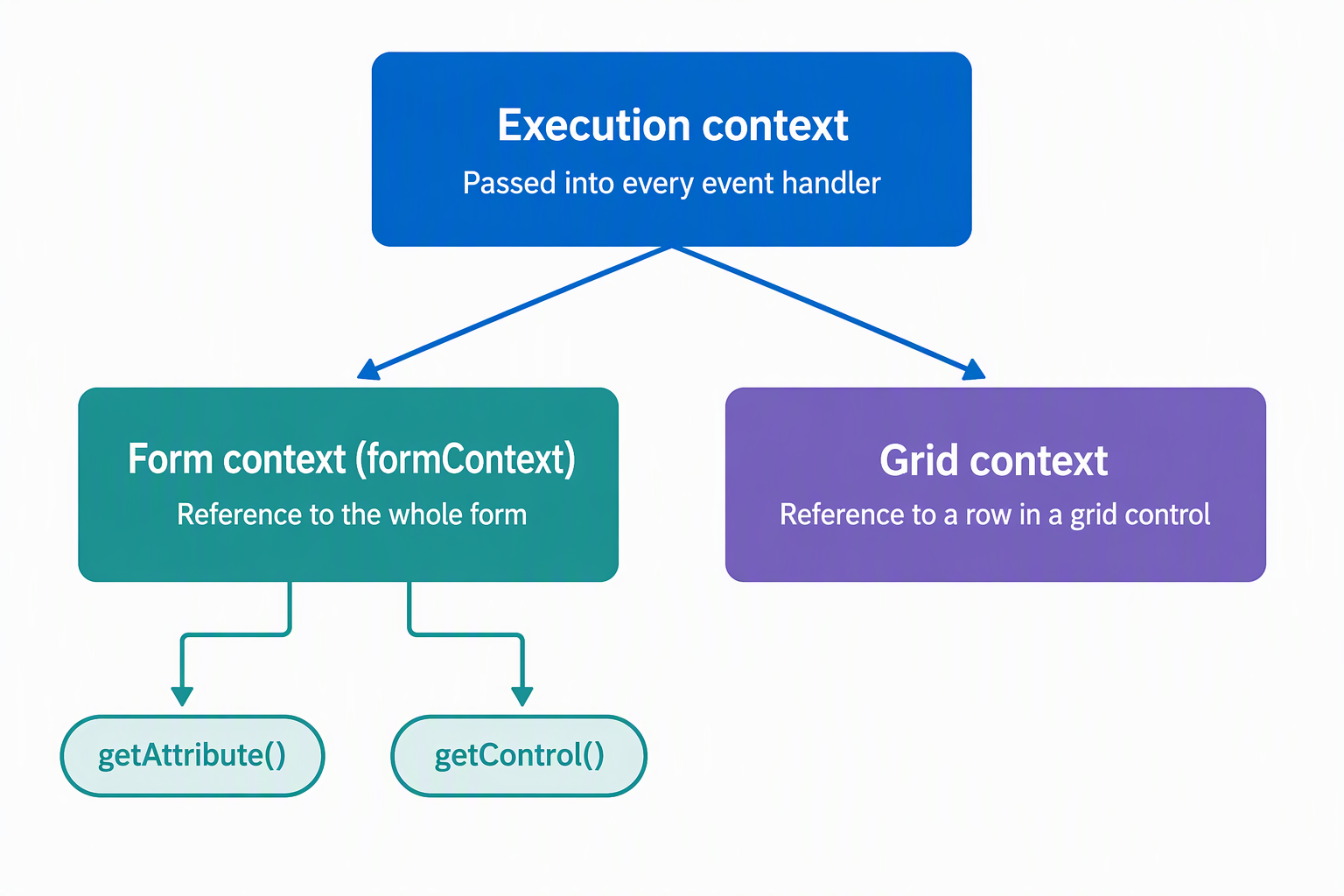
Older samples use a static Xrm.Page object instead of formContext. Xrm.Page still works, but it's deprecated, and it only ever points at the primary form. formContext doesn't have that limitation. Because you retrieve it from the execution context the platform passes in, the same handler works whether an event fires on a full form or a grid row. Write new code against formContext, and favor it over Xrm.Page when you touch older scripts.
The classic Editable Grid control is deprecated, effective March 2026, so the Power Apps grid control is now the recommended grid control for that same inline-editing scenario.
A related object, the grid context, gives you the same kind of reference for a grid or subgrid. Some operations aren't tied to a specific form or grid at all. Navigating to another page or calling the Web API, both covered in later units, are two examples. For these, you reach for the global Xrm object instead.
Here's what that looks like on the Request form. An employee selects a device category, and a handler reads that value through formContext to decide whether to show the control that displays their remaining allowance:
function onCategoryChange(executionContext) {
    var formContext = executionContext.getFormContext();
    var category = formContext.getAttribute("cr_devicecategory").getValue();
    var allowanceControl = formContext.getControl("cr_allowanceremaining");

    allowanceControl.setVisible(category !== null);
}
Notice that the function never references the form directly; it works entirely through the formContext the execution context hands it. That's the pattern to carry into every handler you write: take the execution context as a parameter, call getFormContext() first, and do everything else through the object it returns.
Decide how to register an event handler
Writing the function is only half the job; the function also needs a way to run when the right event occurs. Model-driven apps give you two approaches, and the event you're handling usually decides which one applies.
| Approach | Where you configure it | When it applies |
|---|---|---|
| UI-based registration | The Events tab on a form or column in the modern form designer (Form Properties in the legacy designer) | The event is exposed there: form OnLoad, form OnSave, column OnChange, and similar events |
| Code-based registration | JavaScript, using add/remove methods such as addOnChange/removeOnChange, addOnLoad/removeOnLoad, addOnSave/removeOnSave, or addPreSearch/removePreSearch |
The event isn't exposed through the UI, or you need to attach or detach the handler conditionally at runtime |
The classic form designer is deprecated by default as of October 2023, so the Events tab in the modern designer is the standard path for UI-based registration today.
With UI-based registration, you pick a library and function on the Events tab, and the platform calls that function when the event fires. If your function expects the execution context (and most do, since that's how you reach formContext), select Pass execution context as first parameter in the handler's properties. Skip that option, and your function runs without the parameter it needs.
Code-based registration covers everything the Events tab doesn't expose. The Device lookup's PreSearch event is a good example: it isn't configurable through the UI, so filtering which Device records appear for a selected category has to happen in code, typically registered from the form's OnLoad handler:
function onLoad(executionContext) {
    var formContext = executionContext.getFormContext();
    var deviceControl = formContext.getControl("cr_device");

    deviceControl.addPreSearch(filterDevicesByCategory);
}
The platform passes the execution context automatically to functions registered this way, the same as it does for UI-registered handlers with the parameter option selected.
So which approach applies to a given event? Ask whether the Events tab exposes it at all. If not, code-based registration is your only option. If it's exposed, ask whether you need the handler active only sometimes, such as adding a PreSearch filter only after the employee picks a category. Conditional attachment is something code-based registration handles and UI-based registration doesn't.
A form or column can carry up to 50 event handlers, and the platform runs them in the order they're listed. When handlers need to coordinate (one calculates a value another one depends on), use setSharedVariable and getSharedVariable to pass data between them. Use getDepth to check where a handler sits in that execution order. These tools matter once a form accumulates several handlers on the same event; most forms don't need them from the start.
One caution applies to either approach: a handler that calls into a library you don't trust or haven't reviewed can break form load or behave unpredictably, since scripts can perform any action a user can. Test a handler immediately after you configure it, not just when the form ships.
Guiding question: Think about an event in one of your own forms. Is it exposed on the Events tab, and does your handler need to attach or detach depending on something the user does? Which registration approach fits, and why?
Now that you can target the right object and decide how your code gets triggered, the next unit turns to what that code does once it's running: reading and writing Dataverse records through the Web API, and wiring that logic into commands and buttons with Power Fx and JavaScript.