Create client scripting that targets the Dataverse Web API
Now that you can target the right object and decide how your code gets triggered, this unit covers what that code actually does: reading and writing Dataverse data from a client script, and wiring that logic into the commands and buttons a user selects.
Read and write Dataverse data from a client script
Form scripts, HTML web resources, and ribbon or command JavaScript all reach Dataverse through the same client API surface: Xrm.WebApi. Because this code runs inside a model-driven app, you use the Xrm.WebApi client API methods directly instead of building raw Web API requests the way a standalone single-page app does.
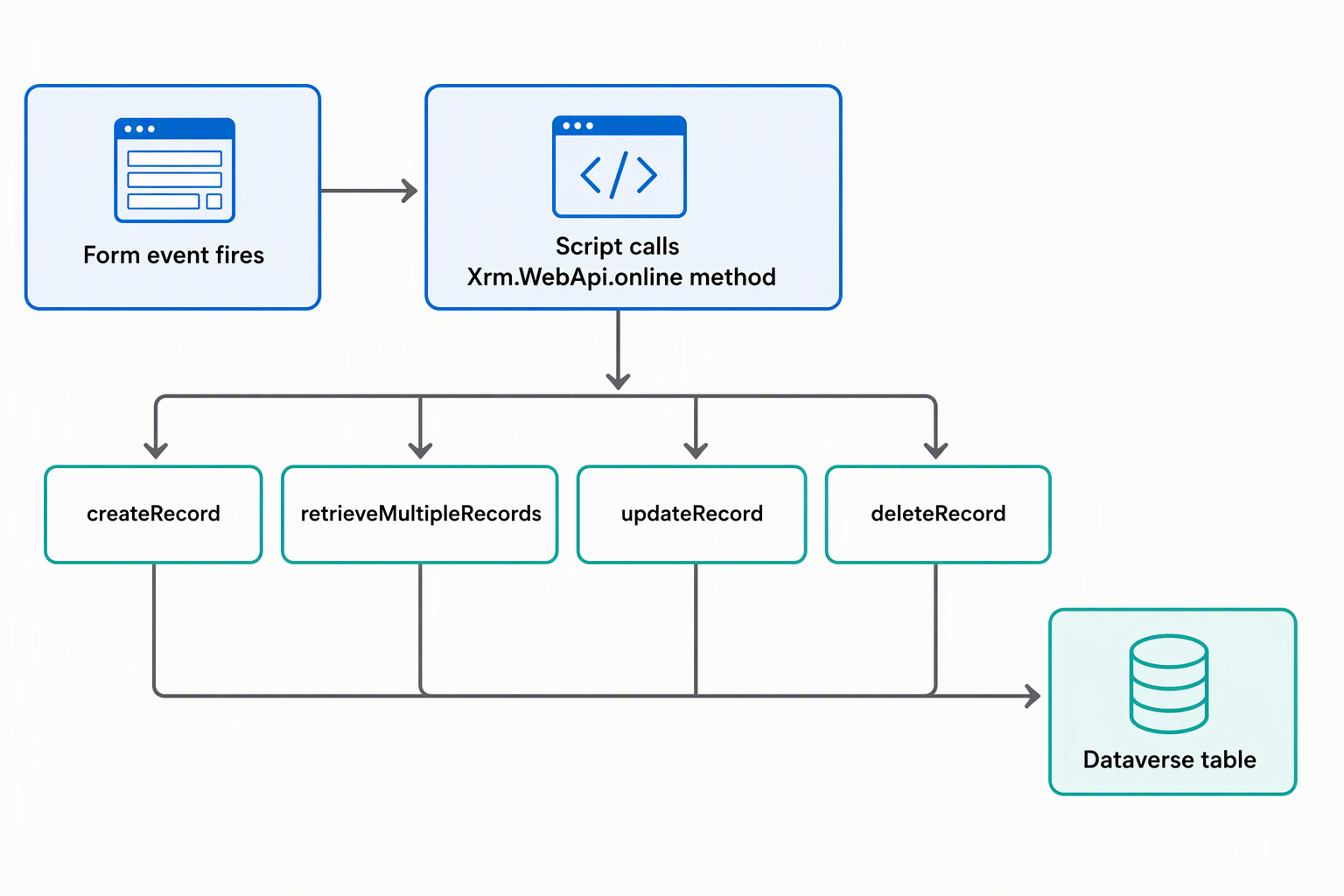
Xrm.WebApi.online exposes the methods you use for most scenarios. At the mental-model level, you're choosing one of a handful of operations based on what you need to do with a record:
| Method | Purpose |
|---|---|
createRecord |
Create a new record |
retrieveRecord |
Retrieve a single record by ID |
retrieveMultipleRecords |
Retrieve a collection of records, narrowed with an OData-style $filter |
updateRecord |
Update an existing record |
deleteRecord |
Delete a record |
execute / executeMultiple |
Invoke an action or function, or run several operations together |
A separate Xrm.WebApi.offline exists for mobile offline scenarios, with a reduced set of methods for working against the device's local data store; most form and command scripts never touch it.
Consider the Request form again. Before an employee submits a request, the form needs to confirm they have enough remaining allowance for the device category they picked. That's a read: query the Allowance table, filter it to the signed-in employee and the selected category, and use whatever comes back to decide what the form does next.
function checkAllowance(executionContext) {
    var formContext = executionContext.getFormContext();
    var category = formContext.getAttribute("cr_devicecategory").getValue();
    var employeeId = formContext.getAttribute("cr_employee").getValue()[0].id;
    var submitControl = formContext.getControl("cr_submitrequest");

    var filter = "?$select=cr_remaining&$filter=_cr_employee_value eq " + employeeId +
        " and cr_category eq " + category;

    Xrm.WebApi.online.retrieveMultipleRecords("cr_allowance", filter).then(
        function success(result) {
            var remaining = result.entities.length > 0 ? result.entities[0].cr_remaining : 0;
            submitControl.setDisabled(remaining <= 0);
        },
        function error(err) {
            console.log(err.message);
        }
    );
}
This builds directly on what you already know about formContext: the Web API call supplies the data, and a familiar method such as setDisabled acts on it. Notice the two functions passed to .then(). Every Xrm.WebApi method is asynchronous and returns a promise.
The form doesn't pause and wait for the response; it keeps running, and your code handles success or failure whenever the response arrives.
Writing data follows the same pattern. When a coordinator approves a request, a script typically needs to update the Request's status and touch a related record, such as marking a Device as assigned. It does this using updateRecord (and createRecord if a separate assignment record needs to exist) inside that same success callback.
Guiding question: Think about a check your own form or command needs to make before letting a user proceed. Does it depend on a single record, or on a filtered set the user doesn't see directly? That distinction is what separates a
retrieveRecordcall from aretrieveMultipleRecordscall.
Choose Power Fx or JavaScript for a command
A command gives a user a way to trigger an action outside of a field or form event. An example is a coordinator selecting an Approve request button from the Request grid or form. Every modern command needs two things: logic for what happens when it's selected, and logic for when it's visible at all. Modern commands give you two ways to define both: Power Fx and JavaScript.
Power Fx is built directly into the command designer's formula bar, the same experience you'd recognize from canvas apps. It works with Dataverse as a data source without any separate setup. Two formula properties matter here: OnSelect, which runs when the user selects the command, and Visible, which determines whether the command shows up at all.
Both can reference the Selected property, which represents whatever the user has selected in the grid or form the command is attached to: Item for a single selected record, AllItems for every selected record, State for whether that record is in edit, new, or view mode, and Unsaved for whether it has pending changes.
For Approve request, visibility logic keeps the button from appearing on a request that's already been handled:
Self.Selected.Item.Status = 'Pending'
And the action itself updates the selected record using Patch:
Patch(Requests, Self.Selected.Item, {Status: 'Approved'})
Power Fx also includes two command-scoped helper functions worth knowing by name: Confirm, for a quick yes/no prompt before an action runs, and Notify, for a lightweight message after it completes. Keep both to small, in-command checks; anything more involved belongs to the JavaScript-based dialogs and notifications API, covered in the next unit.
JavaScript takes a different path. Instead of a formula, you select Run JavaScript as the command's action, point it at a library, and name the function to run. You can optionally pass parameters from the grid or form.
The first time the command designer opens for an app, you choose JavaScript-only or Power Fx; choosing Power Fx also leaves JavaScript available for individual commands. One constraint applies either way: a single command can't currently call more than one library or more than one function, so whatever the function does, it needs to do it all.
This is where the Web API methods from earlier in this unit get wired in. Approve request might need to check device availability through server-side logic before it changes anything. A JavaScript command function reaches Xrm.WebApi.online.execute to invoke that check, update the Request and Device records once it succeeds, and reuse a function you already wrote for a form script.
| Approach | Good for | Limitation to flag |
|---|---|---|
| Power Fx | Simple, data-driven actions; visibility rules tied to Selected; reads like a canvas-app formula |
Best when the command stays in the formula surface, rather than reusing existing JavaScript or direct Xrm.WebApi calls; users also need the command component library shared with them, beyond having an appropriate security role |
| JavaScript | Complex logic, Web API calls, reusing existing form-script functions | One library, one function per command; no equivalent component-sharing requirement applies |
The decision comes down to how much logic the command needs. Power Fx keeps a straightforward, data-driven action readable and close to patterns you already know from canvas apps. Reach for JavaScript, including the Web API calls from earlier in this unit, when the command needs direct Xrm.WebApi calls or server-side action execution. JavaScript is also the right choice when you can reuse a function you've already written for the form.
This unit covered reading and writing Dataverse data from a client script, and using Power Fx or JavaScript to drive what a command does and when it appears. The next unit turns to guiding the user through that experience: navigation, dialogs, and notifications built with the Client API.