Implement navigation, dialogs, and notifications
The previous unit covers how a client script reads and writes Request, Device, and Allowance data, and how a command decides what runs and when it's visible. This unit covers the other half of that experience: how you move the coordinator through related records without losing their place, confirm an action before it runs, and tell the coordinator and the employee what happened.
Open a record without losing context
When the coordinator reviews a request, confirming the employee's device history shouldn't mean leaving the Request form behind. Xrm.Navigation.navigateTo opens a table list, a record, an HTML web resource, a custom page, or a generative page, and it's the method that supports opening a main form as a dialog.
You set navigationOptions.target to 2 and the page opens as a dialog instead of navigating the whole app away from the Request form; target: 1 (or leaving navigationOptions out) opens the page inline instead. Once you specify target: 2, you can also set width, height, and position to size and place the dialog.
Here's the coordinator's device-history check as a dialog, launched from a button on the Request form:
function openEmployeeDeviceHistory(employeeId) {
    var pageInput = {
        pageType: "entityrecord",
        entityName: "cr_employee",
        entityId: employeeId
    };
    var navigationOptions = {
        target: 2,
        width: { value: 60, unit: "%" },
        position: 1
    };

    Xrm.Navigation.navigateTo(pageInput, navigationOptions).then(
        function success() {
            // Dialog closed; the Request form is still right where the coordinator left it
        },
        function error(err) {
            console.log(err.message);
        }
    );
}
The Request form stays open underneath, and the promise navigateTo returns resolves once the coordinator closes the dialog. Xrm.Navigation.openForm looks similar at first glance, since it also opens an entity form or a quick create form, but it doesn't support opening a main form as a dialog.
Reach for openForm for a simple form open without dialog behavior, and reach for navigateTo whenever a main form needs to appear as a dialog. A handful of other Xrm.Navigation methods, openUrl, openWebResource, and openFile, cover simpler needs like opening an external link or a stored file, without the dialog decision.
So how do you choose between a dialog built on navigateTo and the simple dialogs covered next? If the coordinator needs to see or act on another record, such as the employee's device history, without losing the Request form underneath, navigateTo is the right tool. If you need a yes/no answer or a quick acknowledgment, not a whole form, a simple dialog is lighter weight.
Confirm an action before it runs
Before the coordinator's Approve request command calls the Web API update from the previous unit, the coordinator should confirm the action. Xrm.Navigation.openConfirmDialog displays a message with two buttons and returns a promise that resolves with an object telling you which button the coordinator selected. openAlertDialog and openErrorDialog cover the acknowledgment-only case, a single message with one button, for when there's nothing left to decide.
function confirmApproval(executionContext) {
    var confirmStrings = {
        text: "Approve this request and notify the employee?",
        title: "Approve request",
        confirmButtonLabel: "Approve",
        cancelButtonLabel: "Cancel"
    };

    Xrm.Navigation.openConfirmDialog(confirmStrings).then(
        function success(result) {
            if (result.confirmed) {
                approveRequest(executionContext);
            }
        },
        function error(err) {
            console.log(err.message);
        }
    );
}
Notice the pattern mirrors what you already know from Xrm.WebApi: the method returns a promise, and your code decides what happens next based on what that promise resolves with. Here, the resolved confirmed flag gates whether approveRequest (the Web API call from the previous unit) runs at all.
Give feedback at the right scope
Once the approval logic finishes, the coordinator needs to know what happened, but how you deliver that message depends on where the coordinator is by the time the result arrives. Three mechanisms cover this, and the distinction between them comes down to scope and lifespan: does the message belong to one field, one form, or does it need to reach the coordinator even after they've moved to a different record?
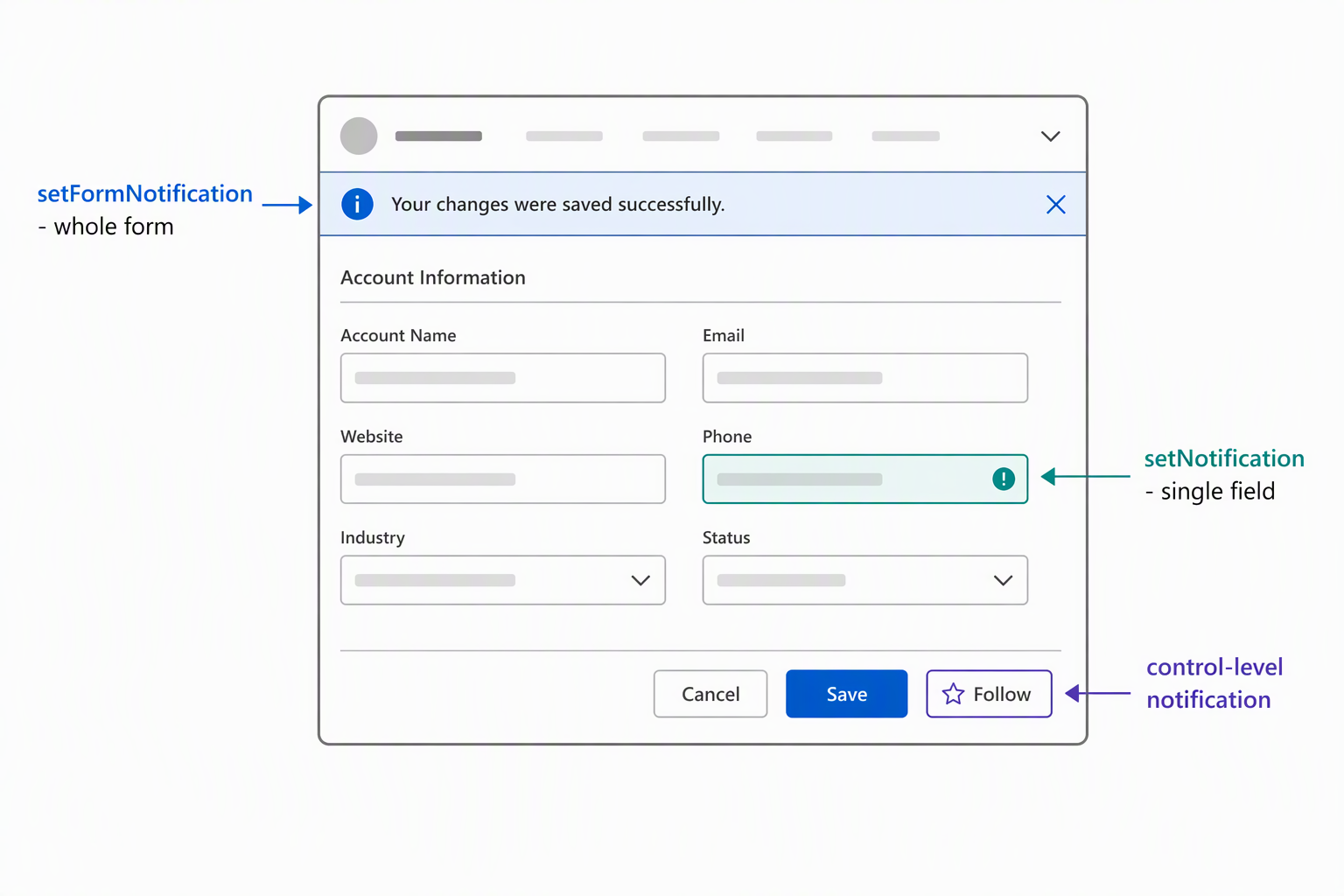
formContext.ui.setFormNotification displays a banner scoped to the form currently open, with a level of ERROR, WARNING, or INFO, and a uniqueId you use later with clearFormNotification to remove it. This fits the approval result while the coordinator is still looking at that same Request:
formContext.ui.setFormNotification(
    "Request approved and the employee is notified.",
    "INFO",
    "approvalStatus"
);
Xrm.App.addGlobalNotification displays an app-wide message that isn't tied to the current form at all. It supports a numeric level (1 success, 2 error, 3 warning, 4 information), an optional action with a label and a handler, and an optional close button.
This is the mechanism for the asynchronous device-availability check. The coordinator kicks it off, then moves on to the next request in the list before the result comes back. The message has to find them wherever they end up:
Xrm.App.addGlobalNotification({
    type: 2,
    level: 3,
    message: "Device availability check still pending for a recent approval.",
    showCloseButton: true
}).then(
    function success(notificationId) {
        // Store notificationId if you need to clear it later with clearGlobalNotification
    },
    function error(err) {
        console.log(err.message);
    }
);
A third option, a control's setNotification method, only matters at the field level. It flags a specific control as invalid, blocking the save until the issue clears. That's what nudges an employee who picks an invalid device-and-category combination on their own Request form before they can save.
| Mechanism | Scope | Typical use | Cleared with |
|---|---|---|---|
formContext.ui.setFormNotification |
Current form | Result tied to the record the user is looking at right now | clearFormNotification(uniqueId) |
Xrm.App.addGlobalNotification |
Entire app | A message that must reach the user even after they navigate elsewhere | Xrm.App.clearGlobalNotification(uniqueId), or the user's close button |
Control setNotification |
A single field | Blocking an invalid entry before save | Clearing the condition, or control.clearNotification() |
The decision rule: start with scope, field, form, or app, then check lifespan. A field-level problem that blocks saving calls for setNotification. A result the coordinator only needs while still on this Request calls for setFormNotification. A result that has to survive the coordinator navigating away, like that pending availability check, calls for addGlobalNotification.
Try it yourself: Think of a feedback moment in one of your own forms or commands. Is it tied to a single field, to the form currently open, or does it need to reach the user no matter where they navigate next? Match that need to the mechanism in the table, and check whether the scope you picked also matches how long the message needs to stay visible.
Navigation, dialogs, and notifications complete the request-to-approval workflow this module builds. That workflow runs from reading and writing data with the Client API, through Web API calls and commands, to guiding the coordinator and employee through what that data means.
The same decision criteria apply to any model-driven app form or command you build next, not just this scenario. Which object to target, how to register the handler, when to call the Web API, and how to navigate, confirm, and notify: these choices carry forward.