Prepare for Microsoft Copilot using Zero Trust security
Zero Trust is a security strategy. It isn't a product or a service, but an approach in designing and implementing the following set of security principles.
| Principle | Description | Met by |
|---|---|---|
| Verify explicitly | Always authenticate and authorize based on all available data points. | Enforce the validation of user credentials, device requirements, and app permissions and behaviors. |
| Use least privilege access | Limit user access with Just-In-Time (JIT) and Just-Enough-Access (JEA) policies, risk-based adaptive policies, and data protection. | Validate JEA across your organization to eliminate oversharing by ensuring that correct permissions are assigned to files, folders, Teams, and email. Use sensitivity labels and data loss prevention policies to protect data. |
| Assume breach | Minimize blast radius and segment access. Verify end-to-end encryption and use analytics to get visibility, drive threat detection, and improve defenses. | Use Exchange Online Protection (EOP) and Microsoft Defender XDR services to automatically prevent common attacks and to detect and respond to security incidents. |
These principles are the core of Zero Trust. Instead of believing everything behind the corporate firewall is safe, the Zero Trust model assumes breach and verifies each request as though it originated from an uncontrolled network. Regardless of where the request originates or what resource it accesses, the Zero Trust model teaches us to "never trust, always verify."
Zero Trust is designed to adapt to the complexities of the modern environment that embraces the mobile workforce. In doing so, it protects user accounts, devices, applications, and data wherever they're located. A Zero Trust approach should extend throughout the entire digital estate and serve as an integrated security philosophy and end-to-end strategy.
Different organizational requirements, existing technology implementations, and security stages all affect how a Zero Trust security model implementation is planned and executed. By using its experience in both helping customers to secure their organizations and in implementing its own Zero Trust model, Microsoft developed guidance to assess your readiness. This guidance can help you build a plan to get to Zero Trust.
With Zero Trust, you move away from a trust-by-default perspective to a trust-by-exception one. An integrated capability to automatically manage those exceptions and alerts is important. It enables you to more easily find and detect threats, respond to them, and prevent or block undesired events across your organization.
Use Zero Trust to prepare for AI companions, including Microsoft Copilot
Security, especially data protection, is a top concern when introducing AI tools into an organization. Microsoft anchors its security recommendations for AI to the Zero Trust model. Organizations that implement Microsoft's recommended protections as they introduce AI tools and companions are building a foundation of Zero Trust security.
Implementing the Zero Trust "never trust, always verify" mindset requires changes to cloud infrastructure, deployment strategy, and implementation.
Layer in protections for AI companions
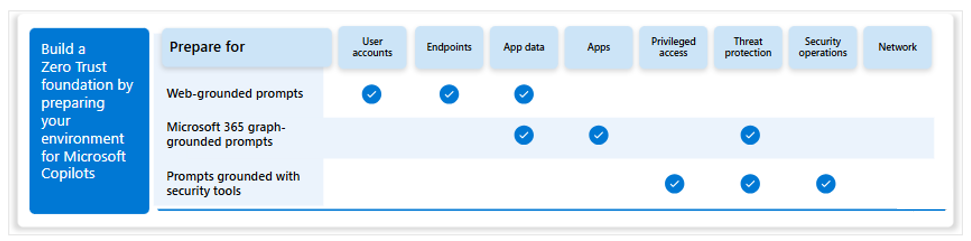
Microsoft helps organizations prepare for AI tools and companions, while at the same time build a Zero Trust foundation. Organizations should take a staged approach starting with protections for web-grounded prompts and maturing to protections for Microsoft 365 graph-grounded prompts. Protections for prompts grounded with data provided by your Microsoft 365 security tools and Microsoft Security Copilot focus on tuning up least privilege practices and honing threat protection.
Note
While the following diagram includes mention of Microsoft Security Copilot, that tool is outside the scope of this training.
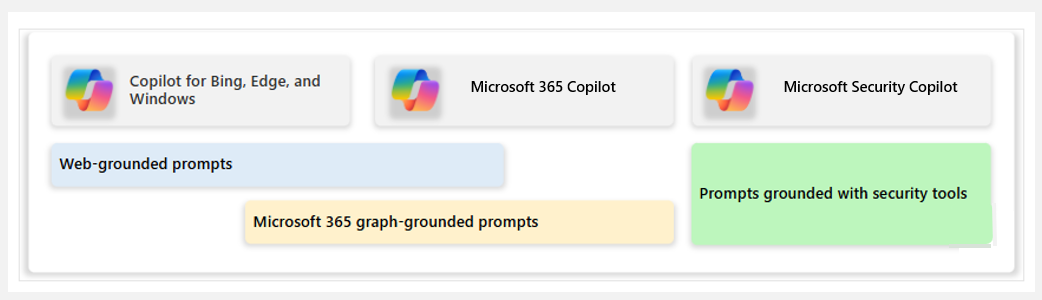
In the illustration:
- Copilot for Bing, Edge, and Windows issue web-grounded prompts. Microsoft 365 Copilot can also be configured to allow web-grounded prompts.
- Microsoft 365 Copilot issues Microsoft 365-grounded prompts. If integration with Copilot for Bing, Edge, and Windows is configured, these copilot experiences can include graph-grounded data (for example, when the Web/Work toggle is set to Work).
- Microsoft Security Copilot issues prompts that are grounded with your security tools.
You can build a Zero Trust foundation by preparing your environment for AI tools and companions, including copilots from Microsoft.