Handle complex data scenarios
Five patterns address complex data scenarios: the single collection pattern consolidates related entity types, the subset pattern bounds embedded arrays, the bucket pattern groups time-series data, the outlier pattern handles statistical exceptions, and the archive pattern manages data lifecycle.
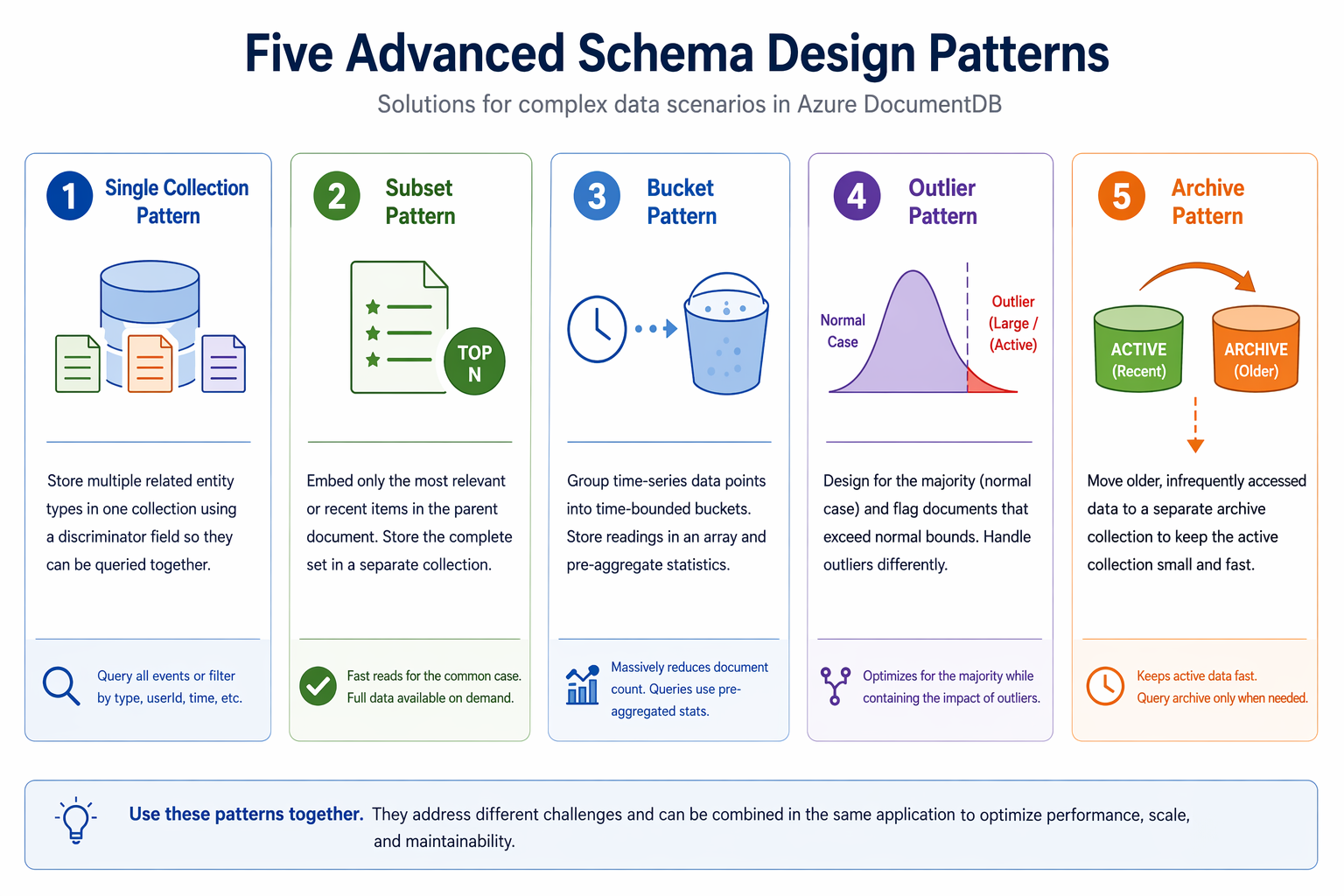
Apply the single collection pattern
When related entity types share access patterns, storing them in separate collections forces complex cross-collection queries. The single collection pattern stores multiple types in one collection with a discriminator field, similar to the inheritance pattern, but aimed at entities that are queried together chronologically or transactionally.
Let's consider an events collection. An e-commerce platform needs a unified activity timeline for user logins, order events, and payment events, all sorted by timestamp. With separate collections, you'd need to query three collections and merge the results in application code. With a single collection, one query returns the complete timeline for a particular user:
// All events in a single collection with type discriminator
db.events.insertMany([
  {
    type: "user.login",
    userId: "user123",
    timestamp: ISODate("2026-04-15T10:00:00Z"),
    data: { ipAddress: "192.168.1.100" }
  },
  {
    type: "order.created",
    userId: "user123",
    orderId: "order456",
    timestamp: ISODate("2026-04-15T10:05:00Z"),
    data: { total: 299.99, status: "pending" }
  },
  {
    type: "payment.processed",
    userId: "user123",
    orderId: "order456",
    timestamp: ISODate("2026-04-15T10:06:00Z"),
    data: { amount: 299.99, method: "credit_card" }
  }
]);

// Complete user timeline in one query
db.events.find({ userId: "user123" }).sort({ timestamp: -1 });

// Query specific event types
db.events.find({
  type: { $regex: /^order\./ },
  userId: "user123"
}).sort({ timestamp: -1 });
Create compound indexes that include the discriminator field:
db.events.createIndex({ userId: 1, timestamp: -1 });
db.events.createIndex({ type: 1, timestamp: -1 });
When to use it: Related entity types share query patterns (for example, event logs, audit trails, multitenant data). The types are queried together more often than independently.
Trade-offs: The collection grows larger because all types share it. Indexes span all document types, even if only one type needs them.
Azure DocumentDB supports up to 1,000 collections per cluster, so consolidating related types into fewer collections keeps you well within this limit. Because all document types share one collection, be intentional about which fields you index so that each query path is covered without creating unnecessary overhead.
Apply the subset pattern
When an embedded array grows without bounds, documents become bloated and slow to read. The subset pattern embeds only the top N items (most recent, most helpful) in the parent document and stores the complete set in a separate collection. This approach optimizes the most common read path while preserving access to the full data.
A product with thousands of reviews doesn't need all of them loaded on every page view. The product page shows the top three most helpful reviews with a "Show all reviews" option:
// Product with subset of top reviews (outlier product with 110 reviews)
db.products.insertOne({
  name: "Mountain-100 Silver, 44",
  price: 3399.99,
  isOutlier: true,

  // Only the top 3 reviews embedded
  reviewSummary: {
    averageRating: 3.9,
    totalCount: 110,
    ratingDistribution: { 1: 6, 2: 9, 3: 14, 4: 44, 5: 37 },
    topReviews: [
      { customerName: "Nikhil Barot", rating: 5, title: "Mountain-100 Silver 44 fit during packed dirt" },
      { customerName: "Dusan Sykora", rating: 5, title: "Mountain-100 Silver 44 drivetrain on rolling pavement" },
      { customerName: "Gitte Olsen", rating: 5, title: "Mountain-100 Silver 44 fit during mixed route" }
    ]
  },
  reviewsLocation: "reviews"
});

// Complete reviews stored in a separate collection
db.reviews.insertOne({
  productId: ObjectId("ccc100030000000000000000"),
  customerName: "Moina Potongia",
  rating: 5,
  title: "Mountain-100 Silver 44 rack mounts on 72 kilometer ride",
  helpful: 237,
  createdAt: ISODate("2026-04-10T20:34:00Z")
});
When a new review is added, update the subset if it qualifies as a top review:
db.products.updateOne(
  { _id: ObjectId("ccc100030000000000000000") },
  {
    $inc: { "reviewSummary.totalCount": 1 }
  }
);
When to use it: Arrays would grow to hundreds or thousands of items, but the application typically accesses only a small, recent, or "top" subset. Product reviews, customer recent orders, and post comments are common examples.
Trade-offs: You manage data in two locations (embedded subset and separate collection). The subset must be kept in sync when items are added or when sort criteria change.
Azure DocumentDB supports $push with the $each, $sort, and $slice modifiers, so you can maintain bounded arrays in a single atomic operation: push a new item, sort by helpfulness or date, and slice to keep only the top N entries. Avoid unbounded arrays entirely, because large arrays degrade query performance and documents risk hitting the 16-MB size limit.
Apply the bucket pattern
Time-series data generates large volumes of small documents. An IoT (Internet of Things) sensor that sends readings every 10 seconds creates 8,640 documents per day. With 100 sensors, that's 864,000 documents per day and over 315 million per year.
The bucket pattern groups multiple data points into a single document based on a time interval. Instead of one document per reading, you store one bucket document per sensor per hour. Each bucket contains all readings for that interval and preaggregated statistics:
// One document per sensor per hour
db.sensorBuckets.insertOne({
  sensorId: "SENSOR-7834",
  bucketDate: ISODate("2026-04-15T10:00:00Z"),
  bucketEndDate: ISODate("2026-04-15T11:00:00Z"),

  measurements: [
    { ts: ISODate("2026-04-15T10:00:00Z"), temp: 22.5, humidity: 45.2 },
    { ts: ISODate("2026-04-15T10:00:10Z"), temp: 22.6, humidity: 45.1 },
    { ts: ISODate("2026-04-15T10:00:20Z"), temp: 22.7, humidity: 45.0 }
    // ... up to 360 readings per hour
  ],

  stats: {
    count: 360,
    tempMin: 21.8, tempMax: 23.1, tempAvg: 22.6,
    humidityMin: 44.5, humidityMax: 46.2, humidityAvg: 45.3
  }
});
This approach reduces the document count from 315 million per year to 876,000, a 99.7% reduction. Queries against preaggregated statistics are fast because they don't require unwinding individual readings:
// Daily temperature statistics from hourly buckets
db.sensorBuckets.aggregate([
  {
    $match: {
      sensorId: "SENSOR-7834",
      bucketDate: {
        $gte: ISODate("2026-04-15T00:00:00Z"),
        $lt: ISODate("2026-04-16T00:00:00Z")
      }
    }
  },
  {
    $group: {
      _id: null,
      avgTemp: { $avg: "$stats.tempAvg" },
      minTemp: { $min: "$stats.tempMin" },
      maxTemp: { $max: "$stats.tempMax" },
      totalReadings: { $sum: "$stats.count" }
    }
  }
]);
When to use it: You collect high-frequency, time-ordered data such as IoT sensor readings, application metrics, website analytics, or financial tick data. The query patterns focus on time ranges and aggregated statistics.
Trade-offs: Adding data requires update logic to find or create the right bucket. Individual data point updates are more complex than with flat documents. Choose your bucket interval (minute, hour, day) based on data volume and query patterns.
Azure DocumentDB supports the $bucket and $bucketAuto aggregation stages for grouping time-series data into intervals at query time. Monitor bucket document sizes against the 16-MB limit. For high-volume sensors, keep bucket windows small (hourly instead of daily) to stay well under that ceiling.
Apply the outlier pattern
Most data follows a normal distribution, but a few outlier documents break the mold. In an e-commerce catalog, 95% of products have fewer than 100 reviews, but a handful of popular products have 10,000 or more. If you design your schema for the outliers, you over-engineer the common case. If you design for the common case, the outliers break your model.
The outlier pattern designs the schema for the typical case and flags documents that exceed normal bounds with a marker field. Application code handles the two cases differently:
// Normal product (95% of products), reviews embedded in summary
db.products.insertOne({
  name: "Road Tire Tube",
  sku: "TT-R100",
  price: 3.99,
  productType: "component",
  isOutlier: false,
  reviewSummary: {
    totalCount: 8,
    averageRating: 4.1
  }
});

// Outlier product (5% of products), reviews overflow to separate collection
db.products.insertOne({
  name: "Mountain-100 Silver, 44",
  sku: "BK-M100S-44",
  price: 3399.99,
  productType: "bike",
  isOutlier: true,
  reviewSummary: {
    totalCount: 110,
    averageRating: 3.9,
    ratingDistribution: { 1: 6, 2: 9, 3: 14, 4: 44, 5: 37 },
    topReviews: [
      { customerName: "Nikhil Barot", rating: 5, title: "Mountain-100 Silver 44 fit during packed dirt" },
      { customerName: "Dusan Sykora", rating: 5, title: "Mountain-100 Silver 44 drivetrain on rolling pavement" },
      { customerName: "Gitte Olsen", rating: 5, title: "Mountain-100 Silver 44 fit during mixed route" }
    ]
  },
  reviewsLocation: "reviews"
});
Application code checks the isOutlier flag and routes to the appropriate data source:
async function getProductReviews(productId, page, limit) {
  const product = await db.products.findOne({ _id: productId });

  if (product.isOutlier) {
    // Fetch from separate reviews collection with pagination
    return db.reviews.find({ productId })
      .sort({ helpful: -1 })
      .skip((page - 1) * limit)
      .limit(limit)
      .toArray();
  } else {
    // Use embedded reviewSummary
    return product.reviewSummary;
  }
}
When to use it: Your data has a small percentage of documents that are significantly larger, more active, or more complex than the rest. The pattern optimizes for the majority while containing the impact of outliers.
Trade-offs: Application code needs separate paths for normal and outlier documents. You need logic to detect when a document transitions from normal to outlier status (for example, when a review count exceeds a threshold).
In sharded clusters, outlier documents with disproportionately large embedded data can skew storage distribution across shards. Keep logical shard storage under 4 TB for optimal performance. Use the isOutlier flag to route application logic to the appropriate data source, and retrieve overflow data with $lookup only for flagged documents.
Apply the archive pattern
Active collections accumulate historical data over time. Orders from years ago slow down queries and increase index sizes, even though they're rarely accessed. The archive pattern moves older data to a separate archive collection, keeping the active collection small and fast.
// Active orders (last 90 days), fast queries and small indexes
db.orders.find({
  status: "processing"
}).sort({ orderDate: -1 });

// Archive process: move old completed orders
async function archiveOldOrders() {
  const ninetyDaysAgo = new Date();
  ninetyDaysAgo.setDate(ninetyDaysAgo.getDate() - 90);

  const ordersToArchive = await db.orders.find({
    orderDate: { $lt: ninetyDaysAgo },
    status: { $in: ["delivered", "cancelled", "refunded"] }
  }).toArray();

  if (ordersToArchive.length === 0) return;

  // Add archive metadata and insert into archive
  const archived = ordersToArchive.map(o => ({
    ...o, archivedAt: new Date(), archiveReason: "age_based"
  }));

  await db.ordersArchive.insertMany(archived);
  await db.orders.deleteMany({
    _id: { $in: ordersToArchive.map(o => o._id) }
  });
}
To query across both collections, check the active collection first (most likely to have results) and fall back to the archive:
async function getOrder(orderId) {
  let order = await db.orders.findOne({ _id: orderId });
  if (!order) {
    order = await db.ordersArchive.findOne({ _id: orderId });
  }
  return order;
}
When to use it: Your collection accumulates data that becomes infrequently accessed over time. Order history, logs, audit trails, and completed workflows are common candidates.
Trade-offs: Queries that span both active and archive collections are more complex. You need a scheduled process to run the archival. Retrieval from the archive may be slower than from the active collection.
Once you move completed orders to the archive collection, the active collection stays small and queries against it remain fast. Azure DocumentDB supports the $merge aggregation stage for moving documents between collections, and batch delete operations after archival are limited to 25,000 operations per batch.
These five patterns give you strategies for the data challenges that appear as applications scale. The single collection and subset patterns control document and collection growth, the bucket pattern tames high-volume time-series data, the outlier pattern isolates statistical exceptions, and the archive pattern manages data lifecycle. Combined with the patterns from the previous units, you now have a comprehensive toolkit for designing schemas that balance read performance, write efficiency, and long-term maintainability in Azure DocumentDB.