Control access to Microsoft Foundry with Microsoft Entra ID
As organizations expand their use of AI, different teams often share the same Microsoft Foundry environment. Developers build and deploy models, data scientists manage datasets, and operations teams configure guardrails and integrations. Without clear access boundaries, a single overly broad role might expose data, change configurations, or disrupt production workloads.
Microsoft Entra ID provides the foundation for identity and access across Microsoft Foundry. It lets you assign permissions through role-based access control (RBAC) and enforce least-privilege principles so people only have access to what they need. Foundry adds a second access layer inside each project with its own user roles, giving you finer control over who can work in specific AI environments.
Together, these layers form a structured access model that protects both the Azure infrastructure and the AI resource that runs on top of it.
Apply RBAC and least privilege in Microsoft Entra ID
Access to Microsoft Foundry begins at the Azure resource layer. Each Foundry resource is an Azure resource that inherits permissions from Microsoft Entra ID through role-based access control (RBAC). These assignments define who can create, configure, or delete Foundry resources and manage the Azure services that support them, like Storage, Key Vault, and managed networks.
RBAC permissions can be assigned at different scopes, including subscription, resource group, or resource level. The best practice is to assign roles at the Foundry resource level whenever possible. Assigning at higher scopes, like subscription or resource group, automatically includes other resources that might not need the same level of access. Keeping assignments focused reduces the risk of misconfiguration or misuse.
Assign roles carefully and at the smallest scope that meets operational needs:
- Owner: full control of the Foundry resource, including user access and role assignments
- Contributor: can create and manage workspaces, connect resources, and deploy models, but can't grant access
- Reader: can view project details, dashboards, and configurations without making changes
- Custom roles: helpful when specific operations, like linking managed identities or enabling diagnostic settings, need to be delegated without broader permissions
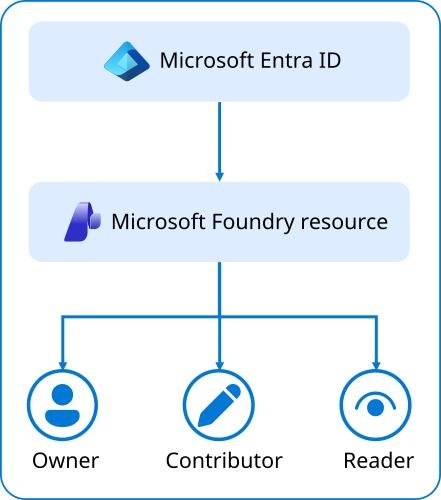
The diagram shows how Microsoft Entra ID assigns RBAC roles to an Microsoft Foundry resource, which defines Owner, Contributor, and Reader roles for project access.
Because Microsoft Foundry is a multi-resource environment, users might also need access to related components. For example, someone deploying a model might need Contributor rights for both the Foundry resource and the resource group that hosts associated compute and storage resources. Keep these assignments aligned and minimal to maintain least privilege.
For automation, use managed identities or service principals for pipelines and deployment processes instead of personal accounts. This keeps operations auditable and avoids permissions remaining after personnel changes.
To reduce standing administrative access:
- Use Privileged Identity Management (PIM) for temporary elevation during resource setup or configuration
- Apply Conditional Access policies to require multifactor authentication and compliant devices for privileged users
- Schedule access reviews to confirm permissions remain accurate as teams or projects evolve
These practices strengthen the Azure layer that hosts Microsoft Foundry and create a solid foundation for managing access inside the Foundry portal itself.
For step-by-step guidance on assigning roles, see Assign Azure roles using the Azure portal.
By defining clear roles and scopes in Microsoft Entra ID, you help ensure that only authorized users can manage or modify your Microsoft Foundry environment. Once this foundation is in place, you can focus on managing access within Foundry itself to control who can work inside each project.