Isolate networks with managed virtual network and Private Link
AI workloads in Azure often rely on multiple connected services like storage accounts, compute clusters, data sources, and model endpoints. Without clear network boundaries, these services might unintentionally expose data to the public internet. Network isolation helps keep communication between components private, consistent, and auditable.
Microsoft Foundry supports network isolation through managed virtual networks and Private Link. Together, these features protect data and model traffic while maintaining connectivity to the Azure services your workloads depend on.
Microsoft Foundry runs in a Microsoft-managed network. You don't need to build a custom network to use the service, but you can still control who can access the Foundry resource and how it connects to other resources. Most organizations focus first on isolating dependent services like Azure Key Vault and Azure Storage, where model data and secrets are stored and accessed.
Secure AI workloads through network isolation
When AI workloads handle sensitive data or run in production environments, network configuration becomes a critical part of security. Public endpoints or open subnets can create paths that attackers might exploit, even when authentication and encryption are already in place.
Using managed virtual networks and Private Link provides several security and operational benefits:
- Private traffic paths that keep data off the public internet
- Granular access control using network security groups and route tables
- Consistent integration with Azure services like Key Vault and Storage through private endpoints
- Simplified compliance by keeping data within approved network boundaries
These controls follow zero-trust principles by verifying every connection and limiting exposure. In short, managed virtual networks define who can reach your service, and Private Link defines how data travels securely between resources.
Configure managed virtual networks
You can configure Networking settings in your Foundry resource to specify which virtual networks can call the Foundry service. The Foundry resource itself stays in a Microsoft-managed virtual network that can't be joined to your own. These settings define who can reach the Foundry resource and which networks are allowed to connect to it.
Isolation for data paths happens at the resource level. For example, your Storage and Key Vault resources should use private endpoints to keep traffic on Azure's private backbone instead of the public internet.
When you secure access with virtual network rules and private endpoints:
- Traffic between Foundry and protected resources uses Azure Private Link once a private endpoint and Domain Name System (DNS) are configured.
- Network rules and security groups on your virtual networks restrict access to approved services.
- Data movement to or from your workloads should use Private Link or ExpressRoute instead of public endpoints. Service endpoints also keep traffic on the Azure backbone but still rely on a public endpoint on the target service. Private Link assigns a private IP within your virtual network and is the preferred option for sensitive workloads.
Managed virtual networks and private endpoints reduce exposure without requiring custom networking inside the Foundry service. For hub-based projects, you can enable a managed network to isolate compute in a Microsoft-managed virtual network and connect to dependent resources, such as Storage or Key Vault, through private endpoints. Use Private Link to secure inbound access to the Foundry project itself.
Tip
Always configure DNS for your private endpoints so the Foundry service resolves the private IPs correctly.
For configuration guidance, see Configure Foundry Tools services virtual networks.
Configure secure connections with Private Link
Azure Private Link lets Foundry connect to other Azure services privately by mapping them to private endpoints within your virtual network. This replaces public endpoints with internal addresses that are only reachable from within your environment.
You can use Private Link to connect Microsoft Foundry securely to services like:
- Azure Storage for datasets and training outputs
- Azure Key Vault for credentials and encryption keys
- Azure Machine Learning or Azure OpenAI Service for model hosting
- Custom APIs hosted in App Service or Azure Kubernetes Service (AKS)
Private Link reduces the risk of data exposure by keeping service traffic on Azure's private backbone. It also integrates with Microsoft Defender for Cloud, which recommends when private endpoints are missing or misconfigured.
The diagram shows how Microsoft Foundry connects privately through Private Link to services like Azure Storage and Azure Key Vault within an enterprise virtual network.
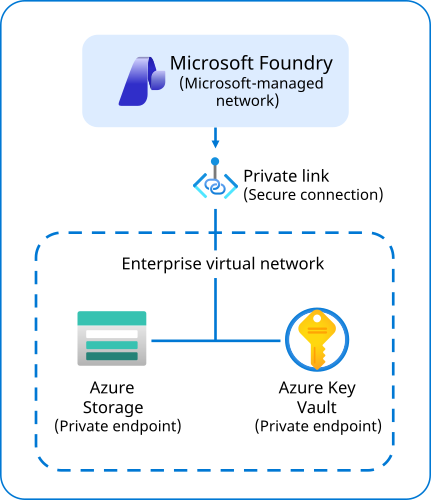
To create a private endpoint for a connected service:
In the Azure portal, open the Azure resource that Foundry connects to, like a Storage account or Key Vault.
Go to Networking > Private endpoint connections, then select + Private endpoint.
Enter the target resource details, subscription, resource group, and the virtual network and subnet that Foundry uses.
Approve the connection request if the target resource requires it.
Once the private endpoint is created, Foundry communicates with that service privately through your virtual network instead of over the internet.
For detailed steps, see Create a private endpoint using the Azure portal.
Combine managed virtual networks and Private Link
Managed virtual networks and Private Link work best when used together. The managed virtual network controls who can access the service, and Private Link controls how dependent services are reached. Used together, they limit lateral movement and ensure that only approved components exchange data.
A secure configuration might include:
- A managed virtual network for each Foundry project to contain data and compute resources
- Private endpoints to Azure Storage, Key Vault, and selected external APIs
- Security groups that restrict outbound traffic to approved Azure service tags
- Diagnostic settings enabled on private endpoints and connected resources for auditing and visibility
These layers create a contained and observable network environment that supports both operational and compliance requirements.
With managed virtual networks and Private Link in place, your AI workloads operate within controlled boundaries where communication stays private and traceable.