Protection method boundaries
Availability, replication, backup, and disaster recovery solve related but different problems. A complete design often needs more than one, with a supported coexistence configuration.
Understand the protection boundaries
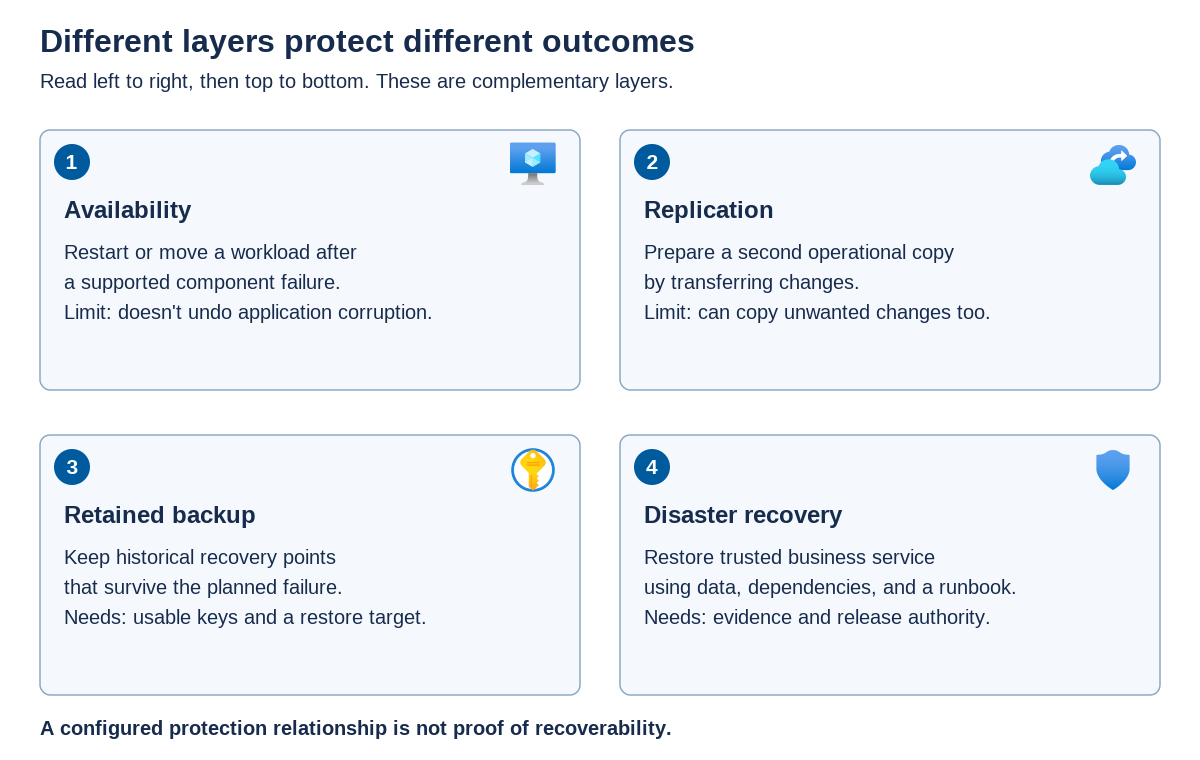
High availability keeps a workload running, or restarts it, after a supported component failure. Azure Local can restart a highly available VM on a surviving node when sufficient compute and storage resources remain. Storage redundancy can tolerate specified drive or node failures. Neither creates an independently retained history of application data.
Replication transfers changes to another location so that a second copy can become operational. Asynchronous replication acknowledges source writes before all changes have reached the destination. That reduces the impact of network latency on the source, but it introduces potential data loss during an unplanned failover.
Backup retains recoverable states according to a policy. Its value depends on whether those states are complete, usable, accessible, and old enough to predate corruption. A backup on the same failed storage system isn't available just because the backup job completed earlier.
Disaster recovery combines recoverable data with replacement infrastructure, application dependencies, access, procedures, and authority to resume service.
The diagram presents these as complementary layers, not as interchangeable products. Read the numbered cards from left to right, then top to bottom.
A VM checkpoint captures a short-lived rollback state and can depend on the VM's existing storage chain. It isn't an independent, long-term backup. Checkpoints also introduce storage and operational constraints. Don't retain a checkpoint indefinitely as a substitute for a backup policy.
Data consistency
Data consistency describes the relationship between the files, disks, and transactions in a recovery point. It determines what the application must do before the restored copy can be trusted.
The following consistency levels help you ask the right questions about a protection product.
| Consistency level | What the recovery point represents | What still needs validation |
|---|---|---|
| Crash-consistent | Disk state comparable to an unexpected loss of power, without preserved running memory | Whether the application can replay logs, roll back incomplete work, and recover all required disks |
| File-consistent | A consistent file-system snapshot within the product's documented scope | Whether application transactions that span files or services are also consistent |
| Application-consistent | A recovery point created with supported application coordination, such as flushing buffers and coordinating writes | Whether all participating components and required transaction history are covered |
On Windows, Volume Shadow Copy Service (VSS) coordinates snapshot creation. A VSS writer represents an application or system component. When supported integration and online-backup requirements are satisfied, Hyper-V can coordinate with VSS-aware processes inside a VM.
That coordination doesn't automatically provide every workload-specific operation. A whole-VM backup mightn't offer individual database recovery or the transaction-log backup and truncation behavior that an application owner requires. A log backup preserves transaction history for recovery. Log truncation makes eligible log space reusable according to the database's rules. They aren't interchangeable operations.
For applications spread across several VMs, individually consistent snapshots might've been taken at different transaction boundaries. Use a supported coordinated method or an application-native recovery process, then reconcile cross-service state. Don't assume that backing up every VM makes the application set consistent.
Protection routes
Select a route by the recovery outcome, then confirm the exact implementation in the product's support matrix. The following comparison identifies the primary purpose and evidence required for each route.
| Method | Appropriate recovery outcome | Evidence required before adoption |
|---|---|---|
| Microsoft Azure Backup Server (MABS) | Recover a whole VM, supported guest application data, or supported individual items, with optional Azure retention | Supported server and agent versions, recovery scope, consistency, destination, and encryption material |
| Partner backup product | Recover machines, applications, or Kubernetes workloads within the vendor's supported scope | Azure Local build, security type, storage support, retention controls, and supported restore destinations |
| Hyper-V Replica | Recover a supported VM on another Hyper-V host or cluster | Replica health, included disks, authentication, target capacity, recovery history, and application consistency |
| Azure Site Recovery (ASR) | Recover supported Hyper-V workloads as Azure VMs | Guest and disk compatibility, security type, Azure connectivity, network design, quotas, and failback prerequisites |
| Workload-native protection | Restore application-specific state, such as a database to a selected transaction point | Complete backup and log chains, supported recovery order, application configuration, credentials, and dependent services |
For example, the order database might need workload-native backups to meet a fine-grained transaction recovery requirement, while a supported VM backup protects its operating system and configuration. Define ownership and compatibility for both. Don't assume that installing multiple protection agents together is supported.
Scope of recovery
The protection product and the scope of recovery are separate choices. A supported product might offer file recovery, application recovery, whole-VM restoration, or several of these. Choose the smallest supported scope that restores a consistent business outcome, not simply the smallest object that can be copied.
The following incident-to-action comparison helps you avoid unnecessary rollback.
| Incident | Candidate recovery action | Boundary to confirm |
|---|---|---|
| A user deletes an ordinary document | Restore the file or folder to an alternate location, validate it, and return it through an approved process | Permissions, ownership, file version, and any changes made since the deletion |
| An application operation corrupts database records | Use supported database point-in-time recovery and transaction reconciliation | Complete backup and log chains, application consistency, and effects on dependent systems |
| A VM's operating system or configuration is damaged | Restore the VM or rebuild it and restore application state through supported procedures | VM identity, disks, keys, application version, and management restrictions |
| A site is lost | Activate a prepared replica or restore the required application set at another site | Independent access, target capacity, dependency order, fencing, and business acceptance |
| Administrative compromise affects several systems | Follow the cyber recovery process before choosing restored or rebuilt components | Trusted identities, investigation of persistence, clean recovery material, and security approval |
For example, restoring yesterday's entire application VM to retrieve one deleted report can also roll back configuration and unrelated valid data. Supported item-level recovery can avoid that disruption. Conversely, copying a single database file from a backup might violate the database's recovery rules. File recovery isn't a substitute for application-aware recovery.
Confirm the product's guest and item-level recovery support. MABS host-level item recovery has Windows-specific requirements, and Linux whole-VM protection doesn't imply equivalent file-level recovery. Validate restored items in an alternate location where possible before replacing production content.
Use MABS at the appropriate protection level
Microsoft Azure Backup Server (MABS) is Windows Server software that manages backup jobs, recovery points, retention, and restores. It's based on System Center Data Protection Manager, but doesn't require a separate System Center license. For Azure Local, it can protect complete VMs through the hosts or selected applications and data through guest-level protection. MABS isn't a built-in Azure Local service or simply an Azure portal setting. You deploy and operate a backup server, its database, its storage, and the required agents.
To protect Azure Local workloads, deploy MABS on-premises, either on a dedicated physical Windows server or in a supported Windows Server VM. Don't install the MABS server software directly in an Azure Local node's operating system. The nodes receive protection agents instead. A MABS server running as an Azure VM isn't a supported substitute for an on-premises MABS server protecting these workloads.
The following infrastructure is required for a MABS V4 UR2 deployment, with additional components depending on the recovery options you select.
| Component | Deployment requirement and purpose |
|---|---|
| Dedicated backup server | Use a supported 64-bit Windows Server installation with Desktop Experience. MABS V4 supports Windows Server 2019 and 2022, and V4 UR1 and later also support Windows Server 2025. Server Core isn't supported. Keep the server dedicated to backup rather than combining it with a domain controller, an Exchange server, or a cluster-host operating system. |
| Compute resources | The published on-premises starting recommendation is two processor cores and 8 GB of memory. Treat that as a starting point, not production sizing for an Azure Local instance. Size CPU and memory for the protected data, workload count, change rate, and concurrent backup and recovery operations. |
| Local SQL Server instance | MABS stores configuration and backup metadata in DPMDB. Setup can install the bundled SQL Server instance on the MABS server. If you supply an existing instance, MABS V4 requires a local named instance of supported 64-bit SQL Server 2019 or 2022 Standard or Enterprise, with SQL Server Reporting Services configured. A remote SQL Server instance isn't supported for this deployment. The bundled SQL Server is licensed only for use by MABS. |
| Backup storage | Provide supported disk storage attached to the MABS server, separate from the operating-system and installation space. Modern Backup Storage uses Resilient File System (ReFS) volumes for local recovery points. Network-attached storage shares and USB or removable drives aren't supported as the MABS storage pool. Local backup storage is required even when you also send backups to Azure. |
| Azure-transfer scratch space | For online backup, provide a scratch location for temporary processing by the Azure backup agent. Plan at least 5% of the data intended for cloud backup as scratch capacity, in addition to the local backup storage. Include temporary restore requirements in capacity planning. |
| Active Directory and local connectivity | Join the MABS server to its domain before installation. Provide DNS, time synchronization, administrator access for setup and agent deployment, and network connectivity to every protected node. The same domain or an appropriate trusted domain provides the normal authentication path. Protecting a cluster in an untrusted domain requires the supported certificate-authentication configuration rather than assumed domain trust. |
| Azure subscription, vault, and MARS agent | Maintain an active Azure subscription and register MABS with a Recovery Services vault, even if you initially retain backups only on disk. The Microsoft Azure Recovery Services (MARS) agent runs on the MABS server and handles cloud registration and online backup and recovery. It needs the required HTTPS connectivity to Azure Backup, Azure Storage, and Microsoft Entra ID. |
| Protection agents and recovery features | Install and attach a compatible protection agent on every Azure Local cluster node for host-level VM protection. Add guest agents where supported application-level protection requires them. For supported file, folder, or volume recovery from VM backups, the MABS server also needs the Hyper-V role. That role isn't required when you only restore whole VMs. |
The normal data path is from the protected workload to MABS's local backup storage, then through the MARS agent to Azure if online protection is configured. Registering the server with a vault doesn't automatically upload every local recovery point. You must select online protection, its schedule, and its retention policy for the required data sources.
Size the disk repository for the initial protected data, retained changes, growth, and recovery workload, not just the current size of the VMs. The Azure Local volumes hosting the protected virtual disks also need free space for temporary differencing disks created during backup. These temporary disks record changes while the backup is taken, so high write rates or long backup windows increase the source-side space requirement. Adding backup volumes to MABS can format them to ReFS, so dedicate and verify the destination volumes before adding them.
Place the backup server and storage so that the planned failure doesn't remove both the workloads and their only usable backups. A MABS VM hosted on the protected instance can be lost with that instance, even though its guest operating system is a supported installation platform. An independent management host or another supported on-premises virtualization environment can reduce that dependency. Retain offsite copies, protect DPMDB, and keep the backup encryption passphrase accessible through an approved process outside the backup server.
MABS uses protection groups to organize data sources that share backup and retention settings. Host-level protection uses the Hyper-V infrastructure to capture VM files. For cluster protection, agents are required on all cluster nodes so that protection can follow VM movement within the cluster.
Guest-level protection places protection inside the VM for supported applications or data. It can provide more precise recovery options, but it doesn't necessarily reconstruct the VM or Azure Local platform. Document which layer restores the machine and which layer restores the application.
MABS can retain local recovery points and, when configured, send protected data to Azure through a Recovery Services vault. The vault is an Azure management and retention resource. Local and online retention are separate policy choices, and you must confirm that the required online points actually exist. Include recovery of the MABS configuration, catalog, and encryption material in the plan.
Windows host-level backups can use VSS to improve consistency when supported requirements are met. MABS documentation limits Linux VM host backups to file-consistent snapshots. It also documents crash-consistent, rather than VSS-guaranteed application-consistent, backup of stopped Hyper-V replica VMs. Choose application-native protection if the required application guarantee isn't available through host backup.
For the configuration discussed here, use the MABS V4 support matrix and the Azure Local-specific procedure. MABS V4 Update Rollup 2 (UR2) supports protection-agent deployment and upgrade while Application Control is enforced when the documented MABS supplemental policy is present. Application Control decides which code can run on a host. A supplemental policy adds approved code to that trust configuration.
Earlier versions have different deployment requirements. Don't routinely turn off Application Control to make an agent install. For MABS V4 UR2, prepare and approve a supplemental policy that identifies the required agent binaries and their dependencies while retaining the base policy's enforcement.
The policy preparation and deployment workflow separates rule generation from changes to the Azure Local environment.
- On the MABS server, generate policy information from the installed
ProtectionAgentsfolder withNew-CIPolicy. Publisher rules identify approved software by its signing information, while hash fallback identifies particular files when a publisher rule can't be used. - In the Azure Local environment, use
Get-ASLocalWDACPolicyInfoto identify the active base policy. Associate the supplemental policy with that base policy, and populate its identifiers and signer certificate fingerprints from the actual environment and generated policy information. Don't deploy sample identifiers or trust unrelated publishers. - Have the security owner review the permitted software and policy version. Deploy the approved XML policy through
Add-ASWDACSupplementalPolicyusing an authorized administrative session. - Use
Get-ASLocalWDACPolicyInfoto confirm that the policy is active on the intended nodes and that Application Control remains Enforced. Then validate agent deployment or upgrade and a representative backup operation. Policy presence alone doesn't prove that every required dependency can run.
Understand Hyper-V Replica
Hyper-V Replica asynchronously copies supported VM disk changes to another host or cluster. For Azure Local cluster-to-cluster designs, configure a Hyper-V Replica Broker on each cluster. The broker provides a cluster-wide endpoint so that replication can continue when VM ownership changes between nodes.
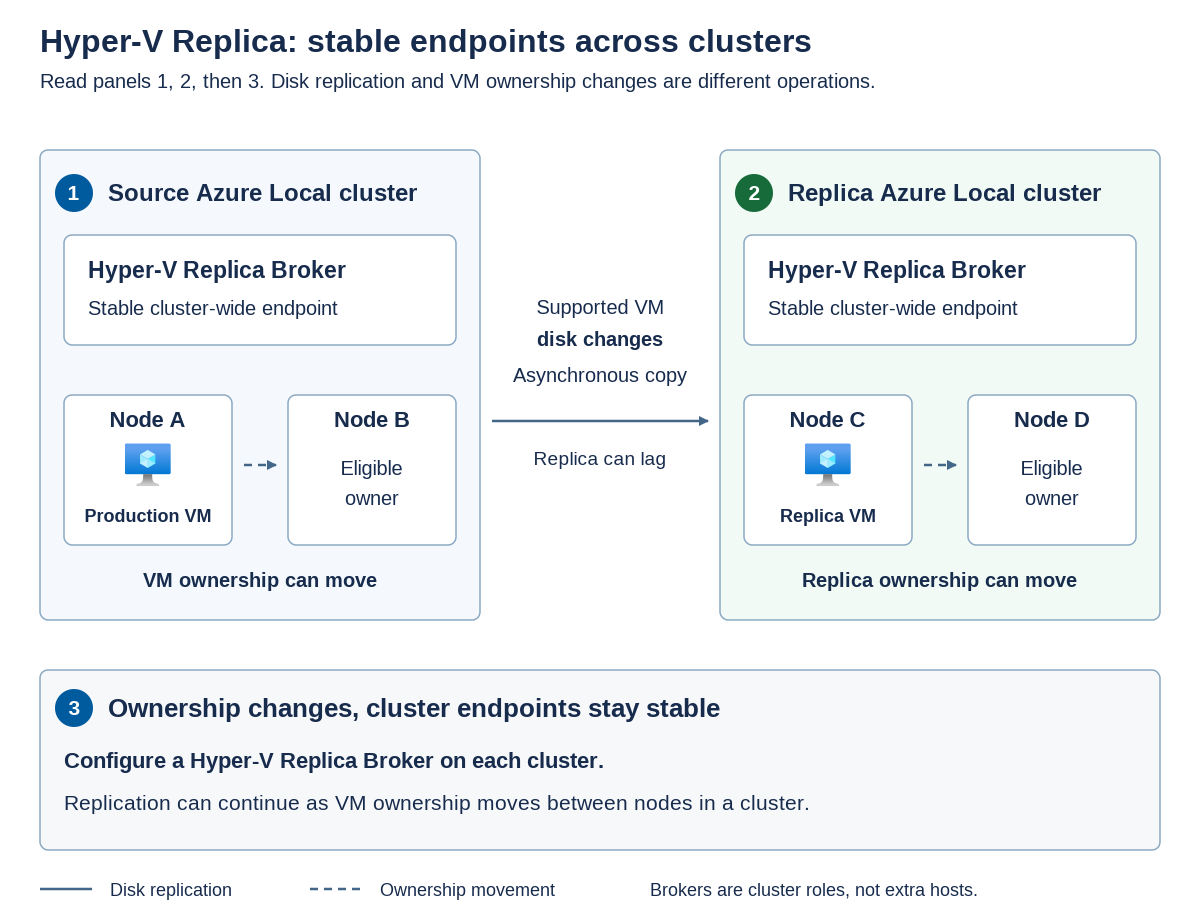
Authentication and network design are part of the protection boundary. Kerberos authentication over HTTP requires suitable domain trust and doesn't encrypt replication traffic. Certificate-based HTTPS provides encrypted transport and is required for configurations without the necessary domain trust. Certificates, trust chains, names, firewall rules, and destination storage must remain valid during recovery and failback.
Supported primary replication intervals include 30 seconds, five minutes, and 15 minutes. An interval is a scheduling setting, not a promise that every application transaction reaches a usable recovery point within that time. Write churn, bandwidth, competing transfers, and destination storage performance affect the backlog.
Additional recovery history and VSS-aware application-consistent points must be configured according to the workload's needs. Recovery history gives you a choice of points, but it isn't a replacement for independently retained backups. An attacker or application defect can affect both the source and the replicated state.
Hyper-V Replica recovery ordering must be planned and operated by your team, for example through approved scripts and runbooks. It doesn't provide ASR's recovery-plan orchestration. Azure Local VMs failed over to another cluster through Hyper-V Replica also have an Azure-management boundary: don't assume that Azure lifecycle management follows them.
Walkthrough: configure replication between two Azure Local instances
This walkthrough configures Hyper-V Replica from a primary Azure Local instance to a recovery instance, then tests a recovery copy in isolation. It uses two existing, healthy, domain-joined hyperconverged instances and a supported standard-security Windows VM. Trusted Launch, shielded VMs, and local-identity deployments require separate assessment and aren't covered by this procedure. Don't change a VM's security type to make it fit the walkthrough.
Use Failover Cluster Manager on an authorized Windows Server management computer to administer both instances. Azure Local's Azure portal doesn't provide this Hyper-V Replica configuration workflow. The steps use certificate-based HTTPS on TCP port 443 to encrypt replication traffic, even though the instances are domain joined.
Warning
Enabling replication changes cluster settings and consumes network, compute, and storage resources. Use an approved change window and an appropriate test workload. This walkthrough doesn't authorize production failover, shutting down the primary VM, or connecting a recovered copy to production.
Prepare the instances and recovery policy
Before changing either instance, record the following values from your environment. The broker names shown are examples, not names to reuse without checking availability.
| Item | Information to prepare |
|---|---|
| Primary and recovery instances | Cluster names, node FQDNs, supported solution builds, and administrative access to both instances |
| Replica Brokers | A unique name of no more than 15 characters for each broker, such as AL-PRI-RB and AL-DR-RB, their FQDNs, and an available IP address or DHCP configuration on each cluster's management network |
| Permissions | Cluster-administration rights, Hyper-V administration on every participating node, and permission to create the broker's Active Directory computer account or use an account prestaged by the directory administrator |
| VM and application | Exact VM identity, supported configuration version at the destination, required virtual disks, healthy guest backup integration and VSS writers where application-consistent points are required, and compatible recovery dependencies |
| Replica storage | An approved folder on a workload Cluster Shared Volume (CSV) accessible to every node in the receiving instance, with capacity for the initial copy, retained changes, and recovery points. Don't use Infrastructure_1. |
| Recovery policy and networks | Approved replication frequency, recovery history, initial-transfer window, destination capacity, production recovery network mappings, and a separate isolated test network |
Provision certificates before enabling replication. For each cluster, deploy the same broker certificate and associated private key to the Local Computer > Personal certificate store on every node through the approved certificate-management process. The certificate must be unexpired, include both Client Authentication and Server Authentication enhanced key usages, and chain to a root trusted by the other instance. Its subject common name or DNS subject alternative name must match that cluster's Replica Broker FQDN. This makes the selected certificate available when VM or broker ownership moves. Record certificate renewal ownership without storing private keys in the runbook.
Confirm DNS resolution, time synchronization, routing, and the required management connectivity between the instances. Size bandwidth for both initial replication and ongoing changes, and retain an independent backup. Replication isn't a replacement for retained recovery history outside the replica relationship.
Configure a Replica Broker on each instance
Configure the recovery instance first, then prepare the primary instance to receive changes during a future approved failback.
- In Failover Cluster Manager, connect to the recovery instance, expand its cluster name, and select Roles. Select Configure Role, then choose Hyper-V Replica Broker.
- On Client Access Point, enter the approved recovery broker name. Complete the wizard, configure the broker's approved static IP address if DHCP isn't available, and bring the role online. Confirm that its FQDN resolves correctly from the primary nodes.
- Right-click the new broker role and select Replication Settings. Select Enable this cluster as a Replica server.
- Select Use certificate-based Authentication (HTTPS), retain port 443 for this walkthrough, and select the certificate for the recovery broker. Don't select an unrelated host certificate or bypass a certificate error.
- Under Authorization and storage, select Allow replication from the specified servers. Add the approved primary broker and source-node FQDNs, the receiving CSV folder, and a common trust-group label for those source identities. A trust group groups authorized replication sources, not Active Directory domains. Don't allow every authenticated server merely to avoid resolving an authorization failure.
- Save the settings and confirm that the broker remains Online. Repeat the broker configuration on the primary instance with its own name, certificate, and receiving storage. Authorize the recovery instance's broker and node identities there. This prepares the return path but doesn't start reverse replication or transfer ownership of production writes.
- Through the approved firewall-management process, enable Hyper-V Replica HTTPS Listener (TCP-In) on every node in both instances. Permit TCP 443 between the approved participating nodes and broker endpoints through intervening firewalls. Configure all nodes, not just the current broker owner, and don't disable the firewall or other Azure Local security controls.
Confirm connectivity before enabling a VM
Run the following connection check in an authorized PowerShell session on each primary node. Replace the placeholders, including their angle brackets, with the recovery broker FQDN and the thumbprint of the primary cluster's replication certificate installed on that node. The check requires the Hyper-V module and doesn't enable VM replication.
$ErrorActionPreference = 'Stop'
Test-VMReplicationConnection `
    -ReplicaServerName '<RecoveryBrokerFQDN>' `
    -ReplicaServerPort 443 `
    -AuthenticationType Certificate `
    -CertificateThumbprint '<LocalPrimaryCertificateThumbprint>'
Expect a successful connection result from every primary node. Repeat the check from each recovery node toward the primary broker, using the local recovery-side certificate, to validate the prepared return path. Stop if a check fails. Resolve DNS, certificate identity and trust, private-key availability, firewall rules, broker state, or authorization before continuing. A successful connection proves connectivity and authentication, not VM recoverability.
Enable replication for the selected VM
The following steps create the relationship and its initial copy. Repeat them separately for each approved VM rather than assuming that configuring a broker protects the entire instance.
- In Failover Cluster Manager, select the primary instance and open Roles. Match the VM to the approved inventory, then right-click it and select Replication > Enable Replication.
- On Specify Replica Server, enter the recovery Replica Broker FQDN. Don't enter an individual recovery node's name or the cluster's ordinary management name. Continue only after the wizard successfully retrieves the destination settings.
- Review the connection parameters. Confirm certificate-based HTTPS and port 443, then select the primary cluster's replication certificate. Choose compression according to the approved bandwidth and CPU plan.
- On Choose Replication VHDs, include every virtual disk required to recover the application, including its operating system, data, and transaction logs. Document any exclusions with the application owner.
- On Configure Replication Frequency, select the approved 30 seconds, 5 minutes, or 15 minutes interval. For a teaching exercise, five minutes is a reasonable setting to observe, but it doesn't establish a five-minute application RPO.
- On Configure Additional Recovery Points, choose the required history. For example, retain six additional hourly recovery points and, for a supported VSS-aware Windows workload, request a VSS snapshot every hour. These are illustrative settings, not a universal retention policy. Individually consistent VM points don't coordinate a multi-VM application.
- On Choose Initial Replication, select Send initial copy over the network and an approved start time. Review the summary, destination, disk selection, and policy, then select Finish. The success message means replication is enabled, not that the initial copy is complete.
- If the application spans multiple virtual disks, ensure cross-disk write-order preservation is enabled. On the primary node that currently owns the exact VM, the approved setting can be applied with
Set-VMReplication -VMName '<VMName>' -EnableWriteOrderPreservationAcrossDisks $true -ErrorAction Stop. This setting doesn't replace application-aware recovery or protect an excluded disk.
Validate the replica and run an isolated test
Keep the primary VM authoritative throughout this exercise. Use the supported test-failover workflow rather than manually copying or starting the replica.
- On the primary instance, select the VM's Replication tab and open Replication > View Replication Health. Wait for initial replication to finish and for the relationship to report Replicating with Normal health. Inspect recent synchronization times and backlog rather than treating the status alone as proof that the RPO is met.
- On the recovery instance, confirm the expected replica identity, included disks, storage location, and capacity. The replica remains off during normal replication. Its adapters aren't automatically connected to a destination virtual switch. Record the intended production recovery switch, VLAN, addressing, and DNS settings separately, and leave the replica disconnected for this exercise.
- In the recovery instance's Roles view, right-click the replica and select Replication > Test Failover. Select an available recovery point, then select Test Failover. The operation creates a separate VM with
- Testappended to its name while normal replication continues. - Before starting the test VM, inspect every network adapter. Test VMs are disconnected by default unless test-network mappings have been configured. Leave them disconnected or attach them only to the approved isolated test network. Prevent access to production endpoints, duplicate address advertisement, and live outbound jobs.
- Start the test VM and validate guest startup, required disks, application recovery logs, integrity checks, and representative transactions through controlled test dependencies. Record the recovery point, results, and elapsed time. Don't infer application recovery from a successful boot.
- Retain the exercise evidence, then right-click the replica VM, not the test copy, and select Replication > Stop Test Failover. Confirm removal of the temporary test VM and its changes. Don't remove the primary VM, replica relationship, or retained recovery points.
- Confirm that the primary is still serving production, the replica remains off, and fresh replication cycles continue. Under an approved same-cluster migration test, move the primary VM to another primary node and confirm that replication continues from its new owner. This tests node-movement coverage without a disaster-recovery handover.
Record the broker identities, allowed sources, certificates, included disks, policy, storage, network plan, test results, and monitoring owner in the runbook. VM configuration changes, such as changed memory, processors, or network adapters, aren't automatically replicated, so review the replica after relevant changes. A real failover still requires source fencing, release approval, renewed protection, and a supported management and failback plan. Completing this walkthrough doesn't automatically restore Azure lifecycle management for a VM running on the recovery instance.
Understand Azure Site Recovery
Azure Site Recovery (ASR) coordinates replication and recovery of supported Hyper-V workloads to Azure. In the manual Hyper-V-to-Azure architecture without Virtual Machine Manager, the ASR Provider and Recovery Services agent run on each cluster node. The provider coordinates replication, and the agent transfers data. This architecture doesn't require installing the replication components inside every protected guest.
The following diagram separates the vault's orchestration role from the flow of disk changes. It also shows that the Azure destination needs more than replicated storage.
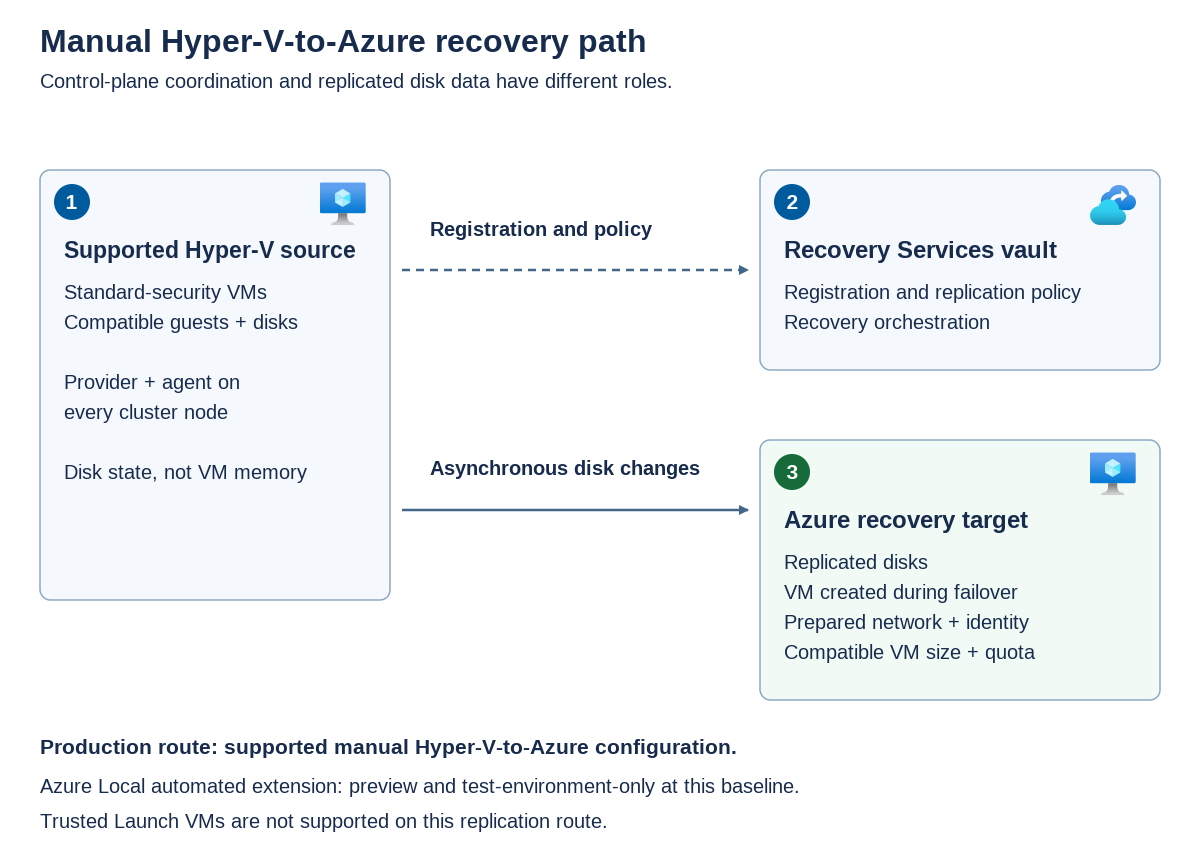
The production-supported manual Hyper-V-to-Azure route is separate from Azure Local's automated ASR extension. At this module's baseline, the Azure Local resilience guidance identifies that extension as preview and applicable only to test environments. A portal preparation wizard doesn't change the support status of the underlying route.
Generation 1 and generation 2 support doesn't imply support for every guest security configuration. The Hyper-V-to-Azure support matrix restricts security types, guest disk encryption, Secure Boot, and particular guest storage configurations. For example, Standard security is supported, while Trusted Launch and confidential VMs aren't supported on this route. Review guest operating system, disk format and size, disk count, and application-consistent snapshot support before enabling protection.
Don't weaken a workload's security controls just to fit a replication product. If an encrypted or otherwise protected workload doesn't meet the matrix, select an approved alternative or formally redesign the workload with its security owner.
Note
Prepare the Azure subscription, region, resource group, VM size, virtual network, subnet, routing, firewall rules, name resolution, and identity services before an incident. Quota is permission to consume a resource, not a guarantee of immediately available compute capacity. Test the actual recovery location and understand its capacity constraints.
Configuring Azure Backup and ASR together on the same Hyper-V host is unsupported because the combination can interfere with replication. Treat protection-component coexistence as a design constraint, not something that a successful installation proves. Don't infer that every combination of MABS agents, Azure Backup components, and replication components is supported because each product is supported separately.
Disk changes can also invalidate an otherwise supported replication configuration. Adding or resizing a disk on a protected Hyper-V VM requires disabling replication, making the change, and enabling replication again. Changing a disk's identifier can leave that disk marked Not Protected. Plan these changes as controlled interruptions to protection, then confirm the included disks, replication health, and new usable recovery points before closing the change.
Account for protected VM security
Record each VM's generation, guest operating system, disks, encryption, security type, and intended destination. A console's Protected status describes a configured relationship. It isn't evidence that every restore destination or security combination will work.
Trusted Launch adds protections that include Secure Boot and a virtual Trusted Platform Module (vTPM). The vTPM holds security state that must remain usable after recovery. On Azure Local, a VM guest state protection key protects that guest state at rest and is stored in the instance's local key vault.
A recoverable Trusted Launch VM needs all its VM files and its guest state protection key. Back up the key through the supported process promptly after VM creation. For Azure Local 2505 and later, the documented manual process exports encrypted key material to a backup folder using a wrapping key. A wrapping key encrypts other key material. Recovery therefore needs both the exported backup and the material required to unwrap it, with appropriate access separation.
These recovery artifacts solve different problems and mustn't be confused.
| Artifact | Purpose | Recovery implication |
|---|---|---|
| VM files | Operating system, data disks, configuration, and saved guest state within the backup scope | Files must be complete and compatible with the destination |
| Guest state protection key | Protects Trusted Launch guest state, including vTPM state | Missing key material can prevent the restored VM from starting |
| Backup encryption material | Decrypts the backup product's retained data | A readable repository isn't enough if decryption material is unavailable |
| Guest volume recovery key | Unlocks a protected guest volume when its recovery process requires it | Restoring VM files or backup encryption material doesn't substitute for this key |
Automatic system-secret backup to a supplied Azure Key Vault is preview functionality. It doesn't back up the VM's application data and doesn't remove the need for an approved, tested key-recovery design.
Warning
ASR replication of Azure Local Trusted Launch VMs to Azure is unsupported. Trusted Launch recovery to another Azure Local instance also has a specific management restriction: local VM tools can manage the recovered VM, but Azure Arc lifecycle management isn't restored through that cross-instance route. Same-instance recovery and cross-instance recovery aren't equivalent. Shielded VMs, other protected machines, and confidential-computing workloads require their own product-specific assessment.