Recover a failed Azure Local node
Recovering an Azure Local physical node is different from restoring a workload VM. A node is a physical machine that contributes compute, storage, and platform services to an Azure Local instance. Cluster failover can move or restart workloads after a node fails, but it doesn't repair that machine or automatically restore the instance's original resilience.
This unit covers connected, hyperconverged Azure Local deployments at the 2610 baseline. Hardware replacement remains subject to the original equipment manufacturer's (OEM's) procedures. Different deployment models and identity configurations can have different recovery requirements.
Select component repair, node repair, or scale-out
First determine whether the fault requires replacing a component, reinstalling the operating system, replacing the whole machine, or increasing the instance's capacity. Those aren't interchangeable operations.
The following distinctions keep a repair within its supported scope.
| Situation | Appropriate direction | Important boundary |
|---|---|---|
| A replaceable component fails, but the operating system remains usable | Follow the OEM component-replacement procedure and applicable maintenance controls | Determine whether replacement is hot-swappable or requires taking the node offline |
| A member must be reimaged or replaced while a viable instance remains | Use the orchestrated Repair-Server workflow |
Repair restores the member's previous name and configuration within the existing instance |
| The instance needs another member | Use the supported Add-Server scale-out workflow |
Adding capacity isn't the normal replacement procedure |
| A single-machine deployment loses its operating system | Use the applicable single-machine redeployment path, including the supported option to retain data volumes | There's no surviving peer from which to run the ordinary multi-node repair workflow |
| Several machines or the whole platform are unavailable | Classify quorum, storage, and instance-state loss before choosing recovery | Don't assume that repeating single-node repair reconstructs a lost instance |
Warning
Don't substitute the process of raw cluster eviction followed by a generic Hyper-V join for Azure Local repair orchestration. The add-node procedure doesn't provide a general permanent scale-in operation, so a remove-and-add sequence isn't an interchangeable replacement recipe.
The node-replacement scenarios include a replacement machine with new or retained disks, and a reimaged original machine with new or retained disks. The exact disk treatment depends on the approved scenario. In particular, reimaging the original machine and reformatting its retained data disks isn't a supported preservation path.
Confirm that the remaining instance can sustain recovery
Before taking a still-running node offline, confirm that the remaining nodes can support the workloads and storage. If the machine has already failed, determine the surviving state before making another change. A dead node mightn't be available for a normal drain or shutdown.
Cluster quorum is the voting mechanism that determines whether a cluster membership can operate safely. A witness contributes to that decision, but isn't another copy of VM or application data. Storage availability also depends on storage-pool quorum and sufficient available data copies for each volume. Meeting one condition doesn't prove the others.
The following table shows how many active nodes must remain to reliably retain cluster quorum after simultaneous node failures from an initially healthy cluster. It assumes default dynamic voting, no manually excluded node votes, and a witness that remains available where configured. The surviving nodes must be able to communicate with one another.
| Cluster configuration | Active nodes needed to reliably retain cluster quorum | How the votes work |
|---|---|---|
| Two nodes with a witness | 1, plus the witness | The surviving node and witness provide two of the original three votes. Either node can survive the other's failure. |
| Three nodes, with or without a witness | 2 | Two of the three node votes are required. A configured witness initially has no vote because the node count is odd. |
| Four nodes with a witness | 2, plus the witness | Two surviving nodes and the witness provide three of the original five votes. |
| Four nodes without a witness | 3 to guarantee quorum | One node initially has no vote. Two surviving nodes can retain quorum only if both held votes before the failures, so two survivors aren't a reliable planning minimum. |
| Five nodes, with or without a witness | 3 | Three of the five node votes are required. A configured witness initially has no vote. |
| Six nodes with a witness | 3, plus the witness | Three surviving nodes and the witness provide four of the original seven votes. |
| Eight nodes with a witness | 4, plus the witness | Four surviving nodes and the witness provide five of the original nine votes. |
| Sixteen nodes with a witness | 8, plus the witness | Eight surviving nodes and the witness provide nine of the original seventeen votes. |
Use a cloud witness or an independently hosted file share witness for these configurations. A disk witness isn't supported with Storage Spaces Direct. A witness is required for a two-node deployment and strongly recommended for three or four nodes. Don't apply the witness-assisted counts if the witness is also unavailable.
These counts aren't fixed thresholds for every failure sequence. Dynamic quorum adjusts node votes after membership changes, while dynamic witness adds or removes the witness vote to keep the total odd. For example, three nodes with an available witness can retain cluster quorum on one node after two separate failures, if voting is recalculated between them. Losing two nodes simultaneously from the original three-node membership doesn't allow that adjustment. These are cluster-quorum outcomes, not guarantees of storage or workload availability.
When communication fails between groups of nodes, only a group that can establish a majority of the current votes can continue running the cluster. Nodes in a group without quorum stop their cluster service to prevent competing owners from writing to the same storage. The surviving group must retain that majority before dynamic quorum can adjust voting for the remaining membership.
Storage-pool quorum uses a separate voting process based on selected drives that hold pool metadata. Unlike cluster quorum, it doesn't adjust its voting threshold dynamically as nodes fail. The cluster database can break a tie while the cluster itself retains quorum. Even when both quorum checks pass, the volumes still need enough surviving data copies to remain available.
For example, losing two machines from a three-node instance can make the storage pool's virtual disks inaccessible even when a data copy remains on the last machine. Forcing a cluster to start doesn't reconstruct missing storage copies. Don't improvise force-quorum operations or reset disks to make a health indicator disappear.
Confirm surviving compute and memory capacity, volume accessibility, storage resilience, network connectivity, and independent access to required keys. Pause the repair plan and escalate if another node is unstable, volumes are inaccessible, or the remaining failure tolerance is uncertain. Service can continue on surviving nodes under an approved degraded-state plan, but that doesn't make an additional node outage safe.
Preserve data and identity before reimaging
Record the failed member's previous NetBIOS name, hardware and disk inventory, management-network configuration, installed solution build, and OEM driver and firmware requirements. A NetBIOS name is the machine's short Windows name rather than its fully qualified domain name.
For the documented Active Directory-based repair flow, the deployment identity, commonly named AzureStackLCMUser, must remain valid and have the required rights. Resolve any credential mismatch through the supported lifecycle credential process before repair. The incoming machine also needs its own local administrator credential. These are different identities serving different purposes. Don't apply this Active Directory credential flow unchanged to a local-identity deployment.
Warning
Preserve retained data disks and their identifiers during node repair. The generic new-deployment instruction to clean non-operating-system drives doesn't apply to machine repair. Don't delete the existing Active Directory organizational unit as cleanup, because it can contain required BitLocker recovery information.
Identify the operating-system device separately from data devices before an OEM technician reinstalls software or replaces hardware. Confirm the approved treatment of every retained or replacement disk. A matching number of data drives is an incoming-node validation requirement. Processor and memory differences can also affect validation and capacity, so a completed hardware swap isn't proof that the replacement can safely carry the intended workload.
Follow the orchestrated repair sequence
Use the following sequence as the structure for an approved multi-node repair runbook. It describes the supported path rather than authorizing changes to a production instance.
- Identify the failed member and agree on the OEM repair scope. Preserve workload recovery points, required keys, diagnostic evidence, and the retained-disk inventory. If the node is still running, use the approved maintenance workflow to move workloads and take it out of service without exceeding the remaining capacity or storage tolerance.
- Handle only the failed member's Azure Arc machine resource as required by the repair procedure. That procedure includes removing its resource lock and deleting that specific faulty-node resource before registering the repaired machine. Verify the resource identity and obtain change approval. This isn't permission to delete the Azure Local instance, resource group, vault, custom location, or other nodes.
- Replace or repair the approved hardware and install the compatible Azure Local operating-system image and OEM drivers. Repair media must match the existing solution's requirements. Don't assume that any Windows Server ISO or an older Azure Local image is a valid substitute. Confirm media compatibility before starting a reimage that can't be completed safely.
- Configure the management network consistently with the instance, including the management adapter name used by peer nodes. Preserve the approved network design and verify address availability, DNS, time, and required connectivity rather than improvising a new configuration.
- Register the incoming machine with Azure Arc in the existing instance's tenant, subscription, region, and resource group. Verify the required device-management and vault permissions for that machine. Don't delete automatically managed Provisioned Machine resources as a troubleshooting shortcut.
- From another existing instance member, use the authorized deployment identity to start
Repair-Server. Its-Nameparameter identifies the member by its previous NetBIOS name, and-LocalAdminCredentialsupplies the incoming machine's local administrator credential. The orchestrated operation restores the member's configuration and integrates it with the instance. - Retain the returned operation ID and follow progress with
Start-MonitoringActionplanInstanceToComplete. If an action fails, inspect the failed validation or action before retrying.Get-ActionPlanInstancecan retrieve the operation details. The supported retry path usesRepair-Server -Rerunafter the cause is resolved, not repeated independent add-node attempts. - Complete the node, storage, and platform acceptance checks before declaring repair complete or beginning maintenance on another node. Record any continuing degraded-state restrictions and who owns them.
If a partial repair has already changed the lifecycle manager's internal state, reinstalling the machine doesn't necessarily return the operation to its starting point. Preserve the operation details and continue through the supported repair or support-assisted recovery path. Don't manually edit orchestrator state to force a successful result.
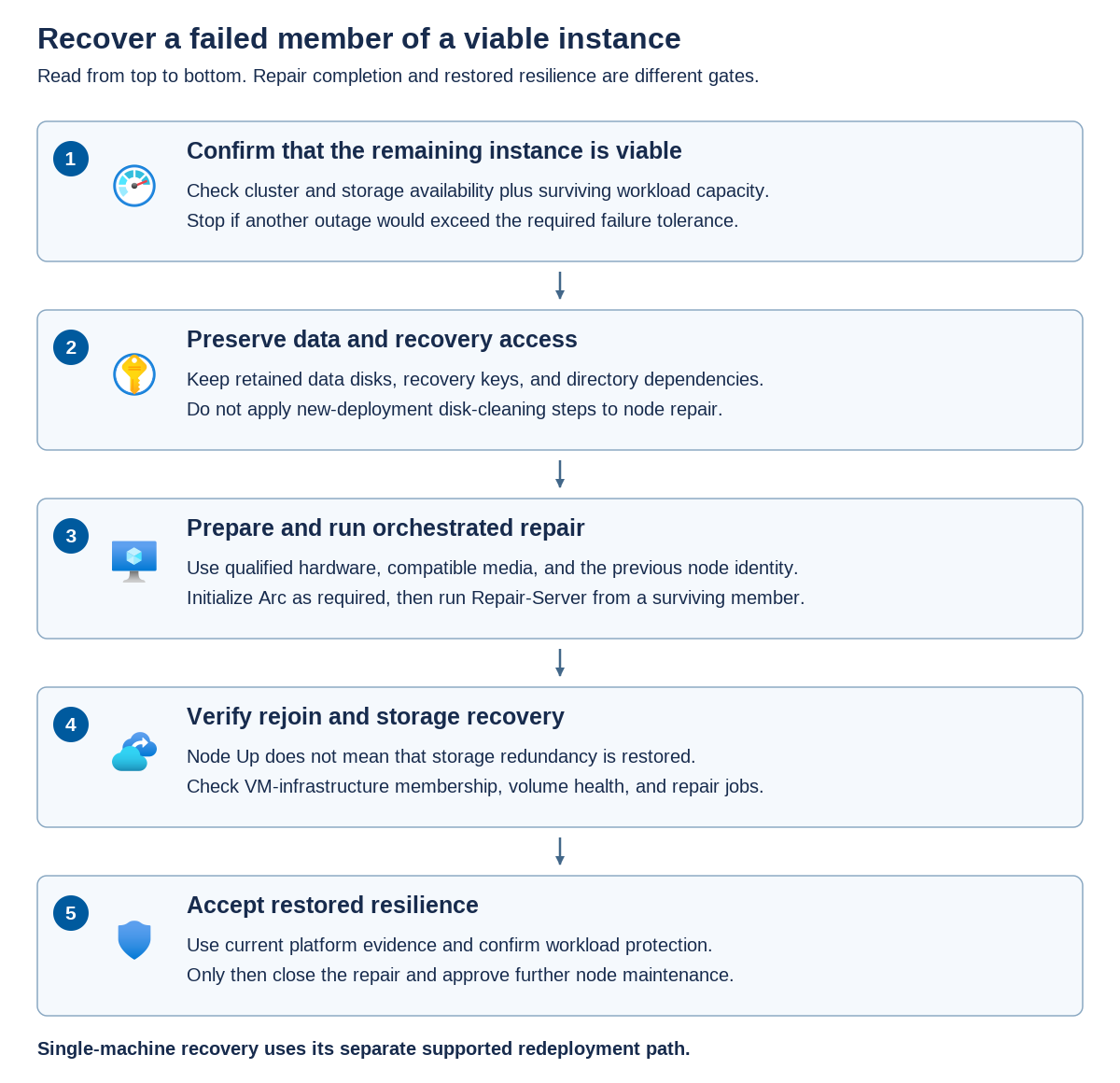
The following diagram separates the repair operation from storage recovery and final acceptance.
Verify rejoin, storage recovery, and platform health
A node reporting Up confirms cluster membership, not completion of every recovery task. The local VM infrastructure, exposed by the MOC management commands, has its own node membership. Storage can also continue repairing or rebalancing after the orchestration action finishes. That work can take multiple days depending on the amount of data and available resources.
Run the following read-only inspection on an authorized existing Azure Local node. It requires the installed Azure Local, failover-clustering, and storage management commands and appropriate administrative rights. It doesn't start a repair or change storage.
$ErrorActionPreference = 'Stop'

Get-ClusterNode | Select-Object Name, State
Get-MocPhysicalNode

Get-StoragePool -IsPrimordial $false |
    Select-Object FriendlyName, HealthStatus, OperationalStatus
Get-VirtualDisk |
    Select-Object FriendlyName, HealthStatus, OperationalStatus,
        ResiliencySettingName
Get-VirtualDisk | Get-StorageJob |
    Select-Object Name, JobState, PercentComplete

Get-SolutionHealthSummary -Detailed -IncludeInformational
Compare the returned nodes, pools, and virtual disks with the inventory. No returned storage job can mean that the repair or rebalance work is complete, but an empty job list doesn't prove that the expected volumes are present or healthy. Investigate missing objects and unexpected health states.
Get-SolutionHealthSummary is available at the 2610 baseline. It reports the latest existing pre-update or daily health-check results rather than starting a new validation. Inspect the result's source and time so that a result from before the incident isn't accepted as proof of recovery.
Close the repair only after confirming the lifecycle operation's result, intended cluster and VM-infrastructure membership, required storage resilience, network and encryption configuration, and current platform health. Check that workload protection still covers the repaired host. Don't schedule the next node outage while unresolved storage recovery reduces the required failure tolerance.