Plan recovery lifecycle
A backup is useful only if you can find it, access it, decrypt it, restore it into a supported environment, and reconcile the result with surviving systems. Disconnected recovery also requires that staff can perform those actions without relying on the failed control plane.
Define separate protection scopes
Control-plane backup captures the appliance's management state, including resource organization and information about connected resources. It doesn't back up associated workload clusters or application data.
Define protection separately for control-plane state, cluster and workload configuration, VM and application data, identity infrastructure, and recovery credentials. A highly available cluster reduces the impact of some failures, but availability isn't a substitute for backup. Replication can also copy accidental deletion or corruption.
The diagram distinguishes the protection scopes and the recovery sequence.
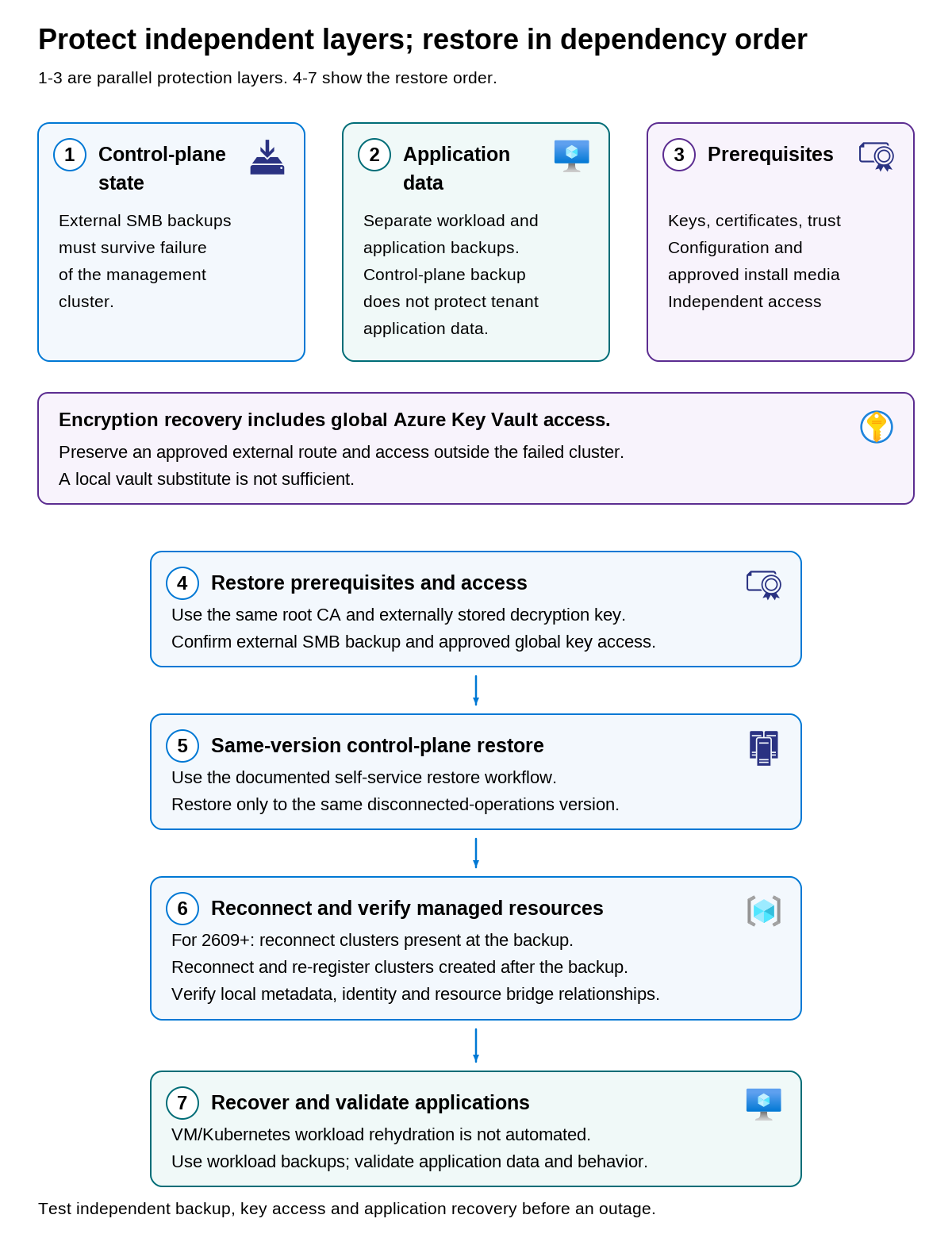
Set a recovery point objective (RPO), the maximum acceptable age of recoverable data, and a recovery time objective (RTO), the target elapsed time to restore service. Define them separately for management and for each business service.
For example, a 24-hour management RPO allows at most 24 hours of lost management changes. It says nothing about whether a research database can lose a day's transactions. A four-hour RTO must account for access approval, hardware preparation, key retrieval, restore, reconnection, and validation, not just the restore command's runtime.
These example targets aren't Microsoft guarantees. Measure them in a rehearsal.
Make backups independently accessible
The documented destination is an SMB share accessible from the disconnected-operations VM. Backup configuration includes a Universal Naming Convention (UNC) path such as \\server\share, share credentials, and encryption-certificate material. A UNC path identifies a network server and its shared folder rather than a local drive.
As a resilience design choice, place the destination and protected secondary copies where management-cluster loss won't destroy the only usable backup. Ensure that the recovery environment can resolve and reach the share and that authorized staff can obtain its credentials.
Release 2609 added scheduled backups. The documented model supports default and named backup configurations, with one schedule per system. Creating or updating that schedule replaces the previous schedule, and its time is expressed in UTC. Account for local time and daylight-saving changes in the operating procedure.
An on-demand Start-ApplianceBackup uses the default configuration. A schedule can refer to the default or a named configuration. Don't assume that creating a named configuration changes the destination of every backup.
Track the actual backup operation through completion. Configuration provisioning success isn't the same as a completed backup. For example, a provisioned backup resource can still report that backup work is running. Record a terminal successful result, the recoverable point in time, the destination, and the associated encryption-material reference.
Distinguish recovery keys and certificates
A certificate thumbprint is a digital fingerprint used to identify a certificate. It doesn't contain the certificate's private key or replace the certificate file. Recovery operators need secure access to the actual certificate files, required private keys or backup decryption keys, and passwords needed for each recovery task. Store this material outside the management cluster's failure domain, and record only its location and access requirements in the inventory, not secret values. The following table distinguishes the purpose of each recovery item.
| Material | Purpose | Recovery planning requirement |
|---|---|---|
| Backup encryption certificate and corresponding decryption material | Protect and recover backup contents | Preserve the complete supported decryption material externally. A public .cer file alone doesn't establish that decryption is possible. |
| Management client certificate and its protected credentials | Authenticate authorized management-endpoint operations | Make it available to approved recovery operators outside the failed appliance. |
| BitLocker recovery passwords | Unlock appliance volumes in relevant failure scenarios | Follow the documented secure external-storage procedure before a failure. |
| Root CA trust and required endpoint certificates | Establish trust for the restored environment | Preserve the same root-CA relationship required by restore and account for certificate rotation. |
| Host Guardian Service certificates | Support the separately documented protection and recovery scenarios | Preserve them through the supported export procedure where applicable. |
| Matching media, OperationsModule, and configuration | Rebuild and operate the supported recovery environment | Keep a verified set that matches the backup's version and recovery procedure. |
Don't expose private keys, passwords, or recovery material in ordinary evidence logs. Separate permission to inspect the inventory from permission to retrieve protected material.
Important
The published backup prerequisites explicitly include an Azure Key Vault in global Azure in the same subscription as the disconnected registration resource. This isn't the local Key Vault service. The guidance doesn't fully specify the air-gap key-transfer workflow, and it doesn't establish a requirement for continuous appliance-to-cloud connectivity. Agree a supported, authorized acquisition and recovery-access route before production. If policy prohibits every required route, resolve that conflict rather than substituting a local vault without support.
For Contoso, a runbook that starts "Sign in from the failed appliance and retrieve the only key" isn't executable. Use independently accessible credentials, approved external administrative access where required, controlled transfer, and rehearsed recovery instructions.
Restore the control plane using a matching version
Microsoft documents a control-plane restore workflow. Its prerequisites include appropriate operator access, a fresh disconnected environment matching the backup's version, the same root CA, access to the backup SMB share, and the externally stored decryption key. Cross-version restore isn't supported.
The documented workflow uses the restore module and the Start-ApplianceRestore, Wait-ApplianceRestore, and Get-ApplianceRestore commands. Their presence establishes a supported restore capability, not a universal one-line recovery script. Use the version-matched procedure and module help for the required inputs. Restoration can take hours.
Don't attempt to restore an older backup into the latest available appliance simply because newer software is normally preferred. Preserve the approved matching recovery media and confirm any later update path separately.
Reconcile the environment after restore
A restored control plane represents a point in time. Physical resources can still exist in a newer state. Rehydration reconnects and, where required, re-registers those resources with the restored management state. It isn't the restoration of their application data.
The documented recovery path depends on the resource's history.
| Situation | Required interpretation |
|---|---|
| Restore is performed before deploying Azure Local to form the replacement management cluster | This is the recommended timing. Install the matching-version appliance on the seed node, restore its state, then perform management-cluster deployment through the local portal. |
| Restore occurs after management-cluster cloud deployment | Stage the backup environment's public root certificate (PublicCertificate.cer), then use the version-matched management-cluster re-registration workflow. That workflow must address confirmed stray backup management-cluster resources before completing repair registration and resource-bridge recreation. |
| A data cluster existed when the backup was taken | Reconnect it to the restored environment. |
| A data cluster was created after the backup | Reconnect it, then re-register it to recreate its management representation. |
| A resource was deleted after the backup | Reconcile the restored metadata with the actual resource state rather than treating the restored record as proof that the resource exists. |
The post-restore documentation provides reconnection and re-registration automation for 2609 and later. Earlier releases use their applicable procedures. Azure Arc resource bridge recovery is included in the documented re-registration flows, not a separate public bridge-only recovery command.
For release 2609 and later, import Azure.Local.DisconnectedOperations.PostRestoreRecovery.psm1 from the matching OperationsModule in an administrator PowerShell session on a node of the management cluster being repaired. Establish an authenticated Az PowerShell context for the restored local environment, because Invoke-ApplianceManagementClusterReRegistration obtains its ARM token from that context unless an explicit ArmAccessToken is supplied. Confirm that the recovery operator has the required permissions for both operator functions and the target cluster scope.
Run Invoke-ApplianceManagementClusterReRegistration with SubscriptionId and ResourceGroup identifying the cluster's intended scope in the restored local environment, AccountId containing the registration account's UPN, TenantId containing the tenant ID of the Operator subscription, and PublicCertificatePath pointing to the backup environment's public root certificate. Don't substitute a public-Azure subscription or assume that the older manual example's Starter subscription is correct for every cluster. The public root certificate is used to recreate the resource bridge. It isn't the separate decryption key needed to restore backup contents.
The management-cluster command discovers cluster and node details, assigns required roles, repairs registration, reconnects disconnected node agents, and recreates the resource bridge and associated resources. Keep its confirmation prompts for CredSSP configuration and removal of stray backup management-cluster resources. Review the discovered records and confirm that they're phantom records for the backup management cluster before approving removal. Don't use -Force or skip stray-resource handling by default. This cleanup doesn't apply to data-cluster re-registration, and it isn't permission to delete an entire resource group, surviving workloads, the existing key vault, or user storage.
The 2604-2608 procedures instead require the documented manual reconnection prerequisites, narrowly scoped cleanup, repair registration, and resource-bridge recreation. The manual path explicitly requires OperatorRP in the Operator subscription and the prescribed CredSSP session. Its bridge-recovery procedure also replaces each node's staged root-certificate file with the backup's public root certificate. Follow that release's complete procedure rather than mixing its steps with newer automation or treating Register-AzStackHCI -RepairRegistration alone as complete recovery.
Keep the data-cluster branch separate. For a data cluster created after the backup, the 2609+ workflow first reconnects it from its Deployment VM, then runs Invoke-ApplianceDataClusterReRegistration on a data-cluster node. Don't apply management-cluster phantom-resource deletion to that path.
The Azure Arc resource bridge connects Azure-style resource management with the local infrastructure operations used by supported workloads. Restoring a resource record without repairing the relevant bridge or cluster relationship can leave that resource visible but unmanageable.
Expect lost cloud-only resources, untracked resources created after backup, metadata for resources that no longer exist, and drift in configuration, credentials, or certificates. Reconcile these deliberately. Don't recreate identities or reconnect resources to public Azure merely to clear a status indicator.
VM and Kubernetes workload rehydration isn't fully automated in the reviewed post-restore guidance. Validate workload resources and restore application data through their own procedures after cluster manageability is recovered.
Define a recovery acceptance sequence
Use this sequence to structure a disaster recovery rehearsal.
- Restore or verify independent DNS, time, identity, network access, storage, trust, protected material, and operator access.
- Prepare the version-matched recovery environment and perform the documented control-plane restore.
- Verify local portal and API access, subscriptions, role assignments, policies, and certificate trust.
- Reconnect and, where required, re-register management and data clusters using their applicable paths.
- Reconcile resource drift and validate the resource bridge and cluster manageability.
- Recover or validate VMs, Kubernetes resources, and application data through their own protection mechanisms.
- Measure the achieved RPO and RTO, resume monitoring and backups, and record unresolved differences before declaring service restored.
A successful backup job and a successful appliance restore are intermediate evidence. The final acceptance condition is that authorized users can manage the intended local resources and complete the required business transactions.
Before configuring backups, select the local operator subscription, confirm the required OperatorRP permissions, and authenticate to the management endpoint with the management client certificate and its protected password. Import Azure.Local.Backup.psm1 from the matching OperationsModule by using its full path. Set-ApplianceBackupConfiguration requires the destination SMB UNC path, share username, password as a SecureString, and Base64-encoded encryption certificate. Omitting -Name, or specifying -Name default, updates the single configuration used by on-demand backups. A different name creates or updates a separate configuration. Inspect the intended configuration with Get-ApplianceBackupConfiguration before using it.
Use Set-ApplianceBackupSchedule to select TwiceDaily, Daily, Weekly, or Monthly, specify the run time in UTC, and reference the intended backup configuration. Weekly and monthly schedules also require the applicable day. Get-ApplianceBackupSchedule shows the saved schedule and nextPlannedRunAtUtc. For an on-demand backup, retain the identifier returned by Start-ApplianceBackup, inspect operations with Get-ApplianceBackupOperationList, and track completion with Wait-ApplianceBackupOperationComplete. Use Get-ApplianceBackup with the backup ID to inspect a specific operation. Check the actual backup status, not just provisioningState, and use isScheduledBackup to distinguish scheduled runs from operator-triggered runs.
For restore, import Azure.Local.Restore.psm1 from the version-matched OperationsModule. Prepare a fresh control-plane environment matching the backup's version, retain the same root CA, and make the backup share and externally stored decryption key accessible. Start the restore with Start-ApplianceRestore, monitor it with Wait-ApplianceRestore, and confirm completion with Get-ApplianceRestore before reconnecting resources. Restoring before management-cluster deployment avoids the management-cluster repair-registration path. Restoring after deployment requires that additional repair.
Use the following checkpoints to confirm that reconnection and registration have recovered the intended management relationships.
| Recovery path | Checkpoint before proceeding |
|---|---|
| Reconnect Azure Arc on cluster machines | azcmagent show reports Agent Status: Connected on every machine. Also confirm that registration targets the restored local environment, not public Azure. |
| Repair the management cluster after a restore performed after cluster deployment | Complete the installed release's management-cluster repair workflow, including the scoped cleanup and backup public-root certificate input. Confirm that all nodes are linked to the cluster, that Get-ClusterGroup shows the resource bridge's control-plane group Online, and that the resource bridge appears in the local portal. |
| Recover a data cluster that existed when the backup was taken | Confirm that Resolve-DnsName resolves the control-plane endpoint to the expected new appliance IP address and that the cluster is manageable in the local portal. |
| Recover a data cluster created after the backup | Reconnect the cluster, complete re-registration, and confirm that its resource bridge appears in the local portal. |
Rehydration covers cluster registration, Azure Arc connectivity, and cluster-scoped resources such as the resource bridge, custom location, logical networks, and storage resources. It doesn't automate VM or Kubernetes workload recovery. Recreate required cloud-only resources that were created after the backup, reconcile stale records for resources that were deleted, and repair changed credentials or certificates before resuming operations. Recover application data through its separate backup process and confirm real workload transactions before declaring recovery complete.
Plan secure decommissioning and retirement
Retirement is a controlled end to the resource lifecycle, not simply deletion of a portal record. Distinguish retiring one workload, removing a workload cluster, and retiring the entire disconnected environment. Each has different dependencies, data-retention requirements, and commercial consequences.
Before removing anything, identify shared dependencies and obtain the workload owner's authorization. A registry, directory account, DNS record, certificate, or storage path might still serve another workload. Likewise, a local subscription is an authorization and resource scope, not the same object as the commercial disconnected-operations resource in Azure.
Use the following retirement sequence as an operating checklist around the applicable supported deletion procedures.
- Approve retention and disposition: Identify data, backups, audit records, and configuration that must be retained for business, legal, or recovery reasons. Assign owners and retention periods, and preserve the decryption material needed for retained copies.
- Stop new use and remove consumers: Stop provisioning or scheduled jobs that could recreate the resource. Migrate or stop dependent applications and confirm that shared services remain available.
- Remove resources through supported interfaces: Delete workload resources in their dependency order, then remove applicable cluster connections or registrations through the release-supported workflow. Don't delete backing disks or edit appliance metadata to force a resource to disappear.
- Retire access and references: Remove unused role assignments, service principals, authentication credentials, certificate bindings, DNS records, and network rules after confirming that no remaining consumer needs them. Preserve protected recovery keys for any retained backups.
- Sanitize storage and media: Apply the organization's approved sanitization process to retired hardware, removable media, and temporary transfer copies. Verify the result before reuse or return to a hardware provider. Deleting a VM or resource record doesn't by itself prove that its data has been erased.
- Close commercial and support records: Have the commercial owner confirm the applicable resource-removal, capacity, licensing, and agreement steps. Record evidence of completion rather than assuming that a local deletion ends charges or an annual commitment.
A retained workload backup can include data from a retired application, while a control-plane backup can retain older resource or access configuration. Restrict access to retained backups and make the retirement record available during recovery so that operators don't unintentionally reactivate retired accounts or workloads.
For Contoso, retiring an old research project means more than deleting its VMs. The team must account for its local subscription resources, registry content, automation, credentials, retained research data, and backup copies. Retiring the entire facility adds the management platform and commercial resource to that scope.