Plan dependency architecture
Local management succeeds only when its dependencies are available locally too. Moving the portal into a facility while leaving its only identity service, certificate-revocation service, or software source outside the isolation boundary doesn't produce operational independence.
Disconnected Azure Local management path
Consider a request to create a VM on a disconnected Azure Local instance. The client resolves a local endpoint through Domain Name System (DNS), establishes a trusted Transport Layer Security (TLS) connection, authenticates the user, and submits a request to the local resource manager. Authorization determines whether that identity can perform the operation at the selected scope. The appropriate resource provider, the service responsible for that resource type, coordinates creation on a workload cluster.
The request also needs an approved image, usable addresses, storage, and a supported target configuration. A healthy portal doesn't prove that all these dependencies are ready.
The following diagram separates external administration and transfer from routine local management.
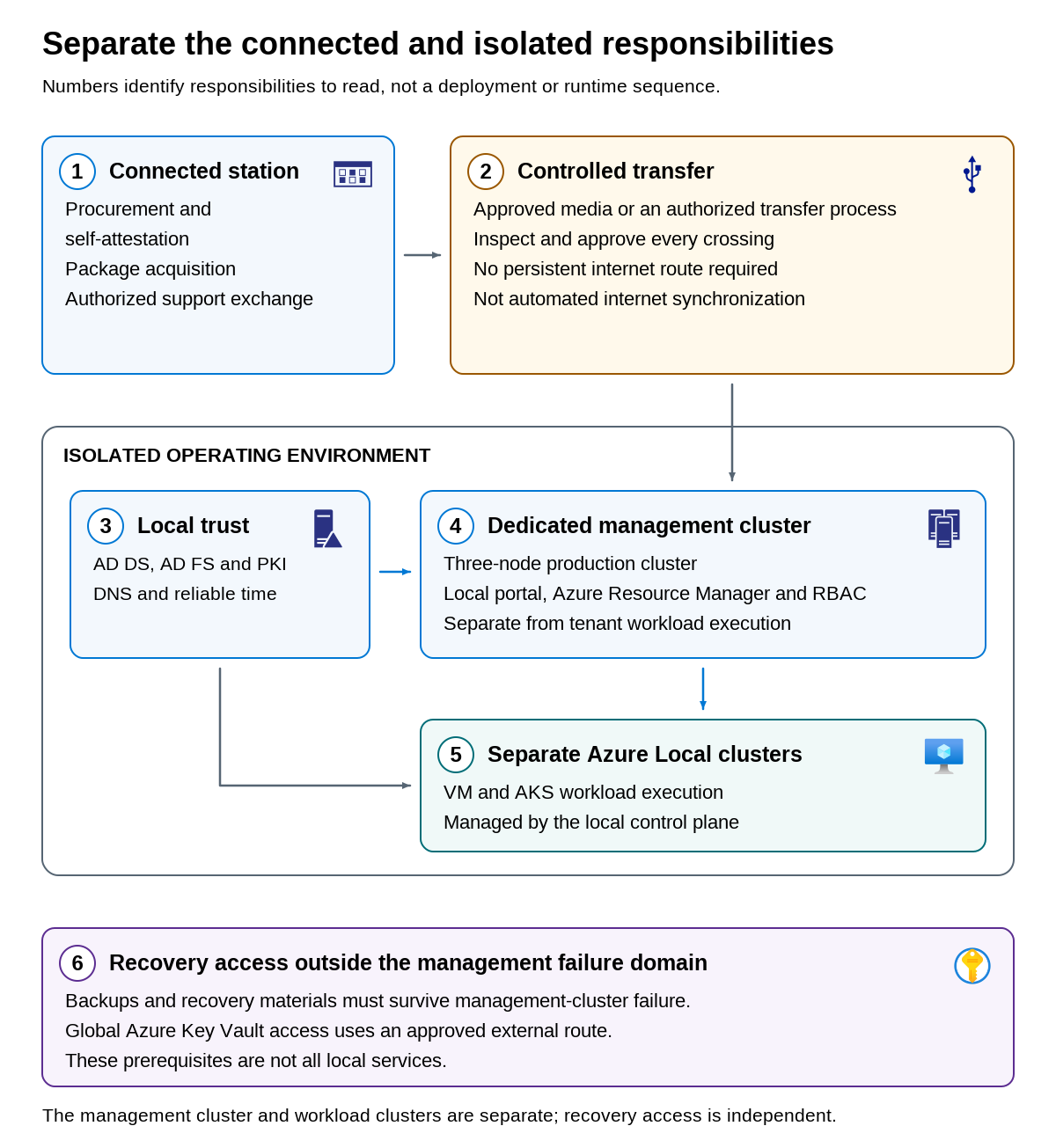
Understand how the management cluster starts
The control plane ultimately runs on the dedicated management cluster, but that cluster must first be created. The documented deployment sequence resolves this bootstrap dependency by installing and configuring the control-plane appliance on a prepared seed node first.
The seed node is the initial host used to start the deployment. Once the local control plane is running, you use its local portal to deploy the first Azure Local instance and form the management cluster. During cluster creation, the appliance moves to cluster storage and becomes a clustered VM.
This sequence requires local identity, DNS, certificates, addresses, and approved installation content before the finished management cluster exists. In the deployment and recovery guidance, cloud deployment refers to this Azure Local deployment stage through the local control plane. It doesn't mean connecting the appliance to public Azure.
Before setting up any Azure Local instance, including later workload clusters, complete certificate trust preparation on every node. Use the public certificate of the root CA for the ingress endpoint certificates, not an intermediate CA certificate. The documented preparation stages this certificate as C:\AzureLocalDisconnectedOperations\applianceRoot.cer, copies it to $env:APPDATA\AzureLocal\AzureLocalRootCert.cer for Arc appliance deployment, and imports it into Cert:\LocalMachine\Root. The AppData path belongs to the account running that step. Record the preparation account and confirm the file is in the profile used by the documented workflow rather than assuming another account's profile contains it. If the management endpoint certificates use a different root, also import that public root into Cert:\LocalMachine\Root on every node.
For the documented fully air-gapped procedure, acquire the Microsoft Code Signing PCA 2011 certificate through the approved connected acquisition and transfer process. Import it from an elevated PowerShell session on every node into Cert:\LocalMachine\CA, the Intermediate Certification Authorities store, not the Trusted Root store. This is a Microsoft code-signing intermediate certificate, not a replacement for the root of your local endpoint PKI. The preparation guide states that cluster deployment fails if this certificate isn't installed.
Importing roots on an administrator's client or staging the management and ingress PFX files on the seed node doesn't perform these node-level trust steps. Transfer only public CA certificates for this preparation, never CA private keys.
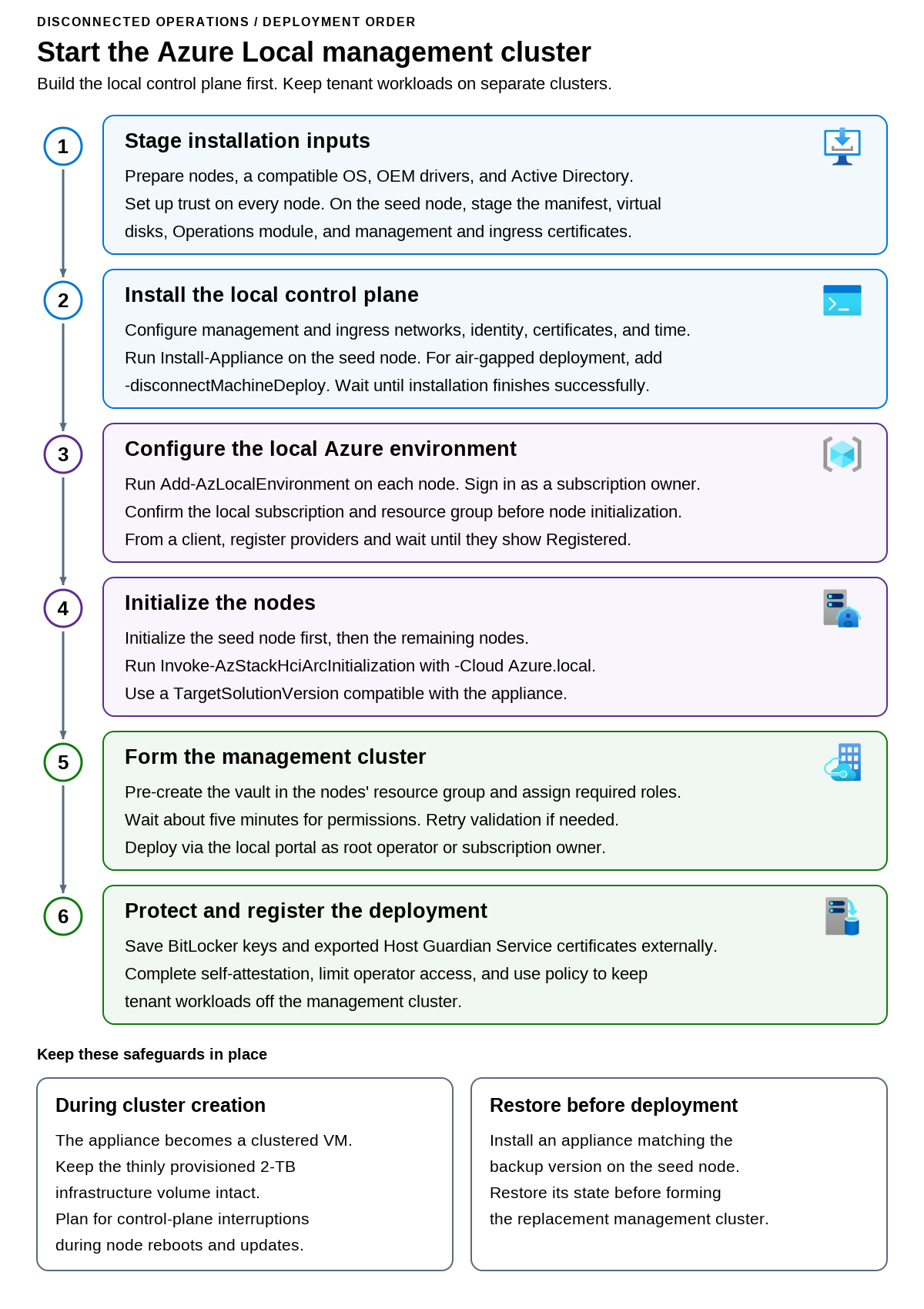
Use the following stages to turn the prepared nodes into an operational management cluster:
- Stage the installation inputs: Prepare the physical nodes with a compatible Azure Local image, OEM drivers, and Active Directory configuration. The management cluster doesn't support deployment without Active Directory. On the seed node, stage the appliance manifest, virtual disks, Operations module, and certificates for the management and ingress endpoints.
- Install the local control plane: Import the Operations module in an elevated PowerShell session on the seed node. Configure the management and ingress networks, identity integration, certificates, and reliable time sources, then run
Install-Appliance. Use-disconnectMachineDeployfor an air-gapped deployment, and wait for installation to finish successfully before proceeding. - Configure the local Azure environment: On each node, use
Add-AzLocalEnvironmentto add the local environment with its ARM endpoint. Sign in to the local environment as the root operator or an account with the Owner role on the target subscription. Select the subscription for the management cluster. The documented recommendation is the operator subscription, which helps isolate the control plane from tenant workloads. Create or confirm the resource group that node initialization will use. From a management client rather than an Azure Local node, register the required resource providers in that subscription and wait until they show Registered before initializing any nodes. - Initialize the nodes: Run
Invoke-AzStackHciArcInitializationon the seed node first, then on the remaining nodes. Set-CloudtoAzure.localand use aTargetSolutionVersioncompatible with the disconnected operations appliance. Targeting public Azure or using an incompatible version prevents a successful disconnected deployment. - Form the management cluster: After node initialization, pre-create the local key vault in the resource group containing the initialized nodes. Follow the pre-creation example linked from the deployment guide. The linked example creates the vault with Azure RBAC authorization enabled. It grants the account that runs the portal deployment the Key Vault Secrets Officer and Key Vault Data Access Administrator roles and grants each node's managed identity the Key Vault Administrator role on the vault. Allow about five minutes for permissions to propagate before continuing with portal deployment. Sign in to the local portal as the root operator or subscription owner, select the initialized nodes, and complete deployment in the same subscription and resource group. If validation reports a Key Vault permission error, allow more time, refresh the portal, and retry validation and deployment.
- Complete the protection and registration tasks: Back up the appliance's BitLocker recovery keys, export the Host Guardian Service certificates, and store them outside the management cluster. Complete post-deployment self-attestation, limit operator access, and use policy to prevent tenant workloads from being deployed on the management cluster.
Note
The current deployment guide links to a Key Vault pre-creation example in the known issues for versions 2602 and 2603. That older issue reports that RBAC permissions can take up to 20 minutes to propagate. The current deployment procedure says to wait about five minutes, then wait longer and retry if validation still reports permission errors. Neither interval replaces the required role assignments.
Cluster creation provisions a thinly provisioned 2-TB infrastructure volume and moves the appliance into cluster storage. Don't modify or delete the infrastructure volumes created by deployment. Plan for control-plane interruptions during node reboots and updates.
This order also matters during recovery. For a restore-before-deployment workflow, install a matching-version appliance on the seed node and restore its state before deploying Azure Local to form the replacement management cluster.
Understand the local service catalog
In this module, the local service catalog means the set of services and management capabilities available through the disconnected control plane. It describes what you can create, manage, and govern locally, including VMs, Kubernetes clusters, container registries, secret storage, and access to resources. You use these capabilities through supported local portal, CLI, or API operations. The catalog isn't a repository of installation packages or VM images. Availability depends on the deployed release and registered resource providers, while role assignments determine which operations each user can perform.
Platform expansion packs can add capabilities after the initial deployment. When a planned capability is supplied through a pack, include its approved package and installed state in the service inventory. Don't assume that selecting a control-plane release and registering a resource provider alone makes that capability available.
Apply the same approved acquisition, quarantine, and transfer controls to expansion packs as to other platform content. The published onboarding prerequisites specify a running disconnected environment on version 2607 or later, an approved package, the OperationsModule, operator access, management-endpoint client authentication, and sufficient upload and installation storage. Confirm support for the selected release and package, complete upload and installation through the supported workflow, and inspect installation status and installed content before relying on the capability.
Removing a pack or one of its components makes that content unavailable to the system or tenants. Assess dependent workloads and obtain change approval before removal rather than treating it as routine package-cache cleanup.
An Azure-consistent interface helps you reuse concepts such as subscriptions, resource groups, templates, and roles. It doesn't imply complete feature parity with the public service of the same name.
The following table explains how to interpret the main local capabilities.
| Capability | What it provides locally | Boundary to preserve |
|---|---|---|
| Portal and Azure Resource Manager | Resource organization, supported management APIs, templates, and CLI workflows | A public-cloud template works only if its resource types, API versions, and features are supported locally. |
| Role-based access control (RBAC) | Permissions scoped to local subscriptions and resource groups | Operator-subscription rights don't automatically apply to tenant subscriptions. |
| Managed identities | System-assigned identity for resource types that support it | Don't assume user-assigned identities or every public-cloud identity integration. |
| Azure Local device and VM management | Management of supported clusters, nodes, and Windows or Linux VMs | Workload capacity and guest configuration remain separate responsibilities. |
| Kubernetes and selected Arc capabilities | Supported Azure Kubernetes Service (AKS) on Azure Local and documented Kubernetes or VM-guest integration | Verify the particular workload and extension, not only the presence of the Arc name. |
| Azure Container Registry | Local storage and retrieval of container images and artifacts | External image registries don't become reachable automatically. |
| Azure Key Vault | Local storage and access for secrets | Don't assume the complete public Key Vault feature set or substitute it for documented global-Azure backup prerequisites. |
| Azure Policy | Supported governance when new resources are created | The reviewed disconnected guidance lists the compliance dashboard, remediation actions, and policy exemptions as unsupported. |
Some endpoint lists contain storage and messaging endpoints used by platform components. An endpoint existing in the appliance's certificate inventory doesn't establish that the corresponding public Azure service is available for arbitrary tenant applications.
Plan network discovery and trust together
The disconnected operations control-plane VM has separate management and ingress virtual network interface cards (vNICs). The management path supports deployment and lower-level operations through protected interfaces. The ingress path serves normal portal, CLI, and service traffic. Separate names don't imply separate physical networks by themselves. Your network plan determines routing and access controls.
Reserve the management and ingress addresses before deployment. The ingress address must be in the Azure Local instance's subnet but outside the reserved range used for instance deployment. Ensure that clients can reach ingress on HTTPS port 443 and that the appliance can reach the required identity and infrastructure endpoints.
The documented appliance container range is 10.131.19.0/24, and it isn't configurable. If you have existing hosts that use this IP address range, resolve overlapping use in the network design before deployment. Don't assume that changing a workload subnet also changes the appliance's internal range.
Create a dedicated DNS zone for the disconnected environment's fully qualified domain name (FQDN). For example, an illustrative deployment suffix of cloud.contoso.com produces names such as portal.cloud.contoso.com and armmanagement.cloud.contoso.com. The dedicated zone can't be on the same level as your domain controller.
DNS must also handle dynamically created service names, including the required wildcard names for registry and vault endpoints. The corresponding certificates must cover the correct names. A working DNS response and a valid certificate are different checks: DNS locates the service, while TLS verifies the service's identity and protects the connection.
Use reliable local time sources. Incorrect time can invalidate certificates, disrupt token acceptance, and make incident timelines unreliable. Provide resilient DNS and time services rather than placing their only instances behind the control plane they support.
Plan optional limited-connectivity diagnostics
Use this path only if the organization authorizes the control-plane VM to connect to Azure for observability and support. It isn't required for routine local management. A fully air-gapped appliance instead uses local collection and an approved transfer and upload process.
For the public-Azure workflow, plan the Azure subscription, tenant, region, and resource group used for the appliance's observability registration. The on-demand diagnostics procedure requires a service principal with the Azure Connected Machine Resource Administrator role scoped to that resource group. Keep the service-principal secret in approved protected storage. Register Microsoft.HybridConnectivity, Microsoft.GuestConfiguration, and Microsoft.HybridCompute in the public-Azure subscription used by that workflow. The published prerequisites also list Microsoft.Compute for Update Manager and extension upgrades and Microsoft.AzureArcData if Arc-enabled SQL is used. These are feature-specific conditions, not instructions to enable those services or claims that every public-Azure feature is supported locally. Confirm the providers needed by the selected supported workflow and release. These connected-Azure prerequisites don't replace local workload-subscription permissions.
The following table identifies the published external endpoint groups for limited-connectivity observability.
| Purpose | Published endpoint names |
|---|---|
| Geneva observability services | gcs.prod.monitoring.core.windows.net, *.prod.warm.ingest.monitor.core.windows.net |
| Azure Connected Machine agent identity and management | login.windows.net, login.microsoftonline.com, pas.windows.net, management.azure.com, *.his.arc.azure.com, *.guestconfiguration.azure.com |
These are DNS destination names, not a complete firewall configuration. Confirm the required routes, protocols, ports, and cloud-specific endpoints for the installed release, then approve only the intended traffic. Don't expand this list into unrestricted internet access or assume that it applies unchanged to another Azure cloud.
Build the observability configuration with New-ApplianceObservabilityConfiguration, apply it with Set-ApplianceObservabilityConfiguration, and inspect it with Get-ApplianceObservabilityConfiguration before attempting a direct diagnostic upload. These cmdlets prepare the configuration used by the connected observability workflow. Microsoft describes that workflow as using appliance Arc registration and managed identity, but setting a configuration isn't by itself proof that registration or upload succeeded. Keep the connected subscription and identity details separate from the local operator context. Configuring appliance observability doesn't authorize public-Azure registration of the isolated Azure Local nodes. If the site must stay fully air-gapped, leave direct connected observability unconfigured and use the indirect diagnostic route.
Define security boundaries and shared responsibilities
An air gap reduces direct exposure to external networks. It doesn't make every user, device, application, or imported file inside the boundary trustworthy. A compromised workload or administrative computer can still attempt lateral movement, which means reaching other systems after gaining an initial foothold.
The appliance includes documented platform protections such as Secure Boot, application control, Microsoft Defender, and BitLocker-encrypted data volumes. Secure Boot checks trusted boot components, application control restricts which code runs, and encryption protects data on storage. None of these controls authorizes an administrator's actions or replaces application-level access controls.
Separate platform-provided protections from the responsibilities that remain with your organization.
| Area | Platform boundary | Customer responsibility |
|---|---|---|
| Appliance | A restricted appliance with protected management interfaces and built-in security controls | Preserve the supported configuration and use approved update, diagnostic, and recovery procedures. Don't install arbitrary agents or modify appliance internals. |
| Network and administration | Management and ingress interfaces serve different purposes | Restrict who can reach each interface, protect privileged clients and host-management access, and monitor permitted network paths. |
| Workloads and data | Supported infrastructure runs the workload | Secure guest operating systems, applications, credentials, data access, and workload-specific backup and monitoring. Appliance protections don't automatically secure every guest. |
| Physical access and transfers | Isolation limits external connectivity | Control facility access, removable media, acquisition stations, and hardware handling throughout their lifecycle. |
Use network segmentation to limit communication between workload, management, backup, identity, and transfer systems. For each required flow, record its source, destination, purpose, protocol, owner, and applicable release requirement. Permit documented necessary flows and restrict unrelated access. Don't assume that two vNICs, two VLANs, or two clusters create an effective security boundary without routing and access rules.
Use dedicated, controlled administrative clients for privileged operations. Separate ordinary user activity from platform administration, limit host and management-endpoint access to the personnel who need it, and protect management client certificates. Avoid turning a transfer station into an unrestricted network bridge between the connected and isolated environments.
Disconnected operations doesn't provide a built-in intrusion detection system (IDS) or intrusion prevention system (IPS). An IDS detects suspicious traffic or behavior, while an IPS can block matching activity. Your organization is responsible for appropriate network-path protection. Ensure that its rules, intelligence, alerts, and response procedures remain usable without public-cloud services.
For Contoso, a useful acceptance check is to confirm that an authorized administrative client can reach required management interfaces while an ordinary research VM can't reach interfaces it doesn't need. Record both permitted and blocked paths. A successful portal sign-in alone doesn't demonstrate segmentation.
For the disconnected operations control-plane VM, the management interface permits a limited set of deployment and troubleshooting commands and uses a customer-provided certificate configured during bootstrapping. The ingress interface instead authenticates users through the configured identity provider and applies RBAC. Protect the management client certificate as a privileged credential, and restrict each interface to its intended users and operations.
The control-plane VM encrypts its data volumes with BitLocker using XTS-AES encryption with 256-bit keys by default. Recovery passwords are managed internally during normal operation, but some support and recovery scenarios require an external copy. Retrieve them with Get-ApplianceBitLockerRecoveryKeys using an authenticated management client context, and store them securely outside Azure Local and its hosts. Also export the Host Guardian Service certificates with Export-ApplianceHGSCertificates from the seed node and protect an external copy. Losing the required recovery material can make redeployment necessary.
Forward appliance security events to a customer-managed security information and event management (SIEM) system through syslog. For production, use TCP with TLS encryption and server authentication. Don't bypass certificate validation or use unencrypted forwarding to work around a configuration problem. These logs support investigation, but they don't replace customer-managed IDS and IPS on the network path to detect and mitigate abnormal traffic.
Identify independent failure domains
A failure domain is a set of components that can fail together. Separate clusters reduce some shared failures, but they might still share power, switches, identity servers, backup storage, or administrator access.
The dependency diagram shows which capabilities build on local foundations and which recovery capabilities must remain independent.
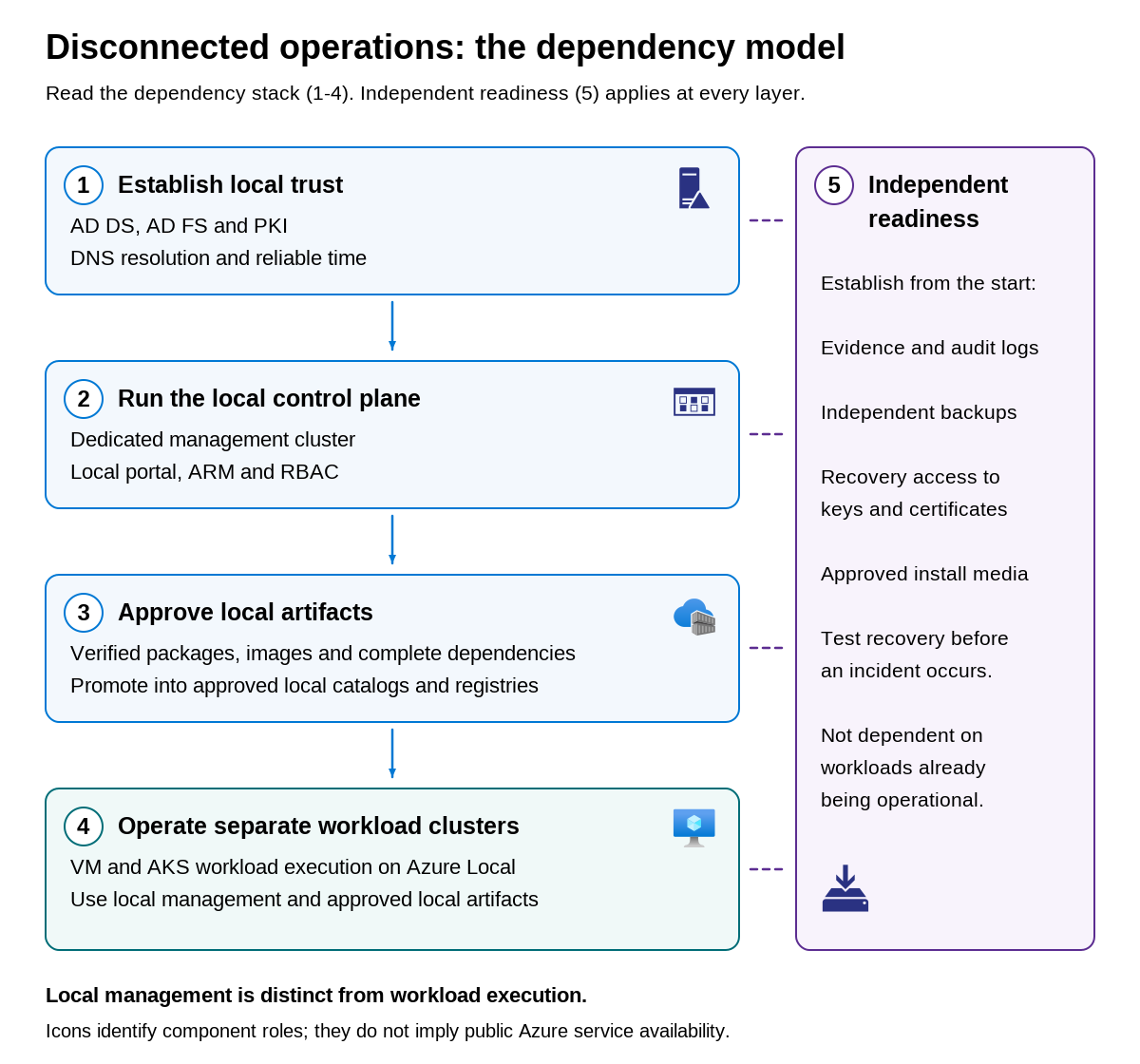
Use the following questions to identify circular dependencies.
| Dependency | Question to resolve before acceptance | Example of an unsafe design |
|---|---|---|
| Identity | Can authorized operators recover access if routine federation fails? | The only identity server and recovery instructions are on an unavailable cluster. |
| Certificate trust | Are trust chains and current revocation information locally reachable? | Certificates require an internet-only revocation service. |
| Management | Can the control plane retain capacity during maintenance and a node failure? | Tenant VMs consume the management cluster's reserve. |
| Workload data | Are application data and configuration protected independently? | The team expects appliance backup to include all VM disks and databases. |
| Evidence and recovery | Can staff reach logs, backups, keys, and instructions after management-cluster loss? | The only backup share and key inventory are inside the failed environment. |
Define separate objectives for management availability and business-service availability. Portal unavailability doesn't necessarily stop an existing VM, but it can block provisioning, configuration changes, and management-driven recovery. Conversely, a responsive portal doesn't establish that a database can complete transactions.
The management and ingress adapters on the control-plane VM connect to the management virtual switch and depend on the underlying physical network. Separate IP addresses don't remove that shared dependency. Assign the management interface a valid, unused local address. Place the ingress IP in the same subnet as the Azure Local instance, but outside the IP range reserved for cluster deployment. The appliance's fixed 10.131.19.0/24 container network can't be reconfigured, so avoid conflicting address use or isolate that range from the disconnected environment.
Provide a dedicated DNS zone for the disconnected environment's FQDN and resolve its service names, including wildcard registry and vault endpoints, to the ingress IP. Clients must be able to resolve and reach these endpoints over HTTPS on port 443. The control-plane VM must also be able to reach its configured DNS server, identity provider, and other required infrastructure endpoints through the planned routes and ports. Include shared switches, DNS servers, and identity services in failure testing rather than assuming that separate VMs or clusters make these dependencies independent.