Plan the local identity lifecycle
Identity has three distinct jobs: prove who a caller is, discover the caller's relevant group memberships, and decide what the caller can do. Treating these as one operation makes access incidents difficult to diagnose.
Separate authentication, synchronization, and authorization
The validated identity model uses Active Directory Domain Services (AD DS) for groups and memberships and Active Directory Federation Services (AD FS) for authentication. The documented group integration supports only Universal groups. Set Universal scope for the Active Directory groups that this integration synchronizes.
Authentication establishes the caller's identity. OpenID Connect (OIDC) supplies the authentication integration with the federation service. A successful sign-in answers "Who are you?" It doesn't by itself answer "Can you delete this VM?"
Directory synchronization imports groups and memberships through the directory integration. This is asynchronous. A fresh sign-in doesn't guarantee that the local copy of group membership has just been refreshed.
Authorization evaluates local RBAC assignments at a resource scope. A role assignment associates an identity or group with permitted actions over a subscription, resource group, or supported resource scope. Use the narrowest appropriate scope and distinguish the ability to manage resources from the ability to grant access.
The diagram shows the separate inputs to an authorization decision.
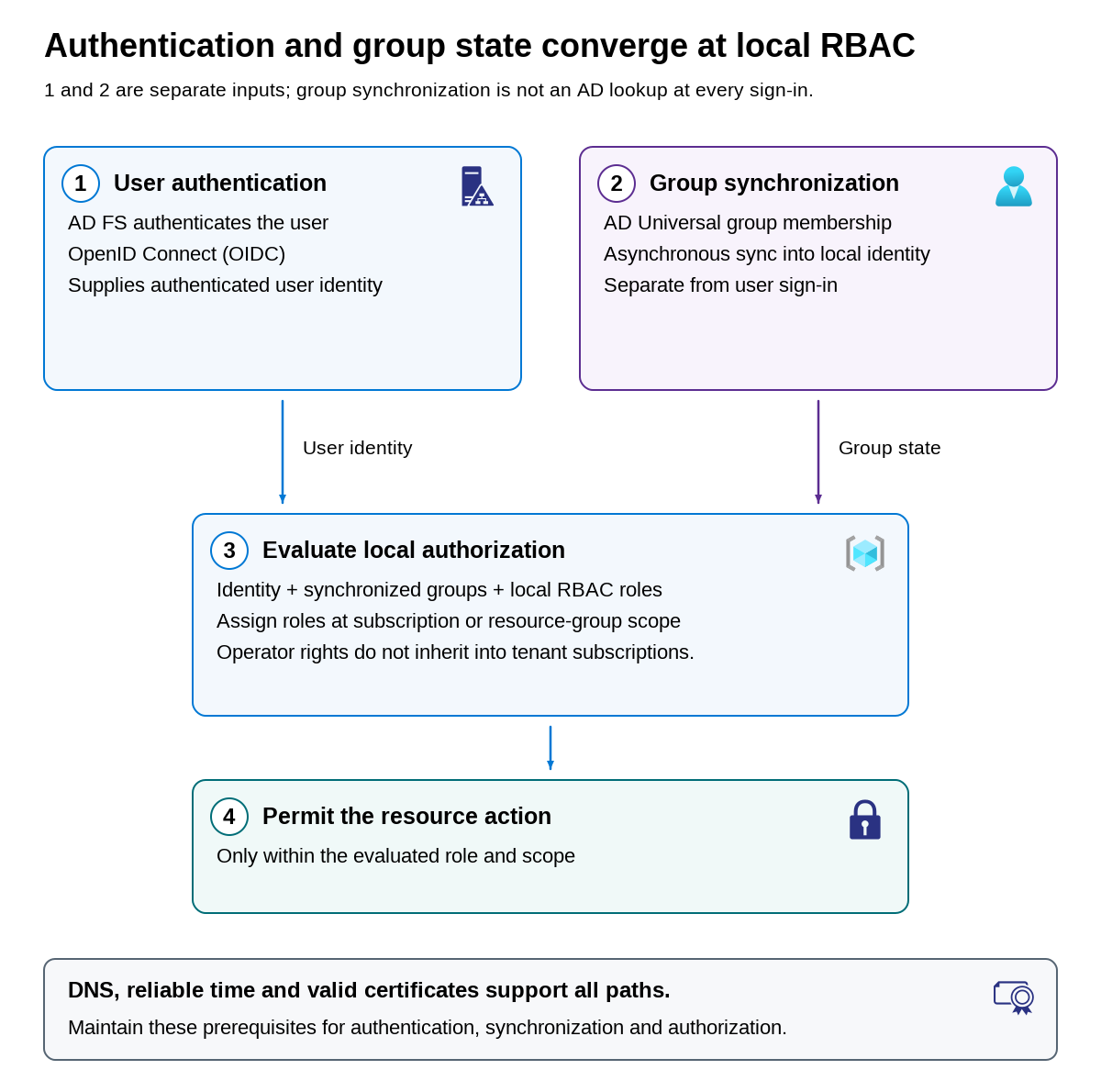
The initial root operator owns the special operator subscription and can add operators. Operator actions include supported identity administration, subscription management, and diagnostic operations. Assigning an operator role doesn't automatically grant that person access inside every tenant subscription. The documented identity model also doesn't provide management groups or an aggregate root scope across subscriptions.
For Contoso, the platform team administers the operator subscription. Research teams receive workload permissions in their own subscriptions. The team that manages the platform shouldn't infer access to every research resource from its operator role.
Onboard workload owners and apply local governance
Workload onboarding is the process of giving a team an owned, supported resource scope with the access, dependencies, and operating responsibilities it needs. In this context, a workload tenant is a consuming team or organization. It doesn't imply a separate public Microsoft Entra tenant.
Use an onboarding record that identifies the workload owner, local subscription, resource groups, approved services, data classification, support contacts, capacity allocation, and protection requirements. A planned capacity allocation is an operating agreement, not a claim that the disconnected platform implements every public-cloud quota feature.
The following sequence connects resource organization with usable, governed access.
- Have an authorized operator create or identify the team's local subscription and confirm its ownership. Keep workload ownership distinct from operator-subscription administration.
- In the intended local subscription, register the resource providers required by the supported services and wait for the required registration state. Registration enables the subscription to use those providers. It doesn't install an unsupported service or register the workload with public Azure.
- Create the required resource groups and assign approved groups or application identities the appropriate local roles. Validate access at the actual workload scope rather than assuming operator-subscription inheritance.
- Apply supported policy assignments and agree naming, ownership metadata, allowed configurations, and change responsibilities.
- Exercise both an allowed operation and an operation that should be denied in an authorized test scope. Confirm that deployment templates use supported local resource types, API versions, images, and dependencies.
RBAC and Azure Policy answer different questions. RBAC determines whether a caller can perform an action. Policy evaluates whether the requested resource configuration meets an assigned rule. An authorized caller can therefore receive a policy denial.
A policy definition describes a rule and its effect. A policy assignment applies that definition to a scope. Parameters supply values such as a required tag name. A tag is a metadata key and value used to organize resources. Tags aren't credentials or security boundaries, and you shouldn't put secrets in them.
For a bounded Contoso example, use the built-in policy that requires a tag on resource groups. In an approved nonproduction local subscription, open Policy, select Assignments, and choose Assign policy. Select the intended scope and supported definition, enable enforcement, and set Tag name to OwnerTeam. Review the assignment before creating it.
With an identity that has permission to create resource groups, attempt creation without the required tag and confirm a policy denial. Then include the tag and confirm that the policy no longer blocks the request. Requiring the tag's presence doesn't verify that its value identifies a real accountable team. That additional ownership check belongs in the onboarding process unless a supported rule explicitly enforces it. After recording the results, remove only the test resources approved for cleanup.
The reviewed disconnected guidance lists the compliance dashboard, remediation actions, and policy exemptions as unsupported. Don't promise that an assignment will repair existing resources or produce the public-cloud compliance experience. Inspect existing resources separately and use an approved supported correction process. An organizational exception record doesn't create a supported Azure Policy exemption feature.
Perform resource-provider registration from a management client configured for the local Azure.local environment rather than from an Azure Local node, where PowerShell module versions can conflict with deployment requirements. Sign in to the local environment, select the intended local subscription with Set-AzContext, and use Register-AzResourceProvider for each required provider. Use Get-AzResourceProvider to inspect registration status and wait until the required providers show Registered. You can also register providers and inspect their status in the local portal by opening the target subscription and selecting Settings > Resource providers.
Before deployment, register Microsoft.EdgeArtifact, Microsoft.HybridCompute, Microsoft.GuestConfiguration, Microsoft.HybridConnectivity, Microsoft.AzureStackHCI, Microsoft.Kubernetes, Microsoft.KubernetesConfiguration, Microsoft.ExtendedLocation, Microsoft.ResourceConnector, and Microsoft.HybridContainerService. Register Microsoft.KeyVault as well when automating local vault creation. These registrations apply to the selected local subscription, not to an unrelated public Azure subscription.
For the OwnerTeam example, select Require a tag on resource groups, not Require a tag on resources, which excludes resource groups. Set the assignment's scope and name, set Policy enforcement to Enabled, and enter OwnerTeam as the Tag name before selecting Review + create. This definition checks for the tag's presence. If a design also requires a particular value, use a supported definition that explicitly requires both the tag and its value.
Other supported built-in definitions cover tag addition and inheritance, Kubernetes image restrictions, container resource limits, allowed host paths, and guest settings such as Windows TLS configuration and time zones. Match each definition to its supported resource type and enforcement behavior. Some generic definition descriptions mention remediation tasks, but those descriptions don't override the disconnected platform's lack of support for remediation actions, the compliance dashboard, and policy exemptions.
Design for delayed and incomplete identity cleanup
Synchronization isn't an immediate access-revocation mechanism. The documentation describes no force-synchronization capability and limitations in cleaning up users or groups removed upstream.
The identity article contains differing descriptions of the synchronization interval. Don't design a critical revocation process around a precise interval quoted from one paragraph. Confirm the installed release's behavior and inspect effective local access.
When a researcher leaves a project, changing Active Directory membership is only the start of the access-removal workflow. Review local role assignments, synchronized identity state, application credentials, and relevant session or token behavior. Use the supported local removal and incident-response procedures, and confirm the result with an authorization check. Don't assume that a successful directory change means all previously issued access is immediately unusable.
For a synchronization failure, investigate directory reachability, DNS, firewall rules, the read-only directory account, and the configured synchronization root. If the wrong groups appear, check the selected root group rather than widening access until a command succeeds.
Prepare an identity integration record
Record the federation authority, client application identifier, directory endpoint and secure port, synchronization root group, certificate chains, initial operator, and accountable owners. Store credentials in the approved protected system, not in the design document.
Use a directory account with the documented read permissions. Separate that account from privileged human operator identities. Protect automation identities and their certificates according to the privileges they hold. A local service principal is an application identity, not proof that the same public Microsoft Entra tenant or authentication flow is being used.
Emergency access must be a supported, rehearsed process. The identity guidance describes host-administrator recovery using the matching OperationsModule and installation certificates, including repair of the root operator configuration. Arrange authorized host access, protected certificate access, and independent instructions before an outage.
Don't invent an undocumented federation bypass or keep untracked administrator credentials as a shortcut. An emergency process needs approval, auditing, and a way to return to normal access controls.
Manage service account identities and secrets
Services and automation also need identities. A credential is the material an identity presents to authenticate, such as a password or a private-key certificate. Changing a credential isn't the same as changing the identity's role assignments. A secret can be a credential or other sensitive configuration consumed by an application.
Give each nonhuman identity an accountable owner, documented purpose, approved scope, credential location, expiry or review date, consumer list, and retirement trigger. Prefer separate identities for separate responsibilities so that replacing a backup credential doesn't also change an unrelated deployment pipeline.
The following examples show why credential ownership must include the consuming systems.
| Identity or credential | Typical consumer | What to verify during a change |
|---|---|---|
| Read-only directory integration account | Group synchronization | The supported identity configuration uses the new credential, synchronization succeeds, and permissions remain read-only. |
| Backup-share account | Appliance backup and recovery access | Backup configuration and authorized recovery access use the intended credentials, and a new backup completes. |
| Local automation service principal or certificate | Deployment and administration automation | The identity retains only required roles, approved jobs authenticate successfully, and retired credentials can no longer be used. |
| Registry access credential or application secret | Workload nodes, deployment jobs, or applications | Every intended consumer retrieves or uses the replacement, including a new deployment or restart where appropriate. |
Where both the local resource and target service explicitly support system-assigned managed identity, it can reduce the need for application owners to distribute credentials. The platform manages that identity's credentials, but operators still own its authorization and lifecycle. Don't assume user-assigned identities, every public-cloud integration, or automatic preservation of identity relationships after deleting and recreating a resource.
Treat routine credential rotation as a coordinated change.
- Inventory all consumers and confirm the supported replacement mechanism, required permissions, and recovery procedure.
- Create or obtain replacement material through the approved identity or secret-management process. Store it in the appropriate protected location.
- Update consumers through their supported configuration paths. Use overlapping credentials only where the service supports them. Otherwise, plan a coordinated maintenance window.
- Confirm real consumer operations, such as a completed backup, successful directory synchronization, or an application request. Updating a secret store alone doesn't prove that a running process has refreshed its cached value.
- Retire the old authentication material, confirm that it no longer works where applicable, and update the inventory without recording secret values.
For suspected compromise, follow the incident process rather than waiting for the next routine rotation window. Immediate revocation might be necessary even when it interrupts a consumer, so identify that authority in advance.
Keep historical backup decryption material separate from routine authentication rotation. A key might still be necessary to restore a retained backup after a password or application credential has changed. Don't destroy required decryption material merely because it isn't used by the latest backup.
Directory synchronization and operator automation use different credentials. The LDAP integration account needs read-only directory access to retrieve supported groups and memberships. By contrast, the optional AutomationCertificate in the identity configuration lets deployment automation authenticate as an operator, create subscriptions, and register resource providers. Protect its private key as an administrative credential and keep it separate from application secrets and directory-read credentials.
An authorized host administrator can inspect and repair identity integration with the deployed release's OperationsModule and the installation certificates. Use Get-Command *Appliance*ExternalIdentity* to discover the available identity commands and Get-ApplianceExternalIdentityObservability to inspect synchronized groups and memberships. Before applying proposed identity settings, use Test-ApplianceExternalIdentityConfiguration for client-side checks and Test-ApplianceExternalIdentityConfigurationDeep for deeper validation of the parameters and setup.
If access to the operator subscription is lost, the supported recovery approach includes changing RootOperatorUserPrincipalName to the intended operator account. Reserve Set-ApplianceExternalIdentityConfiguration for identity-integration repair or recovery because it can reset the operator subscription. Don't treat it as a general-purpose password-rotation command. After a repair, confirm operator sign-in, synchronized identity state, and effective permissions at the intended local scopes.