Manage the operational lifecycle
Disconnected operations shifts responsibility for routine observation and update coordination to the local operating team. You need evidence that distinguishes a healthy management plane, healthy cluster infrastructure, and a working application.
Collect evidence that remains useful during failure
Monitoring observes health and performance over time. Diagnostic collection gathers information for investigation, often after a problem occurs. A support archive collected once isn't a substitute for continuous monitoring.
The disconnected monitoring guidance describes options such as System Center Operations Manager for infrastructure and VMs, and non-Microsoft or open-source tools such as Prometheus and Grafana for Kubernetes. Choose tools whose packages, credentials, data storage, and operating dependencies fit the isolated environment. Their inclusion as options doesn't mean that every deployment must use them.
A local dashboard that queries Azure Resource Manager still depends on the local resource-manager endpoint. Preserve an independent observation path for host health and application transactions during a control-plane outage.
The following evidence categories help you build a useful operating view.
| Category | Examples to retain locally | Why it matters |
|---|---|---|
| Management health | Portal and API availability, resource-operation results, operator access | Detects an unavailable or degraded control plane. |
| Infrastructure health | Node, storage, network, capacity, and cluster events | Distinguishes hardware or capacity problems from portal problems. |
| Identity and trust | Synchronization status, role changes, certificate expiry, revocation availability | Detects access drift and expiring dependencies before they block management. |
| Software supply and changes | Manifests, approvals, installed versions, update history | Connects an incident to the exact content and changes applied. |
| Business service | Application transactions, response times, data checks | Establishes whether users can complete their work. |
| Protection | Backup completion, backup age, protected key access, recovery exercise results | Establishes whether the environment can be recovered, not merely observed. |
Define collection frequency, retention, capacity, access, and alert ownership. Synchronize clocks so events from different systems can be correlated. Keep important evidence outside the failure domain being investigated.
The security guidance supports forwarding appliance security events to a customer-managed security information and event management (SIEM) system. Prefer authenticated, encrypted TCP/TLS and validate the receiver's certificate. Don't solve a trust failure by switching to clear-text forwarding.
Maintain offline vulnerability intelligence
Software can become known to be vulnerable after it's passed acquisition checks. A valid signature and an unchanged digest establish neither that the software is free of vulnerabilities nor that yesterday's deployment approval should remain valid indefinitely.
Assign an owner to acquire security advisories from Microsoft, hardware providers, and application vendors through the approved connected station. Transfer the relevant advisories and supported scanner or security-intelligence updates through the artifact process. Record when intelligence was last refreshed and define how urgent notices reach the isolated operations team.
Maintain a component inventory that maps deployed versions and image digests to the systems that use them. A supplier-provided software bill of materials (SBOM) lists software components and can help identify affected dependencies. An SBOM isn't a guarantee of safety, and it doesn't replace an inventory of what's actually deployed.
Use an advisory's affected versions, prerequisites, and mitigations to determine applicability. A Common Vulnerabilities and Exposures (CVE) identifier helps correlate information about a particular vulnerability. Its severity alone doesn't describe your environment's exposure. Consider whether the component is present, whether the affected function is enabled, which local users or systems can reach it, and the consequence of exploitation.
Choose a supported response: import and apply a compatible fix, apply a documented mitigation, restrict the affected path, or record a time-bounded risk decision with an accountable owner. Isolation from the internet isn't sufficient justification to ignore a vulnerability reachable through local workloads, administrators, or imported content.
An emergency fix can use an accelerated approval process, but it still needs authentic packages, compatibility checks, recoverability, and acceptance evidence. Don't patch individual appliance components through an undocumented route to bypass the supported control-plane update model.
For Contoso, a new advisory about an approved container image should trigger an inventory query, a decision about existing deployments, and a hold or review on further promotion of affected content. The fact that its digest still matches the approved manifest doesn't settle any of those decisions.
Respond to suspected compromise without cloud dependencies
An incident-response plan must work when public-cloud security consoles, remote support, or internet-based collaboration aren't reachable. Identify local decision-makers, communication methods, evidence storage, escalation routes, and the approved connected system used for any necessary external coordination.
Use the following sequence as a planning framework, adapting the order to the incident and the supported product procedures.
- Assess and authorize: Determine which services and identities might be affected, record the available evidence, and identify the incident lead and people authorized to interrupt service.
- Contain the affected path: Restrict implicated workload or administrative access using approved controls. Avoid an indiscriminate shutdown that also removes identity, recovery, or evidence access.
- Preserve evidence: Protect relevant logs, artifact records, timestamps, and configuration before destructive cleanup. Record who collected each item and how it was transferred. Use the supported diagnostic route, accounting for its disruption and credential-disclosure risks.
- Replace compromised access and content: Revoke or rotate implicated credentials through supported processes and quarantine suspect artifacts. Apply an authentic compatible fix or a documented mitigation before reintroducing affected systems.
- Recover from a known-good state: Select recovery points and media based on evidence about when compromise began. A successful backup can still contain malicious changes, so the latest backup isn't automatically the safest one.
- Validate and close: Confirm business functionality, appropriate access, monitoring, and the removal of the identified exposure. Record the timeline, residual risks, and required changes to controls or runbooks.
These are operational responsibilities, not a claim that the appliance provides an automated incident-response service. If the appliance itself is implicated, coordinate the supported investigation and recovery path with Microsoft or the support partner rather than modifying its internals.
For Contoso, a credential discovered in a diagnostic transfer copy is both a data-handling issue and a potential access incident. Restrict the copy, determine who could access it, replace the exposed credential, update its consumers, and verify that the old credential no longer authenticates where applicable. Redacting the file alone doesn't invalidate a credential that's already been disclosed.
Choose the appropriate diagnostic route
The diagnostic route depends on both external connectivity and whether the appliance management endpoint is working.
| Condition | Documented approach | Operational implication |
|---|---|---|
| Approved Azure connectivity and a working management endpoint | Direct appliance log collection and upload | Confirm the permitted destination and required observability setup. |
| No Azure connectivity, but a working management endpoint | Collect locally, then transfer and upload from an approved connected system | Protect the original bundle and review the transfer copy before it leaves. |
| Appliance or management endpoint unavailable | Fallback collection using the documented disk-access workflow | This is disruptive and requires recovery material, sufficient storage, and change authorization. |
Fallback collection isn't a harmless read-only health query. The documented workflow stops the appliance VM, accesses its virtual disks, and can require BitLocker recovery material. Use it under the supported procedure rather than as the first response to any slow portal.
Use the operating-system, host, elevation, shell, and session prerequisites specified by each diagnostic tool. The fallback collection guidance excludes PowerShell 7 and PowerShell ISE. The on-demand upload guidance requires elevated Windows PowerShell and excludes PowerShell 7 and PowerShell ISE for uploads. Follow the release-matched prerequisites for direct and indirect collection too. A script that runs under one management shell isn't automatically supported under another.
The release notes describe a version 2605 issue in which indirect log collection can include Server Message Block (SMB) share credentials in Observability logs. SMB is the file-sharing protocol used for the diagnostic collection destination. The documented mitigation uses an explicit role allowlist that excludes Observability. The reviewed notes don't establish a fixed build, so don't assume either that every later build is affected or that a later documentation view proves the issue is fixed. Check the installed version and use the applicable collection guidance.
Keep the upload system separate from the disconnected hosts. The documented upload flow can involve public-Azure Arc registration of the upload machine. Don't accidentally change an isolated host's registration just to transmit a support bundle.
Maintain three update layers
An appliance update doesn't patch every guest or application. Assign owners to each layer.
| Update layer | Examples | Primary coordination responsibility |
|---|---|---|
| Control plane | Local management services, resource providers, appliance components | Disconnected control-plane operator |
| Data plane | Azure Local host operating system, platform components, storage and networking stack | Azure Local infrastructure team |
| Workloads | Guest operating systems, Kubernetes versions and node images, container images, applications | Workload owners with the platform team |
The control plane has a six-month support window. Don't interpret that as six months from whenever you install an old package. Track the support status of the release and the required upgrade path.
The dependency order is control plane, then compatible data plane, then workloads. This doesn't require all three layers to change together. If the current control plane remains supported and supports the proposed downstream update, the data-plane or workload change can follow its own approved cadence.
At this review date, the acquisition matrix's newest listed pairing is for release 2609. The general availability of Azure Local 2610 and the presence of a 2610 documentation view don't establish a new disconnected pairing. Use the actual eligible package combination and release guidance. Escalate an unlisted pairing instead of assuming that matching marketing version labels are enough.
Use decision gates around each change
The following diagram puts compatibility, artifact approval, and recoverability before a platform change.
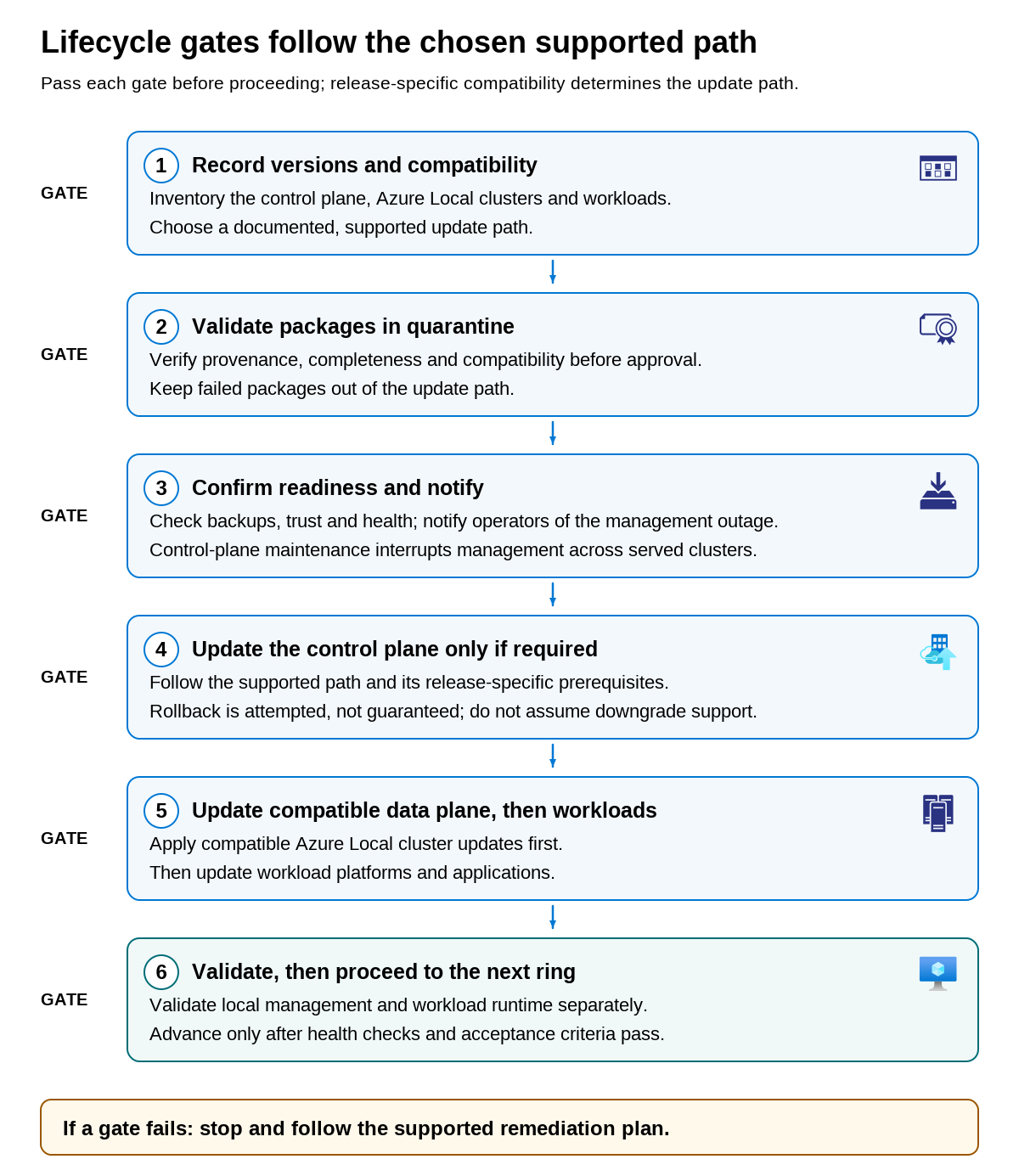
Use this sequence as a change-control framework around the release-specific update procedure.
- Approve the version combination: Record installed and target versions for the control plane, Azure Local solution, hardware solution extensions, clients, and affected workloads. Review prerequisites and known issues.
- Approve the complete package set: Verify provenance, signatures, hashes, malware checks, and dependencies. A generic solution bundle isn't proof that all required Arc resource bridge or AKS images are available offline.
- Establish readiness: Confirm health, spare capacity, valid directory credentials, certificate lifetime, independent backup access, and protected recovery material. Identify who can authorize recovery if the update fails.
- Coordinate management downtime: Notify all teams served by the control plane, stop dependent management changes, and retain independent monitoring. The control plane is unavailable during its update, which can take several hours.
- Apply the supported sequence: Use the matching OperationsModule and documented import/update interfaces. Complete the control-plane step if required, then apply eligible data-plane and workload changes through their supported workflows.
- Require terminal results and acceptance evidence: Verify completed update status, portal and API access, effective authorization, workload transactions, monitoring, and backup operation before proceeding.
A maintenance ring is a deliberately bounded set of systems updated before the next set. It limits the impact of an unexpected issue and creates an opportunity to inspect results. With a shared local control plane, however, updating the control plane affects management of all clusters it serves. Calling one workload cluster a pilot ring doesn't isolate it from that management outage.
The update procedure attempts to roll back to the last known good state if a control-plane update fails. An attempted rollback isn't a guarantee of recovery. Don't invent a downgrade by restoring old appliance disks or installing arbitrary earlier packages. Preserve the observed state and use the documented recovery or support path.
For Contoso, schedule the management outage separately from application maintenance. Some applications might continue running, but test those that rely on local management services or secrets during the outage. Don't promise uninterrupted workload availability merely because the planned change targets the control plane.
If you use System Center Operations Manager, install its agent on the Azure Local nodes and import the Windows Server operating system, Windows Server Cluster, Hyper-V, and Storage Spaces Direct management packs. Select the disconnected operations management pack that matches Operations Manager 2022 or 2025. It provides health and metrics dashboards, alert rules, certificate-expiration warnings, notifications, and reporting for a disconnected deployment. Workload VMs need their own monitoring agents. For Kubernetes, Prometheus can collect metrics and evaluate alert rules, while Grafana provides dashboards. Keep their collection, storage, and alerting dependencies reachable within the isolated environment.
Before collecting diagnostics, reserve at least 25 GB of free space and at least twice the expected compressed bundle size, allowing more for large or expanded logs. Select the incident time range and apply any required version-specific role exclusions before collection. When the control-plane VM has approved Azure connectivity, configure observability with Set-ApplianceObservabilityConfiguration before using Invoke-ApplianceLogCollection. Run direct collection with the release-matched OperationsModule from host infrastructure that can access the appliance VM and management endpoint. The documented procedure normally uses the Hyper-V host hosting the appliance VM, not an arbitrary external management workstation. This direct collection command sends appliance logs to Microsoft Support, so authorize the outbound transfer.
Without Azure connectivity, but with a working management endpoint, run Invoke-AzureLocalDisconnectedLogCollection from Azure Local host infrastructure that can access the appliance VM, normally its Hyper-V host. Don't run this collection workflow from an arbitrary external management workstation. Prepare the release-matched OperationsModule, AzureLocal.Orchestration module, and authenticated management-endpoint context there. Use the incident time range, applicable role exclusions, and -SaveToPath. The common-issues guidance requires Domain\Username when running this cmdlet but doesn't identify which credential parameter that requirement covers. Confirm the installed module help or support guidance before encoding a parameter-specific assumption in automation. Appliance logs are saved under ALDO, and host logs under AzureLocal.
After review and transfer approval, upload ALDO appliance logs with Send-DiagnosticData and AzureLocal host logs with Send-AzStackHciDiagnosticData. Use a separate approved internet-connected Windows Server that meets the standalone observability tool's prerequisites and isn't an Azure Local host or the control-plane VM. A dedicated system without an existing Arc registration is the conservative baseline. Keep the upload system's public-Azure registration separate from the isolated nodes' local registration. Use elevated Windows PowerShell for uploads, not PowerShell 7 or PowerShell ISE.
The current documentation also includes desktop Windows examples and describes preserving a preexisting Arc for Server connection with Clear-DiagnosticPipeline -SkipArcForServer. Confirm the installed tool's support requirements before using desktop Windows or an already Arc-managed upload system. Don't replace or retarget an existing agent registration merely to transmit diagnostics.
For appliance log-collection jobs, retain the operation identifier and inspect progress with Get-ApplianceLogCollectionJobStatus. Use Get-ApplianceLogCollectionHistory to review completed jobs and upload details rather than treating a returned identifier as proof of success. Microsoft retains shared diagnostic data for up to 30 days. In a fully disconnected environment, don't rely on portal-based log collection, remote support, or streaming metrics and telemetry to Microsoft.
A control-plane update is required when the installed release approaches the end of its six-month support window, a required feature or fix needs a newer release, or the intended data-plane or workload version is no longer compatible. Required fixes can address security, reliability, or critical bugs. Otherwise, compatible downstream updates can continue without an unnecessary control-plane upgrade. One supported control-plane release can support multiple eligible data-plane releases, and a compatible data plane can support multiple workload update cycles.
The following table gives the documented release 2609 pairing for a new deployment. Record the full build identifiers, not just the release label, when approving installation media.
| Component | Documented release 2609 value |
|---|---|
| Disconnected operations control-plane build | 2609.1.26316 |
| Azure Local build | AzureLocal24H2.26100.32230.LCM.12.2609.0.3009 |
| Target solution version | 12.2609.1003.7 |
For new deployments, don't select an Azure Local release newer than the control-plane release. For an existing environment, also validate the supported update path and compatibility range. A deployment pairing doesn't establish that every older installation can upgrade directly to it, and matching release labels don't replace the build and dependency checks.