Data encryption in transit in Azure NetApp Files
In addition to securing data at-rest, Azure NetApp Files can secure data when it's in-transit between endpoints. The encryption method used depends on the protocol or feature. DNS isn't encrypted in-transit in Azure NetApp files.
SMB encryption
Windows SMB clients using the SMB3.x protocol version natively support SMB encryption. SMB encryption is conducted end-to-end and encrypts the entirety of the SMB conversation
SMB encryption isn't required for Azure NetApp Files volumes but can be used for extra security. SMB encryption does add a performance overhead.
NFS Kerberos
With NFS Kerberos, Azure NetApp Files supports three different security flavors:
- Kerberos 5 (krb5): Initial authentication only; requires a Kerberos ticket exchange/user sign-in to access the NFS export. NFS packets are not encrypted.
- Kerberos 5i (krb5i) – Initial authentication and integrity checking; requires a Kerberos ticket exchange/user sign-in to access the NFS export and adds integrity checks to each NFS packet to prevent man-in-the-middle attacks (MITM).
- Kerberos 5p (krb5p) – Initial authentication, integrity checking and privacy; requires a Kerberos ticket exchange/user sign-in to access the NFS export, performs integrity checks and applies a GSS wrapper to each NFS packet to encrypt its contents.
Data replication
In Azure NetApp Files, you can replicate entire volumes across zones or regions in Azure to provide data protection. The data transfers take place in the secure Azure network infrastructure, which is limited in access to prevent packet sniffing and man-in-the-middle attacks
LDAP encryption
Lightweight directory access protocol (LDAP) search and bind traffic passes over the wire in plain text, meaning anyone with access to sniff network packets can gain information from the LDAP server such as usernames, numeric IDs, group memberships, etc.
LDAP signing: LDAP signing is specific to connections on Microsoft Active Directory servers that are hosting UNIX identities for users and groups. This functionality enables integrity verification for Simple Authentication and Security Layer (SASL) LDAP binds to AD servers hosting LDAP connections. LDAP signing only checks the integrity of an LDAP packet. LDAP signing doesn't encrypt the payload of the packet.
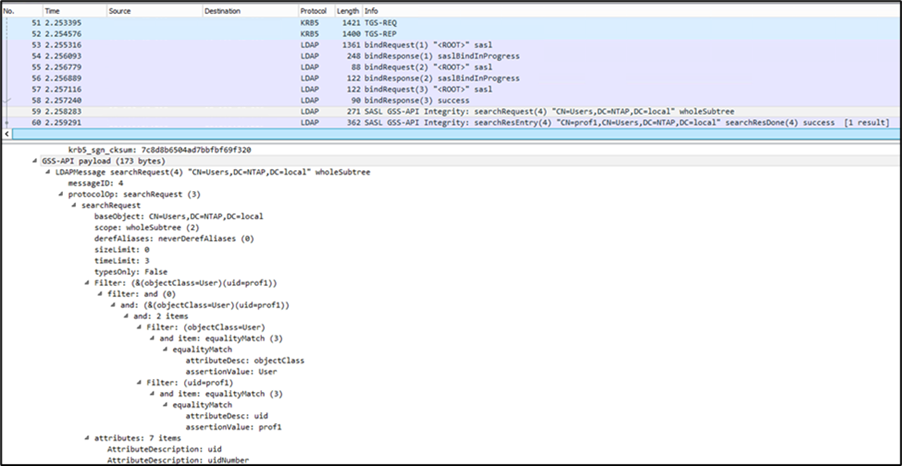
LDAP channel binding: Microsoft recommends that administrators enable LDAP signing along with channel binding. If the LDAP client supports channel binding tokens and LDAP signing, channel binding and signing are required, and registry options are set by the new Microsoft patch.
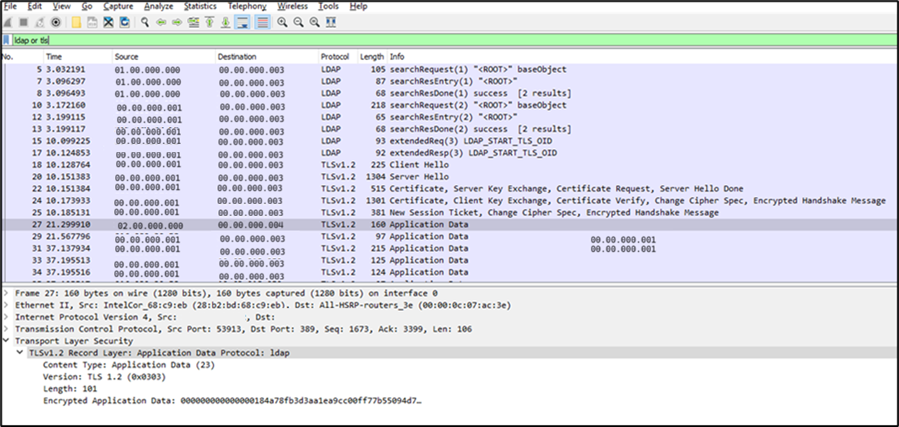
LDAP over StartTLS: LDAP over StartTLS uses port 389 for the LDAP connection. After the initial LDAP connection has been made, a StartTLS OID is exchanged, and certificates are compared. Then all LDAP traffic is encrypted by using TLS. The packet capture shown below shows the LDAP bind, StartTLS handshake and subsequent TLS-encrypted LDAP traffic.
There are two main differences between LDAP over SSL (LDAPS) and StartTLS:
- StartTLS is part of the LDAP standard; LDAPS isn't. As a result, LDAP library support on the LDAP servers or clients can vary, and functionality might or might not work in all cases.
- If encryption fails, StartTLS allows the configuration to fall back to regular LDAP. LDAPS does not. As a result, StartTLS offers some flexibility and resiliency, but it also presents security risks if it's misconfigured.
Active Directory security connection
Active Directory connections with Azure NetApp Files volumes can be configured to try the strongest available Kerberos encryption type first: AES-256. When AES encryption is enabled, domain controller communications (such as scheduled SMB server password resets) use the highest available encryption type supported on the domain controllers. Network traffic encryption between the Azure VM and the storage
Azure NetApp Files data traffic is inherently secure by design, as it doesn't provide a public endpoint, and data traffic stays within customer-owned virtual network (VNet). Data-in-flight isn't encrypted by default. However, data traffic from an Azure VM (running an NFS or SMB client) to Azure NetApp Files is as secure as any other Azure-VM-to-VM traffic.
NFSv3 protocol doesn't provide support for encryption, so this data-in-flight can't be encrypted. However, NFSv4.1 and SMB3 data-in-flight encryption can optionally be enabled.
Encryption key management
By default key management for Azure NetApp Files is handled by the service, using platform-managed keys. A unique XTS-AES-256 data encryption key is generated for each volume. An encryption key hierarchy is used to encrypt and protect all volume keys. These encryption keys are never displayed or reported in an unencrypted format. When you delete a volume, Azure NetApp Files immediately deletes the volume's encryption keys.
Alternatively, customer-managed keys for Azure NetApp Files volume encryption can be used where keys are stored in Azure Key Vault. With customer-managed keys, you can fully manage the relationship between a key's life cycle, key usage permissions, and auditing operations on keys. The feature is generally available (GA) in supported regions.
Azure NetApp Files also supports Azure role-based access control features. Along with the built-in Azure roles, you can create custom roles for Azure NetApp Files.