Understand AI readiness for storage migration
Storage requirements for AI workloads
When you plan a storage migration with AI workloads in mind, you need to consider what data your models can access. LLMs know only what they were trained with. They miss information that wasn't available at the time of training, or that was inaccessible because it's private information. The process of enhancing an LLM with this information is called RAG (Retrieval-Augmented Generation).
To get useful results from AI, you often need to train specific neural networks or enhance an existing LLM through RAG. These datasets are sometimes large, access patterns can be I/O-intensive, and the data may need to be cooled after training is complete. Azure Blob Storage and ADLS Gen2 offer many capabilities required by these use cases.
Azure AI Search
Azure AI Search can already access data on Azure Blob Storage, while the Indexer for Azure Files is currently in public preview. Each indexer supports different content types, so your migration target affects which data sources are available:
- Index data from Azure Files
- Index data from Azure Blob Storage
- Index data from Azure Data Lake Storage Gen2
Note
Data on Managed Disks cannot be used directly.
Azure OpenAI and Azure AI Foundry
Azure OpenAI Service and Azure AI Foundry can consume data directly from Azure Blob Storage and ADLS Gen2. Common scenarios include:
- Fine-tuning: Upload training datasets to Blob Storage for custom model training through Azure OpenAI.
- Batch inference: Store large input datasets and retrieve output results from Blob Storage.
- On Your Data: Connect Azure OpenAI to your storage accounts to ground model responses in your own documents, combining RAG with managed Azure infrastructure.
Migrating your data to Azure storage is often a prerequisite for using these services effectively. Plan your storage account structure and access controls with these downstream AI workloads in mind.
Learn more: Azure OpenAI on your data
The following diagram shows a typical AI training and fine-tuning pipeline and the storage requirements at each stage:
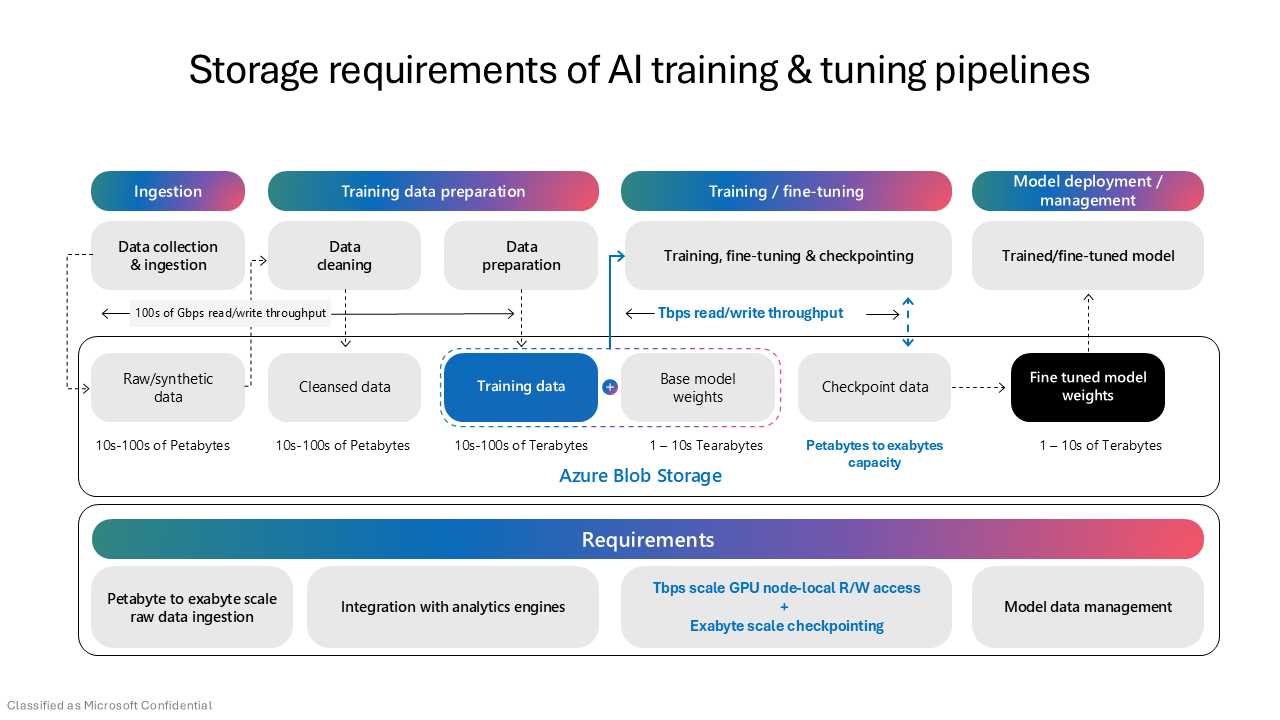
Data lifecycle for AI workloads
AI workloads follow a predictable data lifecycle that maps well to Azure Storage access tiers:
- Hot tier: Use during active training, fine-tuning, or inference when data is accessed frequently.
- Cool tier: Move training datasets to cool storage after a model is trained. Data is retained at lower cost for potential retraining or evaluation.
- Archive tier: Store completed experiment data, historical training snapshots, or older model artifacts that you're required to retain but rarely access.
Configure lifecycle management policies to automate tier transitions and reduce costs as your AI data ages. This is especially valuable for large training datasets that accumulate over time.
Learn more: Azure Blob Storage access tiers
Data organization and format considerations
How you structure and format data before or during migration can significantly affect how easily AI services can consume it:
- Folder structure: Organize data by domain, project, or dataset version. Azure AI Search indexers and Azure OpenAI both benefit from logical folder hierarchies.
- File formats: Structured formats like Parquet and JSON are preferred for training and analytics pipelines. Unstructured documents (PDF, DOCX) work well for RAG and search-based scenarios.
- File size: Avoid very large monolithic files when possible. Many AI tools process data more efficiently when it's split into reasonable chunks.
Tip
Your on-premises data often needs reorganization. The migration is a good opportunity to restructure it before it lands in Azure. Planning data organization alongside migration avoids a second pass later.
Microsoft Fabric and OneLake
Beyond data format, where you land your data also matters. If your organization plans to adopt Microsoft Fabric, data migrated to ADLS Gen2 can be accessed directly through OneLake shortcuts. This means your migrated data can serve both AI and analytics workloads without additional copies:
- OneLake shortcuts provide a unified view of data across storage accounts without physically moving it.
- Fabric workloads like Data Engineering, Data Science, and Real-Time Intelligence can all access your ADLS Gen2 data.
If your organization plans to adopt Fabric for analytics or AI, choosing ADLS Gen2 as your migration target positions your data for both operational and analytical use.
Learn more: OneLake shortcuts
If you plan to use your data for AI, or if AI is driving your migration, plan accordingly. The storage choices you make during migration directly affect what AI capabilities you can use afterward. With your AI storage requirements understood, the next step is to assess your current storage environment and identify what needs to move.