Select diagnostic channels
If you lose access to a VM, your next step depends on what still works. For example, if Remote Desktop won't connect to a Windows VM but the VM agent can still process requests, use Azure Run Command to run Get-Service TermService. A Stopped result tells you that Windows responded but its Remote Desktop service isn't running. This unit compares ways to reach the guest or observe its startup and shows how to confirm that a fallback is usable before you need it.
Secure Shell (SSH) opens a remote command line. Remote Desktop Protocol (RDP) opens a remote desktop. Both need a working network path to the guest, a service accepting connections, and credentials the guest accepts. Azure Run Command instead asks the platform agent to run a script inside the VM. It doesn't need an incoming SSH or RDP connection, but it does need a working agent.
Azure Serial Console connects to the VM's serial port, a text interface that can show startup messages even when the guest network is unavailable. Boot diagnostics captures a screenshot and serial output for you to inspect. Unlike Serial Console, it doesn't let you enter commands.
Note
Permission to open Serial Console in Azure isn't permission to sign in to the guest. A password prompt proves the guest can display text. Count the console as a working fallback only after you can sign in with an approved guest account and run a command such as hostname.
Choose a channel whose requirements still work. For example, if the VM agent is unavailable but you can still sign in over SSH, use SSH rather than Run Command. Keep your SSH session open. Before making a change that could disconnect it, confirm you can use another channel to undo the change.
Read down the left column until you find a test that succeeds, then follow its arrow to the right. Skip any path that depends on a component you already know has failed.
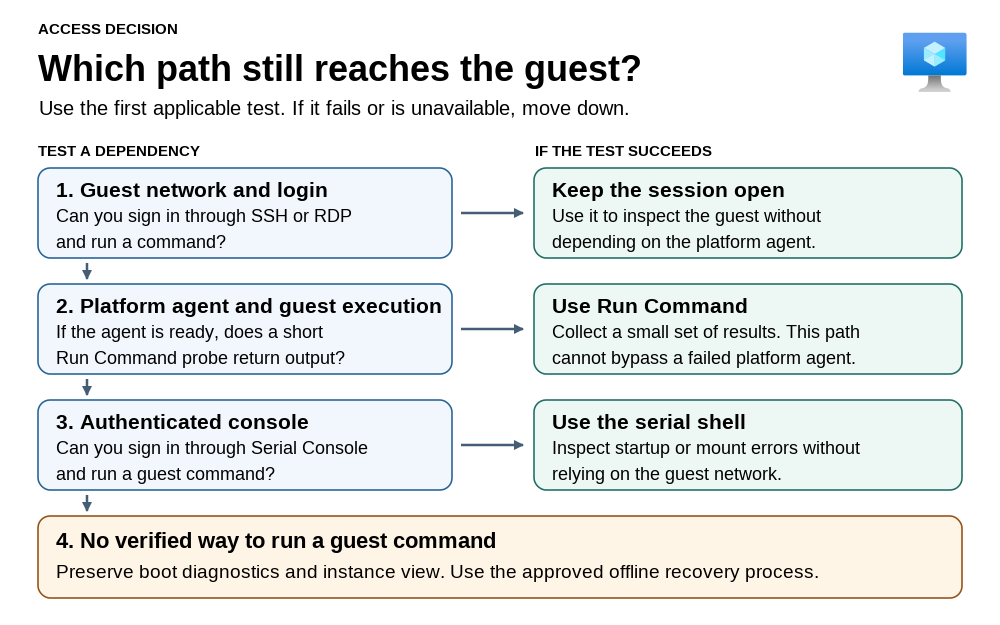
The console can stay connected even when the kernel, the core of the OS, is unresponsive. If no guest session works, offline diagnosis means examining an approved copy of the OS disk on a separate repair VM. A snapshot captures a disk at a point in time. You still need permission to access the copy and, for an encrypted disk, the required key access.
Use this channel comparison when planning an investigation.
| Channel | Dependencies | Useful when | Important limit |
|---|---|---|---|
| SSH or RDP | Guest startup, network route, firewall rules, service accepting connections, credentials | Agent unhealthy but guest network works | No path through an unbootable guest |
| Action Run Command | Platform agent, guest execution, authorized operation, outbound result path | Inbound administration unavailable | Not a fallback for a broken platform agent |
| Serial Console | Portal authorization, enabled service, configured serial output, guest authentication for a shell | Guest network unavailable | Connection isn't proof of a functioning shell |
| Boot diagnostics | Enabled collection, accessible diagnostic evidence, valid resource permissions | Boot failure or no login channel | Output can be stale or incomplete |
| Offline evidence | Approved disk copy or snapshot, repair host, encryption access, permissions | Interactive paths exhausted | Requires a recovery workflow and data-handling controls |
The Action Run Command feature on Linux runs as root (the guest administrator) by default. It runs one script at a time and returns only the last 4,096 bytes of output. It's noninteractive: no one can answer a prompt while the script runs. You can't cancel a script through this interface, and it has a 90-minute limit. If the VM can't send the result back to Azure, the command may still have finished inside the guest.
On the Contoso VM, the operator uses SSH through an approved private route. Azure Bastion is another option: it connects to the VM over its private IP address without exposing an administrative port to the internet. SSH is an independent channel here because the operator can run vmops-report and read the handler log without asking the agent to execute another command. Azure Run Command would still depend on the agent under investigation.
Verify Serial Console readiness
Use a VM deployed through Azure Resource Manager (Azure's resource management service) with managed boot diagnostics enabled. With managed boot diagnostics, Azure manages the storage for startup captures. A VM image is the OS template used to create the VM. Ubuntu images from Azure Marketplace normally configure the serial port, but check yours. A Linux console login needs a local account with a password. An SSH key alone won't let you sign in there. Prepare any approved emergency account while the VM is healthy, and keep its password out of scripts and evidence.
On Windows Server 2022 or 2025 Marketplace images, look for the SAC> prompt. The Special Administration Console (SAC) is the text console provided by Windows Emergency Management Services (EMS). From SAC you can open a command channel and sign in to a Windows shell. Enabling EMS on an older custom image can require a reboot, so prepare it before an incident.
Serial Console must be enabled for the Azure subscription, the billing and management boundary that contains the VM. Your Azure account also needs the documented permissions on the VM, typically the Virtual Machine Contributor role. If you use your own storage account for boot diagnostics, check whether its permissions, key access settings, resource locks, or firewall rules could block Serial Console access. Connection requirements are changing in 2026, so check the current prerequisites in the summary's More info section for your storage configuration. Test the portal connection and guest sign-in while the VM is healthy.
For an already enabled Windows SAC session, the normal shell sequence is as follows.
- At
SAC>, entercmdto create a command channel. - For the first command channel in a fresh session, enter
ch -si 1. If channels already exist, inspect the console's channel help and select the created channel rather than assuming its number. - Authenticate with the approved guest account, then enter
powershellif PowerShell is needed. - Perform only the evidence commands in this module. Don't send interrupts, change boot configuration, or force a crash.
If no interactive channel is available, capture the boot screenshot, serial output, current instance view, failed operation ID, and the last time you know the workload worked. Don't repeatedly reboot to obtain a different screenshot. Preserve a disk copy only under the approved recovery process, including encryption prerequisites and a secure evidence destination.