Classify guest extension failures
Different failures can produce the same extension status. The last stage that recorded progress tells you where to look next: guest startup, storage, agent communication, handler startup, or the command itself. For example, in the Contoso ticket, the handler captured report-ready os=ubuntu before recording exit code 23. The report ran, so inspect the command that called it. Another update can show the same Failed status because the handler couldn't create its working directory. If its log says No space left on device before the script started, check free blocks and inodes on that filesystem instead.
A script error is evidence that execution reached the command. A handler installation error might mean the command never started. A timeout tells you that no result arrived before the deadline. It doesn't tell you why: the command might still be waiting for input, or it might have finished without being able to report its result.
Choose a test that distinguishes possible causes and plan how to undo any change. Suppose your teammate suspects a path error. A relative path such as ./vmops-report looks in the current directory, which can differ between SSH and the handler. If the handler says the script wasn't found, testing the full path, /usr/local/bin/vmops-report, changes only the path. If the failed run's stdout already contains the report, the handler found the script. Check how the submitted command ended instead.
A successful login test proves the command worked in that session. An extension can use a different account, shell, working directory, and environment. Compare those conditions before deciding that a healthy script proves an unhealthy agent. For example, the PATH environment variable lists directories searched for commands; a command available in the user's session might not be found in the extension's environment.
The two Custom Script handlers use different execution contexts.
| Context | Linux Custom Script | Windows Custom Script |
|---|---|---|
| Default guest identity | Root, inherited from the privileged agent/handler path, unless the submitted command deliberately changes identity | LocalSystem, a built-in service account, not the signed-in RDP user |
| Command execution | The submitted command starts through /bin/sh -c. An invoked script's shebang (its #! interpreter line) or an explicitly selected interpreter can choose another shell |
The command runs in the service context. Specify and inspect the actual interpreter used by the command |
| Working directory | The current execution's download directory | The current handler's Downloads directory for that execution |
| What an interactive success doesn't establish | Availability of the same PATH entries, shell features, files, credentials, or environment | Availability of the same user profile, mapped drives, credentials, files, or environment |
For a command that genuinely needs Bash, confirm that the approved configuration selects Bash rather than relying on Bash-only syntax in an inline /bin/sh command. On Windows, an administrator's RDP session isn't a reproduction of LocalSystem. A managed identity, an Azure identity that can authorize a script download, is also not a replacement for the guest process's operating-system identity.
Start with the command text and logs already preserved. If another reproduction is necessary, obtain approval and compare only the relevant nonsecret context. Don't dump all environment variables, copy credentials into output, or rerun a mutating script with broader privileges merely to make it succeed. A context-matched reproduction tests an execution hypothesis; the separate SSH or RDP workload check still provides independent evidence.
Where Linux startup stops changes the recovery decision. The bootloader loads the kernel. The kernel uses a temporary startup filesystem called initramfs to find and mount the real root filesystem. Once the root filesystem is available, /etc/fstab tells Linux which additional filesystems to mount and where. An entry can identify a filesystem by its universally unique identifier (UUID), rather than by a device name that might change.
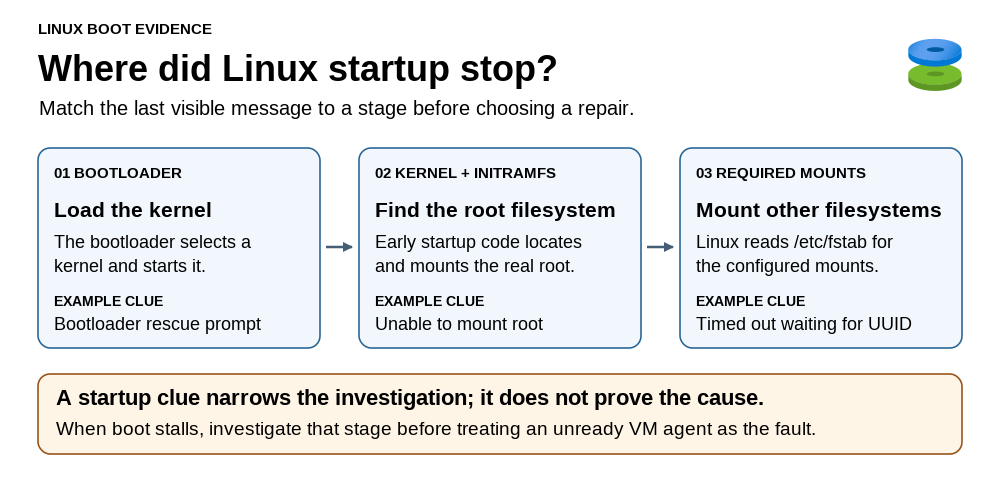
Use the startup evidence to decide whether you have a usable guest shell or need an approved recovery path.
| Startup symptom | Evidence | Next action and limit |
|---|---|---|
| Windows recovery screen | Boot diagnostics shows 0xc000000f; RDP is unavailable; the agent is Not ready; SAC never reaches a usable shell |
Preserve the screenshot, disk identity, and instance view. Neither Run Command nor SAC provides guest access here. Move to approved offline boot repair or restore rather than rebooting repeatedly |
| Linux boot configuration | Serial output stops at bootloader rescue after a configuration change | Bootloader/configuration. Compare change record and last-known-good configuration using approved recovery access |
| Linux initramfs | Kernel reports inability to mount root after kernel update; early boot only | Root-device/initramfs hypothesis. Check kernel/initramfs pairing and disk visibility through recovery workflow |
| Linux mount timeout | SSH is unavailable; serial output names a mount UUID from /etc/fstab and ends at an emergency-mode password prompt |
A prompt isn't an authenticated shell. If approved sign-in works, compare lsblk -f and findmnt with the approved /etc/fstab configuration. If sign-in fails or the required disk is missing, preserve boot diagnostics and escalate. Don't guess a UUID or format a disk |
When the guest is reachable, use the current operation's evidence to distinguish these failures. A working login doesn't imply a working platform agent or monitoring agent.
| Symptom | Evidence that narrows the cause | Next action and limit |
|---|---|---|
| Ubuntu handler can't create its working directory | SSH works and the agent is active. The journal says “no space left” before any command-start record | Check df -h / for exhausted blocks and df -i / for exhausted inodes. Identify what's growing. Reclaim only approved data or arrange more capacity, then retry the original operation. Don't delete agent directories or edit a script that hasn't started |
| Windows agent can't communicate | RDP works and the agent services are running, but the current WaAppAgent.log records a denied host-plugin connection |
Use RDP for the host connectivity tests in Interpret guest agent evidence and inspect guest filtering. Run Command depends on the same agent. A service restart or reinstall won't explain the denial |
| Ubuntu agent can't retrieve goal state | SSH works and walinuxagent is active, but the current agent log records a WireServer or host-plugin communication failure |
Use the independent guest session for the host tests. Compare guest filtering and proxy evidence with the failed endpoint. Don't use Run Command as an independent test of the same agent or assume that a working script-download endpoint proves host connectivity |
| Linux agent is active but doesn't start a new extension operation | No matching handler start, with configuration and agent logs indicating extension handling is disabled | Confirm effective configuration and its owner. Distinguish intentional disablement from a service or download failure. Don't change a control merely to force execution; a current handler command-start record rules out this branch for that attempt |
| Handler fails before command launch | Package download succeeded, but the matching handler log records a startup error and no command-start event | Check the installed handler version, its supported runtime, and the startup error. Missing stdout alone isn't proof that the handler never started |
| Command rejects an argument | The current handler records a command start, stderr names the bad argument, and the command returns nonzero | Correct the argument or command logic. An exit code alone doesn't identify which argument was wrong |
| Ubuntu command times out | SSH works, the agent is Ready, and the current sequence says “waiting for input” | Use SSH to inspect the command and the processes it started. An extension can't answer a prompt. Replace the interactive step, preserve the output, and confirm a new sequence completes. An earlier success doesn't explain this timeout |
| Custom Script progress stops around a guest reboot or agent change | The submitted command or an installer it invokes requests a reboot or stops/updates the platform agent, with corresponding boot or service-history evidence during that sequence | Preserve available output and assess partial changes. Move required maintenance outside the extension command under a separate approved step before another execution. Transitioning alone doesn't prove that the command caused the interruption; don't rerun it merely to reproduce the symptom |
| First-boot extension command fails or waits for package access | Matching command/handler evidence identifies package-manager contention, and cloud-init or another installation task overlaps that attempt | Correlate the owning task and failure timestamps. Preserve output, allow legitimate work to finish when appropriate, and assess partial changes before retry. Don't delete lock files, reset cloud-init, or infer that the agent is broken |
| Windows monitoring stops | RDP and the workload probe succeed. Extensions report success, but the Azure Monitor Agent service has stopped | Inspect the monitoring service history and its logs. This is evidence of a monitoring interruption, not a general guest outage or a reason to reinstall the platform agent |
Don't damage boot files, remove initramfs, fill the OS disk, or stop the platform agent to prove a diagnosis. Before a disruptive recovery action, confirm the owner, approved outage window, tested restore point, encryption access, independent recovery path, and conditions for stopping.
Use module M09 when the VM needs disk recovery or a restore from backup, which recovers data from a saved point in time. Use module M10 when a regional disruption calls for failover, which moves the workload to the designated recovery region. One failed script doesn't justify a regional failover. After either kind of recovery, check the application and its data, not just the recovery job's status.