Reconcile rightsizing costs
When Atlas moves to a smaller VM, it uses less of its reservation, but the reservation still costs the same. The key question is whether another workload uses that freed coverage instead of paying an on-demand rate. In this unit, you compare usage and charges for Atlas and the batch worker before and after the resize. You account for unused commitments and ongoing charges, such as disks and backups, to distinguish a lower total cost from a cost that simply moved between workloads.
Calculate the difference between estimate and outcome
At the supplied retail rates, the estimated compute saving for Atlas is ($0.20 - $0.10) × 720 = $72. That calculation compares two on-demand list prices. To determine whether the resize actually saves money, compare usage and charges for the same resources over the same period, including the existing reservation and the costs of disks, backup, monitoring, and networking.
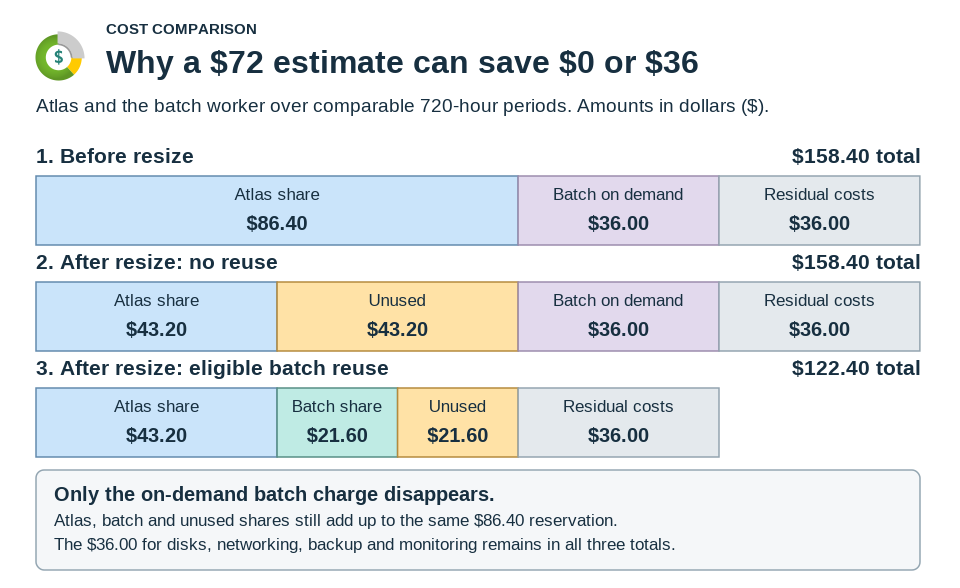
The reservation fixture costs $0.12 × 720 = $86.40 over the same period. After downsizing, Atlas consumes half the normalized reserved units, so its allocated amortized cost becomes $43.20. Without reuse by another eligible workload, the remaining $43.20 is unused commitment. The total reservation cost remains $86.40.
A lower cost attributed to one VM doesn't automatically mean a lower bill. If the reservation was prepaid, there's no refund from resizing. If you pay monthly, the commitment doesn't disappear when the covered VM becomes smaller.
The next table compares two separate eligibility scenarios for a batch worker that runs at the same time as Atlas for 360 of the 720 hours. In the no-reuse scenario, batch usage is outside the reservation's benefit scope or otherwise ineligible in both comparison periods. In the reuse scenario, the batch worker qualifies in both periods. After resizing, the released unit automatically covers its matching hours. Eligibility stays the same within each comparison; it isn't switched off to leave matching usage uncovered.
The shared Before resize column explicitly assumes that all reserved units were allocated to Atlas throughout the baseline, leaving the batch on demand at $0.10 × 360 = $36. This is a supplied allocation assumption, not a guarantee of how every live portfolio allocates benefits. Verify actual allocation records for a live comparison rather than assuming Atlas always receives priority.
| Compute line | Before resize | After resize with no reuse | After resize with eligible batch reuse |
|---|---|---|---|
| Atlas allocated reservation cost | $86.40 | $43.20 | $43.20 |
| Batch allocated reservation cost | $0.00 | $0.00 | $21.60 |
| Unused reservation cost | $0.00 | $43.20 | $21.60 |
| Batch on-demand cost | $36.00 | $36.00 | $0.00 |
| Total comparable compute scope | $122.40 | $122.40 | $86.40 |
Reusing the unit assigns $0.06 × 360 = $21.60 of the existing reservation cost to the batch worker and avoids $36 of on-demand spending. The $21.60 is a cost allocation, not an additional saving. Don't add it to the $36 reduction.
Atlas still incurs $18 for disks, $6 for networking, $8 for backup, and $4 for monitoring. These residual costs total $36 in each period. Including them, the comparable total stays at $158.40 without reuse. It falls to $86.40 + $36 = $122.40 only when the eligible batch worker uses the released benefit.
The batch worker also uses shared resources whose noncompute costs don't appear against Atlas. This example excludes those unchanged costs from both totals. To report a savings percentage for the whole environment, add them to both periods before calculating the percentage.
The realized reduction in this supplied scenario is $36, or approximately $36 / $158.40 × 100 = 22.73%, not $72. With no reuse, the total reduction is zero.
Compare the two after-resize bars. Both keep the same $86.40 reservation. The shorter bar shows where the saving comes from: eligible reuse replaces the batch worker's $36 on-demand charge.
Reproduce the financial worksheet
The table above gives the results. This optional, standalone Python worksheet reproduces the eligible-reuse calculation. It imports Decimal as D and reads each rate from a string, so D("0.12") represents the exact decimal rate rather than a binary floating-point approximation.
from decimal import Decimal as D
hours = D("720")
batch_hours = D("360")
reservation_per_hour = D("0.12")
target_retail_per_hour = D("0.10")
residual = D("18") + D("6") + D("8") + D("4")
reservation = reservation_per_hour * hours
baseline_compute = reservation + target_retail_per_hour * batch_hours
atlas_allocation = reservation / 2
batch_allocation = reservation_per_hour / 2 * batch_hours
unused = reservation - atlas_allocation - batch_allocation
after_compute = atlas_allocation + batch_allocation + unused
print("Retail headline:", (D("0.20") - D("0.10")) * hours)
print("Baseline total:", baseline_compute + residual)
print("After total:", after_compute + residual)
print("Unused commitment:", unused)
print("Scope saving:", baseline_compute - after_compute)
Expect a $72.00 retail estimate, a $158.40 baseline total, a $122.40 total after resizing, $21.60 in unused commitment, and $36.00 in savings across the comparison scope.
For an additional savings-plan example, assume an existing $0.15 hourly commitment. Before a change, eligible usage at plan rates consumes $0.15 each hour. After the change it consumes $0.09, with no other eligible workload. The unused $0.06 per hour equals $43.20 over 720 hours; the commitment still costs $108.
Savings-plan benefit is applied to eligible hourly usage at the applicable discounted rates. Unused commitment expires for that hour and doesn't roll forward. Other eligible workload must exist in the relevant hours and scope to absorb it. Don't replace this hourly calculation with a misleading monthly average, or assume compute benefits cover software, storage, and networking.
When reservations and savings plans coexist, reservation benefits are applied first. Reconcile the actual allocation across both benefits; don't count the same avoided on-demand charge twice or treat a transfer between existing commitments as an additional cash saving.
Reconcile supplied usage with the model
These synthetic records for CHANGE-A-02 cover 30 days of usage, not the 24-hour technical observation window. Read the quantity together with its unit: Atlas and the batch worker report VM-hours. In the final row, 360 normalized unit-hours means one unit of reservation coverage went unused for 360 hours, not that another VM ran. The pricing model shows how the usage was charged or covered.
In this table, UnusedReservation is a label in the Meter column. In the standard Azure amortized cost-details export, UnusedReservation and UnusedSavingsPlan are ChargeType values, not usage meters. Don't look for unused-benefit allocations in the Actual cost dataset.
| Period | Resource | Meter | Quantity | Unit | Pricing model | Amortized cost |
|---|---|---|---|---|---|---|
| Before | atlas | D4s_v5 |
720 | VM-hours | Reservation | $86.40 |
| Before | batch | D2s_v5 |
360 | VM-hours | OnDemand | $36.00 |
| After | atlas | D2s_v5 |
720 | VM-hours | Reservation | $43.20 |
| After | batch | D2s_v5 |
360 | VM-hours | Reservation | $21.60 |
| After | unallocated | UnusedReservation |
360 | Normalized unit-hours | Reservation | $21.60 |
Reconcile quantities first. Atlas ran for 720 hours in both periods, and batch demand remained 360 hours. There's no hidden shutdown or demand reduction. Then reconcile allocated plus unused commitment to $86.40 in each period.
To reconcile charges for a live resize, follow these steps:
- Confirm the selected Cost Management scope, billing agreement/offer, permissions, and support for the required amortized benefit data.
- For a Windows workload, check Azure Hybrid Benefit status and compare the applicable Windows software charges in both periods. A VM reservation discounts infrastructure, not Windows software. Unlike the example, a license-included four-to-two-vCPU resize can change the software charge as well as the compute cost.
- Open Cost Management, Cost analysis, choose comparable date ranges, and inspect Actual cost and Amortized cost. Actual cost reflects charge and purchase timing; amortized cost spreads benefit cost over its term and usage.
- To inspect unused benefits, use supported Amortized cost data and group or filter by Charge type. Inspect
UnusedReservationandUnusedSavingsPlanas applicable. Use a sufficiently broad authorized cost scope and benefit records to include unallocated costs; remove filters limited to the resized resource when they hide those records. - Trace the relevant benefit and its eligible resources. Clear any unused-only charge-type filter when retrieving allocated usage, and retain both used and unused records. Save the selected dates, currency, scope, filters, source records, and available benefit identifier. Reconcile allocated plus unused benefit cost for the same commitment, period, and total comparison scope. Don't assume unused charges always have a particular subscription or resource attribution.
View support depends on the billing offer and scope. For example, Cost analysis doesn't support amortized reservation costs for pay-as-you-go offer MS-AZR-0003P. This limitation doesn't apply to every on-demand offer or billing agreement. Matching Actual and Amortized displays, or an empty filtered chart, don't prove zero unused commitment. Request the required records from the authorized finance owner and keep the result provisional until the comparison is supported.
Cost records can arrive late or be rerated before invoicing. Cost Management figures don't deduct free or prepaid credits; reconcile applicable credits and final billed charges separately with the invoice and finance owner. If permissions, supported views, or data are missing, record the gap and a follow-up owner/date. Don't treat missing data as a zero-cost result.
Troubleshoot, clean up, and report exceptions
Before retrying an unavailable target, check compatibility, subscription restrictions, and capacity. If allocation fails, record the error, placement constraints, and VM power state. A failed operation can leave the requested size different from the running size; inspect both before choosing a recovery action.
If you lack cost permissions, ask the authorized billing owner to provide access or the required records. If cost records are delayed, assign an owner and review date, and report the financial result as provisional. If application checks fail, stop rollout regardless of projected savings.
For an actual change, the operator restores the approved baseline or retires only the canary's approved dedicated resources. Shared infrastructure and retained disks or backups stay under their owners' policies. Delayed billing data doesn't extend the approved runtime: the operator records any continuing charges and their owners, then follows up with finance separately.
Guest shutdown leaves a VM allocated and billed for compute. Stopped (deallocated) stops ordinary VM compute usage charges, but disks, networking, backups, monitoring, existing commitments, and unused capacity reservations can still incur charges. Never claim that deallocation eliminates all costs.
For each supplied case, summarize four things: the decision, the evidence supporting it, the uncertainty that remains, and the next action. For example, defer the Recovery worker resize: its seven-day sample missed failover, the current emergency memory requirement hasn't been tested, and the recovery owner needs to validate it before reconsidering the smaller VM.
Independent assessment
Answer these questions before reading the explanations:
- A recommendation offers $120 in monthly retail savings. CPU is low, memory is missing, and a prepaid reservation covers the current size. What decision is justified?
- Regional quota has 20 spare vCPUs, but the target family has none. Would purchasing a reserved instance fix the allocation gate?
- A resize operation failed. The portal model displays D2s v5, while the guest still reports four processors. What evidence should determine whether the change happened?
- An existing
$0.20hourly savings plan is fully used before a change and only$0.12is used afterward. No other workload is eligible. Over 720 hours, what's the total commitment charge, and how much of it goes unused? - A canary's local smoke test produces the expected result hash, but representative service P95 latency is 290 milliseconds against the 250-millisecond objective. Can a favorable amortized cost justify rollout?
Compare your answers with these explanations:
- Defer. Obtain representative memory and application data and model existing benefit usage. Headline retail savings can't establish technical safety or cash reduction.
- No. The family quota still blocks the request, and pricing reservations don't guarantee capacity. Resolve the specific quota or choose an approved alternative.
- Inspect the failed operation, actual running guest resources, power state, and subsequent successful allocation evidence. The model can reflect requested rather than running configuration.
- The commitment remains
$0.20 × 720 = $144; unused commitment is$0.08 × 720 = $57.60. There's no automatic refund or rollover. - No. The SLO fails. Stop rollout and follow the approved recovery or redesign path regardless of financial attractiveness.
Using the supplied examples, justify the Atlas, Ledger, and Recovery worker decisions; explain why S1 blocks the resize even if quota is sufficient; and show when reservation reuse lowers total cost. Distinguish the retail estimate from the result supported by the cost records.