Recover workloads from infrastructure failures
First identify which pools and dependencies are affected and whether the rest of the fleet can still serve users. An isolated boot error may justify repairing one backend. The same symptom across several pools calls for investigation of the shared image, deployment, network, or data tier before you restart more machines. Loss of an entire region requires a workload recovery decision, not 190 independent restart attempts.
Coordinate host maintenance and isolate unhealthy backends
Use Azure Service Health for subscription-level maintenance and incidents, Resource Health for the affected VM, and Scheduled Events from inside a VM for impending platform actions. An Azure host-maintenance notice is different from the guest patch window you set in Update Manager. Choose the next action according to what you observe:
| What you observe | What you do next |
|---|---|
| Azure schedules a reboot on one backend while another in the same pool is drained. | Map the event and deadline to the pool's maintenance schedule. Pause optional work and restore or add healthy capacity before the platform event. Check the pool's healthy count and application latency before releasing any new drains. |
| After a patch wave, one backend stops responding to both Run Command and Remote Desktop. | Hold further dispatch and compare the affected backend with peers on the same build. For this one exception, examine Resource Health and the Boot diagnostics screenshot and serial log. If available and authorized, use Serial Console to distinguish a boot error from a sign-in or network problem. Preserve evidence before restarting. |
| Several failed backends share a guest startup error, or only one has a host fault. | Don't redeploy a whole wave to fix a shared guest error: halt promotion and investigate the image or patch. For an isolated host fault, an approved redeploy may be appropriate after accounting for downtime and temporary or ephemeral disk loss. Return repaired members to rotation only after direct transactions and pool health pass. |
Prove that backups can restore the application
Set two targets with the portal workload owner: the recovery point objective (RPO) is the maximum acceptable data loss measured in time; the recovery time objective (RTO) is the maximum acceptable time to restore service. A successful backup job doesn't demonstrate either. Use an isolated restore to test both:
- Find gaps before the change: Compare the expected VM and disk inventory with Azure Backup protected items, policy, retention, recent job results, and latest usable recovery point. Check whether all required data disks are included and whether the recovery point has the consistency the application needs. A protected VM with a missing data disk or stale recovery point is a gap.
- Test coverage with representative restores: Select a recovery group that exercises the web tier, required data, and any distinct backup policies or disk layouts. In the Recovery Services vault, restore the selected VMs or disks into an isolated recovery network with test dependencies. Keep it away from production queues, DNS registration, and external notifications. Record which protection patterns the drill covered. A passing restore for one standard backend doesn't prove a differently protected tier is recoverable.
- Test the data, not just the boot: Have the portal workload owner retrieve a known preincident return and submit a synthetic one. Record the point used, which disks were restored, the most recent confirmed transaction, and the elapsed time to working service. Preserve the evidence before cleaning up drill resources.
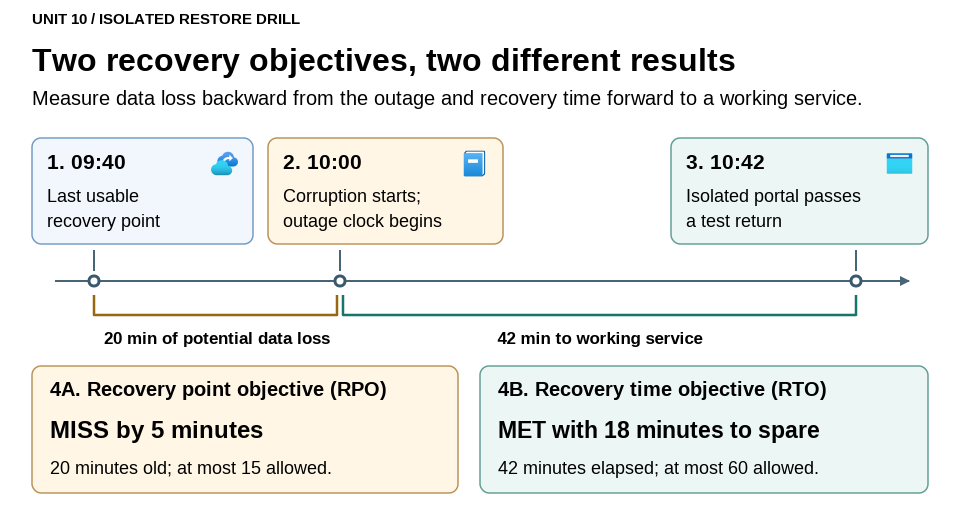
Interpret a restore result: Corruption affects a data tier shared by the portal pools at 10:00. The latest known-good, application-consistent point for that tier is 09:40. The isolated recovery group passes an end-to-end return test 42 minutes after the simulated outage begins. With an RPO of 15 minutes and RTO of 60 minutes, the drill meets the time target but misses the data-loss target by five minutes. Report the dependency limit to the portal workload owner and the backup team. Recovering more web VMs won't make the shared data newer.
Use the outage as the dividing line: the age of the last usable data point and the time to restore working service measure different risks.
Rehearse regional failover and failback
For a regional outage, use an Azure Site Recovery recovery plan for replicated VMs and the appropriate recovery mechanism for dependencies such as a managed database. Replication can copy a bad write, so it doesn't replace backups. Before a drill, verify replication health, recovery-point age, target-region quota and capacity, private networking, identity, secrets, and DNS. Document which component can accept writes in each region.
First establish the extent of the outage. If one availability zone is unavailable and healthy backends and data services in the same region can carry the load, route to them and pause maintenance. A regional failover introduces a new data and traffic cutover; use it when the workload can't meet its recovery objectives in-region and the designated incident commander authorizes the move.
In a test failover, select an isolated target network and a recovery point compatible with the data tier. Bring up dependencies first, then the application tier, then the test frontend. Measure when a user can complete a synthetic return, not when the first VM starts. If all VMs boot but the application can't resolve its database, the drill hasn't recovered the service. Fix target-network name resolution, retest, and clean up the test failover without redirecting production traffic.
For an actual, authorized failover, prevent simultaneous writes in both regions, verify data and service in the recovery region, and move production traffic according to the plan. Record the recovery point and obtain the incident commander's decision before committing. Failback is another change: once the primary region is ready, reprotect in the reverse direction, wait for replication to catch up, schedule the cutback, and verify transactions again. Switching back DNS while the only current copy of the data is in the recovery region risks losing accepted returns.