Choose fleet change tools
In a 200-VM fleet, each request needs its own target list. If one portal pool needs more memory, resize its VMs in waves so the remaining backends can carry the traffic. If you need 30 minutes of diagnostic logging, run a guest command only on the affected VMs, then restore each VM's previous log level. If a Windows service must start automatically on all 190 public backends, use a desired-state policy to detect and correct drift. None of these requests includes the 10 staff VMs.
Match the tool to the change
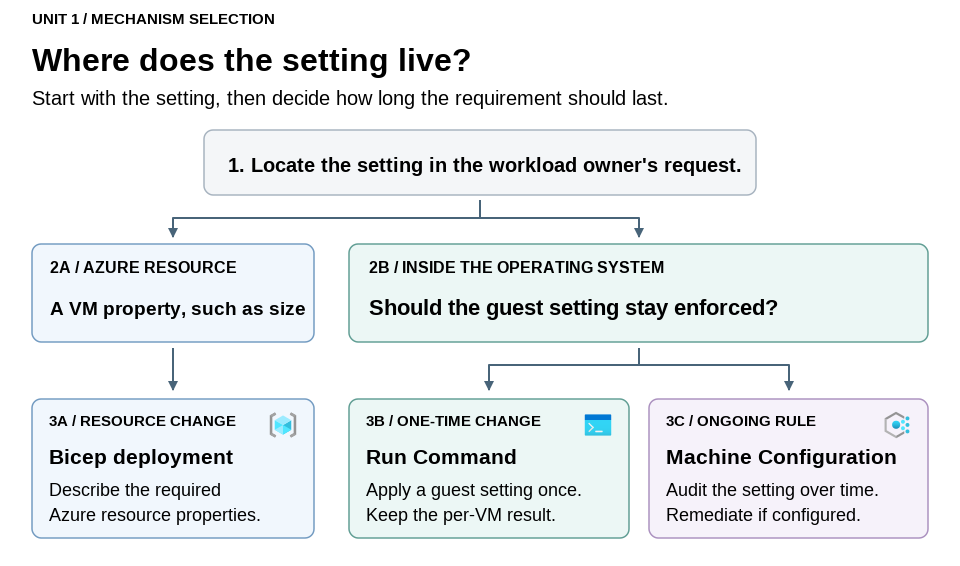
Suppose the portal workload owner approves a one-time support-link update for the 19-VM pilot and a teammate suggests using PowerShell. Azure PowerShell or the Azure command-line interface can submit a Run Command request for each approved backend, but the script that edits the link runs inside Windows. Follow the one-time guest change branch in the diagram: the link lives in a local file, and the request doesn't call for ongoing enforcement.
Note
A baseline is the reference state you compare against. Suppose all 190 portal backends should start a service automatically. An audit finds 187 set to automatic and three set to manual. Those three have drifted. Correcting their settings is remediation; the other 187 don't need a write.
Choose the mechanism by the job it does and the evidence it can provide:
| Mechanism | When you'd choose it | What to check on an existing fleet |
|---|---|---|
| Bicep deployment | Declare the new VM size for an approved pool or the disk attachments for a wave. | Compare the resource paths and property changes in the what-if preview with the wave manifest. Redeclaring a VM can reset an omitted property even in incremental mode. |
| Action Run Command | Read a service setting across the backends reporting errors. | It relies on the VM Agent and returns limited output. Match replies to the target list: eight replies from ten targets leave two unknown, not ten healthy. |
| Managed Run Command | Give a guest operation a named command resource and timeout on each VM in a wave. | Join execution states, exit codes, and independent application checks by VM identity before releasing the next wave. |
| Custom Script Extension | Install the same software on a group of backends as part of a deployment. | Test the package on a canary, then check agent readiness and script access on the rest of the ring. A repeat shouldn't install a second copy or overwrite a newer setting. |
| Azure Machine Configuration | Audit a guest setting over time or enforce it when the policy is configured to remediate drift. | Check the assignment scope, exclusions, and enforcement mode. An enforcing policy could undo an operator's temporary override. A one-time script won't detect later drift. |
| Azure Automation runbook | Coordinate a sequence of actions across VMs, such as submitting a command, collecting its result, and pausing before the next group. | Give the runbook a fixed target list and an explicit stop condition. The runbook's job status isn't a substitute for per-VM results or the portal workload owner's approval. |
Note
A resource provider is the Azure service that manages a type of resource. For example, Microsoft.Compute manages VMs and their managed Run Command resources. Each such command is a child resource of one VM. You can add the command without redeclaring the parent VM's disks, network settings, or size.
For the separate 30-minute logging request, suppose errors are confined to one ten-backend pool. Have the runbook record each backend's current log level, test the change on one, and proceed through the approved pool in batches. Look for diagnostic entries from each intended source. If only nine report, identify the missing backend rather than enabling logging across the other 18 pools. At the end of the window, restore each changed backend's own prior level, not a fleet-wide default.
Note
A managed command's instance view reports what happened during execution, including the script's exit code. Zero means the script reported success. If the caller times out, the script might already have written the setting. A missing result isn't permission to retry.
Use a staged rollout on an existing fleet
The same method works whether you submit a change yourself or use a runbook. Before the first write, agree with the portal workload owner on the user-visible result, the highest number of VMs that may change at once, and who can approve the next group. Then work through these steps:
- Fix the target list. Use Azure Resource Graph or another read-only inventory to find candidates by subscription, resource group, and tags. Record the approved resource paths, VM instance identifiers, and explicit exclusions. Recheck each target against Azure before changing it. If a VM has been replaced under the same name, stop and get a new approval rather than refreshing the list automatically.
- Capture a baseline and a recovery route. Record the existing setting and a working application response on each target. Confirm you can inspect the machine independently if the change tool fails. Agree on how to restore the prior value. For a change that could restart a VM or take it out of service, first establish that the remaining machines can carry its traffic.
- Review what will run and with whose permissions. For a resource deployment, compare what-if output with the approved scope and investigate unrelated or unresolved changes. For a guest command, review the script, its inputs, its execution account, and what it does on a second run. Record the approved version, restrict the caller's access to the intended targets, and keep secrets out of the output.
- Change one representative VM and check it directly. This first VM is the canary. Compare the Azure request result, the guest setting and script exit code, and an application response from that same VM. A healthy response through a load balancer might have come from an untouched VM. If the command fails, times out, or the checks disagree, leave the rest of the fleet alone. Inspect what actually changed before considering a retry.
- Expand only on evidence and approval. Show the portal workload owner the canary results and record the decision before starting the next wave. Keep the agreed limit on simultaneous changes and repeat the health check for each group. Record failed, skipped, and excluded machines individually rather than reducing the fleet to one success percentage.
- Verify repeatability and restoration. If the change is meant to be safe to repeat, compare state before and after an approved repeat. For a temporary change, restore the captured value only on machines that changed, with the portal workload owner's approval. If a current value is unexpected, investigate instead of overwriting it. Close the record only when the application checks support the claimed outcome.
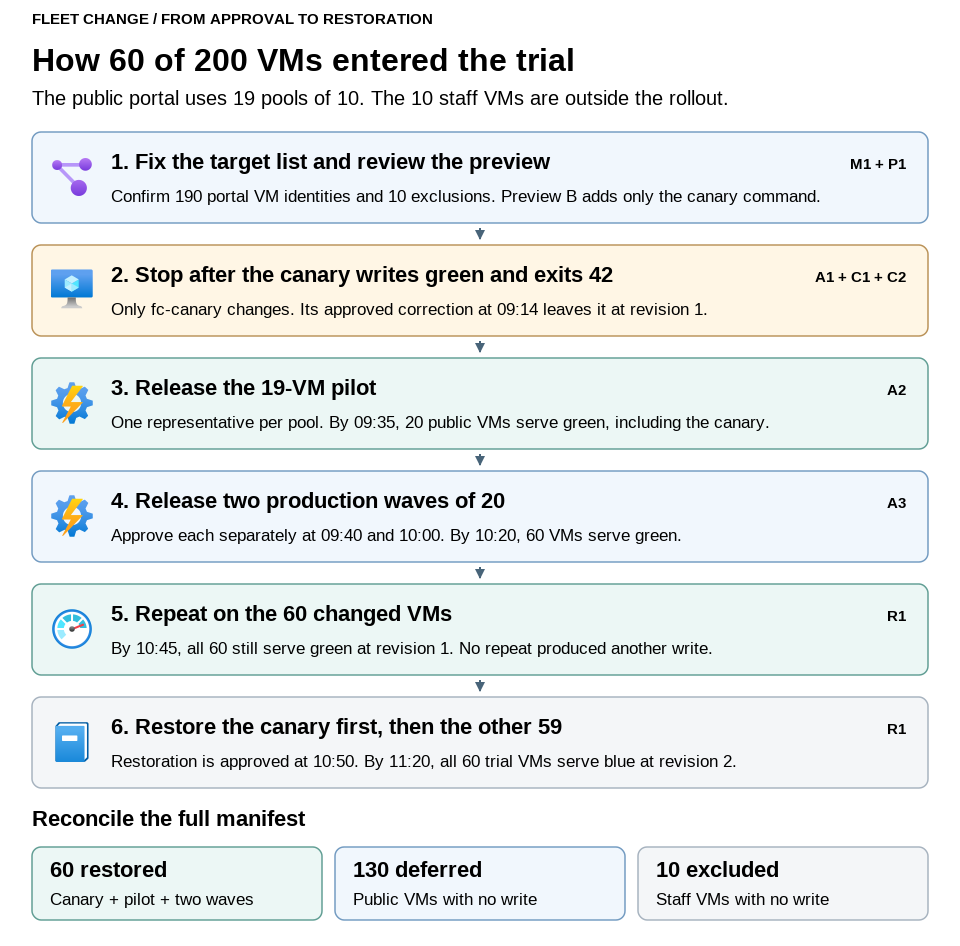
The overview shows where evidence from one step informs the decision to begin the next:
Secure administration and role assignments for a large fleet
In the example 200-VM fleet, the portal team operates 190 public backends, not the 10 staff VMs. It also needs to test a change on just one backend before expanding. Subscription-wide Contributor is too broad for either boundary. An Azure role assignment has three parts: who gets access, which actions the role permits, and where the assignment applies. A VM-level grant doesn't cancel broader permissions inherited from a subscription or resource group, and a rollout tag isn't an access boundary.
Use Microsoft Entra security groups for human teams and a dedicated managed identity for automation. The following assignments illustrate how to separate duties:
| Who needs access | Example role and scope | What remains separate |
|---|---|---|
| Fleet observers | Reader on the workload resource group for inventory. Grant log access separately, such as Log Analytics Reader on a workload-specific workspace, if needed. | Observers don't need to change VMs or sign in to Windows. A workspace-wide grant can expose logs from other workloads that share it. |
| On-call guest operators | On VMs configured for Microsoft Entra sign-in, use Virtual Machine User Login for standard access. Make Virtual Machine Administrator Login eligible only for people and machines that require elevation. | A guest login role isn't permission to resize a VM or assign roles. Use Bastion or another approved private route rather than exposing Remote Desktop or SSH to the internet. |
| Rollout runbook | Assign its managed identity a reviewed custom role on the canary VM. For the managed-command workflow, example actions are Microsoft.Compute/virtualMachines/read, Microsoft.Compute/virtualMachines/runCommands/read, and Microsoft.Compute/virtualMachines/runCommands/write. |
Managed command write can run privileged code inside the VM. It doesn't restrict the caller to one approved script. Restrict who can edit or publish the runbook, pin the reviewed script version, and don't grant role-assignment, VM deletion, or network-write permissions. |
| Access administrator | Use Role Based Access Control Administrator at the smallest scope needed to delegate roles. Where supported, limit which roles and principals the administrator can assign. | Granting access doesn't approve a rollout. Neither rollout operators nor the runbook should grant themselves access. |
| Portal workload owner | Approve the business change: which public VMs may change, when to expand, and whether to restore the prior state. | This responsibility doesn't require Azure's built-in Owner role. Holding that Azure role doesn't make someone the workload's change approver. |
Apply the model to the portal: All 200 VMs share the fictional resource group rg-returns, so a command-write assignment on the group would reach staff VMs too. Scope the runbook's execution role to fc-canary first. After approval, extend it to the named members of the next wave, not every VM carrying a matching tag. A dedicated workload or ring resource group is another option when every member belongs to the same trust boundary. Use Access control (IAM) > Check access on an intended target and an excluded staff VM to inspect inherited and group-based access. Don't test permissions by sending a command to an excluded VM.
Limit how long privilege lasts: Use a named administrator account from a managed device with multifactor authentication. Where licensed, use Microsoft Entra Privileged Identity Management (PIM) for eligible human roles, with a short activation window, justification, and a designated access approver independent of the requester. PIM activation grants temporary capability; it isn't the portal workload owner's approval to change the next VM. Use a managed identity rather than a shared password for unattended jobs. After the change, remove temporary automation grants, review group membership periodically, and reconcile role changes and PIM activations with tickets. Retain Azure Activity Log records for management writes and guest sign-in records for interactive access; neither log replaces the other.
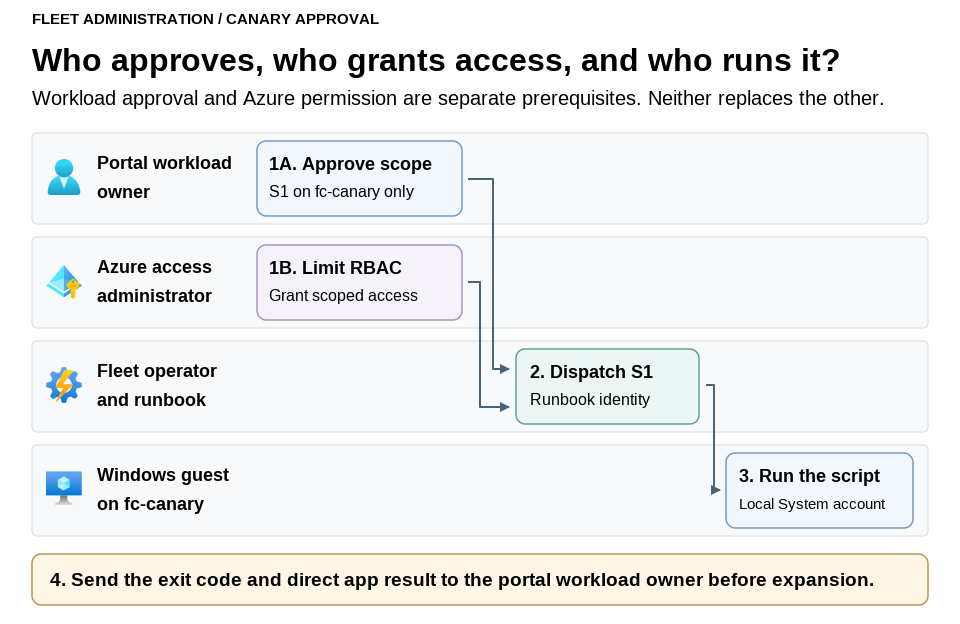
The rollout runbook in the table above is the Azure Automation workflow that coordinates changes across the fleet. After the portal workload owner approves the canary change, the runbook uses its managed identity to submit the reviewed script (S1) to fc-canary through Managed Run Command. The script updates the support link inside Windows as the local System account. The runbook records the result and waits for the portal workload owner's approval before starting the next wave.
Worked example: a temporary change to the returns portal
The retailer's returns portal illustrates the difference between changing an Azure resource and changing what customers see. In the fictional change records, blue represents the old support link and green the new one. Like a maintenance banner or the release version in a page footer, the link is an application setting, not an Azure VM resource property. The proposed PowerShell script changes it inside Windows.
The portal runs in 19 backend pools of 10 VMs each. The portal workload owner wants a temporary trial before deciding on general release. Start with one canary, then seek approval for a 19-VM pilot with one representative from each pool. The other 170 portal VMs are eligible for later waves but not yet approved. The 10 staff VMs use a separate endpoint and are never targets for this change.
Write to one VM during the canary. If the portal workload owner approves expansion, allow no more than five simultaneous changes across the fleet and no more than one per pool. Pause between waves to reconcile per-VM results and obtain the next release decision. This request doesn't authorize infrastructure changes or an application restart.
For each wave, the change record identifies the cohort authorized to proceed, the machines that must remain untouched, and the evidence available at the time of approval. When one VM breaks the pattern, inspect its individual result. A later approval can't authorize an earlier write.
When you cite evidence for a decision, distinguish what each result tells you. Azure's acceptance shows that it received the command. Reading green from the configuration file inside the VM shows what the guest operating system stores. Neither tells you which link the portal serves. For that, use the application's own response from that VM: VmOpsDisplay:green represents the new link.
All 200 VMs already exist in East US. The portal backends use the same Windows Server image and VM size, which determines processor and memory capacity. Regional quota limits how much capacity the subscription can use. The operating system disk holds Windows, while data disks provide additional storage. Updating a support link doesn't require resizing a VM or detaching a disk.
Your handover confirms that the VM Agents are ready and that you have a tested sign-in route if Run Command stops responding. Each VM has a private address on a subnet within an Azure virtual network. Azure Bastion lets you use Remote Desktop to reach that address without exposing a public port on the VM. This route doesn't depend on the VM Agent, so you can still inspect the setting if the agent stops responding.
Within the shared resource group, tags such as Ring=canary or Ring=pilot help you find candidates. A ring identifies when machines are eligible. A wave is the rollout step in which you change a specific approved group. Retagging a VM doesn't add it to the portal workload owner's list.
When you submit a command, Azure role-based access control (RBAC) checks whether your role allows that action on the target VM. If a runbook submits it instead, Azure can authenticate the runbook's managed identity without a stored password. The VM's own managed identity serves a different purpose: it lets software on the VM access Azure resources, but doesn't give you permission to send commands. Once the command reaches Windows in this scenario, the script runs as the local System account, not as the Azure caller.
The portal workload owner wants one temporary change with a separate execution record for each VM. That requirement favors a managed command. A requirement to keep the setting enforced indefinitely calls for a different mechanism.
One-time change: Use Managed Run Command to run a reviewed PowerShell script on fc-canary. It reads the local display setting and changes blue to green only if needed. Record its command and exit code, then check that backend directly. A healthy canary supports a request for the 19-VM pilot. Once approved, issue a separately tracked command for each pilot member, including fc-later. Leave the staff VMs untouched.
Ongoing enforcement: If the portal workload owner instead wants all public backends to stay green, pilot an audit-only Azure Machine Configuration assignment, then compare compliance by pool. After approval, enable Apply and Autocorrect in authorized rings and keep the staff workload outside the assignment. If the portal workload owner later wants blue, revise the policy before restoring the files; otherwise it can reverse the restoration across the fleet.
For example, suppose the fleet security policy owner requires a registry setting to stay enforced on all 200 Windows VMs. A nightly administrator script against every VM tagged Environment=Production isn't equivalent to a tested Machine Configuration policy. Use reviewed VM identities and exclusions for the initial assignment. The security policy owner approves the baseline, while the portal and staff workload owners approve expansion for their respective services. Reject a Bicep template that redeclares each VM with only its size or leaves a shared network change unresolved. If execution is unknown, hold further writes and inspect the existing result, guest state, and application response rather than retrying until a deployment reports success.