Trace fleet changes through rollback
Two claims remain to be tested against the case record: repeating the change had no additional effect, and restoration returned the application to its original behavior. A successful command alone proves neither claim.
Note
Idempotency means that repeating a change leaves the intended state unchanged. For a fleet, test that claim on every member of the repeat wave: if all 60 displays stay green but one revision increments, the repeat didn't pass for the whole wave.
Record R1: repeat and restoration. At 10:25 the portal workload owner approves one repeat on each of the 60 changed VMs. By 10:45 all 60 commands report exit 0 and changed=False. At 10:50 the same person separately approves restoring those 60 to their captured values. Restore the canary, verify its response, and present the result for the portal workload owner's go-ahead before releasing the other 59. Keep the limit of five in flight and one per pool. No write is sent to the 130 deferred or 10 excluded VMs.
The table reconciles every row of M1. Each cell gives the number checked, the direct application response color, and the revision. Missing results would be reported as unknown, not counted as successes.
| Checkpoint | Trial VMs (including fc-canary and fc-later) |
Deferred public VMs | Excluded staff VMs |
|---|---|---|---|
| Before repeat (10:20) | 60 at green / 1 |
130 at blue / 0 |
10 at blue / 0 |
| After repeat (10:45) | 60 at green / 1 |
130 at blue / 0 |
10 at blue / 0 |
| After restoration (11:20) | 60 at blue / 2 |
130 at blue / 0 |
10 at blue / 0 |
Compared with M1, green / 1 both before and after the repeat shows no additional write. Restoration is itself an intentional write, so blue / 2, not blue / 0, is the expected result on the 60 trial VMs. If fc-later instead returned green / 2, investigate that instance, report partial recovery to the portal workload owner, and keep the change open. Don't rerun the other 59.
Use the revision history to compare the five groups in the fleet record. Each line summarizes VMs with the same verified revision at every checkpoint. A correct result on fc-later alone doesn't prove that all 60 trial VMs recovered.
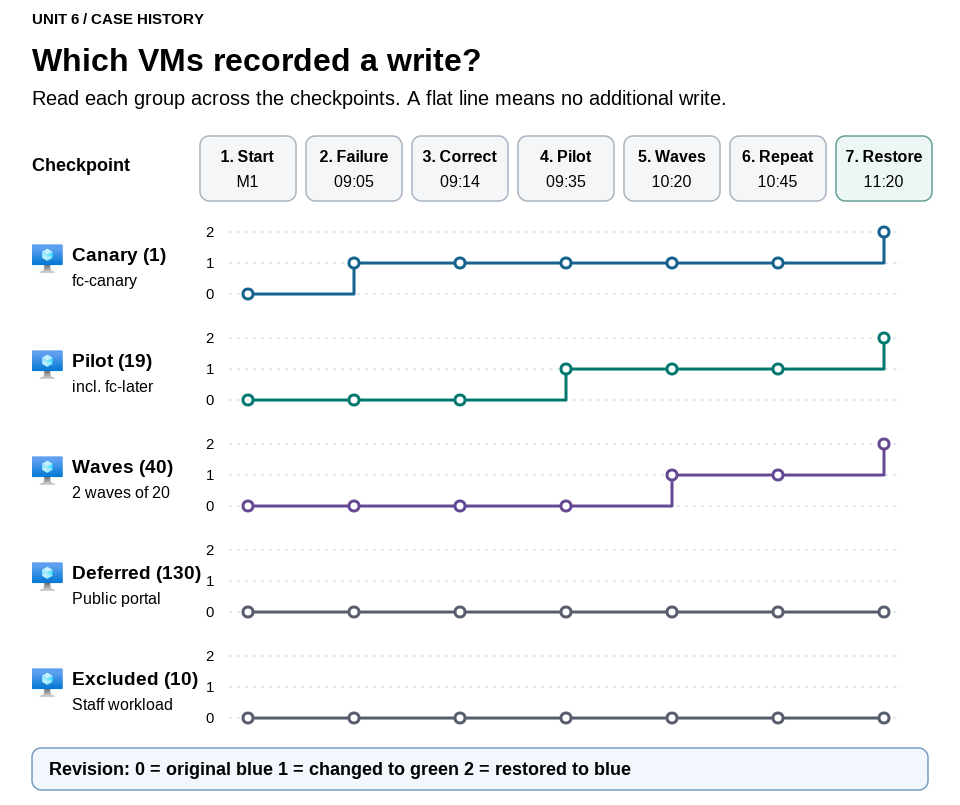
For an auditable change record, reconcile all 200 VM identities by ring and link each wave to its approval and per-instance results. The rows for fc-canary, fc-later, and fc-excluded illustrate a corrected failure, an approved expansion, and an explicit exclusion. Keep the canary's failed first attempt visible and count unique VMs separately from command attempts.
Automate a rollback across a large fleet
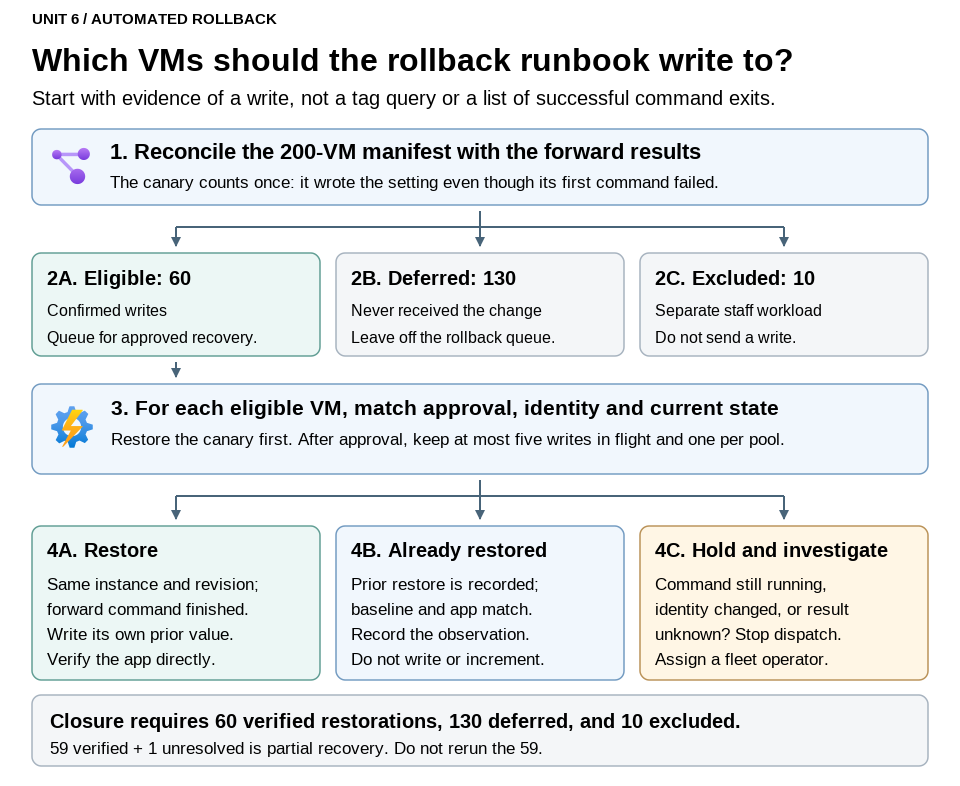
To automate the restoration in R1, build the target list from M1 and the evidence in C1, C2, A2, and A3. That produces 60 unique VMs with confirmed writes, including the canary whose first attempt failed. The successful correction didn't add a second VM or a second write. Leave the 130 deferred and 10 excluded machines off the rollback queue.
Use an Azure Automation runbook to coordinate recovery and a reviewed Managed Run Command to restore the local setting on each approved VM. Rollback is a separate change: stopping the forward runbook doesn't cancel commands it already submitted or undo completed writes. Build the following decisions into the rollback runbook:
- Stop new work and establish the scope: Stop dispatching forward changes and account for commands still in flight. If a command timed out, inspect its instance view and the VM's actual state before classifying the target. Build the rollback manifest from the original approved list and evidence of writes, not a fresh tag query. Record each VM's resource path,
vmId, original value, and expected post-change value and revision. If you can't establish what happened on a VM, flag it for investigation rather than guessing. - Get approval for a specific recovery plan: Produce a read-only report listing which VMs would be restored, skipped, or held, and why. Have the portal workload owner approve the manifest and rollback script versions, the order of waves, the concurrency limit, and the stop conditions. Give the runbook's managed identity only the access needed for those targets. If a policy would reapply the unwanted setting, resolve that conflict before starting.
- Restore one representative VM first: Recheck its identity and settings immediately before the write. Restore that VM's captured value, not a fleet-wide default. Inspect the exit code, then query the application on that VM directly. In the portal example, success means the VM returns
blue / 2: the link is back and the counter still records both writes. Don't use a response from the load balancer as proof that this VM recovered. - Process the remaining VMs in bounded waves: For example, after the rollback canary passes and the portal workload owner authorizes expansion, process the remaining 59 with at most five changes in flight, provided the other instances can carry the traffic. Record and verify each wave before starting the next. On an identity mismatch, unexpected value, timeout, failed application check, or service-health regression, stop dispatching. Reconcile the commands already in flight before deciding whether to resume.
Make the restore operation safe to resume after an interruption. Use a durable per-VM record keyed by the change ID and VM instance. Save the command name before submission so a restarted runbook can inspect that attempt instead of submitting a duplicate. The following examples show how it should decide:
| What the runbook finds | What it does |
|---|---|
| Same instance, the forward command has finished, and the value and revision match the recorded change | Restore that VM's original value only if the expected state still matches at write time. Verify the guest setting and application response, then record restored. |
| A prior rollback attempt already restored the value and the direct application check passes | Record already restored. Don't write again or increment the revision. |
| A command is still running, its result is unknown, the instance was replaced, or the setting has since been edited | Record held with the reason. Assign a fleet operator to investigate; don't retry or overwrite the setting. Take the findings to the portal workload owner for a decision on resuming. |
Close the rollback by accounting for all 200 VMs. R1 verifies all 60 restores. If instead the runbook reported 59 verified restored, one unresolved, 130 deferred, and 10 excluded, that would be partial recovery, not success. Retain the results and approvals. Name the on-call fleet operator responsible for investigating the unresolved VM; don't rerun the other 59 to clear one exception.
Follow only the confirmed-write branch into recovery. Selecting a VM for the rollback queue doesn't mean the runbook should write to it again.