Create workflows in Microsoft Foundry
Microsoft Foundry provides a visual designer that lets you build workflows as a sequence of connected nodes. Each node represents a specific action—such as invoking an agent, evaluating logic, or transforming data—and the connections between nodes define how execution flows from one step to the next. This visual approach makes it easier to reason about orchestration logic and understand how agents interact within a larger process.
You can start a workflow from a blank canvas or by selecting a predefined pattern, such as a sequential workflow. The designer displays the workflow as a series of nodes laid out in execution order. As you build, you can move nodes, insert new steps, and inspect configuration details directly within the canvas. Because workflows aren't saved automatically, it's important to save your changes regularly to preserve each version of your design.
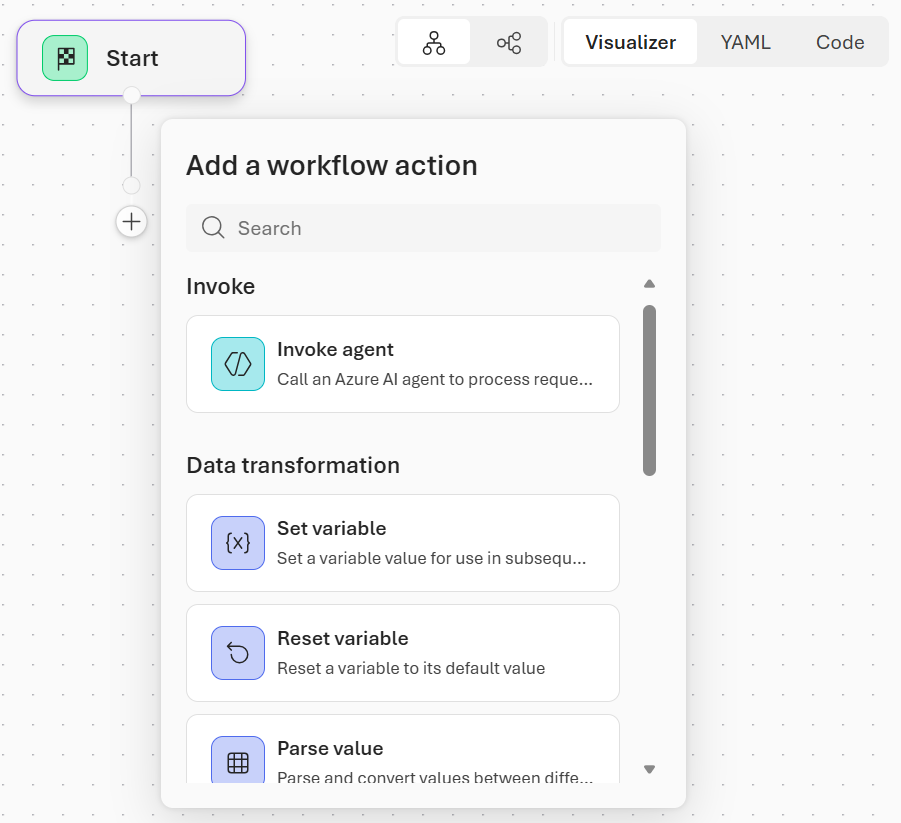
The main node types in the workflow builder are:
Invoke: Invokes an AI agent from your project or creates a new one. Agent nodes can return free-text responses or structured outputs (like JSON) that other nodes can use. They're used for classification, reasoning, recommendations, or any AI-driven task.
Flow: Controls the workflow's execution path. Flow nodes let your workflow adapt dynamically to different inputs or situations. Flow nodes include:
- If/Else: Branches execution based on conditions.
- Go To: Jumps to another node in the workflow.
- For Each: Loops over a list of items, performing the same actions for each one.
Data transformation: Manipulates data and manages variables. Data transformation nodes ensure that information is correctly passed to subsequent steps. Data transformation nodes include:
- Set Variable: Assigns a value to a variable for later use.
- Reset Variable: Clears or reinitializes a variable.
- Parse value: Extracts specific data from structured outputs or converts values to different formats.
Basic chat: Sends messages to the user or asks questions to collect input. These nodes are often paired with variables to capture responses, which can then influence logic or agent decisions later in the workflow.
End: Marks the conclusion of a workflow. The End node can optionally return a final result or status.
flow that determines how each step is executed. Variables provide shared state across nodes, allowing outputs from one step—such as agent results or user input—to inform decisions or trigger more actions. While agent nodes are an important part of a workflow, effective automation relies on the coordinated use of all node types.
Workflows execute within a conversational context, letting you interact with them through the chat window. This interactivity allows you to observe how inputs move through the nodes and validate that each step behaves as expected before adding more complexity. As workflows grow, the visual designer makes it easy to trace execution paths and quickly identify where logic branches or decisions occur.
Understanding nodes and how to combine them gives you the foundation for creating workflows that integrate AI reasoning, data handling, and control logic. Nodes are the building blocks you assemble to turn concepts and automation goals into functional, scalable workflows.