Maintain Workflows in Microsoft Foundry
Building a workflow is just the first step—real-world automation evolves over time. Maintaining and refining workflows ensures that they remain reliable, understandable, and adaptable as business needs or AI models change. Using Microsoft Foundry's built-in features, you can effectively manage workflow versions, document changes, and keep both visual and YAML representations in sync.
YAML and visual representations
Microsoft Foundry workflows can be represented in both a visual canvas and YAML. The visual canvas is ideal for conceptual understanding, tracing execution paths, and collaborating with others. YAML provides a textual representation of the workflow, which can be edited for advanced configuration, version tracking, or integration with source control. Changes in either view are reflected in the other, giving flexibility while keeping workflows consistent.
Versioning
Every time a workflow is saved, Foundry automatically creates a new, immutable version. Versioning provides a safety net: you can review prior versions, compare changes, or roll back to an earlier workflow if a modification introduces errors. Versioning also supports collaboration, making it easier to track who made changes and why.
Adding notes for maintainers
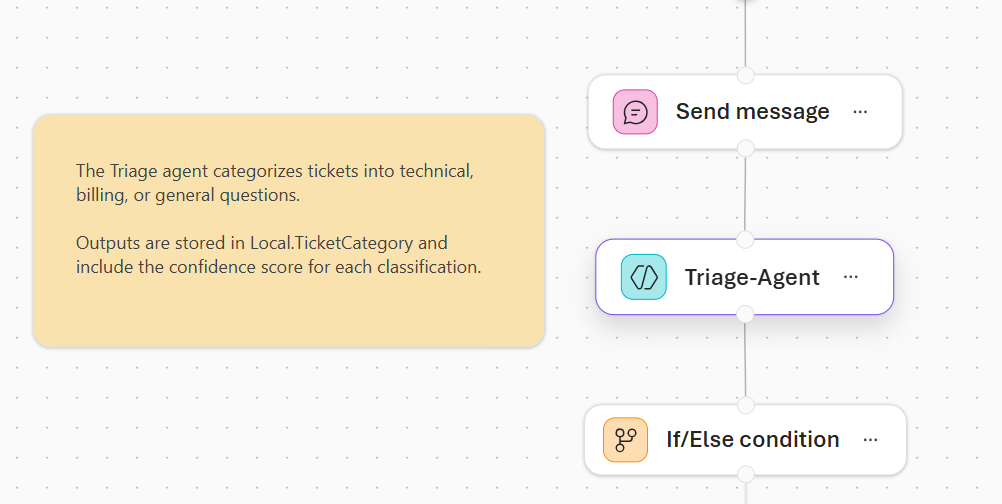
The workflow visualizer allows you to attach notes to nodes or sections of the workflow. Notes provide context, explain design decisions, or clarify variable usage. Adding clear documentation helps future maintainers or team members understand the workflow's purpose and logic, reducing errors and accelerating updates.
Best practices for refinement
Maintaining workflows is not just about fixing errors—it's about improving clarity, reliability, and efficiency. Best practices include:
- Regularly reviewing workflows for unused or redundant nodes.
- Ensuring structured agent outputs are consistently handled.
- Documenting decisions and logic with notes.
- Leveraging version history to track changes and validate updates.
By combining YAML editing, version control, and thoughtful documentation, you ensure that workflows are robust, maintainable, and ready for enterprise use. This focus on maintainability allows teams to scale automation with confidence and adaptability.