Perform Dataverse actions and functions from a code app
Unit 2 connects the Contoso code app to Dataverse tables, so the app reads and writes employee, device, request, and allowance records directly. Before Contoso approves a replacement request, though, the app also needs to run an eligibility check, business logic that lives in Dataverse itself rather than in your client code. This unit shows you how to discover, add, and call that logic from the code app.
Prerequisite: This unit assumes @microsoft/power-apps version 1.1.1 or later.
Reach beyond table CRUD with actions and functions
Dataverse exposes more than table rows. Alongside the create, retrieve, update, and delete operations from Unit 2, Dataverse publishes actions and functions, operations that perform work or return data without mapping to a single table record. Some are built in, such as a queue-assignment action.
Others are custom APIs: a Dataverse developer packages one or more operations into a new callable message. That message becomes invokable through the Web API, the SDK, or a code app, the same way as any other Dataverse operation.
For Contoso, the eligibility rule for a replacement request is a custom API named eqp_IsEligibleForReplacement, a public, unbound action. It's an alternative way business logic gets exposed to your app: instead of every client re-implementing the eligibility rule, Dataverse hosts the rule once, and every caller (this code app, another app, or an automation) gets the same answer.
Functions typically return data without changing anything, while actions typically make a change, return a result, or do both. The distinction matters less to you as a caller than knowing the operation exists and what it expects.
Know whether an operation is bound or unbound
Before you call an operation, confirm whether it's bound or unbound, because that shapes the arguments you pass.
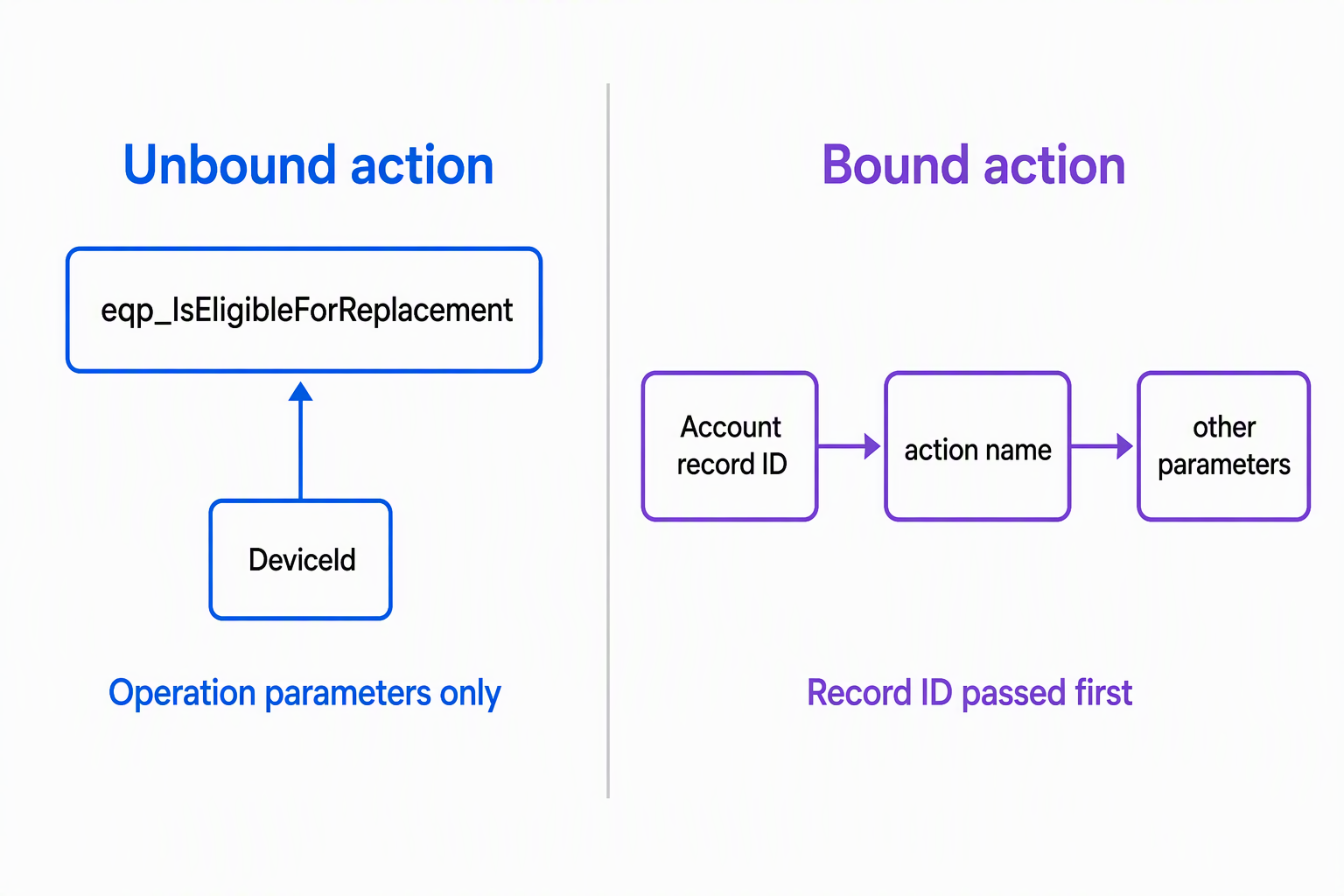
- Unbound operations run independent of any record. You call them directly, with only their own parameters.
- Bound operations run against a specific record. The generated service call takes that record's ID as its first argument, followed by the operation's other parameters.
eqp_IsEligibleForReplacement is unbound: the eligibility check doesn't run against a particular target record, so you call it directly with only its own parameter, a device identifier. Contrast that with a bound example, such as a custom action registered against the account table: calling that action takes the account record's ID as the first argument, followed by the action's own parameters. Knowing the binding before you write the call saves you from guessing at the argument order later.
Find the operation before you wire it in
You don't have to read Dataverse metadata by hand to learn an operation's shape. The Power Apps CLI looks it up for you:
pa app find-dataverse-api --search "IsEligibleForReplacement"
The search is a case-insensitive substring match on the operation name. The result tells you the operation type (Action or Function), the table it's bound to (if any), its parameters, and its return type.
For eqp_IsEligibleForReplacement, that confirms the operation is a public, unbound Action, with a device identifier as its parameter, and a Boolean eligibility result. Running this check first means you generate code against the operation's actual shape: the parameter list and return type, which live in Dataverse, not in your app.
Guiding question: Before you add an operation to the app, do you know whether it's bound or unbound, and to which table? If you're not sure, what command confirms it?
Add the operation and call the generated service
Once you confirm the operation, add it the same way you added each table in Unit 2:
pa app add dataverse-api --api-name eqp_IsEligibleForReplacement
This generates a typed service class (illustrated here as IsEligibleForReplacementService), along with models for any tables the operation references, under the same generated services folder you already use for EmployeeService, DeviceService, RequestService, and AllowanceService. The CLI derives the actual class, method, and property names from the operation's own metadata, so treat the symbol names in this unit's code examples as illustrative rather than guaranteed.
After you run the command, open the generated service file to confirm the real symbol names before you write calling code against them. It's the same generated-code mental model from Unit 2 (a data source produces a typed service), applied to an operation instead of a table.
Calling an unbound action passes only the operation's own parameters:
import { IsEligibleForReplacementService } from './generated/services/IsEligibleForReplacementService';

const result = await IsEligibleForReplacementService.IsEligibleForReplacement(
  deviceId
);

if (result.data) {
  const { IsEligible } = result.data;
}
The app never implements the eligibility rule itself. It calls the operation, waits for the typed result, and reacts, showing an approval or a denial based on the returned eligibility flag.
Know what shape comes back
Parameter and return types follow the Dataverse schema, so you can write the calling code against a known shape instead of guessing at what a response contains.
| Rule | Typed as |
|---|---|
| GUID parameter | string |
| Lookup parameter referencing a table | Record<string, unknown> |
| Operation with no return value | Promise<IOperationResult<void>> |
| Operation returning a scalar value | Promise<IOperationResult<T>> |
| Operation returning a complex type or table | Promise<IOperationResult<Record<string, unknown>>> |
The device identifier that eqp_IsEligibleForReplacement accepts is a GUID parameter, so it's typed as string. Its result carries a single Boolean output, so the call resolves Promise<IOperationResult<Record<string, unknown>>>, and result.data carries the IsEligible field. Knowing this ahead of time means your UI logic, deciding what to render for an approval versus a denial, is written against the type the operation actually returns.
Decide between CRUD and an action or function
Unit 2 gave you create, retrieve, update, and delete for straightforward record changes. This unit adds a second tool, and the judgment call is which one fits the task in front of you.
Reach for plain CRUD when the job is a direct record change: saving a new request, updating an allowance value, retrieving a device for display. Reach for a Dataverse action or function, especially a custom API, when business logic needs to run consistently no matter which client calls it.
The eligibility rule is exactly that case. The same rule applies no matter where the request comes from: this code app, a different app, or an automation. That's because the rule lives in Dataverse, instead of being copied into every client. Your code app doesn't recreate that logic; it calls the operation and acts on the typed result that comes back.
Keep the generated service current
Dataverse operations can change after you've already added them: a parameter gets added, or a return type changes shape. Re-running the same command regenerates the service against the current definition:
pa app add dataverse-api --api-name eqp_IsEligibleForReplacement
This overwrites the operation schema, regenerates the data source information, and removes duplicate configuration entries, while it preserves the table schemas the operation already references. Skipping this step after a Dataverse-side change is a realistic pitfall. Your app's generated types silently drift from what's actually registered in Dataverse, and a working call starts failing or returning unexpected data, with no change in your code.
Handle errors the same way, every time
The calling pattern for an action or function matches the pattern you already use for table operations: wrap the call in try/catch, and check result.data before you use it.
try {
  const result = await IsEligibleForReplacementService.IsEligibleForReplacement(
    deviceId
  );

  if (result.data) {
    const { IsEligible } = result.data;
  }
} catch (error) {
  // Handle the failure path for the UI.
}
That consistency is intentional. As the Contoso app calls more operations (more custom APIs, more built-in actions), you don't relearn a new error-handling shape each time. One pattern covers table access and Dataverse operations alike, which keeps the cognitive load manageable as the app grows.
With table access and now Dataverse operations in place, Unit 4 turns to environment variables.