Use environment variables in a code app
Units 2 and 3 connected the Contoso code app directly to Dataverse: the app reads and writes eqp_employee, eqp_device, eqp_request, and eqp_allowance records, and it calls the supplied eqp_IsEligibleForReplacement custom API. None of that table configuration needs an environment-specific value, as the first section of this unit explains.
One part of the approval flow does, though: once a request clears eligibility, the app needs to know which contact to notify, and that contact differs in Dev, Test, and Production. This unit shows you where a Power Platform solution environment variable actually belongs in this scenario, and how the app reads one at run time.
Know when a Dataverse table doesn't need a variable
It's tempting to assume every value that might differ between environments needs a solution environment variable wrapped around it, including the employee, device, request, and allowance tables the app already uses. That assumption doesn't hold for native Dataverse tables.
When a code app connects natively to Dataverse, as the Contoso app does, it automatically looks for the same logical table name in whatever environment it runs in. As long as a table's schema name stays consistent across Dev, Test, and Production, the app finds it after a solution move without any indirection layer.
That's good news for the four tables already in place: employee, device, request, and allowance don't need an @envvar: reference, a configuration edit, or any extra setup to work correctly after a solution moves to a new environment. The maintenance problem this unit solves lies elsewhere, in a value that a Dataverse table reference can't represent at all.
See where @envvar: references actually apply
The @envvar: prefix does have a real, documented use. You can prefix an environment variable's schema name with @envvar: wherever a Power Apps CLI command accepts a tabular argument, such as --dataset or --table, for a connector-backed data source. The documented example connects a code app to a SharePoint list, where both the site and the list name come from solution environment variables:
pa app add data-source --connector shared_sharepointonline --dataset "@envvar:contoso_SharepointSiteVar" --table "@envvar:contoso_SharepointListVar"
That pattern fits a connector data source because the dataset and table values, a SharePoint site and list, aren't native Dataverse concepts. They're connector arguments, and the connector doesn't otherwise know which site or list to use in a new environment.
Contoso's app doesn't add a SharePoint or other connector data source in this module, so this unit doesn't walk through connector setup here. It's worth recognizing the pattern, though, so you reach for @envvar: only where it actually applies, and not for the native Dataverse tables covered in the previous section.
Read an environment variable's value at run time
The fulfillment contact Contoso's app needs isn't a table or a connector argument at all. It's a single value, stored as a Power Platform solution environment variable with the schema name eqp_FulfillmentContact, that the app reads directly rather than wires into a data source.
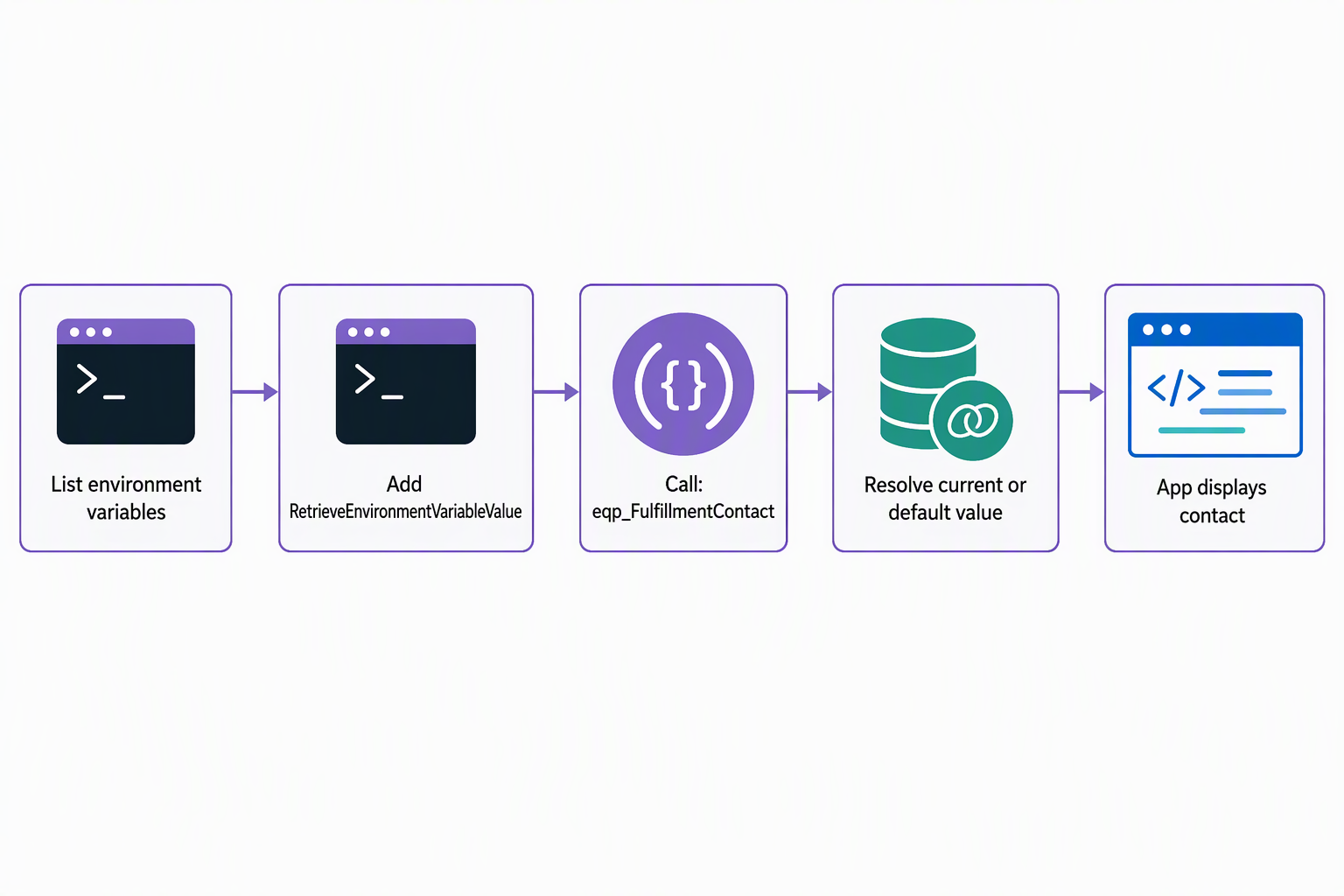
Before you call it, confirm the schema name exists in the environment your code app targets:
pa app list-environment-variables
The output lists the environment variables available to the code app, including eqp_FulfillmentContact. With the schema name confirmed, find the Dataverse function that reads a variable's value, the same way Unit 3 looked up the eligibility-check custom API:
pa app find-dataverse-api --search RetrieveEnvironmentVariableValue
The result shows RetrieveEnvironmentVariableValue as a Dataverse function that takes one parameter, DefinitionSchemaName, and returns the variable's current value. Add it the same way you add any other operation:
pa app add dataverse-api --api-name RetrieveEnvironmentVariableValue
The CLI derives the generated class, method, and property names from current Dataverse metadata. Open the generated service file to confirm those symbols before you use them. The following example uses RetrieveEnvironmentVariableValueService to illustrate the expected pattern. Call the function with the schema name you confirmed earlier, and read the contact value from the response:
import { RetrieveEnvironmentVariableValueService } from './generated/services/RetrieveEnvironmentVariableValueService';

const result = await RetrieveEnvironmentVariableValueService.RetrieveEnvironmentVariableValue({
  DefinitionSchemaName: 'eqp_FulfillmentContact',
});

if (result.data) {
  const fulfillmentContact = result.data.Value;
}
The app never stores the contact itself. It asks Dataverse for the current value of eqp_FulfillmentContact every time it needs one. That way, the same generated call returns whichever contact is configured for the environment the app happens to be running in.
Guiding question: The Contoso app already uses four tables,
employee,device,request,allowance, plus theeqp_FulfillmentContactvariable. If Contoso later needs an approval-threshold amount that also differs by environment, would you model it as a table, a variable read throughRetrieveEnvironmentVariableValue, or something else? What's the deciding factor?
Tell a default value from a current value
A solution environment variable actually carries two possible values, and RetrieveEnvironmentVariableValue returns whichever one applies. The variable's definition can include a default value, set once as part of the solution itself. Each environment can also hold its own current value, set during that environment's solution deployment. When a current value exists, the function returns it. When it doesn't, the function falls back to the default value from the definition.
That separation is what makes Contoso's deployment story work. The solution ships with eqp_FulfillmentContact defined once. Dev, Test, and Production each supply their own current value as part of importing that solution: a test mailbox in Dev, the real fulfillment team's contact in Production. The code app's call never changes. Only the current value that Dataverse resolves for DefinitionSchemaName: 'eqp_FulfillmentContact' changes, environment by environment.
Don't mix up solution environment variables with PA_CLI_* variables
The phrase "environment variable" shows up in two unrelated places in this workflow, and conflating them leads to real configuration mistakes.
eqp_FulfillmentContact is a Power Platform solution environment variable. It lives in a solution, and Dataverse resolves its current value inside the deployed app, per environment, exactly as the previous section describes. The Power Apps CLI also recognizes its own, entirely separate set of environment variables, prefixed PA_CLI_, such as PA_CLI_ORG_URL or PA_CLI_ENVIRONMENT_ID.
These are operating-system-level variables that configure how you run CLI commands: for example, which Dataverse organization URL or environment a script or CI/CD pipeline targets. They configure the tool you run commands with, not the app that ends up deployed.
| Characteristic | Solution environment variable | PA_CLI_* variable |
|---|---|---|
| Where it lives | Inside a Power Platform solution | On the machine or pipeline that runs the CLI |
| What it configures | A value the deployed app reads at run time via RetrieveEnvironmentVariableValue |
CLI authentication and command options |
| Who resolves it | Dataverse, when the app calls the function | The pa CLI, when you run a command |
| Example | eqp_FulfillmentContact |
PA_CLI_ORG_URL or PA_CLI_ENVIRONMENT_ID |
If Contoso's pipeline sets PA_CLI_ENVIRONMENT_ID so a deployment script always targets the correct environment, that setting has no bearing on which contact the deployed app reads. Only the current value configured for eqp_FulfillmentContact in that environment's solution controls that.
With tables connected, Dataverse operations in place, and now a runtime-resolved environment variable, the Contoso code app carries its full data behavior across Dev, Test, and Production without a rebuild. The knowledge check and the module summary close out what this module covers.