Deploy a Spring AI application to Azure Container Apps
In this unit, you learn about deploying your Spring retrieval-augmented generation (RAG) application to Azure Container Apps. Azure Container Apps is a serverless platform that enables you to maintain less infrastructure and save costs when running containerized applications. This unit covers the necessary Container Apps concepts so that you can containerize your application, set up Azure Container Apps, and ensure a secure and scalable deployment.
Environments
A container apps environment is a secure boundary around one or more container apps and jobs. The Container Apps runtime manages each environment by handling OS upgrades, scale operations, failover procedures, and resource balancing. Before you can deploy a container app, you need to create an Azure Container Apps environment.
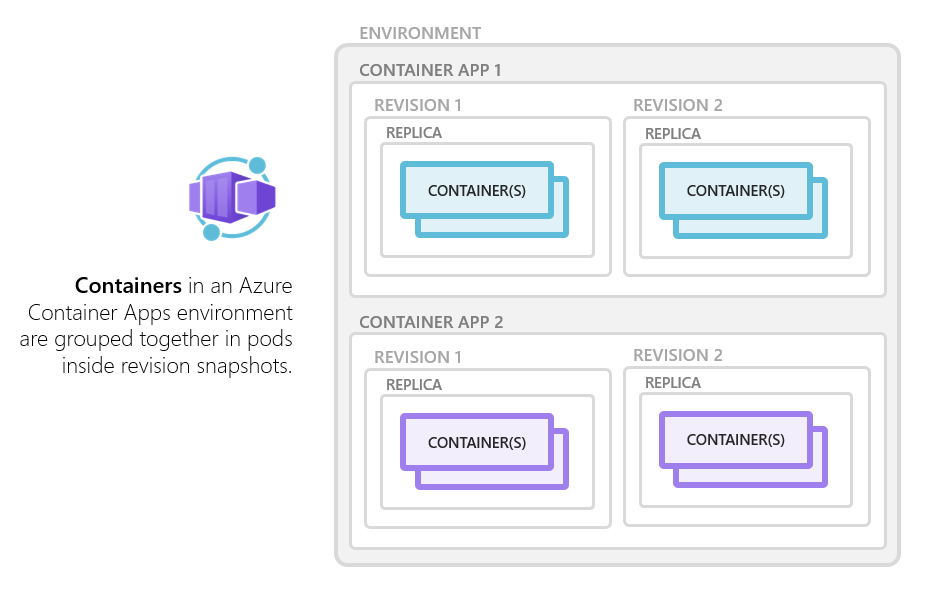
There are two types of container app environments:
Workload profile: run serverless apps with support for scale-to-zero and pay only for resources your apps use with the consumption profile. You can also run apps with customized hardware and increased cost predictability using dedicated workload profiles.
Consumption only: run serverless apps with support for scale-to-zero and pay only for resources your apps use.
Replicas
Replicas are instances of your container app that run concurrently to handle incoming requests or background tasks. By scaling the number of replicas, you can ensure that your application can handle varying loads efficiently. Azure Container Apps supports both manual and automatic scaling of replicas based on predefined metrics or custom rules.
Revisions
Revisions are immutable snapshots of your container app's configuration and code at a specific point in time. Each deployment creates a new revision, enabling you to roll back to previous versions if needed. Revisions enable safe updates and version control for your containerized applications. You can configure traffic splitting between revisions to gradually roll out new features or to perform A/B testing.
Deployment types
There are three primary deployment types for Azure Container Apps:
Deployment from an existing image: you can deploy a container app that uses an existing image in a public or private container registry.
Deployment from source code: you can deploy your application directly from your local source code repository. The
az container upcommand builds the container image, pushes it to a registry, and deploys the container app. It also creates the registry in Azure Container Registry if you don't provide one. This command can build the image with or without a Dockerfile. If you build without a Dockerfile, the following languages are supported:- .NET
- Node.js
- PHP
- Python
Deployment from a GitHub repository: when you use the
az containerapp upcommand to deploy from a GitHub repository, it generates a GitHub Actions workflow that builds the container image, pushes it to a registry, and deploys the container app. A Dockerfile is required to build the image.
Ingress options
Azure Container Apps supports the following ingress options to control how your application is accessed:
External ingress: this option exposes your container app to the internet, allowing external clients to access it. You can configure custom domains and TLS/SSL certificates for secure access.
Internal ingress: this option restricts access to within the virtual network, making your container app accessible only to other resources within the same network. This option is useful for internal services that don't need to be exposed to the internet.
No ingress: if you don't need any external or internal access, you can disable ingress. This option is useful for background jobs or services that don't require direct access.
Scaling
Azure Container Apps provides flexible scaling options to ensure that your application can handle varying loads efficiently. The following list describes the primary scaling options:
Manual scaling: you can manually set the number of replicas for your container app. This option gives you full control over the scaling process, enabling you to adjust the number of instances based on your specific needs.
Automatic scaling: Azure Container Apps supports automatic scaling based on various metrics. You can configure autoscaling rules to automatically adjust the number of replicas based on CPU usage, memory usage, or custom metrics, including
JVM- Java virtual machine - metrics, using Kubernetes event-driven autoscaling (KEDA). This capability ensures that your application can handle increased traffic without manual intervention.Scale to zero: for serverless applications, you can configure your container app to scale down to zero instances when there's no traffic. This helps save costs by using resources only when needed.
To configure scaling, you can use the Azure CLI, the Azure portal, or ARM templates. The following example shows you how to set up autoscaling by using the Azure CLI:
az containerapp update \
    --resource-group spring-ai-demo \
    --name spring-ai-app \
    --min-replicas 1 \
    --max-replicas 10 \
    --scale-rule-name http-rule \
    --scale-rule-type http \
    --scale-rule-http-concurrency 15
In this example, the container app is configured to scale between 1 and 10 replicas based on HTTP concurrency. HTTP concurrency is set to 50, which means each replica handles up to 50 concurrent HTTP requests before more instances are created.
Unit summary
In this unit, you learned about the key concepts of Azure Container Apps, including environments, deployment types, ingress options, and scaling mechanisms. In the next exercise, you put these concepts into practice by deploying your Spring RAG application using Azure Container Apps.