Demonstrate the code component lifecycle and configure its manifest
Every code component on the equipment-request form, whether it's the live availability indicator or the inline device picker, moves through the same set of lifecycle methods. Each one also relies on a manifest that declares what it needs. Understanding when each method runs and how the manifest shapes those methods gives you the mental model you need before you implement any component logic.
Move the component through its lifecycle methods
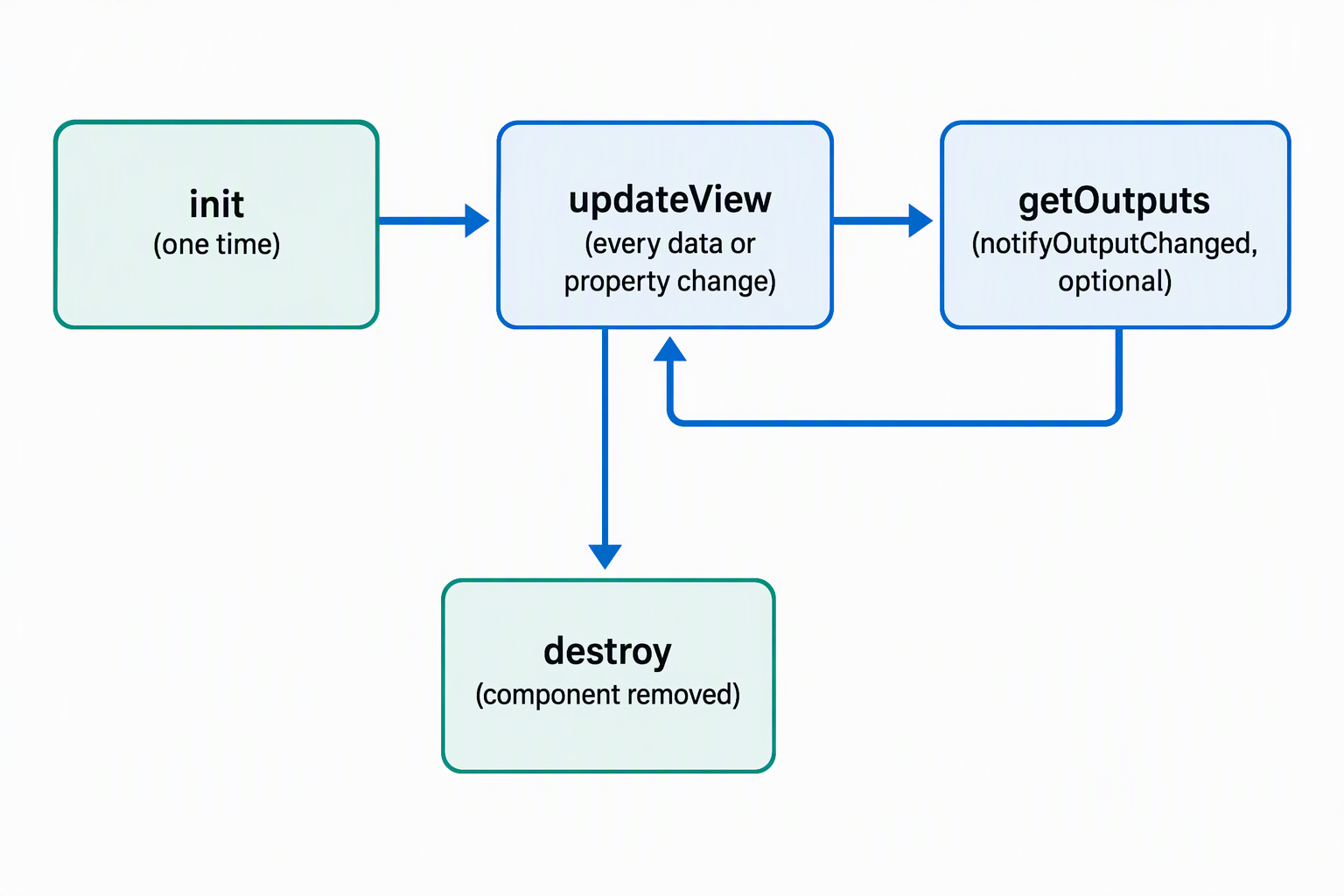
A code component implements four methods, and the Power Apps component framework calls each one at a specific point in the component's life. The Power Platform CLI generates stub implementations for all four when you scaffold a project. You don't write the method signatures from scratch, but you do decide what happens inside them.
| Method | When the framework calls it | What you do there |
|---|---|---|
init |
Once, when the component first loads on the form | Set up the component's UI, read static configuration, and optionally start an asynchronous call. |
updateView |
Whenever a bound value changes: a field value, a dataset, the container size, offline status, or metadata like label or visibility | Read the current values from the context parameter and re-render the component's UI to match. |
getOutputs |
Just before the framework reads new data from the component | Return an object with the component's current output values when the component exposes bound output properties. |
destroy |
When the component is removed from the page | Release event listeners and clean up resources the component allocated. |
Picture the device picker on the request form. init builds the picker's container and dropdown shell the moment the form loads. From there, updateView runs every time the form's data changes: it checks the employee's remaining allowance and the current request's category, then re-renders the availability indicator to reflect which devices still qualify.
When the employee selects a device, the picker calls notifyOutputChanged, the callback it received back in init. That call is what triggers the framework to invoke getOutputs and pick up the selected device ID. When the employee navigates away from the form, destroy runs and removes the click handlers the picker attached to its dropdown.
Note
Dataset values aren't available inside init, and bound values can still be temporarily null while data loads. Wait for the first updateView call before you depend on dataset records or current field values.
Notice how updateView carries most of the reactive logic: it's the method you return to over and over as the form's data changes, while init and destroy run exactly once each. This asymmetry explains why so much of a component's behavior lives in updateView rather than spread across all four methods.
Declare the component in its manifest
Before any lifecycle method runs, the framework reads the component's manifest, an XML file named ControlManifest.Input.xml. The Power Platform CLI generates this file along with a stub index.ts when you run pac pcf init --namespace <namespace> --name <name> --template field|dataset.
The manifest is what makes the component's inputs and outputs type-safe: the framework generates matching IInputs and IOutputs TypeScript interfaces from it, so context.parameters in your code reflects exactly what the manifest declares.
A trimmed manifest for a field-bound availability indicator looks like this:
<control namespace="EquipmentProvisioning" constructor="AvailabilityIndicator" version="1.0.0" control-type="standard">
  <property name="deviceStatus" display-name-key="Device_Status" of-type="SingleLine.Text" usage="bound" required="true" />
  <property name="refreshLabel" display-name-key="Refresh_Label" of-type="SingleLine.Text" usage="input" required="false" />
  <resources>
    <code path="index.ts" order="1" />
    <css path="css/AvailabilityIndicator.css" order="1" />
  </resources>
</control>
The control node names the component and its version. Each property node declares one configurable piece of data: deviceStatus is bound to a Dataverse column, so a maker binds it to a field on the form, while refreshLabel is an input property a maker types in directly. The resources node lists every code, style, and resource file the component needs to render; every manifest requires at least one code resource.
A type-group node, declared inside control alongside its property nodes, names a set of compatible data types instead of a single one. A property that needs to accept any type from that set references it with of-type-group in place of of-type. This fits a property like a numeric allowance value that should work whether the underlying column is Whole.None, Currency, FP, or Decimal, since any of those types can populate the same type-group.
Compare field and dataset component types
The template you pass to pac pcf init determines whether the manifest binds to a single column or to a set of records, and that choice shapes how you read data in updateView.
| Component type | Binds to | Equipment-provisioning example |
|---|---|---|
| Field | A single column on a row | The availability indicator, bound to a status-style column so it reflects one request's current state |
| Dataset | A configurable set of table records, declared with a data-set node instead of a simple property |
A device picker that lists every device matching the request's category, filtered and sorted like a grid |
A dataset component adds a data-set node to the manifest in place of (or alongside) property nodes, and the framework exposes the records through context.parameters.<dataset name>.records once updateView runs. Field components stay simpler because there's only one value to track, but they can't represent a filtered list the way a dataset component can.
Reflect: Think about the device picker scenario. Why does it make more sense as a dataset component rather than several field components, one per device? What would you lose if you tried to model a list of records as individual bound fields instead?
Preview what comes next
The manifest also supports a uses-feature node that declares platform capabilities like Device, Utility, and Web API access. That's a topic for the next unit, where you connect those features to component logic.
For now, you have the foundation: you know when each lifecycle method fires, why updateView carries the reactive weight of the component, and how the manifest's property and data-set nodes shape the IInputs interface your code reads from. With that mental model in place, you're ready to implement the component's interfaces and wire up platform features against the equipment-provisioning scenario.