Implement authentication for custom connectors
You now have a custom connector that reaches the device-availability service and returns a result. But right now, it answers anyone who asks—it doesn't yet confirm who's calling. This unit closes that gap. You move from a connector that works to a connector that only the right callers can use. You do this by choosing and configuring the authentication method that matches how the device-availability service actually protects itself.
Match the authentication type to how the service is protected
Every custom connector defines its security on the Security tab when you create or edit it, and the platform supports exactly four authentication types. Only one applies per connector, so the choice you make here shapes every connection your team creates afterward.
- No authentication suits a service that doesn't check who's calling at all. If the device-availability service exposes a public, read-only stock-lookup endpoint with no sensitive data behind it, this option lets any user create a connection without supplying credentials.
- Basic authentication asks the user for a username and password at connection time, which is the simplest option to configure but also the weakest, since credentials travel with every request. It fits a small internal tool, not a service the equipment-provisioning system depends on for production decisions.
- API key authentication skips asking the user for anything at connection creation beyond the key itself. You choose whether the connector sends that key as a request header or as a query string parameter. This option is a reasonable middle ground for an internal service that issues a single shared key and doesn't need per-user identity.
- OAuth 2.0 uses the OAuth framework to exchange user credentials for an access token, which the connector then attaches to every request through the authorization header. It's the most involved to set up, and it's also the option you reach for when the device-availability service sits behind real identity infrastructure rather than a shared secret.
For the device-availability service specifically, the right choice tracks how the service is actually hosted and protected. An anonymous public endpoint needs no authentication at all. A lightweight internal service that issues a shared secret is a fit for an API key.
But suppose the device-availability service runs as a protected Azure-hosted API, or any API secured behind Microsoft Entra ID. In that case, OAuth 2.0 with Microsoft Entra ID as the identity provider is the recommended path for a production scenario. It authenticates individual callers, rather than trusting one shared value that anyone with access to the connector definition could read.
| Authentication type | What the user provides | Where credentials travel | Typical fit |
|---|---|---|---|
| No authentication | Nothing | N/A | Public, anonymous endpoints |
| Basic authentication | Username and password | Sent with every request | Simple internal services, low sensitivity |
| API key | A key value only | Request header or query string | Internal services with a shared key |
| OAuth 2.0 | Sign-in credentials once, per connection | Access token in the authorization header | Services behind real identity infrastructure, production scenarios |
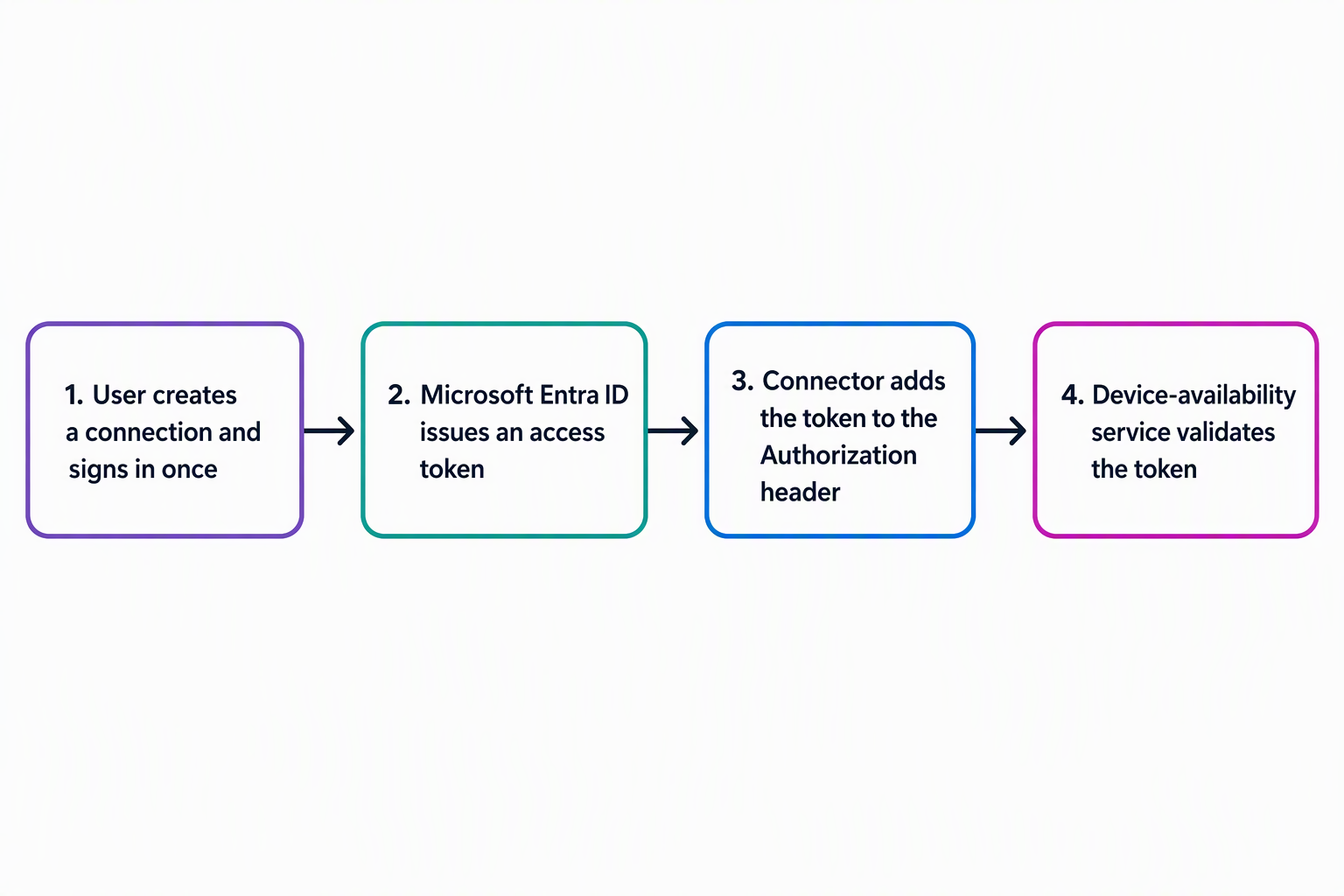
Use Microsoft Entra ID as the connector's identity provider
When you select OAuth 2.0 on the Security tab, you also choose an identity provider. Generic OAuth 2 works with any service that implements the standard flow, while Microsoft Entra ID is the provider built for Azure-hosted and Entra-ID-protected APIs. Suppose the device-availability service runs behind Microsoft Entra ID. You pick that provider rather than the generic one, because it's purpose-built to exchange tokens with the same identity platform the service already trusts.
Choosing Microsoft Entra ID assumes some setup that happens outside the connector itself. You register an application in Microsoft Entra ID for the connector to use, which gives you a client ID that identifies the connector to the identity platform.
You then request the delegated API permissions the connector needs against the device-availability service, rather than broad access, so each user's connection only reaches what their own sign-in allows. With the application registered and permissions granted, you come back to the connector's Security tab.
There, you supply the client ID, client secret, authorization URL, token URL, and refresh URL that tie the connector to that registration. From that point, every connection a user creates uses their own sign-in to Microsoft Entra ID. The resulting access token travels with each request, instead of a single shared credential.
This approach is recommended over a shared API key specifically because Microsoft Entra ID is designed to protect first-party, identity-protected APIs like the device-availability service. An API key proves the request came from someone with the key. An Entra ID-backed OAuth flow proves which identity made the request. That distinction matters once the equipment-provisioning system starts relying on the device-availability service for decisions tied to real allowances and approvals.
Guiding question: Suppose the device-availability service the equipment-provisioning team actually uses turns out to be a simple internal tool. It issues one shared key to every integration, with no Microsoft Entra ID registration involved. Based on the decision criteria in this unit, would you still reach for OAuth 2.0, or does a different authentication type fit better here? What would change your answer?
Keep OAuth credentials working after the connector is secured
Securing the connector with OAuth 2.0 isn't a one-time task, because the credentials behind it have a lifespan. The client secret you generated when you registered the application in Microsoft Entra ID expires on a schedule you set during registration. An expired secret can stop existing and new connections from authenticating. You monitor that expiration date and renew the secret well before it lapses, so the equipment-provisioning team's flows and apps keep working without an unplanned outage.
When you renew the client secret, you also update the connector's swagger version at the same time. The official guidance calls out both steps together, so treating them as a pair helps keep the connector definition aligned with the current authentication configuration after a routine secret rotation.
For Microsoft Entra ID OAuth specifically, a connector can use a managed identity instead of a client secret, which removes secret rotation from the picture entirely. This option requires a single-tenant client app and a one-time federated-credential setup, where you copy the issuer and subject from the connector into the app's Federated credentials.
A new identity is generated when the connector moves to another environment. This doesn't eliminate secret-based connectors as an option. It's an alternative for connectors where you want to avoid ongoing secret renewal.
One more detail worth knowing before you move on: each custom connector gets its own unique redirect URL for the OAuth callback, separate from any other connector in the environment. When you register the application in Microsoft Entra ID, you register this connector-specific URL as the redirect URI.
That way, the identity provider knows where to send the user back after they sign in. The URL is unique per connector. Registering the wrong one, or reusing one from a different connector, is a common reason an OAuth sign-in fails even when every other setting looks correct.
With the connector now reaching the device-availability service and authenticating only the right callers, the next question is how it behaves once real traffic starts flowing through it. The next unit builds on this secured connector, covering how policy templates and OpenAPI extensions let you shape that runtime behavior without changing the API underneath it.