Modify connector behavior at runtime
The previous unit leaves you with a connector that authenticates correctly: it reaches the device-availability service and confirms only the right callers get through. But authentication only answers who's calling.
It says nothing about what the coordinator's flow actually receives back, or how much of the connector's surface a flow builder sees when they drop it into a trigger. This unit moves you from a connector that authenticates to a connector that behaves the way your flow needs, even when the backend API can't change.
Reshape requests and responses with a policy template
A policy template is a predefined, parameterized transformation that the connector applies at runtime. It runs after a call leaves the flow but before the response reaches it, or the reverse, on the way out.
Policies modify request and response payloads, headers, and routing, and they can enforce limits such as throttling, all without you writing a line of backend code. You apply them from the connector's Definition tab: select New Policy, choose a template from the dropdown, and supply the parameter values the template asks for.
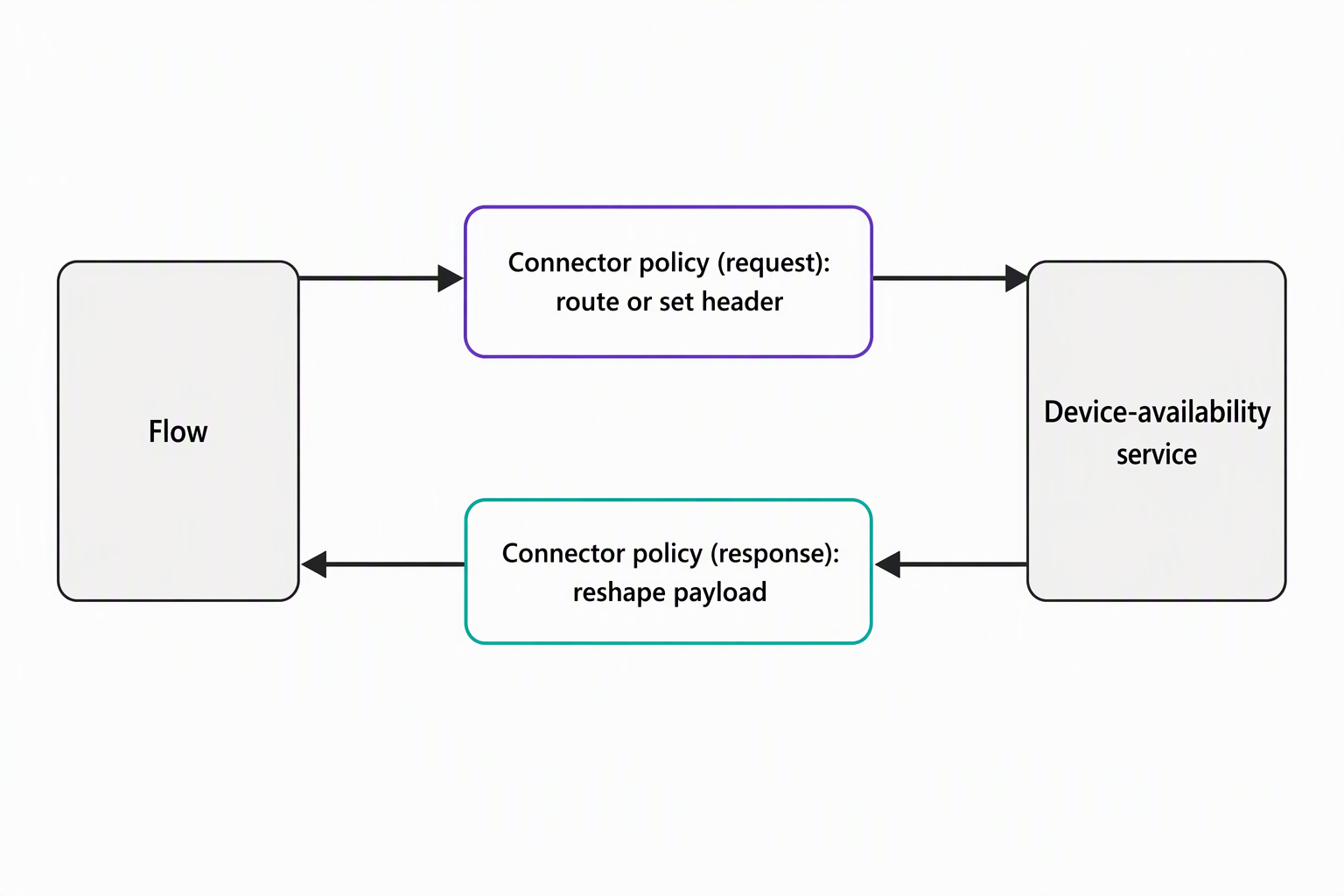
Consider two situations the equipment-provisioning team runs into once the device-availability service connector is live. First, suppose the service reports stock counts in a raw unit, such as individual device IDs, while the coordinator's flow expects a rounded-up count per device category. A policy applied to the response payload can transform that value in transit, so the flow always receives the shape it expects, regardless of how the backend formats its reply.
Second, suppose the team later stands up a separate instance of the device-availability service for a different region. A flow needs to route to that instance, instead of the one the connector was originally pointed at. A routing policy changes where the call lands without touching the connector's underlying definition at all.
That second scenario matters even more once you think about how the equipment-provisioning solution moves through its lifecycle, from a development environment, to test, to production. Each environment likely points at a different instance of the device-availability service, but you don't want three separate connector definitions to maintain.
Policy templates can reference environment variables using the syntax @environmentVariables("environmentVariableName"). That means a single policy pulls its target URL, or any other environment-specific value, from a variable that's scoped differently in each environment.
At time of writing, this environment-variable support inside policies is called out as a preview capability. Treat it as something to validate in your own environment before you depend on it for a production rollout. The underlying policy mechanism itself is fully supported.
Try it yourself: Open the connector's Definition tab for a connector you have access to, and look at the New Policy panel without saving anything. Scan the available templates. Which one would you reach for if the device-availability service started rate-limiting your team's flows during peak provisioning periods?
Shape the design-time experience with OpenAPI extensions
Where a policy changes what happens during a call, an OpenAPI extension changes what the coordinator sees while building the flow, before any call happens. These x-ms-* fields live in the connector's underlying OpenAPI definition, alongside the standard paths and parameters the service already describes. The connector's design surface reads them to decide what to show and how to label it.
x-ms-visibility controls whether an operation or parameter appears by default, sits behind an extra menu, or stays hidden entirely. It accepts three values:
important: parameters appear up front every time.advanced: parameters only appear once the coordinator opens a Show advanced options menu.internal: parameters never appear in the designer at all.
For the device-availability connector, a parameter like an internal request-tracing ID is a reasonable candidate for internal, since the coordinator never needs to set it by hand. A parameter like device category, though, is a strong candidate for important, since it's central to every lookup the coordinator runs.
x-ms-summary gives a parameter or response field a friendlier, title-case label in the designer, separate from the raw field name the service returns. Suppose the device-availability service's response includes a field named something terse. x-ms-summary lets the coordinator see a readable label such as Available Count instead, with no change to the field name the API itself uses.
x-ms-dynamic-values (paired with the newer x-ms-dynamic-list) and x-ms-dynamic-schema go a step further: instead of relabeling a field, they populate it dynamically from another operation's response.
Suppose the device-availability service's "category" parameter currently expects free text, and the coordinator has to know the exact valid category strings in advance. Applying x-ms-dynamic-values to that parameter tells the designer to call a separate operation, such as one that lists valid categories, and populate a dropdown from its response instead. That way, the coordinator picks from a list instead of guessing at spelling.
x-ms-dynamic-schema solves a related but different problem. Suppose the fields available in a response depend on which category or operation the coordinator selected. In that case, it lets the designer fetch the appropriate schema dynamically and adjust the visible fields to match, rather than showing one fixed schema regardless of selection. x-ms-dynamic-properties is the newer companion to x-ms-dynamic-schema, in the same way x-ms-dynamic-list is the newer companion to x-ms-dynamic-values.
| Mechanism | What it changes | When it applies |
|---|---|---|
| Policy template | Request/response payloads, headers, routing, throttling | At runtime, during the call |
| OpenAPI extension | Field visibility, labels, dynamic dropdowns and schemas | At design time, while building the flow |
Decide which mechanism fits the change you need
With both mechanisms available, the practical question becomes which one to reach for. Suppose the problem is about what travels across the wire: how you format a value, where you route a call, or how often you allow calls to fire. That's a policy template's job.
If the problem is about what the coordinator sees and how easy it is to use correctly while building a flow, that's an OpenAPI extension's job. Most day-to-day shaping needs for the device-availability connector fall into one of those two buckets, and neither requires writing or maintaining backend code.
Occasionally, a transformation is too involved for a template or an extension to express. Combining several values with conditional logic, calling out to a separate system mid-transform, or applying a calculation a parameterized template can't represent, pushes past what these codeless mechanisms cover. That's the territory the next unit opens up, where an Azure Function or custom connector code takes over as the deeper transform mechanism for exactly those cases.
Guiding question: The device-availability service starts returning a new field that combines two existing values into one string. The coordinator's flow needs them split back into two separate values before any decision logic runs. Based on what you've read here, is that a policy template problem, an OpenAPI extension problem, or neither? What makes you confident in that answer?
Having shaped how the connector behaves and what the coordinator sees, you're ready to look at the deeper transform option available when policies and extensions aren't enough: the next unit covers how an Azure Function or custom connector code transforms data as it moves between the device-availability service and your flows and apps.