Transform data with an Azure Function or custom code
The previous unit ends at the point where policy templates and OpenAPI extensions stop being enough. Three kinds of logic sit past what a parameterized template or a design-time extension can express. These are combining several values with conditional logic, splitting a combined field back into its parts, and calling out to another system mid-transform.
This unit picks up exactly there. The capability shift is from shaping behavior with codeless templates and extensions to transforming data with code, for the cases those codeless mechanisms can't reach.
When the transformation needs code
Suppose the device-availability service's response nests its stock figures inside a structure the coordinator's flow has to unpack by hand. Or suppose it returns two separate fields that the flow needs combined into one value before any approval logic can run.
A policy template can reformat a single value or adjust a header. An OpenAPI extension can relabel or hide a field. But neither one branches on a condition, reshapes a nested structure, or reaches out to a second system partway through the transformation. When the logic needed crosses that line, custom code is the mechanism built for it.
Custom code takes precedence over the connector's codeless definition whenever both exist. Adding code to a connector that also has policies means the code runs, and the policy templates on that operation don't. That makes code a deliberate, heavier commitment rather than something you add alongside policies as a third option on the same operation. You reach for it specifically when the transformation itself, not the request routing or the field labeling, is the problem.
Guiding question: Think back to the response-splitting scenario from the previous unit, where a single field needs to become two separate values before approval logic runs. Why does that example sit past what an OpenAPI extension or policy template can do, and what about it specifically calls for code instead?
Write inline custom code in the connector
The lightest-weight option keeps the transformation inside the connector itself. You add a C# class named Script that implements ScriptBase and overrides ExecuteAsync, the method the platform runs for every request on that connector.
Inside ExecuteAsync, you work through a Context property of type IScriptContext. It exposes a correlation ID and operation ID for tracing, the incoming Request, a Logger instance, and a SendAsync method. You use SendAsync in place of a raw HTTP client call whenever the script needs to make its own outbound request.
A short illustration makes the shape concrete without turning into a tutorial. The script reads the operation ID from the context to decide which operation it's handling. It then pulls the device-availability service's response body as a string, parses it, and reshapes it — for example, combining two fields into the single value the coordinator's flow expects.
Finally, it returns a new response with that reshaped JSON as its content. The whole thing lives inside the connector definition; there's no separate service to deploy, version, or monitor.
public class Script : ScriptBase
{
    public override async Task<HttpResponseMessage> ExecuteAsync()
    {
        var response = await this.Context.SendAsync(this.Context.Request, this.CancellationToken)
            .ConfigureAwait(false);
        var body = JObject.Parse(await response.Content.ReadAsStringAsync().ConfigureAwait(false));

        // Combine two response fields into the single value the flow expects
        body["availableCount"] = (int)body["inStock"] + (int)body["onOrder"];

        response.Content = CreateJsonContent(body.ToString());
        return response;
    }
}
This approach fits a transformation that's specific to this one connector, doesn't need to run anywhere else, and doesn't carry heavy compute or many branches of logic. The trade-off is that the code lives and versions with the connector definition, with no independent deployment pipeline and no separate scaling. Even so, you can still test and compile the code locally with the supporting classes Microsoft provides.
Inline custom code also comes with firm limits: the script completes within 2 minutes, stays under 1 MB, lives in a single script file per connector, and draws only on the supported .NET Standard 2.0 namespaces, and it isn't available on connections that go through the on-premises data gateway. A transformation that needs more time, more code, or other libraries belongs in an Azure Function instead.
Point the connector at an Azure Function instead
When the transformation outgrows that lightweight model, you move the logic into an Azure Function. You then point the connector at the function's endpoint, instead of, or in addition to, the device-availability service's own endpoint. You build an HTTP-triggered function that exposes its own endpoint, implements the same reshaping or combining logic, and returns the payload shape the coordinator's flow expects. The connector's definition then calls that function's endpoint the same way it would call any other backend.
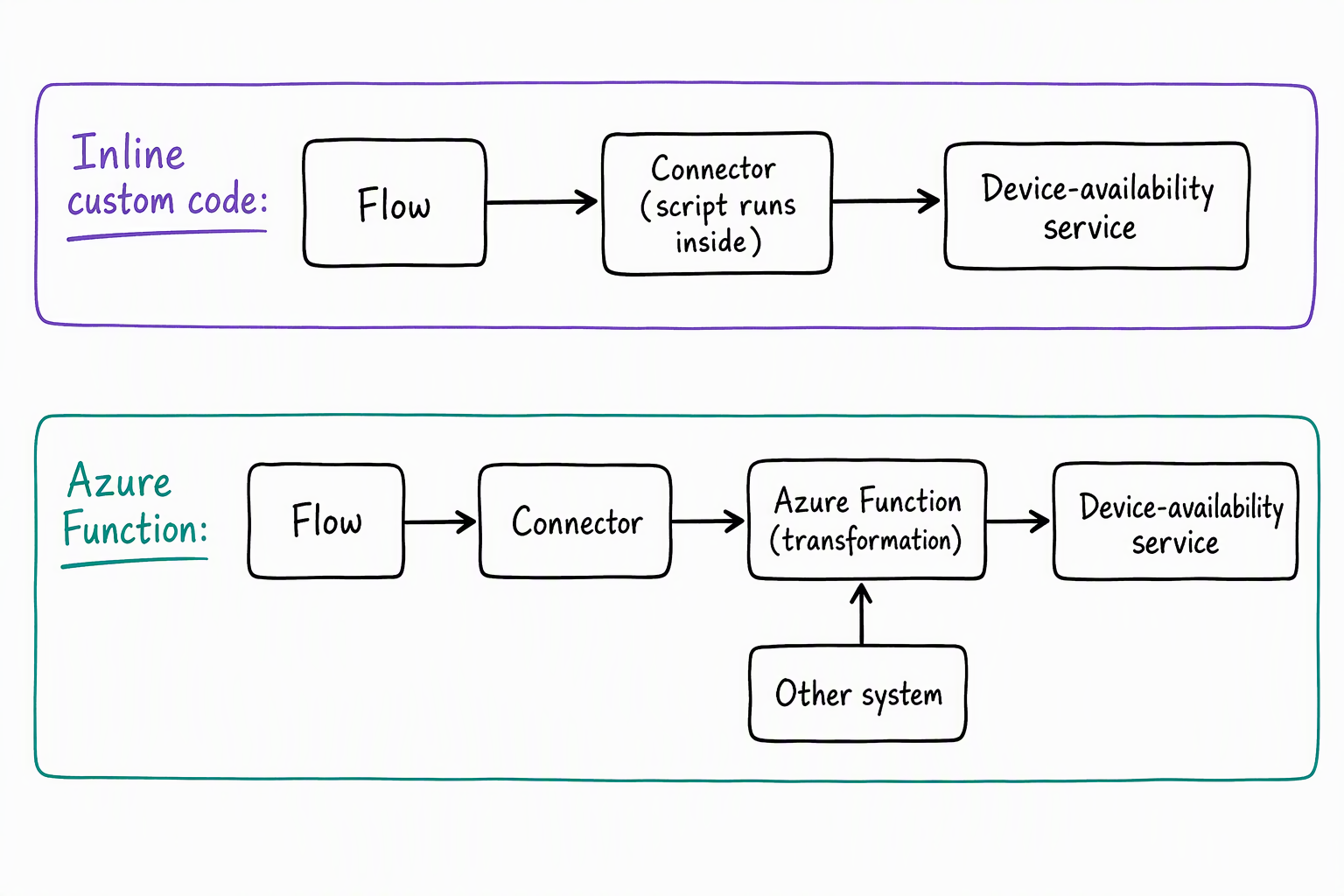
This path makes sense once the logic needs independent testing, independent deployment, or independent scaling, separate from the connector's own release cycle. It also makes sense once more than one connector or caller needs the same transformation.
Suppose the equipment-provisioning team later finds that another part of the solution, not just this connector, needs the same stock-reshaping logic. A shared Azure Function reaches both callers. Inline connector code, by contrast, reaches only requests that pass through this one connector. The function can also hold more complex logic, such as multiple conditional branches or calls to more than one upstream system, without crowding the connector definition itself.
| Consideration | Inline custom code | Azure Function |
|---|---|---|
| Where the logic lives | Inside the connector definition | In a separately hosted function app |
| Reusability | Scoped to this one connector | Callable by multiple connectors or services |
| Complexity ceiling | Best for lightweight, focused reshaping | Handles heavier, multi-step, or multi-service logic |
| Deployment and testing | Versions with the connector; no separate pipeline | Deploys, scales, and tests independently |
Choose between the two for a given transformation
The decision comes down to scope and weight. A transformation that's small, specific to this connector, and unlikely to see reuse elsewhere is a reasonable fit for inline custom code. That choice avoids standing up and maintaining a separate service for a handful of lines of reshaping logic.
A transformation that's heavier, that other parts of the solution could reuse, or that benefits from its test suite and release schedule, is a better fit for an Azure Function. That option gives the logic a life of its own, outside the connector's definition.
Picture a variation of the device-availability service where a single response field now needs to be split into two values. One of those values determines whether the request auto-approves or routes to the coordinator. A second internal system also needs that same split logic applied to its own data.
Synthesis: Walk through the whole module's arc for this variation. How would you import a definition for this service? Which authentication type fits if it sits behind Microsoft Entra ID? Would a policy template or an OpenAPI extension help the design-time experience here? And finally, does this transformation belong in inline custom code or an Azure Function? What's the deciding factor at each step?
Across this module, you moved from a device-availability service with no connector at all to one that's imported, authenticated, and shaped at runtime and design time. It's now also capable of code-driven transformation when nothing codeless reaches far enough. That progression is the full set of decisions a custom connector asks you to make, and it's what the next unit brings together.