Choose the right Copilot mode
Not every business need calls for a new tool, so two quick questions are worth asking first.
Does a solution already exist? Another team may have solved this last quarter. An existing report, site, or shared workbook may already cover most of it. Duplicating a solution creates maintenance work and version confusion later, and two minutes of asking is cheaper than building the wrong thing.
Do you need a tool, or do you need an answer? If you need a summary, a draft, or a one-time analysis, building a tool is the slow way to get there.
Choose the right Copilot mode
Different needs call for different ways of working with Copilot.
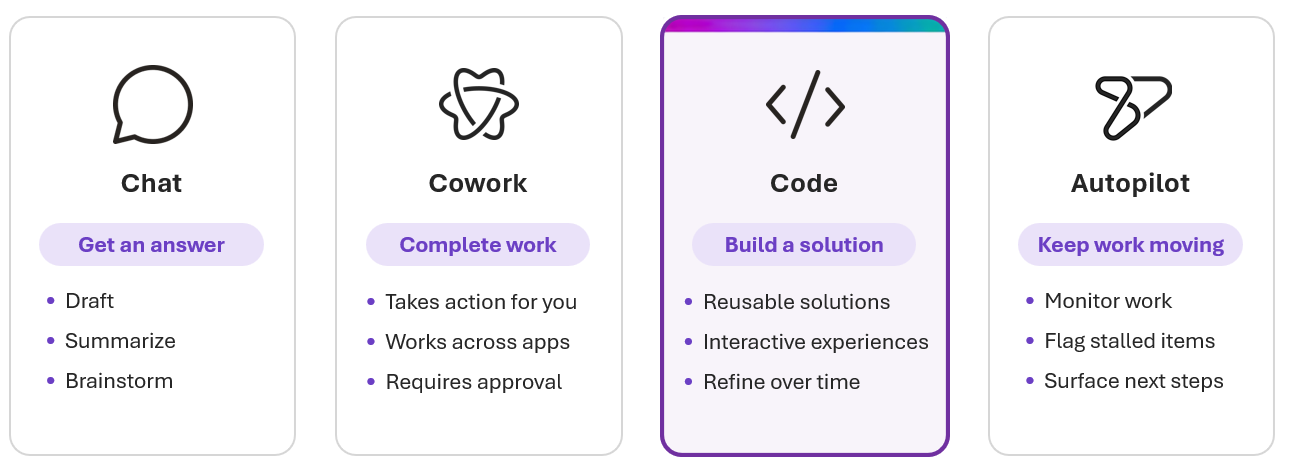
Microsoft Copilot provides several ways to work with AI, and each mode is optimized for a different type of work.
Chat helps you get answers, draft content, brainstorm ideas, and explore topics.
Cowork helps complete a defined body of work across multiple steps, such as researching a company, preparing a meeting briefing, or coordinating follow-up activities.
Code is designed for reusable, interactive solutions. Instead of producing a one-time response, it helps you create something you can return to, improve, and use over time.
Autopilot helps monitor recurring work and keep processes moving. It tracks activity, surfaces stalled items, and flags situations that need attention between check-ins.
Note
Availability of Copilot Chat, Cowork, Code, and Autopilot varies by license, rollout stage, and organizational settings. Some modes might not be available in your environment.
Copilot Code and GitHub Copilot
Copilot Code and GitHub Copilot both create software, but they serve different audiences and workflows.
Copilot Code helps business professionals build tools using natural language and the context of their work. GitHub Copilot helps developers write, review, and manage code throughout the software development lifecycle.
If you already use GitHub, you can connect your GitHub account to Copilot Code and continue working on a project across both experiences.
What makes Copilot Code different
Built for work. Copilot Code uses your work context through Work IQ, so the solutions you create are grounded in real business information instead of sample data.
Built to last. A project is saved, keeps a history of changes, and can be reopened later. What you create is something you return to rather than something you rebuild.
What about App Builder?
App Builder is a skill inside Cowork that creates simple, cloud based web apps from your work data. It is a good choice when you want something quick and lightweight. Copilot Code gives you more flexibility, a project that persists and keeps its history, and room for a solution that grows.
If you need a quick answer, start with Chat. If you need a tool you will keep using and improving, start with Copilot Code.