Publish trust data, validate clients
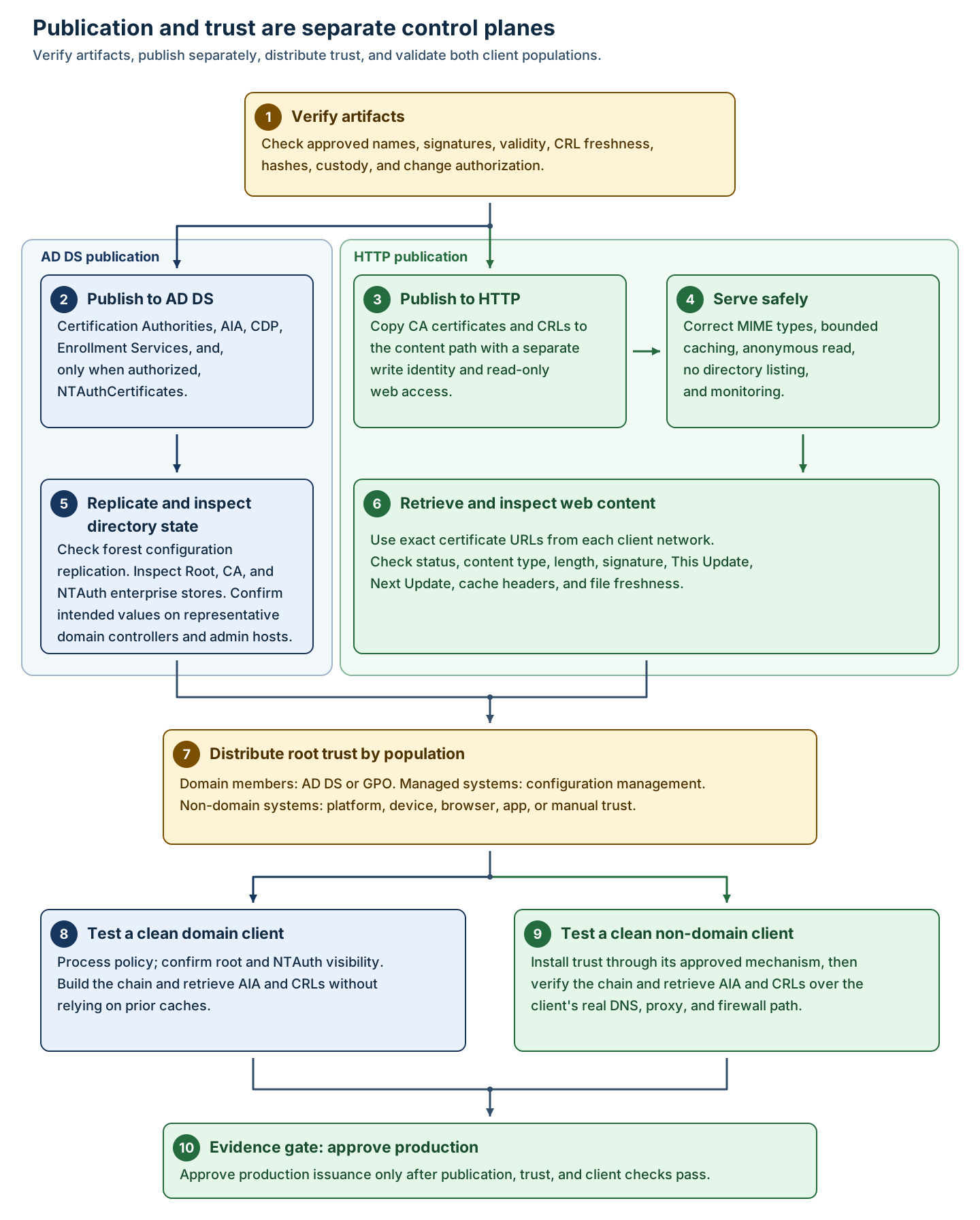
Before the AD DS and HTTP publication procedures in this unit, confirm these infrastructure prerequisites:
- Management host: an authorized domain-connected host with the AD CS management tools (Enterprise PKI) and the AD DS administration tools (Active Directory Sites and Services and
repadmin). A supported Windows Server Desktop Experience host with those Remote Server Administration Tools (RSAT) components installed is one option. Installing CA management tools on the CA doesn't prepare this separate host. - HTTP publisher: the approved
<PkiWebHost>DNS name, a reachable HTTP binding, the content directory and/pkimapping, the IIS Static Content and Request Filtering capabilities, and an available IIS Manager interface. This module assumes that publisher already exists; its provisioning and availability are separate infrastructure prerequisites. Don't install IIS on the offline root to satisfy this requirement.
Public Key Services objects are stored in the forest-wide Configuration naming context at the following location:
CN=Public Key Services,CN=Services,CN=Configuration,<ForestDN>
The following table distinguishes the purpose of each PKI container or object and highlights trust or publication concepts that are commonly confused with it.
| Container/object | Contents and purpose | Don't confuse with |
|---|---|---|
| AIA | certificationAuthority objects containing CA certificates that help clients build certification paths. |
Root trust or proof that HTTP AIA works. |
| CDP | crlDistributionPoint objects containing CRLs published in AD DS. |
HTTP CRL publication or guaranteed freshness at every DC. |
| Certification Authorities | certificationAuthority objects used for enterprise root trust and CA certificate publication. |
NTAuth authorization. |
| Enrollment Services | pKIEnrollmentService objects advertising enterprise CA enrollment metadata and published-template references. |
The template definitions themselves or CA availability. |
| NTAuthCertificates | A forest-wide certificationAuthority object whose multi-valued cACertificate attribute lists CAs authorized for certificate-based AD DS authentication. |
General root trust, application trust, or proof that a certificate maps to an account. |
To view this information in the UI:
Note
Required privilege: authenticated directory read for inspection; delegated forest configuration or Enterprise Admin-equivalent authority for changes.
- Open Active Directory Sites and Services.
- Select View > Show Services Node.
- Expand Services > Public Key Services.
- Inspect AIA, CDP, Certification Authorities, Enrollment Services, and
CN=NTAuthCertificates. - Open object properties read-only and compare intended CA certificates, CRLs, and service metadata.
You can also open Enterprise PKI (pkiview.msc) > Enterprise PKI > Manage AD Containers to review root, AIA, and NTAuth stores. This is UI parity for supported container management, not a substitute for replication checks.
Publish from a domain-connected administrative workstation
The offline root doesn't perform these operations as it should be powered off and hosted on an air-gapped network. Instead, run the following commands from an authorized domain-connected administrative workstation to publish the root certificate, issuing-CA certificate, and root CRL as three distinct AD DS operations:
Note
Required privilege: Enterprise Admin or appropriately delegated write access to the relevant forest Configuration objects.
certutil.exe -dspublish -f RootCA.cer RootCA
certutil.exe -dspublish -f IssuingCA.cer SubCA
certutil.exe -dspublish -f RootCA.crl
The commands should report successful publication; objects are visible through AD tools after replication.
Publishing RootCA.cer with RootCA establishes enterprise root publication for domain populations. Publishing IssuingCA.cer with SubCA assists path building. Publishing the CRL is distinct again. Apply least privilege and preserve command output as evidence.
Publish to HTTP as a separate operation
Copy RootCA.cer, RootCA.crl, IssuingCA.cer, and issuing CRLs to the exact content filenames referenced by certificates. Use a protected staging-to-web deployment identity. Don't grant the IIS worker or anonymous user write access.
IIS Manager UI procedure
This procedure configures signed CA artifacts as static, anonymously readable content with controlled MIME types, caching, and filesystem permissions. It requires web-server local administrator or narrowly delegated IIS/content-administrator privilege and publisher write access to staging and content. Success means the exact URLs return HTTP 200 with the approved bytes, content types, headers, and current signed artifacts from every client network. Web-process write access, an incorrect MIME type, excessive cache lifetime, or stale content replication can break validation or extend revocation exposure.
- In IIS Manager, select the publication site or application.
- Open MIME Types and define/test:
.cer->application/pkix-cert.crl->application/pkix-crl.crt->application/x-x509-ca-cert
- Review the content directory ACL:
- Publisher: write/modify as explicitly required.
- IIS worker and anonymous identity: read only.
- No broad authenticated-user write.
- Open Authentication at the PKI site's or application's scope and verify Anonymous Authentication is enabled. Confirm the effective anonymous identity, such as
IUSRor the configured application-pool identity, has only the required filesystem read access to the published artifacts, and never anonymous write access. Anonymous Authentication is enabled by default in a normal IIS installation, so verify the effective configuration rather than assuming it. When you later retrieve the artifact URLs, do so without supplied credentials from the required client networks, and reject authentication challenges, unexpected redirects, HTML error pages returned as200, stale files, and incorrect bytes. - Disable directory browsing and script/execute capability for the static path.
- Open HTTP Response Headers. Configure bounded cache behavior that can't outlive CRL freshness. Account for intermediary caches and emergency updates.
- At the dedicated PKI publication site, application, or directory, not the server-wide configuration, open Request Filtering, select Edit Feature Settings, enable Allow double escaping, and select OK. This permits the
+character in the delta-CRL filenames this deployment uses. Keep the exception scoped to the approved static PKI path; don't disable Request Filtering or change unrelated applications. If configuration is locked or centrally managed, have the IIS administrator apply the scoped setting through the approved process. - Retrieve each exact AIA/CDP URL and compare its hash/signature to the approved artifact.
Command parity can use an approved deployment script and Invoke-WebRequest; the essential control is separate, authorized file copy followed by end-to-end validation:
$response = Invoke-WebRequest "http://<PkiWebHost>/pki/<RootCAName>.crl"
$response.StatusCode
$response.Headers['Content-Type']
Expected success is 200 and the approved CRL MIME type. Save the response to a controlled path only when signature/freshness inspection is required.
Note
Retrieve the actual base-CRL and plus-suffixed delta-CRL URLs for each issuing CA that uses delta CRLs, without supplied credentials, from every required client network. Confirm HTTP 200 and compare the returned files with the approved signed artifacts. A successful base-CRL request, or success for another issuing CA, doesn't prove that the matching delta-CRL request succeeds. If IIS logs the 404.11 substatus, investigate request filtering rather than assuming the file is absent. Don't make a whole-server iisreset an unconditional step on a shared publisher; apply any necessary service interruption through the hosting environment's change process.
Distribute root trust by population
The following comparison maps each relying population to its trust-distribution mechanism and identifies the main consequence that must be tested.
| Population | Mechanism | Security consequence |
|---|---|---|
| Domain members | AD DS publication and/or a controlled Group Policy Trusted Root Certification Authorities setting. | Forest-wide trust makes every authorized subordinate consequential; test rollover and removal. |
| Managed non-domain systems | Configuration-management or device-management trust payload. | Deployment status and rollback must be measurable. |
| Specialized/unmanaged devices | Device, OS, browser, Java, application, appliance, or controlled manual trust import. | System store trust may not reach an application-specific store. |
| External population | Contractual, application, or platform-specific distribution and rollover. | Never assume external clients consume AD DS. |
The following commands inspect enterprise root and intermediate-CA stores from a domain-connected system:
certutil.exe -enterprise -viewstore Root
certutil.exe -enterprise -viewstore CA
These commands show enterprise stores on a domain-connected system. They don't prove non-domain or application-specific trust.
Manage NTAuth deliberately
Windows enterprise CAs normally publish their own CA certificates to Enterprise NTAuth. Verify rather than assuming. Standalone, third-party, migrated, or cross-forest issuing CAs may be manually published only when policy authorizes them to issue certificates used for AD DS authentication:
Note
Required privilege: Enterprise Admin or specifically delegated permission on CN=NTAuthCertificates,....
certutil.exe -dspublish -f IssuingCA.cer NTAuthCA
The result of this command is that the intended certificate is a value of cACertificate, replicates, and becomes visible through the enterprise NTAuth store.
The following checks confirm both the NTAuth value visible to the client and the health of forest replication:
certutil.exe -enterprise -viewstore NTAuth
repadmin /replsummary
To perform these steps in the Enterprise PKI MMC select Enterprise PKI > Manage AD Containers > NTAuthCertificates and Active Directory Sites and Services > Show Services Node > Public Key Services > NTAuthCertificates.
Domain clients cache NTAuth under:
HKLM\SOFTWARE\Microsoft\EnterpriseCertificates\NTAuth\Certificates
Policy processing and replication latency affect visibility. Don't "fix" a delay by adding local trust broadly without diagnosing directory replication and policy.
NTAuth replacement and removal
Removing retired CA certificates from Enterprise NTAuth limits which CAs can support certificate-based AD DS authentication, reducing exposure if an old CA key is compromised. Remove an entry only after dependent authentication certificates have expired or been replaced and replacement authentication has been validated.
Follow these steps to replace an issuing CA certificate in Enterprise NTAuth and remove the old entry without disrupting certificate-based authentication:
- Inventory current and historical values and dependent authentication certificates.
- Publish the replacement issuing-CA certificate before using it for authentication issuance.
- Verify forest replication and domain-controller/client visibility.
- Issue and validate replacement end-entity certificates.
- Keep the old NTAuth value while still-valid authentication certificates depend on it.
- Remove only under approved change control with rollback and post-removal authentication validation.
Warning
Irreversible-impact warning: Premature NTAuth removal can disrupt smart-card, domain-controller, or other certificate-based AD DS authentication. Root trust removal and NTAuth removal are different operations.
Verify replication, publication, and CA objects
The following commands provide a first-pass replication summary and display the enterprise Root, CA, and NTAuth stores for comparison with approved thumbprints:
repadmin /replsummary
certutil.exe -enterprise -viewstore Root
certutil.exe -enterprise -viewstore CA
certutil.exe -enterprise -viewstore NTAuth
Use multiple representative DCs/sites. A healthy summary doesn't prove the intended object value; inspect container contents and certificate thumbprints.
Clean domain and non-domain client validation
Before you run this procedure, obtain a newly issued end-entity test certificate from each issuing CA being accepted. In the module's two-issuing-CA scenario, obtain and test a certificate from both CAs. In the commands that follow, certificate.cer is the public certificate export for the specific test, not a CA certificate, a self-signed substitute, or a private-key export.
Keep LoadDefaultTemplates=0. After you meet the preproduction prerequisites, including finalizing and publishing the intended AIA/CDP information, use the organization's approved template and enrollment procedure to publish an approved preproduction test template on each issuing CA being tested. Restrict its enrollment permissions to the designated test principals, and keep its subject, intended usages, key settings, and issuance requirements within the approved certificate profile. Don't set LoadDefaultTemplates=1 or enable all default templates to shortcut this.
A template that exists in AD DS isn't automatically offered by a CA. In Certification Authority, connect to the intended issuing CA and use Certificate Templates > New > Certificate Template to Issue to publish the approved template. Enroll with the approved method for that template, targeting or verifying the intended issuing CA rather than assuming the client chose it.
Export only each issued public certificate. Use distinct filenames or per-CA directories, record the certificate and issuing-CA certificate identities, and substitute that export's path for certificate.cer in the validation commands. Confirm the actual issuer, intended usages, validity, and embedded AIA/CDP values before you transfer the exports to the clean validation clients.
Run the domain and non-domain chain and revocation checks below for every issuing CA from each required client network. Success for one issuer doesn't validate another issuer's certificates, CRLs, or publication URLs. After the tests, remove the test template from each CA's issuance list unless the approved profile catalog requires retaining it. Don't delete the forest-wide template object as a cleanup shortcut, and don't revoke a test certificate before completing the tests that expect it to be valid.
This validation procedure proves trust, chain building, AIA retrieval, and CRL retrieval without relying on administrator caches or AD-only reachability. It normally requires only standard client access; local administrator privilege is needed only to install non-domain root trust or clear controlled test state. Success means both clients build the intended chain, retrieve the exact AIA/CDP objects, report valid signatures and freshness, and expose no unintended trust path. Testing only a domain administrator workstation can hide cached intermediates and CRLs, implicit AD publication, proxy differences, and missing non-domain trust.
On a newly provisioned domain client:
Process normal policy and verify the expected root store.
Verify Root, CA, and NTAuth enterprise visibility where applicable.
Validate a newly issued test certificate:
certutil.exe -verify -urlfetch certificate.cerInspect the actual URLs and chain. Confirm the test didn't silently use an unintended LDAP or cached path.
On a clean non-domain client:
Install root trust through its approved platform mechanism.
Don't manually preload the issuing CA certificate or CRL unless that's the real deployment design.
From the client's actual DNS, proxy, and firewall path:
certutil.exe -verify -urlfetch certificate.cerConfirm AIA obtains the issuing CA certificate and CDP obtains current CRLs over the intended HTTP path.
Repeat in the actual application where it has a separate trust or revocation policy.