When to evaluate Windows Server modernization
Not every Windows Server environment requires immediate change. In many cases, existing systems continue to meet organizational needs effectively. However, certain signals might indicate that it’s worth revisiting your Windows Server strategy. These signals typically fall into a few common categories. In practice, they often come up in day-to-day conversations about challenges, changing priorities, or limitations in how environments are currently managed:
Security and compliance
- Increasing security risk or compliance concerns
Operations
- Growing operational complexity or reliance on manual processes
- Limited visibility or integration across environments
Business
- Business changes that introduce new performance, scalability, or resilience requirements
There are also situations where maintaining the current approach remains appropriate—particularly when workloads are stable, risks are understood, and operational needs are being met.
Use the following decision tree to determine whether your current Windows Server environment should remain as-is or whether it might be time to begin a modernization evaluation based on common signals.
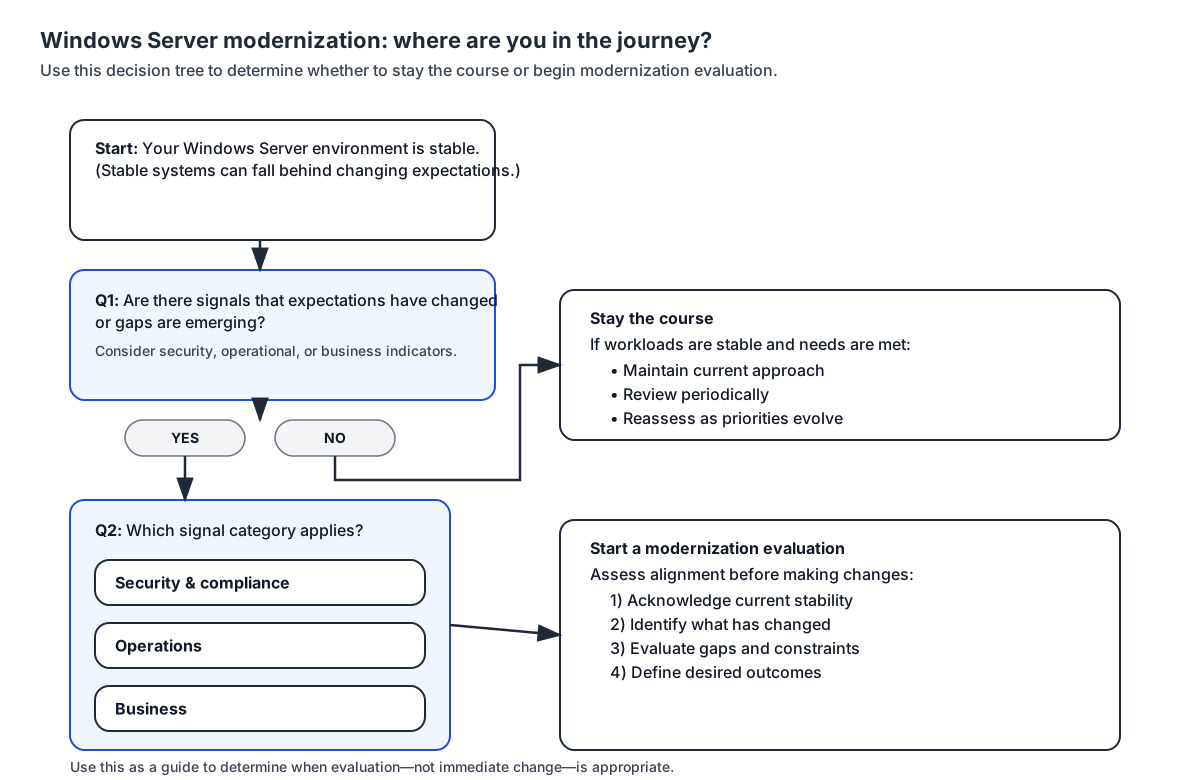
The goal of evaluation isn't to prescribe outcomes, but to determine whether existing environments still align with evolving expectations. As gaps or constraints begin to emerge, this evaluation often expands to consider whether hybrid or cloud approaches could help address those limitations.
This conversation often becomes relevant when:
- Security or compliance requirements increase, and existing environments lack built-in capabilities for advanced monitoring, threat detection, or centralized policy enforcement
- Operational overhead increases, such as increased patching effort, manual failover processes, or limited automation and lifecycle management
- Business continuity and resilience expectations rise, requiring improved disaster recovery, geographic redundancy, or faster recovery times
- Scalability needs become less predictable, including seasonal demand, rapid growth, or the need to provision capacity more quickly than on-premises infrastructure allows
- Integration with cloud services or modern management tools becomes important, such as identity, monitoring, backup, or update management scenarios that span multiple environments
- Data residency, latency, or regulatory constraints rule out a full public cloud move, but still benefit from cloud-connected capabilities through private or hybrid designs
In these situations, organizations often move from general evaluation into exploratory discussions about how existing Windows Server environments might evolve over time. Rather than emerging as isolated issues, these signals tend to appear in recurring patterns. These patterns are often reflected in how organizations describe challenges, changing priorities, or limitations in how their environments support current needs.
The following scenarios illustrate common situations in which organizations reassess alignment with current operational, security, and business expectations—without assuming a required outcome.
Stable workloads with growing operational constraints
An organization runs several business-critical applications on Windows Server. The environment has been stable for years, outages are rare, and workloads behave as expected.
Over time, however, operational constraints begin to emerge. Visibility into system health, security posture, and recovery readiness is fragmented across tools. Tasks such as validating protections, restoring data, or responding to audit requests rely heavily on manual processes and institutional knowledge.
Although the environment continues to function, these limitations introduce ongoing effort and risk. In this scenario, organizations might begin evaluating whether hybrid or private cloud approaches could help improve governance, resilience, and operational visibility while preserving existing Windows Server investments.
Why this matters: Even stable environments can introduce operational risk over time, making it important to periodically reassess how effectively they support current needs.
Rising compliance requirements without readiness for public cloud
An organization operates Windows Server workloads that support regulated or sensitive data. Existing controls are in place, and the environment is well documented.
New or updated compliance requirements increase expectations around auditability, access oversight, and reporting consistency. Meeting these expectations becomes increasingly complex using existing tools and processes alone.
At the same time, migrating workloads to a public cloud isn't feasible due to regulatory, data residency, or organizational constraints. In this situation, modernization discussions often focus on whether private or hybrid cloud options could help meet compliance and governance needs without relocating workloads.
Why this matters: Increasing compliance demands can outpace existing capabilities, even in well-managed environments, making it important to reassess how those requirements are being met.
Changing business demands and reduced flexibility
An organization has historically relied on predictable Windows Server workloads with limited variation in usage. Infrastructure capacity and change planning have remained consistent over time.
Business priorities evolve, introducing more frequent changes, variable demand, or new initiatives that require faster access to infrastructure resources. Responding to these needs involves hardware procurement, coordination across teams, and extended lead times before resources are available.
While the environment remains operationally sound, it no longer aligns with the organization’s pace of change. In this scenario, organizations might evaluate hybrid approaches that improve flexibility and responsiveness without replacing the existing Windows Server environment.
Why this matters: When infrastructure can’t keep up with changing business demands, it can limit responsiveness and slow progress, making it important to reassess whether the current approach still supports organizational needs.
Tip
When evaluating Windows Server modernization options, consider:
- Do we have clear visibility into our current server environment?
- Are security and operational expectations the same today as when our environment was designed?
- Have business changes altered how we rely on our infrastructure?
- Do current requirements for security, scalability, resilience, or management suggest benefits from hybrid or cloud capabilities?