Microsoft Foundry
Note
See the Text and images tab for more details
Microsoft Foundry uses a multi-level approach to organize and build AI solutions. Understanding this hierarchy is essential for setting up your development environment correctly.
- An Azure subscription sets the billing construct and default access control for all resources.
- A Microsoft Foundry resource provides the underlying Azure service container that provides the infrastructure, endpoints, and access to models.
- A Foundry project is where you actually work with the built-in features, models, agents, and tools.
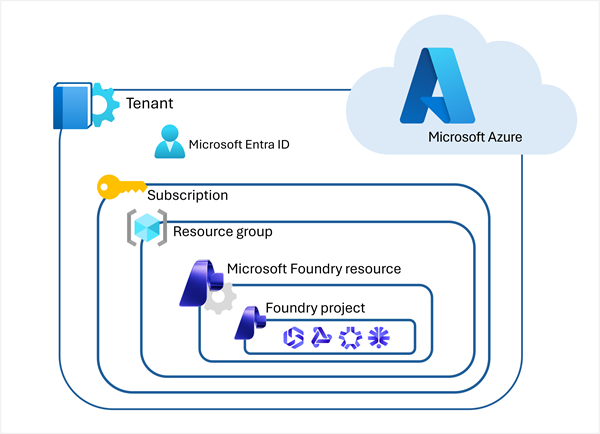
All of these components exist within the overall context of a Microsoft Azure tenant secured using Microsoft Entra ID authentication and authorization. Resources in a subscription are organized into resource groups.
Prerequisites
Before you begin creating your Foundry project, ensure you meet the following requirements:
Subscription requirements
You'll need an Azure subscription with active billing. Currently, Claude on Microsoft Foundry requires an Enterprise Agreement (EA) or Microsoft Customer Agreement - Enterprise (MCA-E) subscription.
Important
Free trials, student subscriptions, and pay-as-you-go sponsorships aren't currently supported for Claude. Request quotas are tied to EA and MCA-E subscription types.
Permission requirements
To create and manage Foundry resources, you need:
- Contributor or Owner role on the resource group where you'll deploy the Foundry resource
- Permissions to subscribe to offers in the Azure Marketplace (Claude billing flows through the Azure Marketplace into your Azure invoice)
Tip
Microsoft recommends following the principle of least privilege when assigning roles. Only grant the minimum permissions necessary for users to perform their tasks.
Regional availability
Your Foundry project must be created in a supported region. Regional availability is expanding, so check the official documentation for the latest list of supported regions.
Note
If you're unsure about these prerequisites, have a conversation with whoever manages your Azure tenant before proceeding.
Microsoft Foundry: A unified platform
Microsoft Foundry brings together all the components you need to build AI solutions:
- Models - Access to Claude and other AI models
- Prompting - Tools for crafting and testing prompts
- Tools - Extensibility through function calling and integrations
- Data - Management of training data, evaluation datasets, and knowledge bases
- Agents - Building and deploying autonomous AI agents
These capabilities aren't isolated features—they work together as a unified platform to support your entire AI development lifecycle.
Microsoft Foundry offers flexibility in how you develop AI applications:
The Foundry portal
A web-based interface where you can:
- Create and manage Foundry projects.
- Explore available models and capabilities.
- Experiment with prompts and responses.
- Prototype quickly without local setup.
Developer tools
Full development environments for production-grade work:
- Azure CLI - A command-line interface for scripting and automation.
- Visual Studio Code - An integrated development environment with rich AI tooling and Foundry integration.