Validate the Genie Agent and data access
The integration doesn't replace Genie Agent or Unity Catalog security. Validate the prepared agent in Azure Databricks before you expose the app in Microsoft 365.
Check the agent's technical foundation
Open the existing Genie Agent with an editor or data engineer and confirm these requirements:
- The agent's data is registered in Unity Catalog.
- The agent contains no more than 30 tables or views.
- The default compute is a pro or serverless SQL warehouse.
- The editor who selected the warehouse has
CAN USEon it. - The agent has a clear title and description that identify its business domain.
This module assumes the data team already designed the agent's instructions, business terminology, example queries, and trusted assets. The system engineer verifies that the prepared agent can support the integration without changing its semantic design.
Separate compute access from data access
A shared Genie Agent uses two identities for different purposes:
| Access type | Identity used | What it permits |
|---|---|---|
| SQL warehouse compute | Embedded credential of the editor who configured the warehouse | Runs the generated SQL statement. |
| Unity Catalog data | Signed-in business user's identity | Determines which catalogs, schemas, tables, views, rows, and columns the query can read. |
The embedded credential doesn't give the business user the editor's data permissions. It supplies warehouse access only. Unity Catalog evaluates the generated query as the user and records the user as the query actor.
This distinction allows many people to use one governed agent while receiving results that reflect their individual authorization.
Assign the Genie Agent ACL
The Genie Agent access control list controls whether a person can discover, run, edit, or manage the agent. For business users, assign at least CAN VIEW/CAN RUN through a group.
- Open the Genie Agent in Azure Databricks.
- Select Share.
- Add the target Azure Databricks group.
- Assign
CAN VIEW/CAN RUN. - Confirm that agent editors retain
CAN EDITorCAN MANAGEas appropriate.
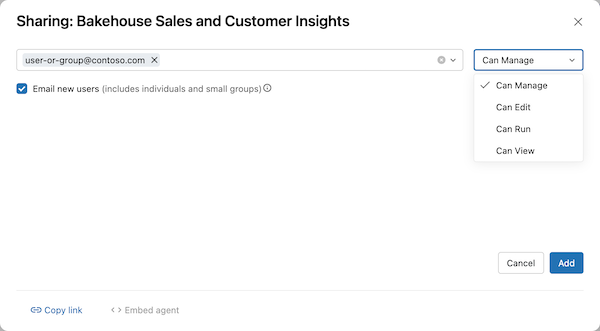
Don't grant edit access merely because a person consumes the agent through Teams. Editing changes the agent configuration and isn't required to ask questions.
Grant least-privilege Unity Catalog access
Users need USE CATALOG, USE SCHEMA, and SELECT privileges appropriate to the objects queried by the agent. Grant privileges to the target group at the narrowest practical scope.
Use Unity Catalog controls to preserve differences within the group:
- Row filters restrict returned rows according to the signed-in user.
- Column masks hide or transform protected column values.
- Views expose a curated projection instead of a broader source table.
Sharing the agent doesn't grant privileges on its underlying data objects. Similarly, adding a table to the agent doesn't make that table readable to every agent user.
Important
Genie can query objects beyond the tables explicitly attached to an agent when instructions, metadata, joins, or edited SQL reference them. Base least-privilege design on Unity Catalog permissions, not only on the agent's visible table list.
Confirm allowed and denied data behavior
Use two representative identities to confirm the authorization design in Azure Databricks:
- Sign in as a user who has
CAN VIEW/CAN RUNand the required Unity Catalog privileges. - Ask a question that uses an approved data object and confirm that the agent returns the expected governed result.
- Sign in as a user who can run the agent but doesn't have
SELECTon a protected object. - Ask a question that requires the protected object and confirm that the agent doesn't return its data.
- If row filters or column masks apply, confirm that each identity receives the expected filtered result.
For a shared Genie Agent, an unauthorized data question returns an empty response. The app shouldn't replace that response with data from the editor's identity.
Protect the embedded warehouse credential
Confirm who owns the default warehouse setting. If the person whose credential is embedded loses access, another editor must select and save the warehouse to embed a valid credential.
This ownership record supports configuration continuity without expanding end-user permissions. After the agent, compute, ACL, and Unity Catalog checks pass, the governed data path is ready for the Microsoft app.