Configure auditing for SQL Managed Instance
SQL Managed Instance uses a different auditing model than Azure SQL Database, one that mirrors traditional SQL Server audit architecture. Contoso's credit risk assessment system runs on SQL Managed Instance. The security team needs to configure server-level auditing using T-SQL commands and diagnostic settings to route logs to both blob storage and Azure Monitor.
| Aspect | Azure SQL Database | SQL Managed Instance |
|---|---|---|
| Audit model | Server-level + database-level specs | SQL Server–style server audit spec |
| Nonstorage destinations | Configured in the portal auditing screen | Configured via T-SQL (TO EXTERNAL_MONITOR) or diagnostic settings |
| Portal experience | Full auditing screen with all three destinations | Portal mainly covers storage destination; T-SQL required for others |
| Support operations auditing | Not available | Separate server audit for Microsoft support engineer access |
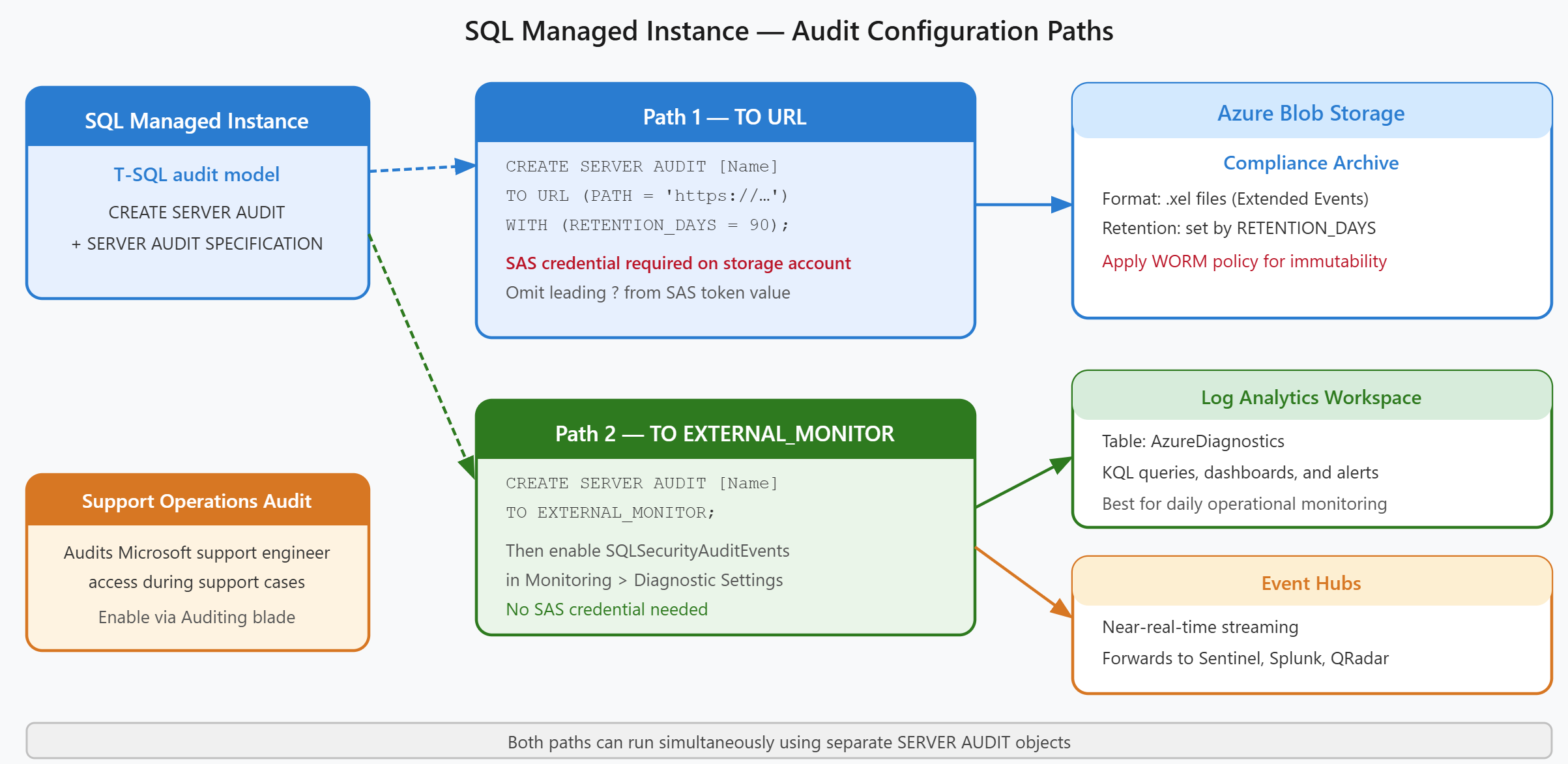
Configure auditing to Azure Blob Storage
SQL Managed Instance requires a server audit and server audit specification to send logs to blob storage. Unlike Azure SQL Database, which uses portal toggles for all audit destinations, SQL MI relies on T-SQL commands to create and configure audits.
To route audit logs to blob storage, you create a server audit with the TO URL clause that points to a storage container. This approach mirrors how SQL Server audits work on-premises, making it familiar to database administrators migrating workloads to Azure.
-- Create a server audit to Azure Blob Storage
CREATE SERVER AUDIT [ContosoMIAudit]
TO URL (PATH = 'https://contosostorage.blob.core.windows.net/sqlmi-audit/')
WITH (RETENTION_DAYS = 90);

-- Enable the audit
ALTER SERVER AUDIT [ContosoMIAudit] WITH (STATE = ON);

-- Create server audit specification
CREATE SERVER AUDIT SPECIFICATION [ContosoMIAuditSpec]
FOR SERVER AUDIT [ContosoMIAudit]
ADD (BATCH_COMPLETED_GROUP),
ADD (FAILED_DATABASE_AUTHENTICATION_GROUP),
ADD (SUCCESSFUL_DATABASE_AUTHENTICATION_GROUP)
WITH (STATE = ON);
The audit specification determines which events are captured. In this example, Contoso tracks all completed batches and authentication attempts, both successful and failed. Tracking provides visibility into who accesses the credit risk system and what queries they run.
SQL Managed Instance authenticates to the storage account using a Shared Access Signature (SAS) token, not a managed identity. You must create a SQL credential that stores the SAS token, with the credential name matching the storage URL:
CREATE CREDENTIAL [https://contosostorage.blob.core.windows.net/sqlmi-audit]
WITH IDENTITY = 'SHARED ACCESS SIGNATURE',
SECRET = '<SAS-token-value-without-?>';
The SAS token requires at minimum write and list permissions on the container—the exact permission set is configured when you generate the SAS token in the Azure portal. [REVIEW: Microsoft documentation shows required SAS permissions via portal screenshot only; verify the minimum required permissions when generating the SAS token for your storage account.] The token must omit the leading ? character that Azure generates.
Route audit logs to Azure Monitor or Event Hubs
Nonstorage destinations like Log Analytics workspaces and Event Hubs use a different configuration pattern. You create a server audit with the TO EXTERNAL_MONITOR clause, then configure the actual destination through diagnostic settings in the Azure portal.
-- Create a server audit to Azure Monitor (Log Analytics or Event Hubs)
CREATE SERVER AUDIT [ContosoMIExternalAudit]
TO EXTERNAL_MONITOR;

ALTER SERVER AUDIT [ContosoMIExternalAudit] WITH (STATE = ON);

CREATE SERVER AUDIT SPECIFICATION [ContosoMIExternalAuditSpec]
FOR SERVER AUDIT [ContosoMIExternalAudit]
ADD (BATCH_COMPLETED_GROUP),
ADD (FAILED_DATABASE_AUTHENTICATION_GROUP)
WITH (STATE = ON);
The TO EXTERNAL_MONITOR clause signal that logs flow through Azure's diagnostic pipeline rather than directly to storage. After creating this audit, you configure the destination in the Azure portal:
- Navigate to the SQL Managed Instance resource
- Select Monitoring > Diagnostic settings
- Select Add diagnostic setting
- Enable the SQLSecurityAuditEvents log category
- Choose a destination: Log Analytics workspace or Event Hubs
This separation between the T-SQL audit definition and the portal-based destination configuration provides flexibility. Contoso's security team can configure one audit for storage (using TO URL) and another for external monitoring simultaneously, sending logs to multiple destinations without conflicts.
When logs route to Log Analytics, you query them using the AzureDiagnostics table with a filter for Category == "SQLSecurityAuditEvents". This integration lets Contoso build custom dashboards and alerts using Kusto Query Language (KQL) queries, providing real-time visibility into database access patterns.
Audit Microsoft support operations
SQL Managed Instance offers a unique auditing capability for Microsoft support engineer access. When Contoso escalates a support case and grants Microsoft temporary access to troubleshoot the managed instance, this elevated access can be audited and logged.
This support operations audit provides compliance evidence that even Microsoft's privileged access is monitored and recorded. In the Azure portal, navigate to your SQL Managed Instance resource and select Security > Auditing. When creating or editing a server audit, you see a Microsoft support operations option that enables auditing of activities performed by Microsoft engineers during support sessions.
This audit trail helps Contoso demonstrate to auditors that all database access, including vendor support access, is logged and reviewable.
Storage-based audit logs appear as .xel (extended events) files in the blob container, which you open using SQL Server Management Studio's Extended Events viewer. Both storage and external monitor audits can run simultaneously, providing redundancy in case one destination becomes unavailable.
With SQL Managed Instance auditing configured for both storage and external monitoring, you're ready to design a compliant audit strategy that spans both database services.