Implement network isolation
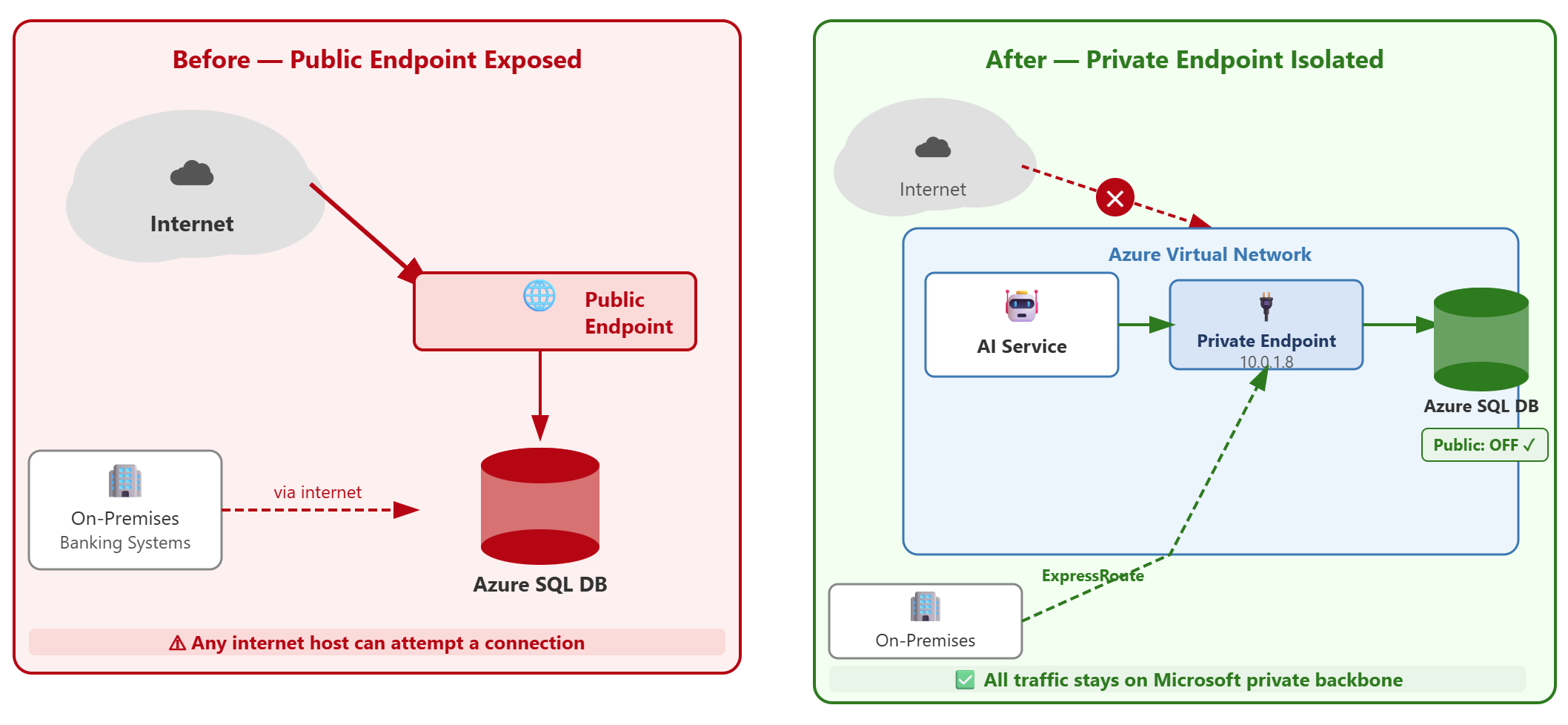
Contoso Financial Services runs Azure SQL Database for transaction processing and SQL Managed Instance for credit risk assessment. Both services currently expose public endpoints to the internet. The AI fraud detection service and internal banking applications run in Azure Virtual Networks (VNets), and on-premises banking systems connect through ExpressRoute. The security team must eliminate public internet exposure while maintaining access for Azure-hosted workloads and on-premises systems.
| Implementation approach | Use case |
|---|---|
| Private endpoints + disable public access | Financial services, regulated workloads requiring no public endpoint exposure |
| Virtual network service endpoints + firewall rules | Development environments where public endpoint is acceptable with restricted access |
Configure private endpoints for Azure SQL Database
Private endpoints bring Azure SQL Database into your virtual network address space, eliminating the need for public endpoint access. When you deploy a private endpoint, Azure creates a network interface with a private IP address from your subnet and maps it to your SQL server's fully qualified domain name (FQDN).
For Contoso's transaction processing database, you create a private endpoint in the virtual network where the fraud detection AI runs. In the Azure portal, navigate to your SQL server, select Security > Networking, and choose Private access. When you add a private endpoint, specify the target subnet and enable automatic private DNS zone integration. Azure creates the privatelink.database.windows.net DNS zone and adds a record that maps your server name to the private IP address.
The connection policy determines how traffic flows after a private endpoint is deployed. The Proxy policy routes all traffic through port 1433 and is the simplest option for private endpoint deployments—it requires no extra firewall changes and works with existing private endpoints that use the Default policy. The Redirect policy provides lower latency by establishing a direct connection to the database node, but requires clients to open ports 1433 to 65535 for both inbound and outbound communication on the virtual network hosting the private endpoint.
Note
Existing private endpoints using the Default connection policy fallback to Proxy mode (port 1433 only) to avoid disrupting client traffic. To use Redirect with a private endpoint, explicitly set the connection policy to Redirect after provisioning the endpoint—toggling the policy can be required if it was set before the private endpoint was created.
For Contoso's AI fraud detection service running in Azure, Proxy mode on the private endpoint provides secure connectivity with straightforward firewall configuration. Redirect mode can be enabled later if latency requirements demand it.
Note
Private endpoint creation requires approval from the SQL administrator. After the network administrator creates the endpoint, the SQL administrator must approve the connection in the SQL server's Private endpoint connections list before it becomes active.
Disable public network access
After you deploy a private endpoint, you disable the public endpoint to complete the isolation. The private endpoint alone doesn't prevent public access—both endpoints remain active until you explicitly disable public network access.
Navigate to your SQL server's Networking page and select Public access > Disable. This action blocks all connections from the internet, even if firewall rules permit specific IP addresses. The "Allow Azure services and resources to access this server" setting, which creates a special rule for Azure's internal IP ranges (0.0.0.0–0.0.0.0), no longer applies because the public endpoint is turned off.
With public access disabled, Contoso's on-premises banking systems connect through ExpressRoute private peering. Traffic routes from the on-premises network through ExpressRoute to the Azure virtual network where the private endpoint exists, then to the SQL server. This path keeps all database traffic on Microsoft's private backbone network.
Firewall rule changes can take up to five minutes to propagate across Azure's infrastructure. If you need immediate effect after modifying rules, connect to the database and run the following command:
DBCC FLUSHAUTHCACHE
This command clears the authentication cache and forces the server to reload firewall rules immediately.
Apply network isolation to SQL Managed Instance
SQL Managed Instance takes a different approach to network isolation because the deployment is directly inside a virtual network from the start. Unlike Azure SQL Database, SQL MI doesn't require a private endpoint—it's already VNet-native.
When Contoso deployed SQL MI for credit risk assessment, they allocated a dedicated subnet and delegated it to Microsoft.Sql/managedInstances. This delegation gives the SQL MI service permission to manage network resources in that subnet. The instance receives a private IP address and is accessible only from within the virtual network or through connected networks like peered VNets or on-premises networks linked via ExpressRoute or VPN.
SQL MI offers an optional public endpoint on port 3342, but it's disabled by default. For Contoso's regulated environment, keep this endpoint disabled. If cross-VNet access is needed, use virtual network peering rather than enabling the public endpoint. Virtual network peering maintains private connectivity while allowing the fraud detection AI in one virtual network to query the credit risk database in another virtual network where SQL MI resides.
The key difference: Azure SQL Database requires you to add private endpoints and disable public access as separate steps, while SQL Managed Instance starts with private-only connectivity built in.
Verify complete isolation
After implementing network isolation, confirm that external access is blocked and authorized networks connect successfully. From an external network outside Azure, attempt to connect to your SQL server using its FQDN. The connection should time out because no public route exists.
From the fraud detection AI service running in the virtual network with the private endpoint, test connectivity using the same FQDN:
sqlcmd -S contoso-transactions.database.windows.net -U sqladmin -P <password> -Q "SELECT @@VERSION"
The connection succeeds because DNS resolves the FQDN to the private IP address, and the virtual network routes traffic directly to the database. For on-premises banking systems, verify connectivity through ExpressRoute by running the same test from an on-premises workstation.
Network isolation and authentication hardening work together to build a complete security posture. Removing public endpoints blocks unauthorized networks, while Microsoft Entra authentication and role-based access control determine which identities can connect from authorized networks. Both controls must be in place to meet Contoso's security requirements.