Encrypt and protect data in transit and at rest
Transparent Data Encryption (TDE) is enabled by default on all Azure SQL databases, protecting data files, logs, and backups at rest using service-managed keys. While this approach provides strong encryption without configuration overhead, financial regulators require Contoso Financial Services to control encryption keys for databases containing financial personal data.
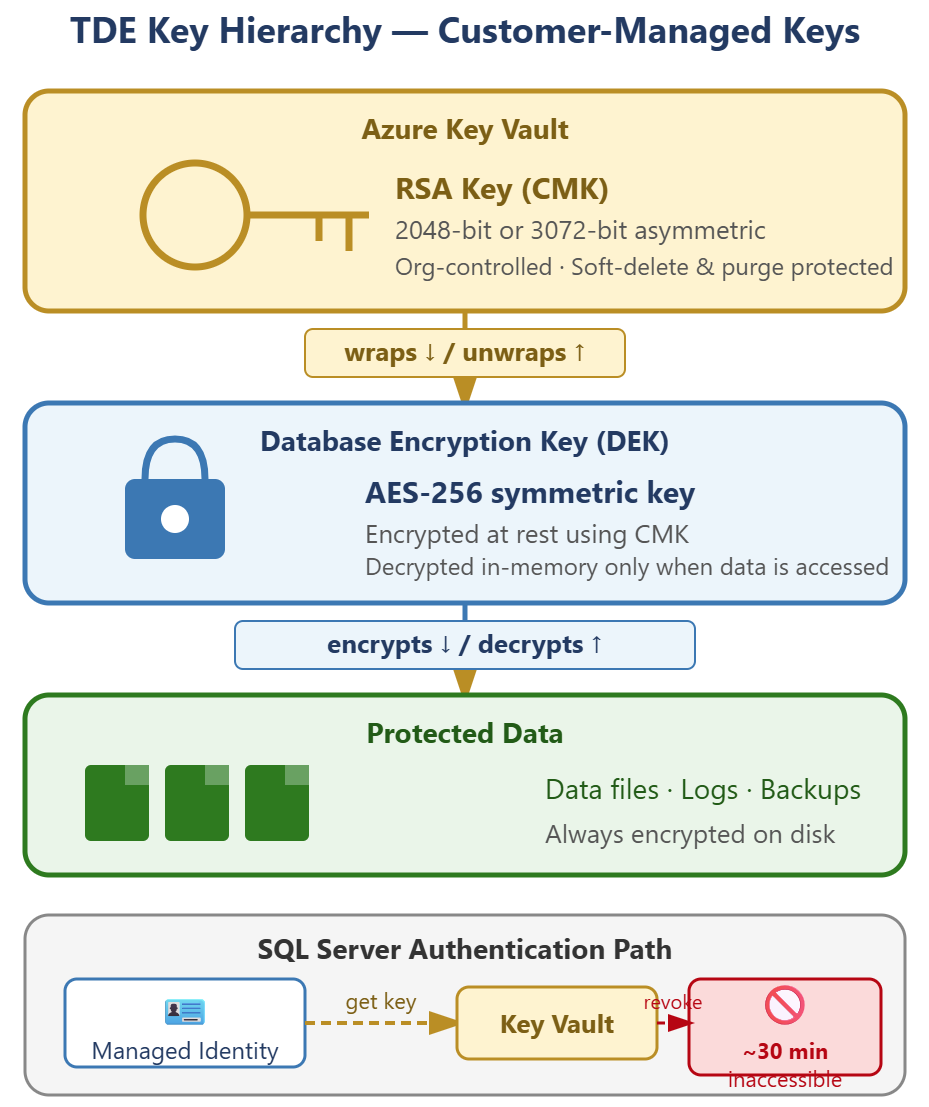
| Encryption layer | Service-managed | Customer-managed |
|---|---|---|
| Key control | Microsoft | Organization |
| Key rotation | Automatic | Manual or automated |
| Compliance support | Basic | Advanced (regulatory) |
| Configuration complexity | None | Moderate |
Configure customer-managed keys in Azure Key Vault
Customer-managed keys (CMK) give you control over the encryption keys that protect your database, meeting regulatory requirements for key ownership and rotation policies. The SQL server uses its managed identity to retrieve the key from Azure Key Vault each time it needs to encrypt or decrypt data.
Before you attach a customer-managed key to your SQL server, the Key Vault must meet two mandatory requirements. First, soft-delete must be enabled to prevent accidental key deletion. Second, purge protection must be enabled to block malicious or permanent key deletion. Without these safeguards, losing access to the key makes the database permanently inaccessible.
If the Key Vault has a firewall configured, you must enable Allow trusted Microsoft services to bypass the firewall. Without this setting, Azure SQL's managed identity can't retrieve the TDE key and the TDE protector configuration fails. This requirement doesn't apply if the SQL server connects to Key Vault through a private endpoint.
| Step | Action |
|---|---|
| 1. Create or verify Key Vault | Confirm soft-delete and purge protection are enabled |
| 2. Generate RSA key | Create 2048-bit or 3072-bit asymmetric key in Key Vault |
| 3. Assign managed identity | Enable system-assigned or user-assigned identity on SQL server |
| 4. Grant key permissions | Assign Key Vault Crypto Service Encryption User role or access policy with get, wrapKey, unwrapKey |
| 5. Configure TDE | Select customer-managed key option and specify the Key Vault key |
After you configure the customer-managed key, TDE continues using AES-256 encryption but wraps the database encryption key (DEK) with your Key Vault key. The SQL server authenticates to Key Vault using its managed identity, retrieves the key, and decrypts the DEK. If the key becomes inaccessible—because of deletion, access is revoked, or the Key Vault is unreachable—the database enters an inaccessible state. Restoring key access allows the database to recover automatically without intervention. Configure Key Vault alerts and diagnostic logging to detect key access failures before they affect database availability.
Plan your Key Vault architecture around blast radius and availability. Use separate Key Vaults per environment (development, staging, production) so that a vault issue affects only one tier. Key Vault soft-delete retention runs 7–90 days (default 90 days), which affects how quickly a deleted vault name can be reused. For geo-redundant SQL deployments, plan for vault availability as part of your disaster recovery testing.
Secure data in transit with TLS
Azure SQL requires Transport Layer Security (TLS) for all connections—clear-text connections are never accepted. The minimum TLS version setting on your SQL server determines which protocol versions clients can use to establish connections.
With the minimum TLS version set to 1.2, clients using older protocols like TLS 1.0 or 1.1 can't connect. Financial and healthcare regulations typically mandate TLS 1.2 or higher to prevent downgrade attacks and ensure modern cryptographic standards. TLS 1.3 is also available for Azure SQL Database for the highest protocol-level security—regulated workloads where all clients support TLS 1.3 can enforce it as the minimum version. You configure this setting in the Azure portal under your SQL server's Networking screen.
The Tabular Data Stream (TDS) protocol carries SQL traffic over TLS. TDS 8.0 with Strict connection encryption provides the highest security by encrypting the entire connection handshake, including authentication credentials. TDS 7.1 remains the minimum supported version for backward compatibility, but Strict encryption is recommended for new deployments and regulated workloads.
Tip
Set the minimum TLS version to 1.2 during initial SQL server deployment rather than updating it later. This approach prevents applications with weak TLS configurations from connecting and requiring security exemptions.
Evaluate Always Encrypted for column-level protection
Always Encrypted protects specific columns by encrypting data at the application layer before sending it to Azure SQL. Unlike TDE, which protects data files on disk, Always Encrypted ensures the database engine never sees plaintext values for encrypted columns—even during query execution.
This encryption model addresses insider threat scenarios where database administrators, cloud provider staff, or anyone with elevated SQL privileges must not access sensitive data. Social security numbers, credit card numbers, and health identifiers are common Always Encrypted use cases. The client driver encrypts data before sending INSERT or UPDATE statements and decrypts query results before returning them to the application.
| Criteria | TDE alone | Always Encrypted |
|---|---|---|
| Protects against disk theft | Yes | Yes |
| Protects against DBA access | No | Yes |
| Protects against Azure personnel | No | Yes |
| Application changes required | No | Yes |
| Query complexity challenge | None | High (limited operations) |
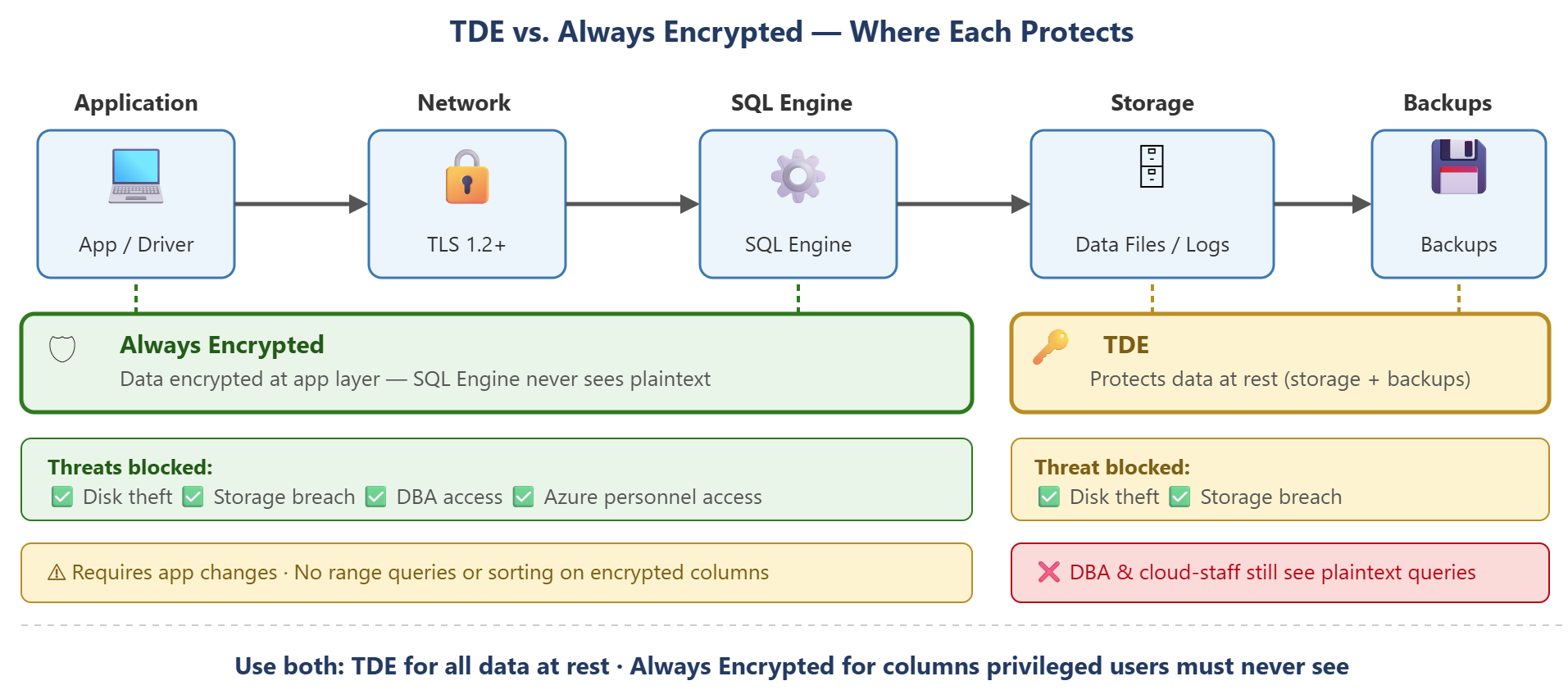
The trade-off is implementation complexity. Always Encrypted requires application-layer changes to manage the column main key and column encryption key, and query capabilities are limited—you can't perform range queries, pattern matching, or sorting on encrypted columns. It's appropriate when your threat model specifically includes insider access to the database, but it's not a replacement for TDE. You typically implement both: TDE for at-rest protection across all data, and Always Encrypted for columns containing data that even privileged users shouldn't see in plaintext.
If you meet security requirements by TDE with customer-managed keys, network isolation, and Microsoft Entra ID authentication, the more complexity of Always Encrypted can’t provide sufficient value. Evaluate your threat model, regulatory requirements, and application architecture before committing to Always Encrypted for production workloads.
With data encrypted at rest and in transit, you're ready to apply access controls that determine what data each user can see.