Set up Copilot and agents in Contact Center
Dynamics 365 Contact Center includes two distinct categories of AI agents that serve different purposes, along with Copilot capabilities that assist human representatives in real time. For Contoso, this is where the platform's promise of using AI to handle routine interactions becomes real — freeing customer service representatives (CSRs) to focus on the complex cases that actually need them. Setting up these agents involves understanding the available agent types, using Agent Hub for adoption and monitoring, and creating rollout plans to manage phased deployment.
Understand the AI agent portfolio
Dynamics 365 Contact Center organizes its agents into two categories: Contact Center Agents and autonomous service agents. Understanding the distinction is important because each category is configured and accessed differently.
Contact Center Agents
Contact Center Agents are strategic agents tied to core contact center outcomes. You access and manage them from Contact Center Agents in the Copilot Service admin center site map.
| Agent | Purpose |
|---|---|
| Customer Assist Agent | Combines autonomous self-service with real-time representative assistance. Understands customer intents, resolves issues autonomously, assists representatives during escalations, and initiates proactive outbound engagement. |
| Quality Assurance Agent | Evaluates conversations in real time and after completion against defined quality criteria. Provides quality scores, supervisor alerts, and real-time monitoring dashboards for coaching and intervention. |
| Service Operations Agent (preview) | Supports conversational setup through natural language, conversation orchestration with AI-powered playbooks, and built-in configuration validation. |
Autonomous service agents
Autonomous service agents are AI-powered agents that handle specific operational tasks independently. These are the agents you configure and adopt through Agent Hub and rollout plans.
| Agent | Purpose |
|---|---|
| Customer Intent Agent | Uses generative AI to discover customer intents from past and current conversations, suggests new intents, and recommends knowledge articles to resolve issues. |
| Customer Knowledge Management Agent | Analyzes closed cases to extract knowledge, fill knowledge gaps, and create and manage knowledge articles in real time. |
| Quality Evaluation Agent | Generates autonomous and AI-assisted assessments of customer interactions using evaluation criteria and plans defined by supervisors. |
Note
Case Management Agent is available in Dynamics 365 Customer Service only and isn't available in Dynamics 365 Contact Center standalone.
These agents are supported by several related capabilities:
- Intent-based routing: Uses customer intents discovered by the Customer Assist Agent to route conversations to the best-suited agent group based on intent, priority, skills, sentiment, and capacity.
- Rollout manager: Guides administrators through phased, controlled adoption of autonomous agents.
- Agent Insights dashboard: Provides supervisors with real-time visibility into AI agent performance and operational trends.
Use Agent Hub for adoption and monitoring
Agent Hub is the central trust center for agent adoption and monitoring within a Dynamics 365 Contact Center environment. From Agent Hub, administrators can learn about available agents, adopt them with guided configuration, and monitor their performance.
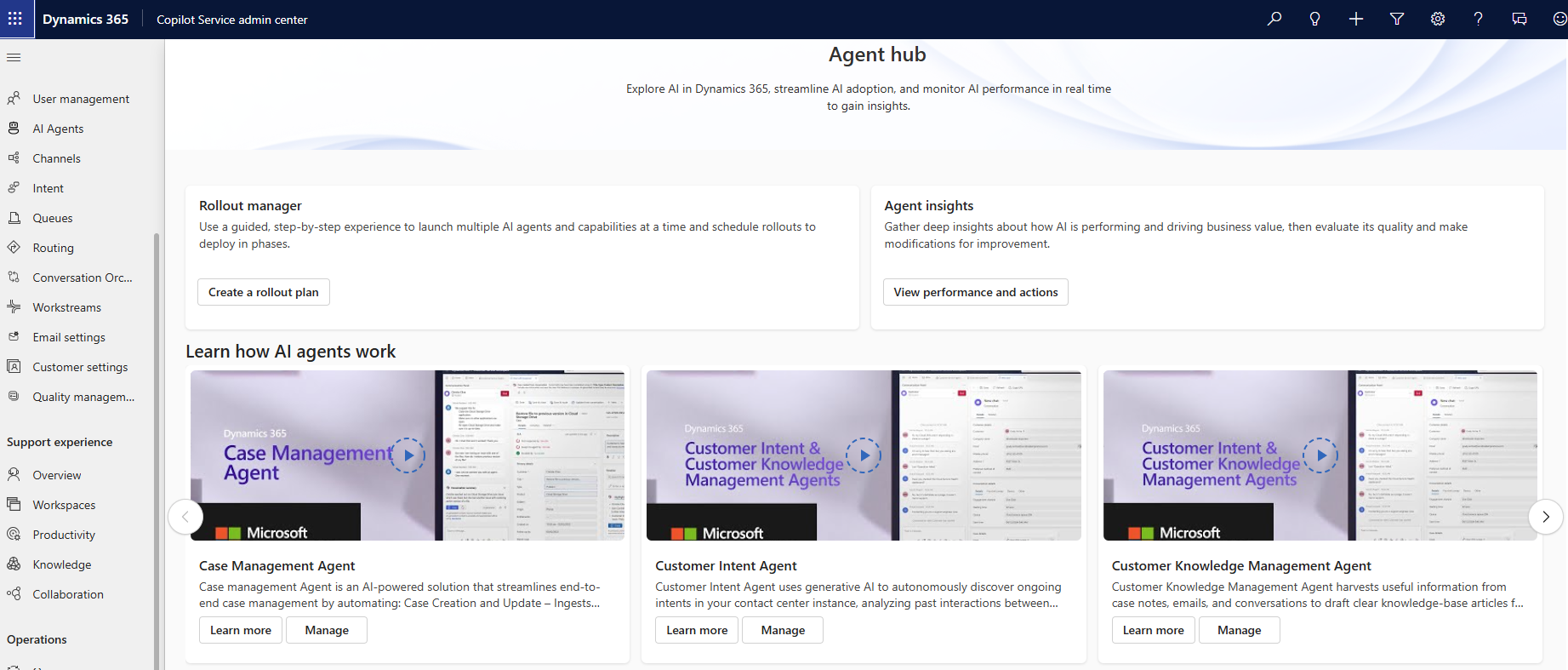
To access Agent Hub:
- In the site map of Copilot Service admin center, select Home.
- Select Open in the Agent hub section.
From Agent Hub, you can:
- Browse available agents and review their capabilities and use cases
- Adopt agents using guided setup wizards that walk you through agent-specific configuration
- Monitor performance through metrics that track agent effectiveness
- Measure business impact of agent deployments over time
Important
Agent Hub is for adopting and monitoring agents within a single environment. It doesn't move agents between environments (for example, from development to production). Cross-environment promotion requires Dataverse solution export and import, either manually through Power Platform Admin Center or automated through CI/CD pipelines.
Create rollout plans for AI agents
The rollout manager is a wizard that helps administrators adopt autonomous AI agents in a phased, guided, and controlled manner. Rather than activating all agents at once, you create rollout plans that align with business readiness and organizational priorities.
Prerequisites
The autonomous agents must be enabled in your environment before you can create a rollout plan.
Create a rollout plan
- In Copilot Service admin center, select Home, then select Open in Agent hub.
- On the Agent hub page, select Create a rollout plan.
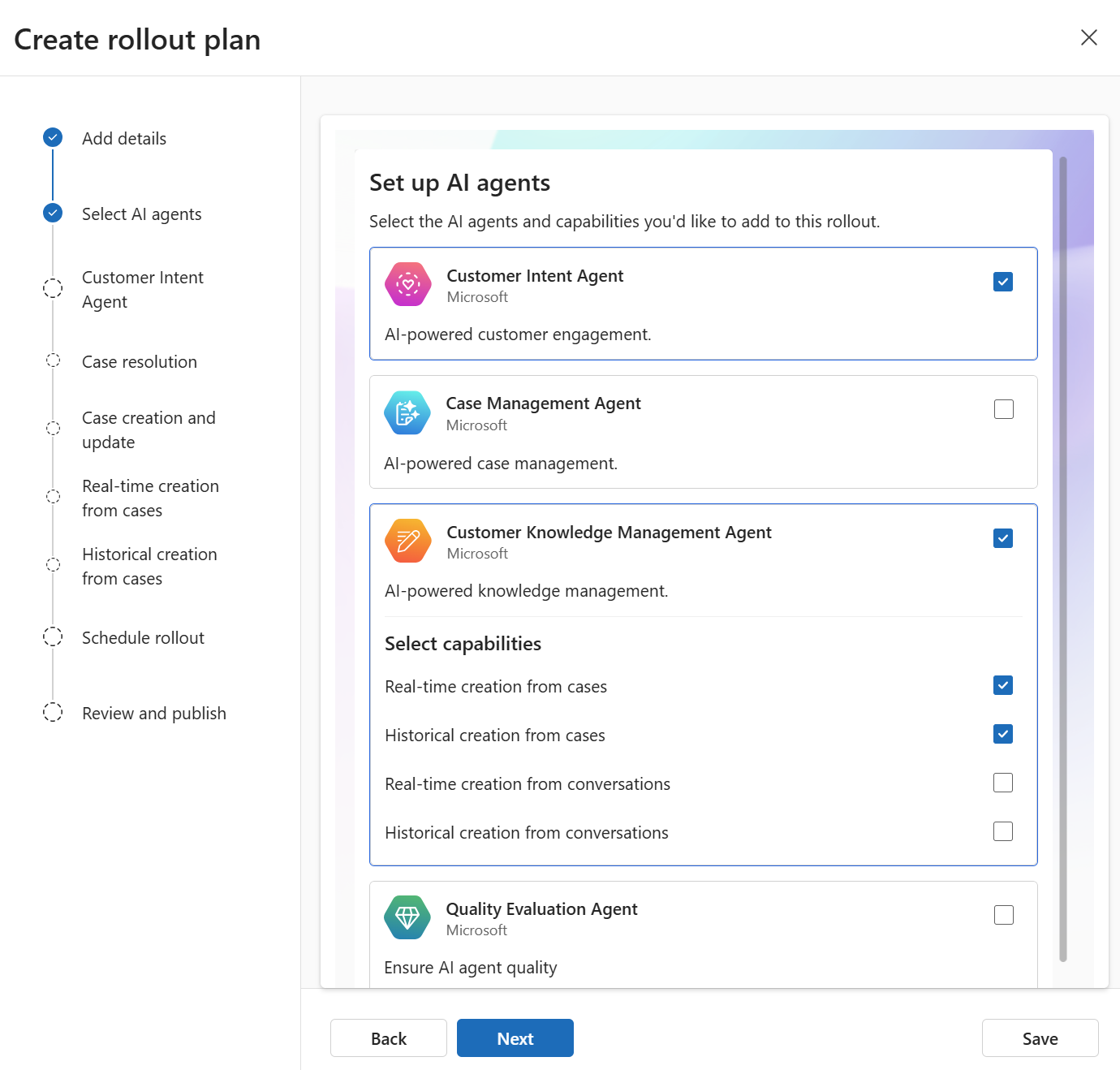
- Select Create on the Rollout manager page.
- Use the guided steps to configure settings for each autonomous agent you want to include.
The wizard guides you through agent-specific settings for each autonomous service agent:
- Customer Intent Agent: Select a line of business and configure intent suggestions for service representatives
- Customer Knowledge Management Agent: Configure knowledge extraction behavior after cases are closed
- Quality Evaluation Agent: Define evaluation criteria and scoring plans for assessing customer interactions
You can create individual rollout plans for each agent or a single rollout plan that covers multiple agents based on your business needs.
Manage rollout plans
After creating a rollout plan, you can manage it from the rollout plan list:
- Edit: Modify settings or configuration of an existing plan
- Deactivate or activate: Temporarily disable or enable a plan
- Delete: Permanently remove a plan
- Schedule: Set a future date and time for automatic activation
Note
When you deactivate or delete a rollout plan, the behavior depends on the agent. For some agents, deactivating or deleting a rollout plan also deactivates or deletes the corresponding rules. For others, the underlying agent settings remain active. Check the agent-specific documentation for details.
Plan your agent adoption strategy
A phased adoption approach reduces risk and lets your organization build confidence with AI agents over time. Consider the following strategy:
- Start with a single agent. Begin with the agent that addresses your most pressing operational need. For many organizations, this is the Customer Assist Agent, which improves self-service resolution rates and routing accuracy.
- Test in a development environment. Configure and validate agent behavior before deploying to production.
- Monitor through Agent Hub. Use the Agent Insights dashboard to track performance metrics and identify areas for improvement.
- Expand gradually. Once the first agent is performing well, add additional agents through new rollout plans.
- Promote through CI/CD. Use Dataverse solution export and import to move validated agent configurations from development to production environments.
Configure Copilot features
Copilot provides real-time AI assistance to service representatives during active conversations. As an administrator, you control which features are enabled and how they behave. The following table describes where each feature is configured and what you can control:
| Feature | Where to configure | Admin control |
|---|---|---|
| Ask a question | Agent experience > Copilot > Ask a question | Enable or disable; configure knowledge sources and trusted domains |
| Email assist | Agent experience > Copilot > Email | Enable or disable; works with or without a connected knowledge base |
| Conversation summaries | Agent experience > Copilot > Summaries | Enable or disable; customize summary structure for bot handoff, consult, and conversation end |
| Case summaries | Agent experience > Copilot > Summaries | Enable or disable; configure which case fields, notes, and emails are included |
| Suggested prompts | Agent experience > Copilot > Ask a question | Enable or disable auto prompts; context is derived automatically from the active case or conversation |
| Resolution notes | Agent experience > Copilot > Summaries | Enable or disable; content is generated from case notes and emails |
To configure Copilot features:
- In Copilot Service admin center, navigate to Agent experience > Copilot.
- Enable or disable individual Copilot features based on your organization's needs.
- Configure knowledge sources that Copilot uses to generate responses.
- Assign Copilot access through experience profiles to control which service representatives see which features.